
Before I start here's a little info about my purchase just in case that helps:
I preordered my S7 on March 5th and received it on Wednesday, March 9th. I activated it on the next day (the 10th) in the AT&T store. I'm honestly not sure if everything on this phone is correct because I just switched from an iphone 5s and haven't used an android in like 5 years. But from all the videos i've watched reviewing the S7 i don't think mine has the "correct" stock set up.
Here's my layout in the settings (quick settings in a tab):
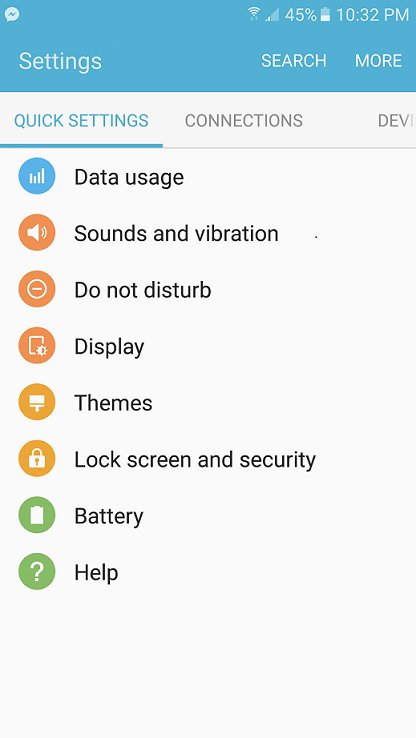
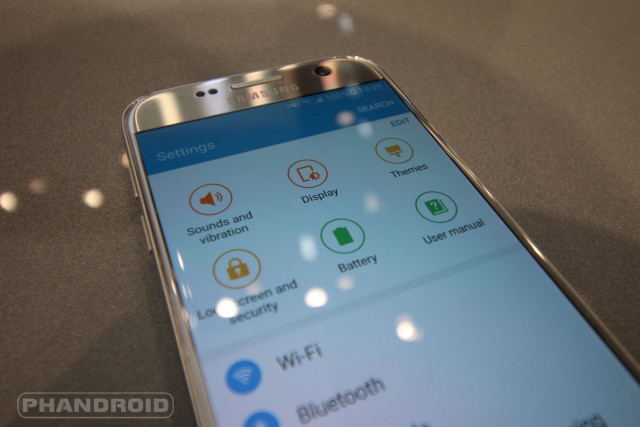
But all the other S7 settings layouts I've seen look like this (quick settings on top of all the other settings):
I know this is kind of nitpicking and it's really not THAT big of a deal, but it makes me wonder if there is anything else wrong with my phone that I just haven't caught on to yet.
Any help is appreciated.
Thanks in advance
I preordered my S7 on March 5th and received it on Wednesday, March 9th. I activated it on the next day (the 10th) in the AT&T store. I'm honestly not sure if everything on this phone is correct because I just switched from an iphone 5s and haven't used an android in like 5 years. But from all the videos i've watched reviewing the S7 i don't think mine has the "correct" stock set up.
Here's my layout in the settings (quick settings in a tab):
But all the other S7 settings layouts I've seen look like this (quick settings on top of all the other settings):
I know this is kind of nitpicking and it's really not THAT big of a deal, but it makes me wonder if there is anything else wrong with my phone that I just haven't caught on to yet.
Any help is appreciated.
Thanks in advance

