
Install the app
How to install the app on iOS
Follow along with the video below to see how to install our site as a web app on your home screen.
Note: This feature may not be available in some browsers.
-
After 15+ years, we've made a big change: Android Forums is now Early Bird Club. Learn more here.
You are using an out of date browser. It may not display this or other websites correctly.
You should upgrade or use an alternative browser.
You should upgrade or use an alternative browser.
Help SD card issue
- Thread starter seanio01
- Start date

Use an app called SD Insight to determine if your card is legit or counterfeit. Many unscrupulous dealers will take a slow, small capacity card and format it as a faster, high capacity card. That's why I only buy name brand cards from a reputable site like Amazon.
Use an app called SD Insight to determine if your card is legit or counterfeit. Many unscrupulous dealers will take a slow, small capacity card and format it as a faster, high capacity card. That's why I only buy name brand cards from a reputable site like Amazon.
Thanks for the advice
Use an app called SD Insight to determine if your card is legit or counterfeit. Many unscrupulous dealers will take a slow, small capacity card and format it as a faster, high capacity card. That's why I only buy name brand cards from a reputable site like Amazon.
Thanks for the advice
I downloaded the app but not sure where to find the speed of the SD card. I can see the size and other information, just can't see the speed.
Well, if the app says the card is legit, I'm not sure what to tell you other than re-seat the card 
Well, if the app says the card is legit, I'm not sure what to tell you other than re-seat the card
It's says Kingston on the card but says Phison Electronics Corp for the manufacturer on SDInsight.
Does that mean it's not legit?
Most likely, unless Phison is a Kingston contractor. Does the capacity in SD Insight match the capacity printed on the card? For example, is it really 32GB?
Most likely, unless Phison is a Kingston contractor. Does the capacity in SD Insight match the capacity printed on the card? For example, is it really 32GB?
Yea the size is the same. Just don't understand why my phone would say it's a slow card when I first installed it when it's a 10 speed card.
Oh well, thanks for your help anyway.

The brand on an SD isn't necessarily the actual manufacturer of it.
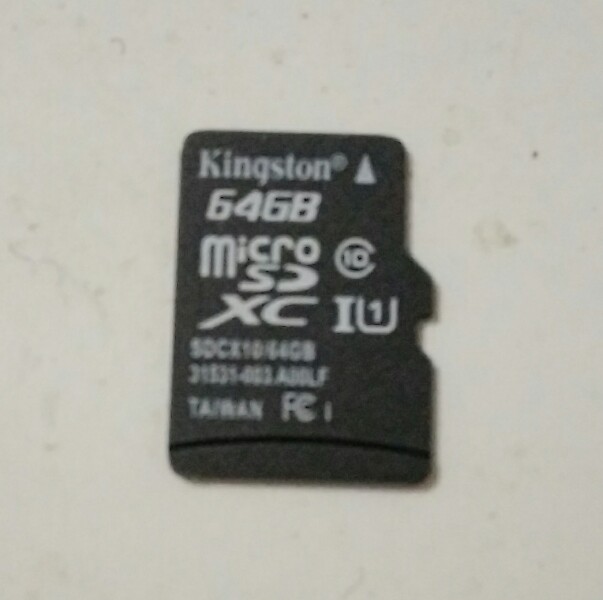
This is a couple of Kingston 64GB XC SDs I've got, one in my phone, other in my Win 10 tablet. Both quite legit, and no problems with speed on either device.
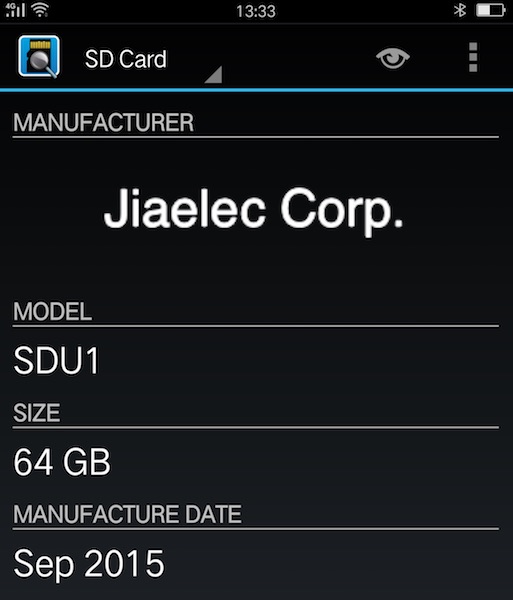
Jiaelec is a division of Transcend, and AFAIK Phison is a legit Taiwan manufacturer as well. And presumably they're contracted to Kingston.
Counterfeits will probably show as "unknown" with SD Insight, and the reported capacity is wrong as well. That's what's been posted here on AF from time to time.
This is a couple of Kingston 64GB XC SDs I've got, one in my phone, other in my Win 10 tablet. Both quite legit, and no problems with speed on either device.
Jiaelec is a division of Transcend, and AFAIK Phison is a legit Taiwan manufacturer as well. And presumably they're contracted to Kingston.
Counterfeits will probably show as "unknown" with SD Insight, and the reported capacity is wrong as well. That's what's been posted here on AF from time to time.
The brand on an SD isn't necessarily the actual manufacturer of it.
This is a couple of Kingston 64GB XC SDs I've got, one in my phone, other in my Win 10 tablet. Both quite legit, and no problems with speed on either device.
View attachment 102889
View attachment 102890
Jiaelec is a division of Transcend, and AFAIK Phison is a legit Taiwan manufacturer as well. And presumably they're contracted to Kingston.
Counterfeits should show as "unknown" with SD Insight, and the reported capacity is wrong as well. That's what's been posted here on AF from time to time.
Thanks, you have any idea why my phone said it was a slow SD card? Even though it's 10 speed rating?
Mine are "10" speed rated as well. No idea why it would state as being slow, and in fact I've never heard of that before, not here on AF. I've got an Oppo R7 Plus phone with Lillipop 5.1.1, certainly not seen anything like that with it, or any previous devices I've had.
Fake SDs will usually manifest themselves with data corruption, like corrupting and losing photos. etc. Which is a bit of a FAQ in Android Questions actually. Because it might be a 2GB or 8GB chip or something, that's been doctored to lie to the OS about its capacity.
Fake SDs will usually manifest themselves with data corruption, like corrupting and losing photos. etc. Which is a bit of a FAQ in Android Questions actually. Because it might be a 2GB or 8GB chip or something, that's been doctored to lie to the OS about its capacity.

chanchan05
The Doctor
It may not be a real Class 10 card. Sure they could sell you a 32GB card, say it's class 10 but really class 4. Or you may just have a dud.
On the other hand, SanDisk sells a special optimized for Android version of their SD cards, marketed separately from class 10 cards. They seem to be ok. I have a 32GB one in my tablet, and another in my Note 2. AFAIK the Note 2 is more powerful than a Tab 4, but the Tab 4 is actually faster in accessing the card.
On the other hand, SanDisk sells a special optimized for Android version of their SD cards, marketed separately from class 10 cards. They seem to be ok. I have a 32GB one in my tablet, and another in my Note 2. AFAIK the Note 2 is more powerful than a Tab 4, but the Tab 4 is actually faster in accessing the card.

svim
Extreme Android User
Class 10 microSD cards are rated for 10MB/s transfers (class 6 - 6MB/s, class 4 - 4MB/s, etc.) As far as apps, a class 10 card should be more than suitable. Stuttering would be more likely if you're dealing with high-res video content (over 1080p). I have to wonder if that actually is a class 10 card.Hello, I recently bought a Micro SD card with a speed rating of 10 for my Moto G 3rd Gen.
When I installed it my phone said it was a slow card and some apps may stutter, which they are. But I thought 10 was a fast speed rating for an SD card.
Class 10 microSD cards are rated for 10MB/s transfers (class 6 - 6MB/s, class 4 - 4MB/s, etc.) As far as apps, a class 10 card should be more than suitable. Stuttering would be more likely if you're dealing with high-res video content (over 1080p). I have to wonder if that actually is a class 10 card.
Hmm, maybe I'll try another SD card then. Anyone got any good reliable sites for SD cards?
svim
Extreme Android User
Amazon is a good source, just be sure to avoid the '...frustration free...' packaging options since that makes it harder to verify the card's origin, and note that there's a distinction between 'Fulfilled by Amazon' (shipping from Amazon warehouses but may/may not be from 3rd party retailers) and 'Ships from and sold by Amazon.com' (still a chance your card could be a counterfeit but less likely).
Amazon is a good source, just be sure to avoid the '...frustration free...' packaging options since that makes it harder to verify the card's origin, and note that there's a distinction between 'Fulfilled by Amazon' (shipping from Amazon warehouses but may/may not be from 3rd party retailers) and 'Ships from and sold by Amazon.com' (still a chance your card could be a counterfeit but less likely).
Thanks very much

Grandcross
Lurker
Hi!
I have sony's Xperia z5 SOV32.
It has single slot for sim.
If it was opened, There is two space for sim and microSD card.
I was set the 64GB microSD card before sim card.
And then I connected computer by usb cable for PC Companion and Media go.
It is for the walkman's application ,But can use for Xperia and more.
The sony's PC companion is for android devices to send and recieve the data at computing.
Media go can moving from the data place of music that is choose the library and setting on underbar.
There is choose the to inport place from CD,If it was changed the first child of directory to iTunes media's place, As soon as saerch and add in libraly of music and more.
But I wasting the time to move data on strage of SD card very slowly too.
But Media go is saerched by Gracenet of data base for Hi-Res comverter.
I have sony's Xperia z5 SOV32.
It has single slot for sim.
If it was opened, There is two space for sim and microSD card.
I was set the 64GB microSD card before sim card.
And then I connected computer by usb cable for PC Companion and Media go.
It is for the walkman's application ,But can use for Xperia and more.
The sony's PC companion is for android devices to send and recieve the data at computing.
Media go can moving from the data place of music that is choose the library and setting on underbar.
There is choose the to inport place from CD,If it was changed the first child of directory to iTunes media's place, As soon as saerch and add in libraly of music and more.
But I wasting the time to move data on strage of SD card very slowly too.
But Media go is saerched by Gracenet of data base for Hi-Res comverter.
Hi!
I have sony's Xperia z5 SOV32.
It has single slot for sim.
If it was opened, There is two space for sim and microSD card.
I was set the 64GB microSD card before sim card.
And then I connected computer by usb cable for PC Companion and Media go.
It is for the walkman's application ,But can use for Xperia and more.
The sony's PC companion is for android devices to send and recieve the data at computing.
Media go can moving from the data place of music that is choose the library and setting on underbar.
There is choose the to inport place from CD,If it was changed the first child of directory to iTunes media's place, As soon as saerch and add in libraly of music and more.
But I wasting the time to move data on strage of SD card very slowly too.
But Media go is saerched by Gracenet of data base for Hi-Res comverter.
I appreciate your input but not sure I understand.
Grandcross
Lurker
I said for android of sony's Xperia z5 's issue.
If your phone is sony, you can same issue is able to apply.
But not is me unknown.
Sorry I said one way for sony.
But it's issue is been able to other device is on PC Companion of soft wear is downloaded.
If you can try it, You will seach for PC Companion on search engin.
And You must open the Media go.
And then you must click or tap your computer is connected for android devise at library.
And it is soft wear has taskbar to setting. In it, you choice the to CD inport change to place of directory for iTunes Media.
I said so.
If your phone is sony, you can same issue is able to apply.
But not is me unknown.
Sorry I said one way for sony.
But it's issue is been able to other device is on PC Companion of soft wear is downloaded.
If you can try it, You will seach for PC Companion on search engin.
And You must open the Media go.
And then you must click or tap your computer is connected for android devise at library.
And it is soft wear has taskbar to setting. In it, you choice the to CD inport change to place of directory for iTunes Media.
I said so.
I said for android of sony's Xperia z5 's issue.
If your phone is sony, you can same issue is able to apply.
But not is me unknown.
Sorry I said one way for sony.
But it's issue is been able to other device is on PC Companion of soft wear is downloaded.
If you can try it, You will seach for PC Companion on search engin.
And You must open the Media go.
And then you must click or tap your computer is connected for android devise at library.
And it is soft wear has taskbar to setting. In it, you choice the to CD inport change to place of directory for iTunes Media.
I said so.
OK thanks