• After 15+ years, we've made a big change: Android Forums is now Early Bird Club. Learn more here.

skinning the cat

foxII

Well-Known Member
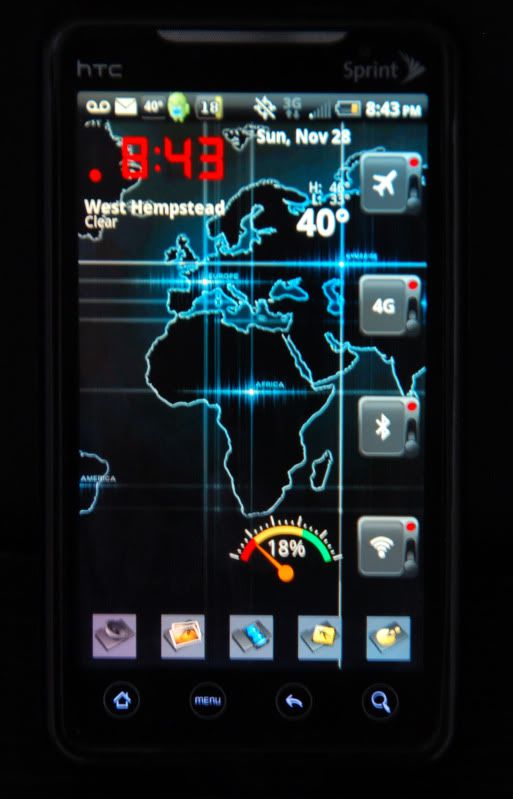
first of all. Thanx to all who have helped me with this work in progress. I wanted to know about the rectangular screens that appear on the pages and can open and close like the header bar. What app is that and where can I get it? Also I paid for launcher pro plus and now the app icon is gone. How do I get it back?
Evo_2.jpg
 
Cryin' shame........
57 replies about some freakin' plastic pos case, and no response to something instrumental; to the enhanced operation of this phone.

Well.............Thats the world for you.
 
Try mentioning Angry Birds in your posts. There are probably 15 popular threads about it. As for your question, I have no idea.
 
I guess I'm not entirely sure what your question is but I have LPP and I don't have an icon in my app drawer either. To get to the program and the setting though, you just hit your menu button and hit "preferences". This will bring up all the LP settings. At least that is the way it is on my droid eris.

as to the rectangular screens, do you mean something like this? look at post 1666. I believe they used Desktop Visualizer to do those icons although I have never tried it.

http://androidforums.com/htc-droid-eris/27414-lets-see-your-ui-layout-34.html


If this is not what you are talking about, I'm sorry and hopefully someone more knowledgeable can help soon. Good luck.
 
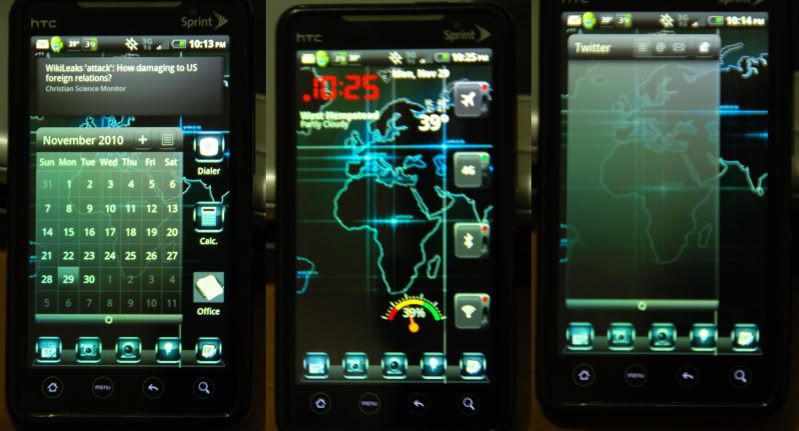
Well I tried on my own and now I have a twitter box that I cant remove from its galaxy.
 
a screenshot of what you mean would be useful

"I wanted to know about the rectangular screens that appear on the pages and can open and close like the header bar."

what pages? do u mean the home screens? afaik there aren't any apps that allow you to put rectangular screens on your homescreen which you can drag down like the 'header' bar. You can make folders with folder organizer, but they don't open by 'dragging' down, they open by tapping them.

regarding lpp, which app icon? do u mean the link to the app drawer? (the one made up of small squares?)

tl;dr I dunno what u r talking about :)
 
First, these are the other two screens. My issue. is that the screen on the right has a twitter box that I cant get to close (i.e. menu or drag to trash). How do I get rid of it.
Also how would I adjust transparencies on the calendar?
Evo_shot.jpg
 
First, these are the other two screens. My issue. is that the screen on the right has a twitter box that I cant get to close (i.e. menu or drag to trash). How do I get rid of it.
Evo_shot.jpg

The Twitter box is a widget. You should be able to drag it to the trash. Press and hold until it is moveable, then drag it to the trash.
 
The Twitter box is a widget. You should be able to drag it to the trash. Press and hold until it is moveable, then drag it to the trash.

For some reason it wont highlight to drag into the trash. And if I tap the bar at the bottom of the tweeter screen it just tuns yellow for a sec
 
Got it. I had to hold down on to the right box at the header of the twitter box. Thanxs.

Now can anyone help me about the transparencie issues and the drop down boards.
 
Back
Top Bottom