• After 15+ years, we've made a big change: Android Forums is now Early Bird Club. Learn more here.

Help smart action not working

wolgy

Newbie
So i have 3 tasks in smart actions. 1 is a battery saver which i havent even gotten my phone below 40% let alone 25%. 2. Is a a school/work which has a time trigger and 3. Is a night time app that also has a time trigger.

The school/work action has never worked, i have to manually silence my phone. The night time one worked until one time i manually took my phone off vibrate. Now it wont work.

I have rebooted my phone, tried recreating the tasks, resaving them, they simply will not work :(.

Any help would be appreciated.
 
So i have 3 tasks in smart actions. 1 is a battery saver which i havent even gotten my phone below 40% let alone 25%. 2. Is a a school/work which has a time trigger and 3. Is a night time app that also has a time trigger.

The school/work action has never worked, i have to manually silence my phone. The night time one worked until one time i manually took my phone off vibrate. Now it wont work.

I have rebooted my phone, tried recreating the tasks, resaving them, they simply will not work :(.

Any help would be appreciated.

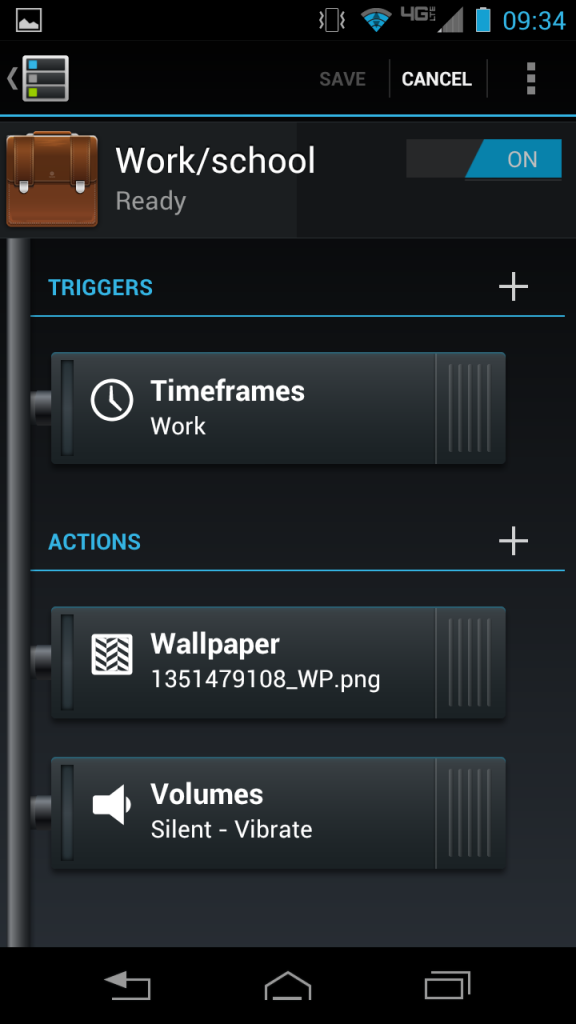
My time-based triggers always work for me. It might be helpful if you post some screen shots of what your triggers/actions screen look like. I'll post one of mine for my work SA which is a time-based SA that shuts off the wifi and silences the phone. I'll post it directly from my phone in a couple minutes so you can compare yours to mine.
 
Here's mine for work: uploadfromtaptalk1352759192687.jpg
 
It's been hit or miss with prior moto phones that I've had (some CLN replacements).

I really haven't tried again with smart actions. Obvious cat tip #1 is to make sure you are on wifi for location based triggers.
 
It's been hit or miss with prior moto phones that I've had (some CLN replacements).

I really haven't tried again with smart actions. Obvious cat tip #1 is to make sure you are on wifi for location based triggers.

That was my first thought for him but he said the SA was time triggered. I learned the hard way about the location based SA needing to be on wifi!
 

Sorry to hijack, but Scott this is my first time with "Smart Actions". I set one up similar to yours. But I have a question. At first I was going to use location for the trigger but then I went with time frame instead. Which it looks like you have also. So I deleted the "location" one. So why do you have both (location and time frame)? do you use both or did you not delete the location one? Meaning, Should I have not deleted the location trigger even though I didn't have it slide over to activate?(or that I wasn't going to use it)

This might be hard to undertand what I mean, sorry.
 
Sorry to hijack, but Scott this is my first time with "Smart Actions". I set one up similar to yours. But I have a question. At first I was going to use location for the trigger but then I went with time frame instead. Which it looks like you have also. So I deleted the "location" one. So why do you have both (location and time frame)? do you use both or did you not delete the location one? Meaning, Should I have not deleted the location trigger even though I didn't have it slide over to activate?(or that I wasn't going to use it)

This might be hard to undertand what I mean, sorry.

No problem and I know exactly what you are talking about. When I first programmed this SA I tried using the location. But since there is no wifi at work (that I can connect to at least) I had to resort to a timeframe trigger. This is annoying since my hours change from time to time.

I left the location trigger in place as I am hoping to someday find a password to one of the several wifi's in my workplace so I can connect and then have a trigger that is fool proof. If that happens then I will delete the timeframe trigger. If not then I will delete the location trigger.

I'm still puzzled (and more than a little annoyed) that you need to be connected to a wifi to use the location trigger. That just makes no sense to me at all!
 
No problem and I know exactly what you are talking about. When I first programmed this SA I tried using the location. But since there is no wifi at work (that I can connect to at least) I had to resort to a timeframe trigger. This is annoying since my hours change from time to time.

I left the location trigger in place as I am hoping to someday find a password to one of the several wifi's in my workplace so I can connect and then have a trigger that is fool proof. If that happens then I will delete the timeframe trigger. If not then I will delete the location trigger.

I'm still puzzled (and more than a little annoyed) that you need to be connected to a wifi to use the location trigger. That just makes no sense to me at all!

Perfect, I get it. I was hoping you had a certain situation that made you keep both. I inderstand 100%. Mine is a nightime while charging setting so i figured "just use a time frame dummy". But at first i had location set and then realized you could delete it. I wanted to make sure deleting it was ok. You confimed. thanks again
 
Everything looks right. Not sure what the deal is. Post a screenshot of your timeframe setup. Maybe its something in there?
 
I messed with SA initially, but the lack of NOT triggers or intuitive/practical prioritization of conflicting triggers led me to switch back to Locale. Simply including a "Default" Action (like Locale does) which won't ever override other triggers would double its usefulness.

It's a great concept, but potential isn't capitalized on.
 
I messed with SA initially, but the lack of NOT triggers or intuitive/practical prioritization of conflicting triggers led me to switch back to Locale. Simply including a "Default" Action (like Locale does) which won't ever override other triggers would double its usefulness.

It's a great concept, but potential isn't capitalized on.

I have to agree written this statement. I was thinking of trying Tasker but its so much more than I really need. Maybe I'll check out Locale as well. I've heard it mentioned a couple of times now.
 
Wolgy, have you tried clearing the data for the smart actions app? I had the same problem and as soon as I cleared the data they started working.
 
Wolgy, have you tried clearing the data for the smart actions app? I had the same problem and as soon as I cleared the data they started working.
I have tried this. Just did it again to see if it helps.

Also, i might give locale a try
 
One thing I discovered accidentally is that using an icon from an existing trigger for a newly written trigger can result in odd behavior. In my case I had a SA that puts the phone into silent mode when I'm at a certain location, but I liked the little calendar icon so I used that icon.

Low and behold my appointment time I had blocked out (1:00 - 2:30) caused my phone to go silent. Only I wasn't anywhere near my trigger location. However my SA notification at the top said the SA was in fact turned on.

Turns out the calendar icon goes with a pre-written "calendar" trigger that makes your phone change to silent when your calendar is blocked.

For whatever reason that overruled my "location" trigger even though I had not one thing in the SA about silencing the phone when the calendar is blocked.
 
I'm still puzzled (and more than a little annoyed) that you need to be connected to a wifi to use the location trigger. That just makes no sense to me at all!

You do not need to be connected to WiFi for the location trigger, at least not in my experience. I have a "Work" smart action saved to switch my phone to silent and, turn off data unless I'm using that particular app, and to switch to "Smart" screen brightness, and I always turn WiFi off manually before I leave my house in the morning for the office. As soon as I arrive at work, the SA kicks in while I'm in 4G mode. It has worked flawlessly every day.
 
You do not need to be connected to WiFi for the location trigger, at least not in my experience. I have a "Work" smart action saved to switch my phone to silent and, turn off data unless I'm using that particular app, and to switch to "Smart" screen brightness, and I always turn WiFi off manually before I leave my house in the morning for the office. As soon as I arrive at work, the SA kicks in while I'm in 4G mode. It has worked flawlessly every day.

I have the same SA set up on my phone for work and it does not work. When I did research on the problem there were several posts about the location trigger needing wifi to work so I assumed it was that.
 
So, I went ahead and disabled wifi and turned the work SA on (now using location with 4g only) and it worked - for a while. Then it stopped working. I didn't notice it until I had located to a different part of the plant.

Now, it's not a huge plant by any means. I'm probably only a couple hundred yards from where I was before. Could it be just by walking to a different area that I lose the location trigger? Does anyone know the approximate limit to this?

I suppose I could just do a second trigger with this exact location to see if that works. I'll post back what I find but this would be good info to know!!!
 
Back
Top Bottom