
This is with the Samsung Fascinate if its phone specific.
Disclaimer: Involves deleting ALL Google Contacts so make a back up export...Also if you have contacts with multiple numbers/emails and you have defaults set...the defaults MAY be removed.
I have to have contacts sorted by last name. But couldn't find a setting to do so. You can do it in Gmail...but it doesn't change on the phone.
My phone sorts based on the Display name in Google.
You see the John Doe...Just change how you want it to look and Android will short alphabetically,
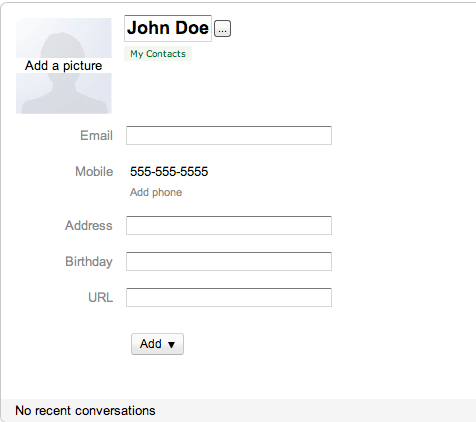
So for me to do Last name sorting, I change it to Doe, John and as you can see below it doesn't change the name field in google. You can do whatever you want and it sorts by this field.
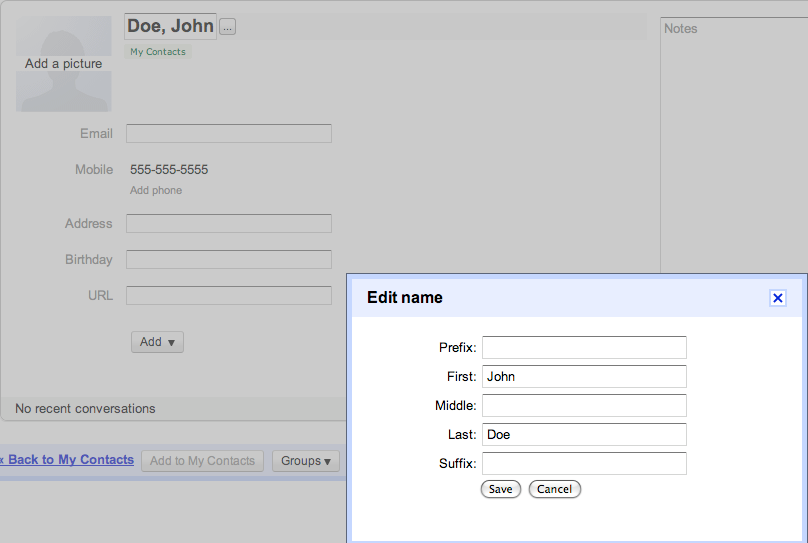
A warning though if you change the name in Android contacts it will resort it by first name. But this is an easy fix for one or two names just do it in google contacts like above!
as for all your contacts...export in CSV format. Make two copies of the csv file (one for back up incase you fubar it) Rename the second.
I used the simple "=CONCATENATE("last name cell", "Comma-space", "First Name Cell") in column A and then "copied" and the column and "Paste special" and select "Values" (removes the formula and makes it values/text)
Save it into csv format.
Make sure you have have your back up CSV file. then Delete all your Google contacts. (if you don't google thinks its helping by merging...and you will get some duplicate phone numbers and other fields) Then import your NEW CSV file and sync your phone...
If it didn't do right keep playing with the CSV file. If you have to give up Delete all your contacts and import the back up CSV file which will put it back to original.
You can also use this CSV format to put any exported contacts into google. just rearrange the columns in the format with the google csv file and combine them.
REMEMBER make a back up csv file before you start...so you can always get back to square 1!
Enjoy...It helped me...hope it does for you too!
Disclaimer: Involves deleting ALL Google Contacts so make a back up export...Also if you have contacts with multiple numbers/emails and you have defaults set...the defaults MAY be removed.
I have to have contacts sorted by last name. But couldn't find a setting to do so. You can do it in Gmail...but it doesn't change on the phone.
My phone sorts based on the Display name in Google.
You see the John Doe...Just change how you want it to look and Android will short alphabetically,
So for me to do Last name sorting, I change it to Doe, John and as you can see below it doesn't change the name field in google. You can do whatever you want and it sorts by this field.
A warning though if you change the name in Android contacts it will resort it by first name. But this is an easy fix for one or two names just do it in google contacts like above!
as for all your contacts...export in CSV format. Make two copies of the csv file (one for back up incase you fubar it) Rename the second.
I used the simple "=CONCATENATE("last name cell", "Comma-space", "First Name Cell") in column A and then "copied" and the column and "Paste special" and select "Values" (removes the formula and makes it values/text)
Save it into csv format.
Make sure you have have your back up CSV file. then Delete all your Google contacts. (if you don't google thinks its helping by merging...and you will get some duplicate phone numbers and other fields) Then import your NEW CSV file and sync your phone...
If it didn't do right keep playing with the CSV file. If you have to give up Delete all your contacts and import the back up CSV file which will put it back to original.
You can also use this CSV format to put any exported contacts into google. just rearrange the columns in the format with the google csv file and combine them.
REMEMBER make a back up csv file before you start...so you can always get back to square 1!
Enjoy...It helped me...hope it does for you too!