
Install the app
How to install the app on iOS
Follow along with the video below to see how to install our site as a web app on your home screen.
Note: This feature may not be available in some browsers.
-
After 15+ years, we've made a big change: Android Forums is now Early Bird Club. Learn more here.
You are using an out of date browser. It may not display this or other websites correctly.
You should upgrade or use an alternative browser.
You should upgrade or use an alternative browser.
switch windows
- Thread starter reader
- Start date

chanchan05
The Doctor
How troublesome? Press a button, switch? Depends on what device you have maybe?

Crashdamage
Android Expert
Long-press the 'Home' button and the last few apps used appears. Tap on the one you want. Simple.
chanchan05
The Doctor
Long-press the 'Home' button and the last few apps used appears. Tap on the one you want. Simple.
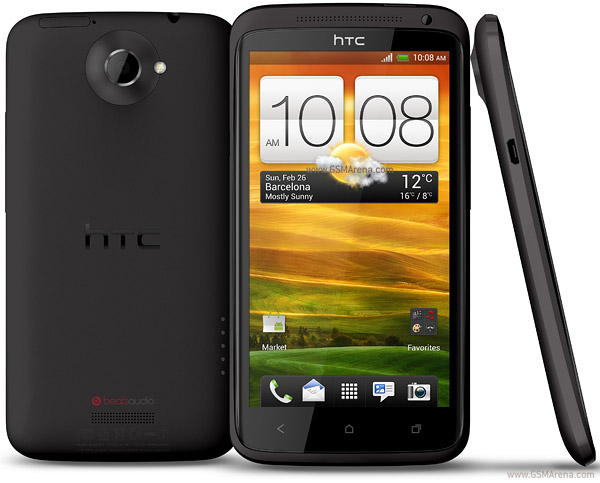
That's for Samsung. A more recent HTC device like the One X and One S would have a dedicated multitask key.
Crashdamage
Android Expert
That's how it works on my HTC Amaze w/ICS and every other Android device I've had.
chanchan05
The Doctor
That's how it works on my HTC Amaze w/ICS and every other Android device I've had.
See multi-task button on lower right corner of phone. Probably the US versions are different?
Crashdamage
Android Expert
I use Nova Launcher, mimics vanilla ICS but does not have the multi-task button on phones with capacitive buttons. Long-press home for recent apps.
chanchan05
The Doctor
I use Nova Launcher, mimics vanilla ICS but does not have the multi-task button on phones with capacitive buttons. Long-press home for recent apps.
Whatever launcher you use, that key won't change, Its a capacitive key sitting on the hardware, just like the back and home keys. So its really your phone.

Crashdamage
Android Expert
I have Home, Menu, Back & Search capacitive buttons. No Multi-task.
chanchan05
The Doctor
A probably some US version weirdness. Samsung phones there also have those four buttons instead of the usual 3 buttom layout internationally.
Samsung phones there also have those four buttons instead of the usual 3 buttom layout internationally.