• After 15+ years, we've made a big change: Android Forums is now Early Bird Club. Learn more here.

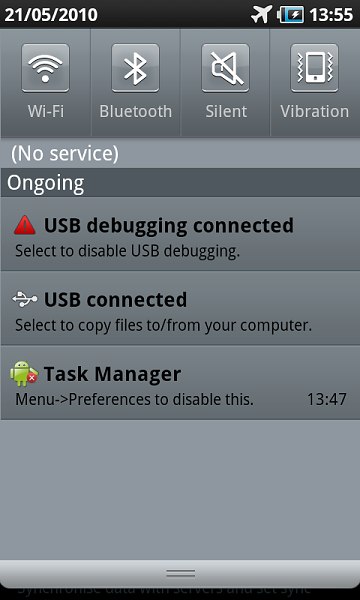
Toggles in Notifications Area?

gsmarena_014.jpg


(Adding the pic inline to save people from having to click the link.)
 
It's not exactly what you're looking for, but try out Quick Settings. You can put a shortcut to it in the notification area, which has the same benefits with just one extra step (and less clutter, really). I'd love to have toggles in the notification area like that, too, though.

Quick Settings - Android app on AppBrain

EDIT: Looks like those toggle switches in the notification window are from the Galaxy S. I doubt it's possible to do that outside of the modifications they probably made.
 
@akazabam: Actually, I've been using that for a few days; you're right in that it's not exactly what i'm looking for, nor is it pretty. Thanks for the suggestion.

TouchWiz is definitely improving, but on the other hand, bugs such as not being able to customize a ringtone for google-synced contacts is unacceptable. Also, it would be great to carry that feature over to my N1 (not to mention keeping the feature on the S after flashing CM6).

I'm still holding out for a better solution.
 
Have you tried Quickdesk? That works well for quickly accessible toggles (and any other widget, for that matter). It does seem to slow the phone down a little bit, though.
 
It's not exactly what you're looking for, but try out Quick Settings. You can put a shortcut to it in the notification area, which has the same benefits with just one extra step (and less clutter, really). I'd love to have toggles in the notification area like that, too, though.

Quick Settings - Android app on AppBrain

EDIT: Looks like those toggle switches in the notification window are from the Galaxy S. I doubt it's possible to do that outside of the modifications they probably made.

I never even realized it did that. Thanks!
 
Have you tried Quickdesk? That works well for quickly accessible toggles (and any other widget, for that matter). It does seem to slow the phone down a little bit, though.

You said it, it slows the phone down too much for my taste. Another great find though.
 
It's only for wifi, but I use Status Toggle which puts a wifi on/off switch in my taskbar. I often times would be in the middle of an app DL from the market or viewing a page on the web, and would realize it was taking too long, or running slowly.

So I'd have to hit home, go over to my power bar widget and turn on wifi, then go back to what I was doing. With this, I can just pull down the status bar and hit wifi on or off while staying in the program I'm using.

StatusToggle - Android app on AppBrain
 
It's only for wifi, but I use Status Toggle which puts a wifi on/off switch in my taskbar. I often times would be in the middle of an app DL from the market or viewing a page on the web, and would realize it was taking too long, or running slowly.

So I'd have to hit home, go over to my power bar widget and turn on wifi, then go back to what I was doing. With this, I can just pull down the status bar and hit wifi on or off while staying in the program I'm using.

StatusToggle - Android app on AppBrain

Nice find.
 
Back
Top Bottom