• After 15+ years, we've made a big change: Android Forums is now Early Bird Club. Learn more here.

Web browser with full HD

Hello.
What browser supports the actual resolution of a full hd andorid tablet?

I have tried Firefox, Chrome, Opera Mini, Dolphin browser and UC Browser HD and they all have inside horizontal resolution of less than 1000pixels.
All web pages look like crap with the resolutions these browsers offer. It makes no difference to request a 'desktop site' or whatever, the browser inner resolution is still about half of that what the screen is capable of.

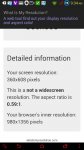
These are the result of www.whatismyresolution.com for the different browsers:
Firefox: Screen resolution = 960x552, inner resolution = 980x480
Chrome: Screen resolution = 960x600, inner resolution = 960x431
Dolphin: Screen resolution = 1920x1104, inner resolution = 960x437
Opera mini: Screen resolution = 872x404, inner resolution = 873x405
UC Browser HD: Screen resolution = 1922x1105, inner resolution = 980x451

 
I don't think that site knows what it's talking about. Dolphin, Chrome, and Firefox on 1080p screen -

1434987393274.jpg

1434987407345.jpg

1434987421349.jpg

If your pages look wrong, it's something else, so I agree - what tablet?
 
This is Acer Iconia A1-840.
I'll try and attach photos of what the tablet looks like on a webpage I use often (a finnish news aggregator) and a photo of what it looks like on a normal desktop 1920x1080 23" display (which has less vertical resolution and yet is able to display about 3 times more rows even while the flash ad on the desktop is twice the size).

The tablet result is what firefox shows for that particular site, 'request desktop site' was selected.
The desktop result is IE11 with zoom factor of 100%.WP_20150622_002.jpg WP_20150622_004.jpg
 
OK, what I *think* might be happening is that the new web servers are able to detect a mobile device and will now shape content that way regardless of whether you request the desktop site.

Our site is doing that (and making a lot of crazy) and if I recall the reason correctly it has to do with the number of dots per actual display inch (or cm, either way ok).

So even if the resolutions are the same, your Android has the dots packed more densely than a laptop or a desktop - and the server goes by that.

I forgot which - but as I recall, you can either zoom out or in enough on the desktop and suddenly it will acquire that mobile view.

The only browser I found that's immune to it is Xscope Pro, no longer supported and full of Java error pop-ups.

If you want to link your example site here, I could see if I can confirm that.
 
Comparing your firefox view of that particular site in portrait mode to mine, I can see that your portrait shows about 20% more rows than mine does. The view on that website is better in portrait mode.
However, I'm assuming the amount of pixels the initial website I pasted results from holds true and the horizontal resolution in portrait mode is less than 500px wide, this makes a lot of other sites unviewable (because the content just doesn't fit).

I verified your observation by zooming my desktop chrome window to ~200% and a site I tested this with went into 'i-look-stupid-mode' just like it does on the tablet. (www.xxl.fi - the top navigation bar disappears and is replaced with the three stripes type 'menu' when zoomed)

Is there anything I can do? I am finding it difficult to comprehend the idea behind a fullhd tablet.
 
"However, I'm assuming the amount of pixels the initial website I pasted results from holds true..."

That's entirely your call but I wouldn't.

The site is grabbing synthetic scaling values and making outrageously bad arithmetic mistakes. It's not like there's some store of truthful values and that site is just displaying it ok.

You can't fix everything, the nature of the CSS controls on the web server along with the hardware scaling on your device prevents it.

However - you can change how Firefox responds to a lot of sites beyond just "desktop" - check out an add-on called Phony - under Firefox menu, Tools, Addons.
 
Well this is what I get for chrome from the op's website on a 1080 display which I'm guessing is pretty shit?
 
What I meant is this: What I'm seeing on my tablet conforms with what the website suggests. If you can with your own eyes verify that your screen is not 360x640, you can obviously say it's wrong as I can with my own eyes verify that the above screencapture from my tablet screen is not a true 1920x1200 resolution webpage view (be the reason whatever it may be).

I tried phony with little luck. Didn't seem to matter what user-agent I selected as the resulting page seemed always the same.

I however want to thank you Earlymon for helping me.
 
By the way, here's an uncompressed shot of one of the earlier pictures -

18900297990_5f13b8c747_o.png


I think that you can verify with your own eyes that my 1920×1080 device is not 360×640.

I agree that you must have a scaling problem somewhere - but that ppi website has you looking in the wrong place. According to it, the above picture is impossible. It's not somehow wrong with mine and right with yours and funky's - it's wrong in the approach and doesn't explain scaling.

Anyway, a direct screen shot may reveal more.
 
OK, if you're still following this, I tracked down the resolution.

First - here's a resolution test for the Web and the device that doesn't get things accidentally right or misleading -

http://dev.jeffersonscher.com/resolution.html

Next, here's the instructions to change yours from within Firefox (you'll have to click on the solution button to see it) -

https://support.mozilla.org/en-US/questions/981038

"Assuming the device pixel ratio is closer to 3 than to 1, you can try editing a hidden setting to see whether it improves things.

Open a new tab, and type or paste about:config in the address bar and tap the Enter key on the keyboard. You may want to bookmark this page for future tweaking.

In the search box, type css and then tap the Enter key on the keyboard.

When you find layout.css.devPixelsPerPx tap the Modify button and change the value to 1.0 (typically, you just need to delete the - sign). Tap the OK button.

Switch back to the first tab and reload."

Presto - the desktop version of our site appears in Firefox.

1435172942237.jpg


(low res screen shot due to Tapatalk compression)
 
Last edited:
Back
Top Bottom