• After 15+ years, we've made a big change: Android Forums is now Early Bird Club. Learn more here.

Help What does "Embedded in *" mean in Chrome site settings?

Paddy Landau

Well-Known Member
I have Android 6.0.1 on my Nexus 5.

In Chrome, I go to Settings > Site settings > All sites.

There, I can view permissions and storage for each individual site.

Today, I noticed that a few sites have the wording "Embedded in *". For example, Facebook has three entries:

1. m.facebook.com
(This has some stored data)

2. https://m.facebook.com
(This has some stored data)

3. https://m.facebook.com
Embedded in *
(This has notifications blocked)

What is the meaning of that "Embedded in *" in the third entry? I cannot find the answer.

Thank you.
 
I have an LG-K330 Android V 5.1.1 and I'm wondering also about the "Embedded In*" and why it's shown in site settings. Also, only some sites list this way. They appear to be sights that need a username and/or password. Not all have saved passwords though. Please inform. Thanks.
 
I have Android 6.0.1 on my Nexus 5.

In Chrome, I go to Settings > Site settings > All sites.

There, I can view permissions and storage for each individual site.

Today, I noticed that a few sites have the wording "Embedded in *". For example, Facebook has three entries:

1. m.facebook.com
(This has some stored data)

2. https://m.facebook.com
(This has some stored data)

3. https://m.facebook.com
Embedded in *
(This has notifications blocked)

What is the meaning of that "Embedded in *" in the third entry? I cannot find the answer.

Thank you.

Seriously no answers for the last TWO+ years??!!! What's going on here!!???
 
I have Android 6.0.1 on my Nexus 5.

In Chrome, I go to Settings > Site settings > All sites.

There, I can view permissions and storage for each individual site.

Today, I noticed that a few sites have the wording "Embedded in *". For example, Facebook has three entries:

1. m.facebook.com
(This has some stored data)

2. https://m.facebook.com
(This has some stored data)

3. https://m.facebook.com
Embedded in *
(This has notifications blocked)

What is the meaning of that "Embedded in *" in the third entry? I cannot find the answer.

Thank you.

I've observed something. If you've set preference for any site, it'll be marked as 'embedded in*'
For example, when a site asks you to send notifications and you refuse, it is marked as a site preference.
But it's just my observation, There might be something more to it.
 
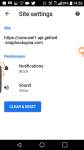
I've tried Define the answer to this question for at least 2 years. What's the site is embedded it's very difficult to get rid of the application it seems like whatever that application is it can do whatever it wants to whenever it wants to know matter what type of settings I change. I just came across the site checking inside sunny wear a for site has been added by Google Chrome. WTF site settings or extensive the first one I found was of course Facebook and we all know how that turned out with our data and management of it. If anyone has any other ideas or knows anything please let us all know the results. Thank you.
 

Attachments

  • Screenshot_2018-12-06-14-53-05.png
    Screenshot_2018-12-06-14-53-05.png
    78.2 KB · Views: 830
I have Android 6.0.1 on my Nexus 5.

In Chrome, I go to Settings > Site settings > All sites.

There, I can view permissions and storage for each individual site.

Today, I noticed that a few sites have the wording "Embedded in *". For example, Facebook has three entries:

1. m.facebook.com
(This has some stored data)

2. https://m.facebook.com
(This has some stored data)

3. https://m.facebook.com
Embedded in *
(This has notifications blocked)

What is the meaning of that "Embedded in *" in the third entry? I cannot find the answer.

Thank you.

I don't know what this means, but I know how to get rid of it. Just go into search history, then clear browsing data, then un check all the boxes except for site settings. A pop up should come up which lets you choose what sites will be affected. Once you chose the sites you want to remove notification settings on, just tap the clear data button and the notification settings will be removed.
 
Back
Top Bottom