
Install the app
How to install the app on iOS
Follow along with the video below to see how to install our site as a web app on your home screen.
Note: This feature may not be available in some browsers.
-
After 15+ years, we've made a big change: Android Forums is now Early Bird Club. Learn more here.
You are using an out of date browser. It may not display this or other websites correctly.
You should upgrade or use an alternative browser.
You should upgrade or use an alternative browser.
Help What's killing my battery
- Thread starter djnott
- Start date
-
- Tags
- samsung galaxy s3
A week ago my battery would have 30% left at bed time now it's almost dead at noon. What's happening? I've loaded some new apps, 1 was a live wall paper, I've uninstalled it. But it's not making a y difference. What's going on?
Look in battery setting and see what is draining also clear your ram

silentwitness
Android Expert
install GSam Battery monitor then charge ure phone full and let it discharge and you can see what app is using how much of ure battery.

silentwitness
Android Expert
@scooz16 try installing gsam battery and see which app is waking ure device and holding it awake.

SUroot
Extreme Android User
Betterbatterystats is also a great application for pinning down battery killers
Yep. I find this very useful.
BroncoDroid
Newbie
I'll try it now.
There was a long 20+ page thread about JB battery issues earlier. Several tests with betterbatterystats later it ended up being Samsung accounts draining all of their battery. Check to see if you have any samsung accounts that are syncing.
I'm looking for the thread, no luck so far.
mine lost 2% of battery 1 minute after it was unpluged the other day and that was connected to WIFI then I shut wifi off wne went to work and down to 65% after 2 hours and dead 5 hours into day and never used the phone at all. No emails or text nothing and dead after 5 hours. Friday I noticed I had 68% of the time I have no service for the reason my phone was drained in the battery screen. This phone has the worst reception of any phone I have ever owned.
barney_rebel
Android Enthusiast
Root it, freeze all the samsung crap...
Mine seemed to drain very fast also. It had lost 25% in 4 hours while not being in use.
I turned off syncing globally and it seems to do the trick. I got 13 hours out of it but with close to 7 hours of screen time. I played Most Wanted almost 45 min out of those 7 hours (representing 26% of battery usage according to gsam). I won't use it that much in normal circumstances so we'll see if it gets better, but turning off global syncing helped a lot as it lost barely 1% in 1 hour while not being in use (now to find out what wants to sync so bad...).
EDIT: I do have power saving mode turned on with brightness turned all the way down, but gps and wifi are both on and I don't feel like I'm sacrificing any of the experience the way things are configured right now, i.e. this is a real-life config.
I turned off syncing globally and it seems to do the trick. I got 13 hours out of it but with close to 7 hours of screen time. I played Most Wanted almost 45 min out of those 7 hours (representing 26% of battery usage according to gsam). I won't use it that much in normal circumstances so we'll see if it gets better, but turning off global syncing helped a lot as it lost barely 1% in 1 hour while not being in use (now to find out what wants to sync so bad...).
EDIT: I do have power saving mode turned on with brightness turned all the way down, but gps and wifi are both on and I don't feel like I'm sacrificing any of the experience the way things are configured right now, i.e. this is a real-life config.
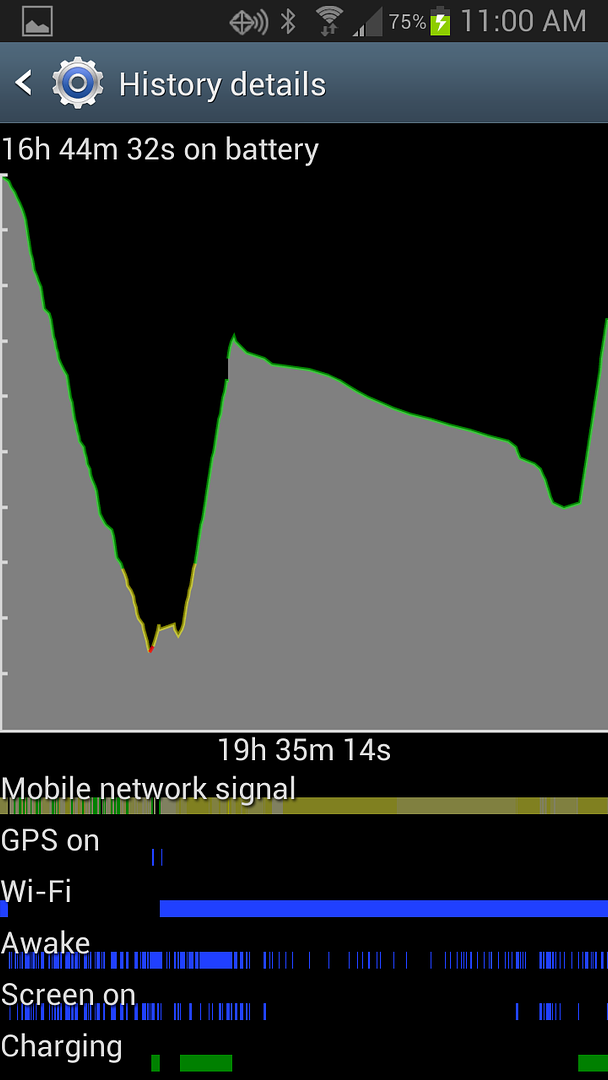
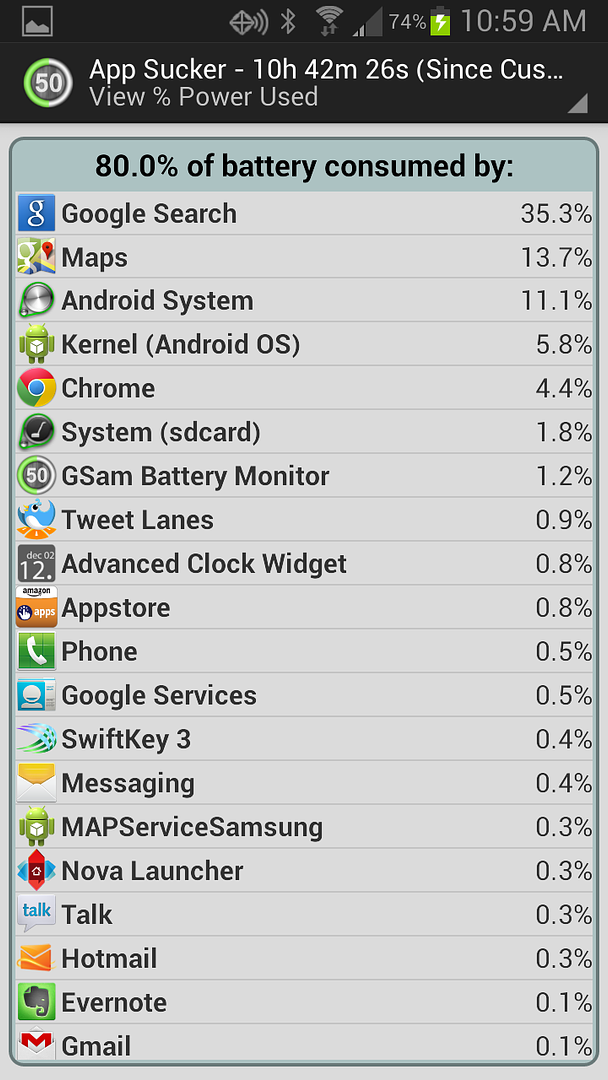
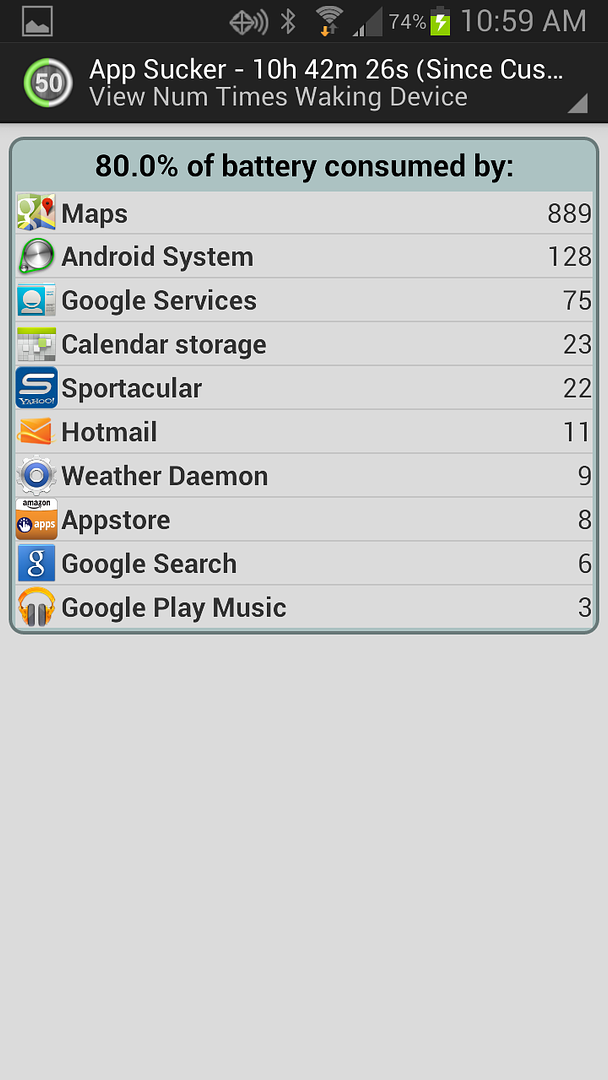
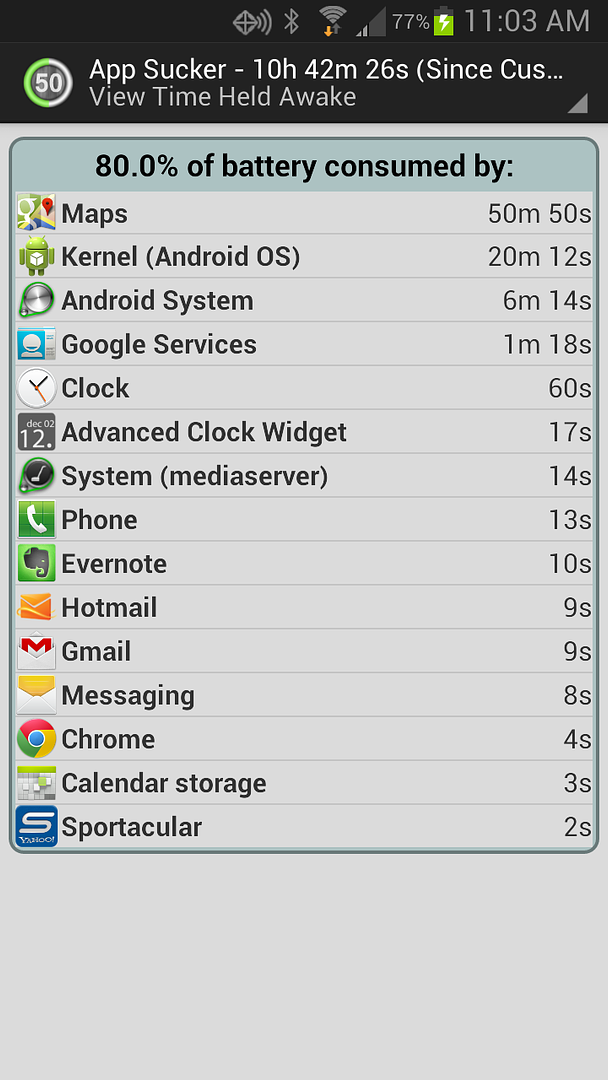
So gsam is telling me google search and maps are the biggest culprits. Now what??
If Google Search and Maps are the biggest drain, it doesn't sound like you were successful in shutting down Google Now.
If Google Search and Maps are the biggest drain, it doesn't sound like you were successful in shutting down Google Now.
I triple checked. Its Def. off. What else could it be? Those ticks awake shouldn't be happening that often right?
In my "running applications" it does list maps twice and both are running..is that weird?
I triple checked. Its Def. off. What else could it be? Those ticks awake shouldn't be happening that often right?
In my "running applications" it does list maps twice and both are running..is that weird?
That does sound weird. Not sure then. There are folks here that are a whole lot more knowledgeable than I that could help. Good luck.

silentwitness
Android Expert
by any chance are u rooted? I had a similar issue with maps and ended up freezing it in titanium backup so it was not running anymore. When required unfreeze.
by any chance are u rooted? I had a similar issue with maps and ended up freezing it in titanium backup so it was not running anymore. When required unfreeze.
I am not rooted
silentwitness
Android Expert
ok then go to settings --> Application manager --> All and scroll down to maps and click on it and see if u get an option to force stop and disable. Try force stopping the maps and then click on disable.