
Install the app
How to install the app on iOS
Follow along with the video below to see how to install our site as a web app on your home screen.
Note: This feature may not be available in some browsers.
-
After 15+ years, we've made a big change: Android Forums is now Early Bird Club. Learn more here.
You are using an out of date browser. It may not display this or other websites correctly.
You should upgrade or use an alternative browser.
You should upgrade or use an alternative browser.
X10 qwerty keypad is a pita, can it be changed to a conventional
- Thread starter Cupa t
- Start date

rosered
Android Expert
That depends on what carrier you are with... if its AT&T then that can also be a pita, but not insurmountable. If you are with a normal carrier (ie one that allows you to install apps from unknown sources) then have a look at this step by step thread on how to install.
http://androidforums.com/sony-ericsson-xperia-x10/195479-how-install-htc-keyboard-step-step.html
http://androidforums.com/sony-ericsson-xperia-x10/195479-how-install-htc-keyboard-step-step.html

Oh right, yup thats what I want....
Only one prob now....Ive downloaded it to the desktop but err how do I get it from there to the phone....I know it says copy....but how?....sorry for sounding stupid
Meant to say, Ive downloaded Astro manager so I'm ready so to speak
I'm using XP home if that any help and alot of the time when I go to open something all I get is "windows cannot open the file, choose a programme"
Only one prob now....Ive downloaded it to the desktop but err how do I get it from there to the phone....I know it says copy....but how?....sorry for sounding stupid
Meant to say, Ive downloaded Astro manager so I'm ready so to speak
I'm using XP home if that any help and alot of the time when I go to open something all I get is "windows cannot open the file, choose a programme"
rosered
Android Expert
Yes, don't try and open it on your PC just copy it across to your phone and then find it with Astro and when you tap on it you will be prompted to install it.
Sorry fuller instructions....
Connect your phone to the PC and mount the SD card, then using windows explore copy and paste the file over on to your SD card.
Hope that's making sense!
Sorry fuller instructions....
Connect your phone to the PC and mount the SD card, then using windows explore copy and paste the file over on to your SD card.
Hope that's making sense!
I'm having problems here...
I cant copy it, because when I open link you sent above and click "here", all I get is "open" "save" or "cancel". And when I connect to the pc and "pull" the usb symbol down, all I get is "turn off usb storage".
If I'm doing somthing wrong....what is it?
I cant copy it, because when I open link you sent above and click "here", all I get is "open" "save" or "cancel". And when I connect to the pc and "pull" the usb symbol down, all I get is "turn off usb storage".
If I'm doing somthing wrong....what is it?
rosered
Android Expert
Try open and it should give you the option to extract or unzip the files. Once this is done you can then copy.
I am gong to have to go off line now but will be about tomorrow for further help if you can't get it sorted in the meantime.
The phone needs to be seen by your PC so that you can copy it across unless you have bluetooth on your PC/laptop so that is an issue that needs addressing too.
I am gong to have to go off line now but will be about tomorrow for further help if you can't get it sorted in the meantime.
The phone needs to be seen by your PC so that you can copy it across unless you have bluetooth on your PC/laptop so that is an issue that needs addressing too.
rosered
Android Expert
Morning!
I am assuming you managed to find it with Astro and Install it and the clicker app thing that comes along with it?
If so, on your phone in Menu>Settings find either Locale & Text on 1.6 or Language and Keyboards. Then tick HTC_IME, should be bottom of your list. Whilst you are here also go in to the settings tab underneath and in keyboard types select Phone Keyboard.
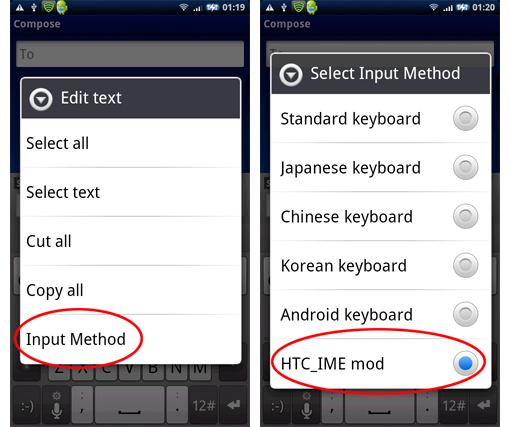
Then in your texting app when you long press and get asked for Input Method you should then get the next pop up with HTC_IME included.
I am assuming you managed to find it with Astro and Install it and the clicker app thing that comes along with it?
If so, on your phone in Menu>Settings find either Locale & Text on 1.6 or Language and Keyboards. Then tick HTC_IME, should be bottom of your list. Whilst you are here also go in to the settings tab underneath and in keyboard types select Phone Keyboard.
Then in your texting app when you long press and get asked for Input Method you should then get the next pop up with HTC_IME included.

rosered
Android Expert
So are you up and running now!? Hurrah.
Next step is to go and register on Gimpsta's site and make your own, so you can pick the colours of the keys and numbers etc (you don't have to go pink like mine, honest!)
If you want to be able to scroll through the three styles of keyboard you can go into the settings and select gestures and swipe right and one of the options is cycle keyboards, so you can swipe between them. It should automatically switch to qwerty when you go horizontal which is better when entering passwords etc. The other neat trick is to go into User Interface and scroll down to volume keys and you can set them up to move the cursor in case you need to go back and correct a typo, much easier than the random jab the screen approach!
Next step is to go and register on Gimpsta's site and make your own, so you can pick the colours of the keys and numbers etc (you don't have to go pink like mine, honest!)
If you want to be able to scroll through the three styles of keyboard you can go into the settings and select gestures and swipe right and one of the options is cycle keyboards, so you can swipe between them. It should automatically switch to qwerty when you go horizontal which is better when entering passwords etc. The other neat trick is to go into User Interface and scroll down to volume keys and you can set them up to move the cursor in case you need to go back and correct a typo, much easier than the random jab the screen approach!


way i got it to work on the phone was used barcode scanner to scan the generated QR code, then once downloaded opened in astro and then opened the download file in app manager. when i first done it, it gave me an option to update and once done, it was there.
i done one for my gf's x10 and there wasnt an update option so clicked uninstall then reinstall and it worked.
this is one i just made for my gf's phone:

i done one for my gf's x10 and there wasnt an update option so clicked uninstall then reinstall and it worked.
this is one i just made for my gf's phone: