• After 15+ years, we've made a big change: Android Forums is now Early Bird Club. Learn more here.

Samsung A52 5G clanging loud. Why?

My three year old. A52 has been fine until today. It was in my jacket pocket and screen off when suddenly CLANG CLANG..... CLANG CLANG...for over five minutes until I unlocked the phone. It was the loudest I've ever heard from a cell phone. There were no abnormal notifications.


How to find out how/why this happened? My A54 did not ever do this and didn't do this while the A52 was clanging.

I need your Help

Hello my Motorlla g10 touchscreen is not working and i cant enable usb debugging i tried to factory reset it and now its in the setup screen but i cant do anything is there any shortcut i could use to enable usb debugging or any application for the comupter wich can force it to enable usb debugging?

Lg Luca

Stalled Software Update

Hey android guru's, I have a Motorola edge plus 5g UW 2022. I have a Motorola Software update trying to download for the past three day. When I click on it it's saying "Waiting for Wi-Fi or zero rated network to resume downloading." When I hold down on this it says Software Download Notifier , when I click on this is says these notifications can't be modified, Blocked by your IT Admin. Any advise to fix this?

Reviews, I'm tired of being asked to leave one

It seems I get more and more emails asking me to review a recent product I purchased or to review my shopping experience at a store. Donating my time to leave a review deserves compensation. I'm going out of my way to do them a service. Definitely above and beyond a consumer's obligation. I made the mistake of leaving a couple of reviews on Amazon. Now after everything I purchase there I get a reminder to review. I even received an Email from Amazon inviting me to join their Vine program so my reviews have a bit more importance. Every time I run to Walmart I'm asked to review products and store experience. Every week I get an Email from the insurance company that repaired my truck reminding me to leave a review. I'm sick of it. If they want my review, give me something more than a chance to be chosen from a pool for a gift that I don't want.

Is your phone blown up with the review BS?

  • Question Question
XCover 5, function "share with", how to add missing app symbols to the menu

Tech data:

Samsung Galaxy XCover 5
OneUI 5.1
Android 13

Following matter:

If I want to share any media or text with the function "share with", then the corresponding menu opens with the apps to which I can forward the content to share. However, some app icons are still missing in this listing. Even with the option "edit apps", I can't add the missing icons.

Is there any possible solution to this?

  • Question Question
Samsung keyboard freezing

I'm having issues with my keyboard freezing when I make comments on YouTube. I've done all the obvious like uninstall YouTube, reset default keyboard, I've also looked for settings on the YT app but the issue is only on my phone not my other devices. I have premium so I'm always signed in. I also have a timer on the write side in the comment box that has a box with 0:12+ inside I tried to post a picture here but I don't know how. As soon as I try to type nothing happens and then my keyboard locks and doesn't go away until I turn off my phone. Anyone know what to do?

Letters Match: Pairs Puzzle - puzzle game for relax [Free] [Game]

Hi, everybody! ;) I am an indie developer and I created cool letters puzzle game - Letters Match. I would appreciate feedback and ideas for improvement. Thanx!

Letters Match combines the best of the games you love. It’s a mix of pairs matching, word searching and field clearing games. We take that all and flavoured it with entertaining gameplay. If you love of brain pop with puzzle-games, Letters Match is just right for you!

The goal of Letters Match puzzle-game is to clear the field of letters. To do this, find pairs of identical letters or letters that make up special magic words. Letters can be chosen vertically, horizontally and diagonally. And you can always look up the 4 magic words in the magic vocabulary.

screenshot-1.png
screenshot-2.png
screenshot-3.png
screenshot-4.png
screenshot-5.png

Special features​

- Easy but deep: Letters Match is easy to play at first, but to pass the sequence of levels and score maximum points you will need to develop your skills to the maximum and become a master of the game! Especially, you need to note every word from “magic” vocabulary.
- Infinite levels: by completely clearing all cells of the field you move on to the next level. As long as your tactics and strategy help you choose the right moves, then you can play forever!
- Train your brain: find pairs of letters and words, use the right tactics to clear the playing field.
- Hints available: if you get stuck, take a hint!
- Time for yourself: give yourself time to relax, get into the flow and enjoy a chilling and entertaining game. It's the best activity for commuting to work on the bus or subway!
- Free to play: the game is completely free to play, but you can buy adverts disabling.
- Any age: the best puzzle game for adults and impulse brain training for kids.
- Familiar gameplay: you won't spend a lot of time to start playing. If you love puzzle-games, your skills will allow you to start getting fun quickly and easily.

Clear each line filled with letters and words. Match the letters in the furthest corners of the playing field. Elevate brain training with mix of puzzle and word game. Play, get fun and solve every new level of Letters Match!

How to play​

- Select 2 letters in the correct combination. The correct combination includes not only pairs of identical letters, but also magic words. These are special 2-letter words that can meet on the game board. The list of words is limited to 4: "GO", "HI", "MA", "OK". Correct pairs of letters for these words can be chosen in any order. For example, you can choose the word "OG" or "AM" and your match will be successful.
- Clear every cell of the field. Line by line, like you do in blocks clearing games. And you'll take it to the next level.
- Earn score points and beat your own record.

Link to Store

DESPERATE: Restore deleted text messages back onto phone!!

Hi,

I have a number of messages related to a legal matter that we inadvertently DELETED 9 days ago. I can use an app like DroidKit to see the messages, restore them to PC - but I can NOT restore them back to the device!

Since the phone is part of an ongoing investigation and I don't want it to appear as tampering I want to RESTORE those messages back to the original thread. They have not been overwritten and I just want to UNDELETE them.

To be clear, I am NOT trying to restore from backup, but rather the private data store where they are marked deleted but have not yet been overwritten. I only need to RESTORE them to the Message data store on the same phone. If there is a backup, I can't do a full reload - I need the option to ONLY restore text messages. I may have some Google backups but that's it.

Does anyone know how to do that? The phone is a Samsung S23 Ultra. I only use Textra as my messaging app.

Please help. Any assistance is greatly appreciated !!

should i factory reset to solve these problems?

manufacturer - Samsung
model - Galaxy A14 5G
Software version - 6U
not rooted

I've noticed weird problems on my cell lately. first my Facebook notifications on Facebook dating it seems and feed were missing new posts when compared to using Facebook on the computer. i tried several times to change my password and other security settings but nothing works it seems. i notice tabs to web sites i didn't visit open on my browsers sometimes. sometimes my Microsoft Authenticator passwords for Facebook don't work. i cant find exactly to disable install from unknown sources because i believe its on. those are the problems I've noticed lately. should i factory reset? I've tried it before on a previous cellphone and had a backup from google but doing that doesn't that bring back these sort of problems? will i have to buy my purchased apps again? also i downloaded a android software update today and after on lock screen it showed this symbol

IMG_E2156.JPG


i googled it and i never played around with debugging mode before or developer options.

can someone please assist?

P.S. sorry i couldn't think of a better header to better describe this post.

  • Question Question
Help Need help identifying an app, please.

Hi all,

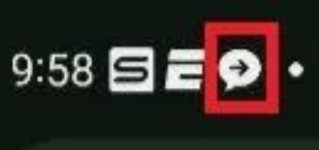
I've been trying to identify what app this chat icon (outlined in red) is from. It's a screenshot from a Samsung phone in the USA. This is from a screenshot I received so I can't go into the phone and see what the notification is from. It's not the native Samsung or Google messages app. It's definitely not WhatsApp, FB Messenger or Signal. It has a right facing arrow inside of a speech bubble. I've tried googling but only come up with stock images for app developers. Can't find anything similar in the Play Store. Anyone ever seen this?

Attachments

  • Screenshot_20231102_170430_Gallery.jpg
    Screenshot_20231102_170430_Gallery.jpg
    51.7 KB · Views: 642

one plus Nord ce 3 hangs up and poor performance

Hi I am Rupesh from India and I have brought oppo Nord ce 3 and it frequently hangs up and performance is very slow.

My phone has 8 gb ram and Qualcomm Snapdragon 788g processor but still the performance is slow. It came with Android 13.

I brought oppo Nord ce 3 10 days back and after that I have installed os update through ota. The update was security update I mean it is not an update to Android 14. At present my phone is running Oxygen os Android 13.

Actually my phone has an 512 gb external memory card Samsung and it is loaded with MP3 and other files. I usually listen to music and copy from internal memory to external memory card and vice versa.

So I have installed es explorer file manager and solid explorer file manager.

Whenever I try to launch es explorer file manager and open the directory containing music files it shows message as loading and even after two minutes it still shows message as loading and finally opens.

When I switch to another app like folder player and play music and come back to es explorer the last opened folder is last and it starts from the beginning and when I try to open the same previous directory it still shows message as loading upto two minutes.

The same thing is happening with solid explorer also.

Along with one plus Nord ce 3 I have brought oppo pad air which has Qualcomm Snapdragon 680 processor and 6 gb ram and it's performance is ten times better than one plus Nord ce 3.

One plus Nord ce 3 has better hardware than oppo pad air but still the performance is ten times lower.

Regarding one plus Nord ce 3 everything is working fine except that file system is slow and I think it has ufs 2.1 and not ufs 3.1.

Suppose I open any text editor and enter some text and keep it away for five minutes and after that try to open the same text editor the previously entered text is lost.

When I open es explorer file manager and keep away for five minutes and after that try to open the same es explorer file manager the previous opened directory is last and it starts from the beginning.

When I am examining files in es explorer file manager the folder player music player stops playing I mean it is hang.

With in 20 minutes the music player stops or hangs upto three times.

I have selected option allow background activity and even selected option don't optimise for the following apps

1) es explorer file manager
2) folder player music player
3) solid explorer

There is no use and finally I have selected option high performance mode under battery section and even no use I mean es explorer starts from the beginning.

Finally what I want to say is it's not keeping background activity.

As my phone has 8 gb ram only 4 gb ram is being used and remaining 4 gb ram is free. I have noticed ram usage under running services of developer options.

Kindly try to suggest what is the reason behind app hangs and how to improve my phone performance.

Regards,
Rupesh.

WhatsApp not inducing messages

Samsung Galaxy S21
Whatsapp is installed and working.
On Whatsapp on other devices when you get an incoming chat .... you get a number of the bottom right hand corner of the icon.
Great if you missed the notification sound, away from your phone etc.

Currently if I get an incoming WhatsApp chat message it does not get a number or increase the number to match messages.

How can I get this back working - tried de-install and reinstall - no change.

Contacted WhatsApp they asked me to check that notifications & badges were enabled - which they were., at that point they said its a phone issue.

Filter

Back
Top Bottom