• After 15+ years, we've made a big change: Android Forums is now Early Bird Club. Learn more here.

Hi new on forum

hi
just joined up thought id be social and say hello. I've just started learning the android system i'am not a professional computer science engineer i am a engineering tradesman looking to build a app to help other people in the same job as i am in so this is a bit of a hobby.

Just on here to read common problems people have so i can the same pitfalls.

happy to be here

a21 not connecting to the nework

i have a galaxy a21 phone. and it is connected to the meto pcs network thru the wifes plan, she got this for life plan added to her phone as an extra number and they connected that number to my a21 phone. i get unlimited calls texts and 2gb data

so today i managed to make it a hot spot phone to see if when we lose power i can use the phone to hook up to the internet just in case i have to check on whatever.

so today at the restaurant i tried to see my cameras and for the life of me i can't connect to them. but the wife can connect to them with her phone. so is this issue due to the for life plan? i kind of figure if i can get online with this phone using the hotspot i should be able to see the cameras. the wife's phone setting ar the same as i have mine set to.

when i turn on the tinycam app i get a no network message. so does anyone happen to know why? i even just turned on the hotspot and the lte is on but i do not see the 4g icon at the top notification bar. the wife's phone shows both the lte and 4g. so maybe this a21 is not an actual 4g phone. any ideas? thanks

Help S9 screen *mostly* black when unlocking

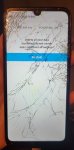
About 30% of the time, when I unlock my S9, the screen briefly comes alive, and then turns black. Often the top ~5% of the screen is still visible, but the colors are wrong and it's distorted. I can still interact with the phone, and that 5% of the screen does change in some way, and haptic/sound queues show the phone is working.

This happens most often when I quickly lock and then unlock the phone. It has happened with increasing frequency over the past ~3 months, and now is quite common.

Usually I can fix it by locking again, waiting 10-15 seconds, and unlocking. If I unlock too soon it happens again. However, today after my phone got hot from being in the sun, it took ~20m before it would unlock properly - gave me a scare. Notably, when the phone was stuck this way, I could restart it, and the boot screen showed the Android logo just fine, but as soon as it booted the screen went black again.


To fix it, I've tried a hard restart, full factory reset, and booting in safe mode - nothing seems to affect it. Phone otherwise works great.

Is there anything I can do to fix this? Or do I just need to resign myself to getting a new phone?

Wifi Calling

Hi all,
I wanted to ask if samsung s7 comes with wifi calling. I went to settings-> connections, and did not see this option. I also searched for 'wifi calling' and got no results. Do you know if this option is even available on my device. Talked with samsung rep on the phone and they told me to call my cell carrier. I am now confused, I thought this would be a hardware feature, not dependant on my carrier.
Any advice is appreciated.
Thanks.

Help [SOLVED] "Safe Notepad" to keep bunch of passwords?

Hello,

I need to keep a list of login+password safe in my phone.

Classic password managers such as KeepassDX and KeePassAndroid won't do because they require typing each and every item manually in Android with two fingers :-/

I thought about converting a text file into a password-protected PDF, but that won't do, as a PDF can easily have its password stripped.

So what about some kind of "Notepad safe" for Android, that prompts for a password to access a list of text items?

Thank you.

Memocool app.

https://play.google.com/store/apps/details?id=notepad.memocool&gl=US


The biggest issue I have with this, is with the free app it always either crashes on me, without any warning, or it keeps on vanshing and closing trying to open it it would not, but with the pay version that is a much smaller version with my Samsung Galaxy Tablet, it runs really quick. I am glad I have notes floating online of screen shooting the images and saved to my Social Media platforms..


Be advised my friends.

Android Studio Example Code

Using MIT App Inventor I modified a Bluetooth example that connects & sends data to a remote device, all pretty straightforward. Grabbed the AIA file from the Internet, loaded it into App Inventor, made changes, built the APK, installed and ran it on my phone – no problems.

Next I downloaded & installed Android Studio, made a basic test program with some buttons & pictures, sent it to my phone over Wifi and everything worked.

Then gave a shot at loading some Bluetooth examples on Android Studio but got lost in the weeds. First tried to directly load a bunch of different APK files but couldn’t get things to work, no Bluetooth connections could be made. Next gave a shot at using GitHub, downloaded a bunch of examples but same thing, couldn’t made a connection to the remote device.

MIT App Inventor makes it easy, only a single AIA files is needed while Android Studio has a bunch of files and directories and I don’t have a clue as to how properly load example code.

How does one know what files go where and into which directories?

Thanks.

Help No status bar

I have a JP5s tablet running Android 4.2.2 Jelly Bean and my status bar isn't showing on any screen. What can I do to get it back? It was there up until week or so ago before I started checking out files and things in the back. All of which I know next to nothing about. I am, however, ready and willing to learn more about how these things operate. Any help would be greatly appreciated. Thank you.

Help Cannot move individual contacts among storage locations

I am on Samsung S10e, Android 12.
In my older phone/OS, I used to be able to move individual contacts among the various storage locations.
E.g., I could move a contact from my phone to my Google account (exception: once a contact was in Google, I couldn't move it elsewhere, but I guess that was normal).
Now I can't see that option anymore. The closest I found is with
Contacts -> Three bars -> Manage contacts -> Move contacts
but that seems to move all contacts in one location to another.
Can I recover the previous behavior?

Help Android 12: swipe up from bottom often doesn't work

My Pixel 4a, ever since some 2022 Android 12 update (currently SP2A.220405.003), often becomes unresponsive to the swipe-up-from-bottom gesture when an app is open (i.e. to bring up the list of opened apps; or from that list, to close an app). The tactic feedback (single brief vibration) occurs, but nothing else happens. It gets stuck like this for at least 10-30 seconds at a time. Tried restarting. Any easy workaround (not a factory reset)?

Wireless charger recommendations

Hi, I currently use a Samsung
ep-pn920
fast charger but the last 2 phones I've had s9 and now the s20fe (the s20fe in particular) it's becoming tedious that I have to get the phone mm perfect on the charger to get it charging without the dreaded flashing blue light and it cutting out /turning off etc.
Yes my phone is in a case but not a big metal 360 type which I used to have and that's what I'd put the issue down to, but a basic shell cover type.
What's a better upgrade for a wireless charger that people are using?
Or is it more a modern phone issue with smaller coils?

Tablet version on phone?

Hey! I had a Note 10 that got smashed to bits, so I have to use my Note 9 until it gets fixed.

I use some apps at work and one of the apps you have to use a tablet version in order to do my job.

My note could do this just fine, but for some reason my Note 9 just won't... I've tried fiddling around with the app settings and also looked through developer options but I can't find a workaround for this. Anyone have any experience with this? Any tips? I'm sick of lugging this tablet with me everywhere I go.

  • Locked
easiest way to monitoring and spy?

i was wondering the best way and easiest way to go about monitoring a Samsung z fold 3? would it be to install a spy app, or can i clone a phone? i have access to Wi-Fi network, Bluetooth if needed, i also have the passcode and could get access for a little bit also if this matters i have the phone info imei everything else and account manager of Verizon. Please help im not tech smart but willing to learn. thanks

Strange screen sizing

Hi all, I am using a Galaxy S6 Lite with Android 12. Seeing in app ads is nothing new, but some ads are changing the display size so that the edges of the ad, including the close button, are off the screen. The only solution is to close the app and restart. Does anyone have experience of this and how to resolve it? Different apps, and many ads behave normally. This is random.

Help Strange occurrence with sounds

I use a calendar app that has 5 different sounds. On my Pixel 6 Pro, I can access any app's sound settings two ways. Either through the app's settings or through the app's information in the phone's settings. (Or just long press the app's icon and choose the "circled I")
When I access the calendar's sounds, each way gives me a different list of sounds. One seems to be my "Notifications" (apps settings) and the other seems to be "Ringtones"(phone's information). I've never seen this before. Usually the sounds are the same, aren't they?
Any explanation or information is welcome. The app's developer had never seen that either. Rebooting the phone doesn't help.
Thanks in advance.

Personal App with Photo/Image database

Hi there,

Brand new to the community here. I was hoping to get some advise here. I am a bird photographer (Cloud Architect by trade). I would like to develop an app for personal use that meets the following requirements:
  • Storage of photos in the cloud (I am familiar with Microsoft Technologies)
  • Database where I can link the photo to a list of species including some metadata (Name, Date first sighted, Location (manual entry))
  • App front end to view species, view photos per specie, view sightings
So in essence a relatively basic requirement, but I have absolutely no idea where to start. For those that are familiar with Microsoft PowerApps, I have built such an app already, but looking to convert the solution to a more native Android solution.

Any tips, pointers, advise will be helpful.

Thanks,

Dirk

Filter

Back
Top Bottom