• After 15+ years, we've made a big change: Android Forums is now Early Bird Club. Learn more here.

Convert solar lamp to electric?

UPDATE: she's indoors now and has no access to sunlight!

I have a beautiful fairy lamp that's been in my yard for years. It lights up, powered by a solar panel. Well, it *did* light up, back before the elements, careless people, and various other things broke it. The lamp itself is fine, but it just doesn't light up any more; right now, the battery box (on the bottom) is hanging open, and I can see some wires but can't really tell if they're still connected to anything at the other end.

What I'm wondering is if there's any chance of converting this to an electric lamp? Before...in another life...I'd buy stuff at Michael's to make all kinds of things myself--fountains, with or without lighting, you name it. So I know from experience that small electrical sets are available for all kinds of projects, I just don't know what I'd need for this. I'd like to simply convert it so the solar panel and battery box are gone, and it uses electricity instead.

Is this doable? I mean in my senile, decrepit, horrible eyesight current condition?! :D

It's funny, but as I've been typing this, it's started to look a lot easier than I thought. I was assuming I'd have to use its existing wiring--now connected to batteries powered by a solar panel. But, really, I could just yank that all out, right? And insert a new bulb set, like using a small candelabra-type bulb inside the globe, and the power cord sticking out underneath?

Here's what she looked like while still in good health, day and night (the colors continuously changed):


fairy_day.jpg

fairy_night.jpg

Help [FINISHED] Unlock bootloader failure.... What should I do now??

I tried to unlock bootloader on my Verizon Samsung Galaxy S5 using this (linked) guide online. However, when I installed a .zip using Safestrap recovery mode, and rebooted my phone, my phone said it could not start because there was a kernel error. I saw that the developers had been talking about something like that in the main article (linked).

I did the instructions twice until I realized it wasn't an error on my side. Now I did the instructions a third time but this time I didn't install the .zip on my phone, so I can still use my phone.

The reason I wanted to unlock bootloader was so I could root my phone. Is there some kind of ROM I can install that has root? I saw someone say something about using towelroot. However, I'm stuck with this custom ROM I installed using Odin 3B for now.

How should I go about this? Should I reinstall the default, factory ROM I had before I did these steps, then try using towelroot? (If so, I need a link to download the factory ROM.) Or is there some way to get root by installing a custom ROM? Or should I just give up and install the factory ROM and not have root? Idk what to do.
(Also I don't know much about messing with phones, so when I say ROM I might not mean ROM)
Thank you!
Before and after info:
Before I tried unlocking bootloader:
Used default ROM running Android 6.0.1
After (Now):
Custom ROM running Android 4.4.2, has root
Links if hyperlinks don't work:
1.https://forum.xda-developers.com/t/...-on-any-version-bootloaders_mm_ll_kk.4009089/
2.https://forum.xda-developers.com/t/...ootloader-using-dev-bootloader-kk-mm.3337909/

Whatsapp recording

Hello,

Can someone please help me with recording a whatsapp video call with audio from both sides. I have an old S7 and tried a few apps but they didn't record the other ends audio.

Anyone know what version of android I need to make it work or an app that would work with my phone.
Or can anyone know a phone that would work, I need a new one anyway.

Thank you

Root [ROM] CyanogenMod/ROOT/firmware for the LG Motion 4G LGMS770 Ultimate Guide 2022

Hello I repost this post whit some updates (LINKS ARE BROKEN IN THE ORIGINAL POST)
the original post and credits for PlayfulGodExtreme Android
Of course I will add some tutorial about firmware too

[GALLERY=media, 1610]2 by kisame010588 posted Apr 9, 2022 at 11:24 PM[/GALLERY]

Original post

https://androidforums.com/threads/rom-cyanogenmod-10-for-the-lg-motion-4g-lgms770-l0.747755/

DISCLAIMER: This is a CUSTOM' ROM! Use at YOUR OWN RISK!!! By using this ROM, you understand that that I am not liable for any or all consequences of using this ROM. If you don't know what you're doing, DON'T TRY IT. Use at your own risk!

Here ya go folks, CyanogenMod 10 for the LG Motion!!! Well, let's be honest, unless you're living under a rock, you probably know what Android 4.1 (Jellybean) is. Furthermore, you should know what the CyanogenMod project is. However, if a rock is really your home and you'd like to learn more, please visit their site: (CyanogenMod | Android Community Rom based on Jelly Bean) Broken links don't work anymore go to down int his post to get new links


Version: 20130829
Developer(s): PlayfulGod
Description: CyanogenMod 10 for the LG Motion 4G
Source: github
Status: Active


CyanogenMod 10

What is this?

This is a build of the popular CyanogenMod 10 for the LG Motion 4G. This is built from source.

People to Thank

  • CyanogenMod - Do I need to state why we owe thanks to this guys?
  • hroark13 - Sharing his working device tree.
  • 985hPaKicK - For making the LTE2 2nd-init recovery APK that works on this phone.
  • djrbliss - for his rooting guru'ness.
  • isaccj87 - for his help and knowledge.
  • BobZhome - for his help and input as well.
  • Sammyz - for his unbricking guide.
  • aboatright3605 - for debugging and testing.
  • Many others now that I will list when time allows. ;)

Whats Working??


    • Almost everything
Whats Not Working??


    • Video Recording at 1080p (its purple) FIXEX IN THE VERSION
      5-21-13
Changelog


    • 05.02.2013
    • Initial Build
    • 05.13.2013
    • Booting w/ almost everything working.
    • 08.04.2013
    • GPS fixes added
    • Low call volume fixes added
    • 08.09.2013
    • More fixes for low volume
    • 08.17.2013
    • More fixes for low volume
    • Fixes for front camera
    • 08.29.2013
    • More fixes
NEW Screenshots provide for my


    • ADFAF.JPEG
    • AFAFD.JEPG.jpeg
    • FAFDA.JPEG

How do I install this?


    • Download the .zip & copy to phone or sdcard (make sure 4g or wifi is enabled if dl'd from phone).
    • Zip can be installed from either internal or external sd in CWM (Which ever you copied it too!)
    • MAKE A BACKUP!!!
    • DO A FACTORY RESET!!! - this will wipe data & cache!
    • Go to install zip from sdcard
    • Choose zip from sdcard
    • Select cm-10-xxxxxxxxxx-UNOFFICIAL-l0.zip
    • Confirm
    • Repeat Steps 5 -8 for gapps
    • Reboot
Downloads NEW LINKS

https://mega.nz/file/XocBmQSA#kWWxHShR_PzMESdlPa7Kn1rnNQYtyyIZQiVPYHQlL_g

The link have all files as you need to root and install you custom rom and also include the stock firmware
otherwise you can download the official firmware here

https://lg-firmwares.com/downloads-file/1079/MS77010g_04.S10g_04.P3039

Root tutorial guide for offline work
https://mega.nz/file/7sMh0ZKR#xtmo5F7F2npHpBng8G-GqeoqOZptWLgENJ60pUR3EGI

Videos

HOW TO INSTALL CUSTOM ROM CYANOGEN MOD 10 CM10 ON LG MOTION 4G IN UNDER 10 MINUTES


HOW TO ROOT LG MOTION 4G METROPCS LG-MS770 EASY STEP BY STEP


LG MetroPCS Motion 4G MS770 install firmware


How To Reset LG Motion 4G MS770 Metro PCS - Hard Reset and Soft Reset


NOTE for the ILLITERATE/LAZY: DO NOT INSTALL the LTE RECOVERY WITH CM10!!! IT HAS BEEN SAID TO BRICK YOUR DEVICE!!!! A 2nd-init recovery is included already (subject to be removed) in CM10.

Special thanks to GameTheory
here original post where he help me

https://androidforums.com/threads/cyanogenmod-custom-rom-request-and-guide.1341137/#post-8066841

Here it is the website where I have the last update the rom whit te camera fixed i uplaod in the mega link already

https://sites.google.com/site/bobzhomeroms/ms770


NOTE all files (Cyanogen Rom, firmware, backup nan, apk , adb files) it is include in the mega link I shared in this post if you can't find or the link it is down let me know to upload again thanks

https://mega.nz/file/XocBmQSA#kWWxHShR_PzMESdlPa7Kn1rnNQYtyyIZQiVPYHQlL_g


Attachments

  • fielsss.png
    fielsss.png
    18.4 KB · Views: 237

Google speech recognizer for Traditional Chinese text

I want to output the speech to traditional chinese but it output to simplify chinese instead. My codes:

Java:
Intent intent = new Intent(RecognizerIntent.ACTION_RECOGNIZE_SPEECH);
intent.putExtra(RecognizerIntent.EXTRA_LANGUAGE_MODEL,
            RecognizerIntent.LANGUAGE_MODEL_FREE_FORM);
intent.putExtra(RecognizerIntent.EXTRA_LANGUAGE, "zh-TW");

I also tried to set EXTRA_LANGUAGE to "zh_TW", "TW" and Locale.TAIWAN but it doesn't work too.
In my Android 7.0 settings "Traditional Chinese"(繁體中文) is added in Language preferences. I able to select it in keyboard & type it.

Is this a bug of google speech recognizer?

MIDI Help?

Hello

I need to find some free software or apps that I can use to test a Midi Controller Keyboard - a Novation Launchkey 61 MK3.

I want to buy it second hand but the seller only has a a smartphone to test it on and I only have a Chromebook (Asus C523) (desktop and laptops are not an option).

All I need to be able to do is test All/Most the different TYPES of buttons.... to make sure it works ok
eg. The Keyboard keys themselves, Faders, Q-Link Knobs, Drum Pads, Transport Buttons, 2x Mod Wheels, etc etc

I don't need to record a song or anything - just be able to hear/see all these different kind of buttons working on screen and hear them too.

I have a Novation Launchkey 61 MK2 here with me - I've only just bought it but never used it, or midi on a daw etc so I have no experience with it all.
I've seen it on videos etc but they were all setup etc.

I want to buy the newer version MK3, but since I have the older MK2 here - I can use that at home to test and get this working on the chromebook before I go meet this guy and test the mk3 he is selling.


I've tried a bunch of free apps on Chromebook via Play Store - but I can't get Faders, Q-Link knobs working, I think I got pads working on one?

But there are other buttons too I haven't mentioned but the above are the big ones.

Could someone please record a super quick video showing me how to test these things on a Chromebook ideally as that's the only one that I have that will work?
Or failing that - give good instructions?

It could be a Synth app only or a DAW or something else?

Even if I can only test half the buttons on one and the rest on the other that would be fine?

I really hope someone can perform a miracle and help me out.


Thank you for your help

[RESOLVED] S22 Ultra Bluetooth Connection Issues

Anyone else having Bluetooth connection issues with your S22 Ultra? For example: Phone shows connected.to devices such as car or earbuds, but sound continues coming from phone speakers and not said devices. Seen this happen also with my son's new Pixel phone.

Thanks for your help. What am I missing?????

EDIT -

I found the answer. Had to reset the network. Now all is fine.

No "Magic Eraser"

Followed a few tutorials for side loading magic eraser on a pixel 5.
DOESN'T WORK!
Tried this more than s few times over the past months.
Dunno if Google put the kibosh on it, and made it so its "exclusive" to the pixel 6 or what?
Somebody got REAL TIME info on this? Cuz all the videos & tutorials are 5 months or more old. I must've had more than a few updates to my phone since, including latest one (april 2022).
Says newer version installed.
Dont fully understand the SAI installer either.
Please lemme know the deal so I don't try to get this stupid thing anymore. I even tried renaming the apk file by removing the "m" in "apkm" at the end. NOTHING.
DONT WORK!
HELP!
Thanks!

Help Unknown download

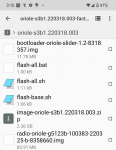
I was checking my notifications and found that this was downloaded:
oriole-s3b1.220318.003-factory-f7db2286.zip
I didn't specifically download it myself and I don't know what it is. When I view the zip file, this is the contents.
Screenshot_20220408-151531.png
Anyone know what this is? I'm planning on deleting it unless someone knows what it is. Thanks

Can't send text to one contact

I have a new to me Samsung A10e and signed up on Mint Mobile. My last phone was a Samsung J3 on Tracfone. There is one contact that I can't send texts to but can receive texts from her and I can call her. The icon by her name has a blue dot on the lower right, and when I switched to this phone and carrier, her icon by my name also developed the blue dot. How can I fix the problem of my not being able to text her? I transferred my phone number from my old J3.
So far I've restarted my phone, deleted and re-input her contact, and cleared the text message cache. I really need to be able to text this person. Thanks for any suggestions. Brigit-Carol

Help Dual Sim & Dual profiles

Dual Sim & Dual profiles,

I currently own a P30 pro (best phone I've had) & a work phone Iphone xr.

I am upgrading now and looking for a phone where i can have different profiles, So a sim 1 profile which would have all my personal stuff apps/etc and Sim2 profile which would have all my work apps etc.

I don't mind getting a top end phone if it does the job for me.

Problems with "Adopt good coding practices" step

I'm just starting to learn Android app development and kotlin and I'm working with the resources on developer.android.com. Currently I'm working on Build a basic layout > 3. Add images to your android app > 4. Adopt good coding practices.
In the instructions it talks about a warning next to the textView that I made in an earlier step and goes on to tell you how to extract the resources to your XML file so that the text is no longer hardcoded into your app and can be changed. The problem that I am having is that in my android studio there is no warning next to my textViews. I still want to make sure that the text is extracted to the XML file so I've been searching through help for that dialogue box but nothing has been coming up.

Here is the image from the tutorial that shows what I should be seeing:
d871085dc82340a0.png

here is what I am actually seeing:
upload_2022-4-8_13-41-55.png

Please help me figure out #1, why are there no warnings on my textviews, #2, how to extract the resources to the XML file.

Attachments

  • Screen Shot 2022-04-08 at 1.37.55 PM.png
    Screen Shot 2022-04-08 at 1.37.55 PM.png
    142.3 KB · Views: 138

Help Cyanogenmod Custom rom request and guide

I have this phone

[GALLERY=media, 1609]LG motion by kisame010588 posted Apr 8, 2022 at 11:18 AM[/GALLERY]

LG Motion 4G MS770

I looking for Custom rom for this phone in this forum

https://androidforums.com/devices/lg-motion-4g.2147/

but all link about roms it is down so i decide to make my own custom rom based in cyanogenmod

anyone know where start and can bring me a good guide to make

of course I accept any tutorial can work in this phone remember this phone came whit android 4.0.4 my target it is make a Custom rom whit android 5.00 I try whit GAPS and download some images but don't work

Here the current state of my phone
Rooted = yes
SUPER SU = Yes
Recovery installed = YES (but don't use twrp recovery used lite2recovery2 based in ClockworkMod recovery v5.5.0.4 FOR optimus lte2 by 985hpakick)

I have experience in root devices = yes

Why i want this, found this phone in the street soo i want to revive for make a good project whit arcade tools

Sync iTunes Library from PC to Android

Hi All,

I have newly transitioned to Android after much much debate, I feel free breaking away from Apple haha, but my main concern now is my music library. I know this question sort of comes up a lot, but I can't seem to find one specifically about continuing to use iTunes when moving to android.

I have a local iTunes library on my computer, not songs I downloaded from apple music, songs I've ripped from CDs to iTunes. I know there is Samsung Smart switch (which has been hit or miss for me, sometimes transferring things on the first attempt and sometimes not until the 3rd or 4th). However, is there a way to keep adding tracks to iTunes on my computer and then sync it to my android (Samsun S22 Ultra)? I know I can copy the songs from the folder to my Samsung, but I'm wondering if there is a way to continue using iTunes on my computer to keep all the music organized and then transfer to Samsung if I add new tracks.

If not what is the most seamless way you folks transfer music from your computer to your android devices? (I know I still buy and rip CDs, I won't stop until they stop making CDs!).

I had downloaded and subscribed to Apple music when I got this phone as I mistakenly thought that if I subscribed I could transfer my local iTunes library to that app but it only works for songs you have downloaded through apple music, not songs stored on a computer in iTunes as far as I can tell.

Any advice is appreciated on the best way to manage music/add new music via PC is great. I'm a physical media guy so suggestions to only using a streaming service don't really work for me.

Filter

Back
Top Bottom