• After 15+ years, we've made a big change: Android Forums is now Early Bird Club. Learn more here.

phones for hearing impaired

I am 95 years old hearing impaird from India. hearing aids were not successful. I use phone only for talking or texting with people in whatsapp or mobile and for no other purpose. Is there app or headphone or headset (obviously with mic) or speakers or any other attachment which will help me to talk to people talk clearly and in sufficient volume. I tried some bluetooth headphone and the sound in these are miserable. Only wired headphones to some extent help but not on whatsap. how are the phones with LIVE CAPTION? will they be of help to me?

[Free] [New Game] Space Mission

Hello and welcome to the space mission! Fly with your galactic spaceship, avoid asteroids, UFO's, planets, lasers, aliens and try to rescue astronauts in space!


YOUR MISSION

You are an astronaut exploring the universe in your new spaceship in this fun 2D survival game. Fly to the space, different planets and Navigate your spacecraft. Your main goal is to guide your spaceship through challenging obstacles and survive in Space! As an astronaut you can choose one of 11 different spaceships to rescue your astronaut friends.

Space mission is one of the best small MB games to download from the play store. Have fun!

Youtube:

Download: https://play.google.com/store/apps/details?id=com.kare.spacemission

  • Locked
Problems with Alexa App

Why does Amazon Alexa app for Android not show up in my installed apps folder? When I go to the app store it says enable instead of download or open. It shows in my app list (usually) and I can run it fine. But it keeps disappearing. I guess because it's not actually "installed" just "enabled". Android version is 10.

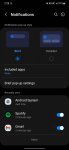
How to stop notifications from popping up from the top of the screen

Hey all. I used to have it where when is receive notifications, the app icon would display at the very top by the clock. Since getting my new phone, a mini pop up drops down showing the message before disappearing and going back to just showing the app icon up top.

I have my notification pop up style set to brief instead of detailed but this still occurs. Any ideas?

Attachments

  • Screenshot_20220407-142826_Settings.jpg
    Screenshot_20220407-142826_Settings.jpg
    97.2 KB · Views: 522

Which parental control should I go for?

I'm trying to find a suitable parental control for my child's phone (Samsung Galaxy A41/Android 11) which I've reset to factory defaults and am busy trying to configure.

After a lot of frustrations I believe I've managed to install Google Family Link, but I'm not sure if it does what I want, if it's overkill and if there are privacy issues I should be concerned about.
I'm not entirely sure how it works either, but as I understand it a child basically gets his/her own user-profile on the phone where any and all phone use goes through an approve/do not approve procedure at Google according to what the parents allow or not. Is this how it works in a nutshell?
I know I can configure how "intrusively involved" myself as a parent can be, but I'm more concerned about Google's intrusiveness -being the middle man so to speak. And do I really need to have all that control?

Basically I want to limit my child's phone use down to being able to make phone calls, send/receive SMS messages and possibly one or two additional apps. I don't want to make the phone too interesting, and the main problem in the past was that it was possible to install any free app from the Google Play store. If I could block the Google Play store with a password, even for free apps I think it would solve most of the problems. So far I haven't found an option for that, or other ways to do it. Suggestions on how to block the Google Play store for my child?

It would also be nice if I could disable, remove or block some apps that the phone (or Android) came with by default. Like I said, I don't want to make the phone too interesting. This probably means restricting the ability to reconfigure the phone as well.
I have heard that it's possible to create a new profile on the phone, and this sounds like a solution, but I'm not sure if it does the above or if it's just for something like a "work" and "home" type of setup, with different types of contacts or whatever, but no restrictions...
I'm confused! o_O

Battery issue after replacement

Hi!

I have a 3 years old Xiaomi Pocophone F1 it is a great phone however the battery was started to have less and less SOT until I reached around 3-3.5hours.

I replaced the battery but I still had the same SOT like nothing happened,so I factory reset the phone. After the reset it defaulted back to MIUI 11 and when I checked the battery usage it look good. I calculated the battery capacity based on the info in the battery menu (app usage % and mAh) and I got a little less then 4000mAh so I thought everything is OK.

Then I updated it back to MIUI 12.0.3 and the phone went back as it were. If I calculated the capacity from the battery menu I got 1600-2000mAh depending on the charge. I downloaded AccuBattery and saw at the battery stage menu that my calculated battery capacity is ~2000mAh which is half of the official 4000mAh battery. I tried calibrating the battery by draining it to 0% then charging it 100% deleting the batterystats.bin file via "NoAd Battery Calibrator" app then draining it to 0% and charging it back up to 100% again. But it doesn't seems to work. Can I fix this issue without having to revert back to MIUI 11 or is it inevitable?

Help with passing variables etc.

Hi there, I'm trying to pass a variable to a function from the OnCreate function and I get no errors, but it crashes no matter what I try passing. Here's where I'm using it:
upload_2022-4-7_12-43-30.png


and here's where I'm trying to pass it to:
upload_2022-4-7_12-45-21.png


I've tried setting a boolean flag and passing it and that doesn't work either. I've also tried declaring the flag as public static Boolean flag; in MainActivity and passing it as MainActivity.flag and it throws no errors, but it crashes everytime.

Any help would be great, thanks in advance!

Do launchers have WiFi, Hotspot and Flight Mode widgets?

I need to have these 4 widgets:

WiFi, Hotspot, Flight Mode and 'screen stay alive'

I want to be able to tap these to turn on and off.

These are missing in the standard Google Pixel for example (latest OS).
They are there in other phones I have like Xiaomi.

You can't get them from Playstore. I think they stopped working as far back as Android 7. Guessing it's a security thing. Not sure.

Just wondering if it would be part of any launchers? (Though, that wouldn't make logical sense if not allowed in a widget!)

Having or not having these widgets is a deal breaker for me and determines if the phone is good for me or not. I must have them!

My Samsung Galaxy doesn't have. But I can make Bixby Routine widgets that give me the functionality. (They're not as good as the proper widgets, but they get the job done.)

I'm guessing there are tons of launchers... So I thought I'd try asking first before trying some.

Thanks.

Escape Room - Mystery Fiesta

It is a classic escape room game.If you like the challenge, you must not miss it! New escape game free to play type of great mystery games!

Escape Room Games are suitable for all generations of new escape games fans! your friends, family and start an escape room challenge? You are in the spotlight - Here the horror adventure and mystery thriller begins!

A point and click, adventure escape game! You need to escape the room and find hidden objects and win this mystery search and find object games full of brain teasers, numerical riddles and puzzles!

56XY5N4h2Mff18ydGVBYjlKYMjbQhoWNPDJH3NL6ghF4naIswTMoz_CgbsLXy0RDI5U=s180-rw


https://play.google.com/store/apps/...s.escape.room.mystery.fiesta.puzzle.adventure

Will you open the doors? Can you escape the room?

xM8-f5z0igTFmDmQqsvFkH5Gu3a5VBqZ6OiAs-JJnIXobvFpZ-Vp4kCnX-o911vI2BA=w720-h310-rw

Boost logical skills by solving mysterious puzzles to escape. High quality graphics, exciting plot and a lot of interesting mystery places made this game special among other horror escape games and thriller games. You won’t forget this scary adventure!

3QzQdgKaGJJ7K1Yj65qkdS2dvtyamruQ4qZMaectJ1m1x11oakx8GT63YxAL6k7NkUA=w720-h310-rw


Download this amazing horror game to live this ultimate adventure.one of the best escape games! Play the game for absolutely free, but if you feel stuck solving a magical puzzle to unlock doors, you may escape from the horror mansion!

FEATURES:

- Explore over 50 stunning locations
- 100 Levels with different rooms
- Game Localized
- More than 100+ riddling puzzles.
- Tricky brain teaser.
- Thrilling scenes and hidden clues
- Amazing graphics and gameplay
- Challenge yourself with interactive hidden object scenes

Be the first to win the great escape game, and enjoy the mystery journey for free.


COLLAPSE

Wear OS and mobile native app debugger issues

Hey guys

I've created an android application with a wearos module contained within it. This might be a rookie issue given that I'm new to android development (I'm from a web dev background) but I'm struggling to get my wear and mobile apps to communicate, when they are in debug mode.

Basically, I have written some code in the mobile application to detect if the wearOS app exists on a connected watch, and if it does, allow the user to monitor the sensor activity on the watch.

When I run the mobile application debugger on a physical device through USB, I see it doesn't package the wear application with it and so I cannot install the linked watch application on my watch (which is linked to android studio through ADB over wi-fi). While the mobile device debugger is running, I run the debugger for the watch app too and the app then runs on the watch, but it doesn't look like the code in the app is actually detecting the watch. This functionality does work though when downloading the published app through the play store, and then installing it on the watch through the play store too using the 'apps on your phone' menu on my watch.

How can I achieve the connectivity between the watch and phone apps through the debugger? This is a massive pain point for me and I can't seem to find anything online that addresses this and that describes how best to set up debug environments so that these apps are linked on the 2 devices and can communicate in debug mode. My mobile device app is heavily dependent on detecting watch sensors and interacting with them and so I need an efficient way to test this.

Thanks!

Samsung S21 Cannot add contacts to Group

I created a group on my Samsung S21; going to contacts --> Menu --> Create Groups and gave it a name, but when I select Add Member no contacts are shown. It says no contacts.

I thought maybe my contacts are not stored right, so I checked one of the ones I wanted to add and it says Phone Storage.

I cannot figure out why it will not show my contacts so I can add them to the group.

Some had say you can select contacts and hold for 3 seconds and then add to group, but that did not work either.

Xiaomi Mi Note 10 Lite

I purchased this phone September 2020 and I wondered if there are other owners out there?
During the time I've had this phone, it has had 2 MIUI Global version updates and is currently running 13.0.1.0
This is Android 12 (originally Android 10) and with 2.2GHz CPU (Snapdragon 730G) and 8GB of RAM is very fast and stable. Battery is 5250mAh capacity and AI Quad rear camera 64MP and 16MP front camera. It has 128GB internal storage and Dual SIM.
The screen is the Gorilla glass and is not showing any scratches or marks during this time.
So far I've had a completely trouble free time with this phone.

nothing working on s20fe

Hello. New to this site and new to forums really but have been really disappointed with my phone since I bought it over a year ago.

Nothing works on it, I've rooted it with magisk but nothing loads/installs. Can't get luckypatcher to work, patch to android etc. No xposed or lsposed, just says not installed.
Is this phone compatible with root things as lucky patcher etc or do I need to get rid and buy another phone or can I download a custom rom to make it work. Many thanks for any replies

[Free] [App] Custom Aim - Crosshair Generator Pro

Custom Aim - Crosshair Generator Pro helps you to change crosshair in all shooting FPS games. Create a custom crosshair overlay in any shooting game to accurately aim & shoot your targets or enemies. Change crosshair and become a professional sniper shooter with the best free Crosshair Aim Helper

Custom Aim - Crosshair Helper & Aim Controller adds a customizable virtual overlay pointer on your weapon controls to seamlessly aim and shoot in top FPS shooting games with accuracy. With over 24 available crosshair style, change crosshair on your favorite shooting games to boost your aiming skills! Use this simple lightweight crosshair tool while playing your favorite FPS games to improve your sight in any FPS game and shoot with custom aim.

Features of Custom Aim - Crosshair for FPS Games

Unlimited Crosshair Designs
Choose from a wide collection of crosshair designs to add as an overlay to your shooting FPS games, that make your shooting aim much more precise & accurate.

Customize Crosshair for your FPS Games
Customize crosshair designs according to the games you play. Track the games you played and customize your crosshair designs. Bored with the default crosshairs? Use Custom Aim - Crosshair generator app to change the crosshair of any shooting game. Adjust crosshair size and choose any color that you want and customize the crosshair designs the way you want! Adjust the crosshair position to fit on your weapon controls & improve shooting skills. Custom aim is the best tool to change Crosshair for games and it helps you to focus on your target.

Generate Crosshair on Unsupported Weapons or Guns
Custom Aim - Crosshair generator app, makes custom crosshair for your guns & weapons that help you to shoot and aim accurately to target and kill your enemies. Custom Aim generates free Crosshair designs for all shooting games, even if your weapons do not support crosshairs.

All Games Supported
Custom Aim - Crosshair Generator supports almost all popular shooting FPS games to change the default crosshair designs of your game. Crosshair Changer supports all major shooting games, Action games & FPS games. Use the Free crosshair changer app to enhance your shooting &
aiming skills and let the Free Fire

Improve your shooting skills and test your reflexes & tactical skills with the best crosshair app to make shooting easy & fun. Create a custom crosshair style and adjust its appearance. This is the best crosshair aim app for shooting FPS games that makes it the best aim helper app. It also helps people with weak eye sight to play FPS games by adjusting crosshair size options. Make yourself the best player with this crosshair practice in all first person shooter games!

Download Custom Aim - Crosshair Generator & take headshots like aimbot PRO! but in an ethical way!

Download The App on Google Play: https://play.google.com/store/apps/details?id=com.itdeveapps.customaim

Filter

Back
Top Bottom