• After 15+ years, we've made a big change: Android Forums is now Early Bird Club. Learn more here.

Reviews Screen Protectors

Google has put out a list of certified protectors that work with their fingerprint sensor. I didn't try any of them. A few weren't available and I don't like the soft protectors. So I tried one from Amazon that had a special circle over the fingerprint sensor. It was by Feitenn and it didn't fit. It was curved to cover the screen but it's design was faulty. It has a thin black band of adhesive around the edge. It lifts the protector away from the screen so you have to press hard to get anything to register and forget about tapping anything around the edges. The adhesive band keeps them from registering.
Then I tried a protector from Whitestone. I've used them for other phones. They are completely different but are great. And they work with the fingerprint sensor. This protector gets bonded to your phone's screen. The kit comes with everything you need including the bonding light and two complete setups.. I strongly suggest you watching the video and reading the instructions. They have thought of everything so you don't have to worry about the bonding resin going where it shouldn't. The most important instruction is the surface HAS TO BE completely level. (use a level tool or a level app before starting) If the surface tilts, even a little, it won't work. After I was done, I reset my fingerprints and they work perfectly. Also, since there have been reports of the screen spontaneously cracking, this should help prevent that. Honestly, I have no interest in the company and the protector lasted over 2 years on my last phone. I started to see slight craze lines so I removed it and put on the second one. I highly recommend it.
One last tip; I read an article a while ago that said how to improve your fingerprint sensor. Scan the fingers you will use two times for each finger. It helps a little.

Android phone cutting out during automated messages

Hello everyone, I have an LG smartphone model LG LML212VL, that is running Android 8.1.0, and is using Tracfone Wireless Pay as you go plan for service, and it has a strange issue that I cannot find any cause for....
Whenever I make a call, and get a robot (automated answering system) providing options, or menus, it cuts in and out, making it so that I cannot hear the instructions, and it cannot recognize my responses. :(
Basically, what I hear is bits and pieces of instructions, and 'I'm sorry, I didn't get that, lets try again' over and over until it either hangs up on me, or connects me to a live agent. o_O
If I am connected to someone, it is a good thing truthfully, as I would always rather speak with a human being than with a recording, but oftentimes, this is not the case, and I am missing out on accomplishing goals because of it. It is a real problem, mainly because SO MANY companies nowadays have robots answering their phones, long before you are allowed to reach an agent, forcing you to jump through a labyrinth of confusing hoops in order to get anything done. :mad:
It does not seem to be happening when I am talking to live people though, and only automated answering robots, so I am thoroughly confused by this behavior. Can someone give me a possible cause for this, and if available, a fix?? :cool:
Thanks in advance!!

Help finding the right faucet

Since this has nothing to do with toilets, I decided not to add it to my toilet thread!

I'm having an awful time searching for the kind of faucet I want for my bathtub. This is the Kohler Artifacts faucet I bought for the sink:

Kohler_Artifacts_sink_faucet.png


But they apparently don't have a matching bathtub faucet.

This random, other brand looks very much like what I want in terms of style:

bathtub_faucet_with_shower.png


But, I do NOT want the attached hand-shower.

I need to have a diverter lever, and hot and cold levers. I have a separately installed detachable showerhead up above. It MUST be wall-mounted.

My current configuration includes three [apparently] separate knobs in a straight line across: hot, diverter, cold, and a spout about a foot beneath them. I'd prefer the look of the configuration pictured (sans hand shower), but can accept a separate spout, if I have to.

My problem is that I can't figure out HOW to search and only end up with relevant results! I'll find page after page of faucets that include a hand-shower (as pictured), but absolutely *no* filter choice to get rid of that as an option. Trying to search using "without hand shower" (or similar) just yields even MORE results *with* showers!

Can someone please clue me in? I was hoping to stick with Kohler, but will accept any other high-quality brand that fits my needs. I'm specifically looking for brushed nickel, solid brass, but will accept satin nickel if necessary.

Thanks!

Hacker in my phone?

Hey guys.
I hope you can understand me, I don't speak English and I'm using a translator.
My phone has been weird for a while, as if there was some kind of monitoring, I've formatted it several times, so if it was malicious apps, I believe it would have come out.
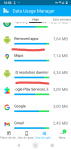
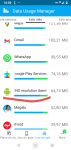
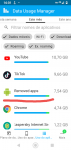
I went to check my mobile internet consumption and I noticed that there are two unknown applications on my cell phone. I would like your help so that I can solve my problem.
My cell phone is Motorola Moto G7 Power.
I thank you all.
app names are in portuguese, i'm brazilian.

Attachments

  • Screenshot_20220127-163310.png
    Screenshot_20220127-163310.png
    181.8 KB · Views: 193
  • Screenshot_20220127-163223.png
    Screenshot_20220127-163223.png
    202.8 KB · Views: 169
  • Screenshot_20220127-163202.png
    Screenshot_20220127-163202.png
    206.6 KB · Views: 166

Help Suspicious wifi activity

I'm on a Samsung Galaxy Tab S6


So yesterday I found a saved network in my wifi settings that I have never seen before so I reset it.


I then grabbed geeky tools to check the wifi signals and I can see 3 signals labeled Wifi disable 1 in the 2.4 band they sit directly over my Xfinity network, a neighbors ATT network and a random one off by itself.

Screenshot_20220127-093049_Geeky Tools.jpg


Then in the 5Ghz band I can only see myself and a Wifi Disable laying on top of it.

Screenshot_20220127-093100_Geeky Tools.jpg


Is any of this normal?

Chrome Opening Link in Email rather than App option

Hi,

I have done something, but have been unable to return it back to having an option of choosing app

Basically I receive an email to do with geocaching and there is a link to a particular cache. If I click this it use to give me thr option of opening the link either in Chrome or on of the two Geocaching apps I have on my phone. For some reason it now only opens in Chrome. I have gone into the app permissions and I can get it so that one of the apps opens it but I can not get the box that pops up with all my options when the link is clicked.

Sorry I know I have done something stupid, just can't figure what

Mods Share or make public an implemented library in Jar

Hi, I need to do an api implementation in the Android Studio module, then create an aar or jar file to create an VS Android Binding project, I am following all the steps to do it here https://developer.android.com/studio/projects/android-library, but when I build the aar/jar file and copy the file into my Android Binding project, I can't access to those libraries, I only have access to
com.packagename.defaultConfig class.

I can send you my project files if you need it, just let me know.

Thanks

Allow access to tablet data security dialog

I have been given the task to get some android tablets (SM-T500) working in kiosk mode (soti mobicontrol). The issue is when they are in kiosk mode it blocks the USB switcher menu and the allow access to tablet data dialog box

I have managed to get the USB switcher menu working by allowing Launch://com.android.settings/.Settings$UsbDetailsActivity to launch but for the life of me I cannot workout what apk strand (not sure if thats the correct terminology) that controls the "Allow access to tablet data" security dialog box

I am new to android and usually only work with ios.... would anybody be able to point me in the right direction??

Null Pointer Exception Help in Code

Hey
The is the code for my android app it is a app that demonstrates how to communicate with multiple fragments in one activity. But the textview in the text fragment is not being updated after an item of the listview is selected because of a nullpointer exception from the listener I think. The textview should update when an item in the listview is selected but it is not updating, it is not crashing though. Can someone help? Thanks.

fragment_text.xml
Code:
<?xml version="1.0" encoding="utf-8"?>
<FrameLayout xmlns:android="http://schemas.android.com/apk/res/android"
    xmlns:tools="http://schemas.android.com/tools"
    android:id="@+id/TextFragment_layout1"
    android:layout_width="match_parent"
    android:layout_height="match_parent"
    tools:context=".TextFragment">


    <TextView
        android:id="@+id/textView1"
        android:layout_width="wrap_content"
        android:layout_height="wrap_content"
        android:padding="16dp"
        android:text="[USER=696546]@String[/USER]/welcome" />

</FrameLayout>
Java:
package com.example.tourguide;

import android.content.res.Resources;
import android.net.Uri;
import android.os.Bundle;

import androidx.fragment.app.Fragment;

import android.view.LayoutInflater;
import android.view.View;
import android.view.ViewGroup;
import android.widget.ArrayAdapter;
import android.widget.ListView;
import android.widget.TextView;

/**
* A simple {@link Fragment} subclass.
* Use the {@link TextFragment#newInstance} factory method to
* create an instance of this fragment.
*/
public class TextFragment extends Fragment
{
    TextView textView;


    // TODO: Rename parameter arguments, choose names that match
    // the fragment initialization parameters, e.g. ARG_ITEM_NUMBER
    private static final String ARG_PARAM1 = "param1";
    private static final String ARG_PARAM2 = "param2";

    // TODO: Rename and change types of parameters
    private String mParam1;
    private String mParam2;

    public TextFragment() {
        // Required empty public constructor
    }

    /**
     * Use this factory method to create a new instance of
     * this fragment using the provided parameters.
     *
     * [USER=315340]@param[/USER] param1 Parameter 1.
     * [USER=315340]@param[/USER] param2 Parameter 2.
     * @return A new instance of fragment TextFragment.
     */
    // TODO: Rename and change types and number of parameters
    public static TextFragment newInstance(String param1, String param2) {
        TextFragment fragment = new TextFragment();
        Bundle args = new Bundle();
        args.putString(ARG_PARAM1, param1);
        args.putString(ARG_PARAM2, param2);
        fragment.setArguments(args);
        return fragment;
    }

    [USER=1021285]@override[/USER]
    public void onCreate(Bundle savedInstanceState)
    {
        super.onCreate(savedInstanceState);
        if (getArguments() != null)
        {
            mParam1 = getArguments().getString(ARG_PARAM1);
            mParam2 = getArguments().getString(ARG_PARAM2);
        }

    }

    [USER=1021285]@override[/USER]
    public View onCreateView(LayoutInflater inflater, ViewGroup container,
                             Bundle savedInstanceState)
    {
        View view = inflater.inflate(R.layout.fragment_text, container, false);
        textView = (TextView)getActivity().findViewById(R.id.textView1);
        return view;
    }

    public void updateTextView(int index)
    {
        if(index==0)
        {
            textView.setText(getResources().getString(R.string.set_Richmond));
        }
        else if(index==1)
        {
            textView.setText(getResources().getString(R.string.set_Vancouver));
        }
        else if(index==2)
        {
            textView.setText(getResources().getString(R.string.set_Toronto));
        }
        else if(index==3)
        {
            textView.setText(getResources().getString(R.string.set_New_West));
        }
        else if(index==4)
        {
            textView.setText(getResources().getString(R.string.set_Montreal));
        }
        else if(index==5)
        {
            textView.setText(getResources().getString(R.string.set_Aldergrove));
        }
    }

        public interface OnFragmentInteractionListener
    {
        public void onFragmentInteraction(int index);
    }
}


Code:
fragment_list.xml
<?xml version="1.0" encoding="utf-8"?>
<FrameLayout xmlns:android="http://schemas.android.com/apk/res/android"
    xmlns:tools="http://schemas.android.com/tools"
    android:id="@+id/ListFragment_layout1"
    android:layout_width="match_parent"
    android:layout_height="match_parent"
    tools:context=".ListFragment">

    <ListView
        android:id="@+id/listView1"
        android:layout_width="match_parent"
        android:layout_height="match_parent"
        android:dividerHeight="32dp" />

</FrameLayout>


Java:
package com.example.tourguide;

import android.content.res.Resources;
import android.net.Uri;
import android.os.Bundle;

import androidx.fragment.app.Fragment;

import android.view.LayoutInflater;
import android.view.View;
import android.view.ViewGroup;
import android.widget.ArrayAdapter;
import android.widget.AdapterView;

import android.widget.ListView;

/**
* A simple {@link Fragment} subclass.
* Use the {@link ListFragment#newInstance} factory method to
* create an instance of this fragment.
*/
public class ListFragment extends Fragment implements AdapterView.OnItemClickListener
{
    ListView listView;
    String[] array;
    String listStr;
    OnFragmentInteractionListener listener;


    // TODO: Rename parameter arguments, choose names that match
    // the fragment initialization parameters, e.g. ARG_ITEM_NUMBER
    private static final String ARG_PARAM1 = "param1";
    private static final String ARG_PARAM2 = "param2";

    // TODO: Rename and change types of parameters
    private String mParam1;
    private String mParam2;

    public ListFragment() {
        // Required empty public constructor
    }

    /**
     * Use this factory method to create a new instance of
     * this fragment using the provided parameters.
     *
     * [USER=315340]@param[/USER] param1 Parameter 1.
     * [USER=315340]@param[/USER] param2 Parameter 2.
     * @return A new instance of fragment ListFragment.
     */
    // TODO: Rename and change types and number of parameters
    public static ListFragment newInstance(String param1, String param2) {
        ListFragment fragment = new ListFragment();
        Bundle args = new Bundle();
        args.putString(ARG_PARAM1, param1);
        args.putString(ARG_PARAM2, param2);
        fragment.setArguments(args);
        return fragment;
    }

    [USER=1021285]@override[/USER]
    public void onCreate(Bundle savedInstanceState) {
        super.onCreate(savedInstanceState);
        if (getArguments() != null)
        {
            mParam1 = getArguments().getString(ARG_PARAM1);
            mParam2 = getArguments().getString(ARG_PARAM2);
        }
    }

    [USER=1021285]@override[/USER]
    public View onCreateView(LayoutInflater inflater, ViewGroup container, Bundle savedInstanceState)
    {
        View view = inflater.inflate(R.layout.fragment_list, container, false);
        listView = view.findViewById(R.id.listView1);
        array = getResources().getStringArray(R.array.string_array_cities);
        ArrayAdapter<String> adapter = new ArrayAdapter<String>(getActivity(), android.R.layout.simple_list_item_1, array);
        listView.setAdapter(adapter);
        listView.setOnItemClickListener(this::eek:nItemClick);
        return view;
    }

    [USER=1021285]@override[/USER]
    public void onItemClick(AdapterView<?> adapterView, View view, int index, long id)
    {
        //if(listener != null)
        //{
            listener.onFragmentInteraction(index); //pass index of array
        //}
    }

    public interface OnFragmentInteractionListener
    {
        public void onFragmentInteraction(int index);
    }
}


activity_main.xml
Code:
<?xml version="1.0" encoding="utf-8"?>
<LinearLayout xmlns:android="http://schemas.android.com/apk/res/android"
    xmlns:app="http://schemas.android.com/apk/res-auto"
    xmlns:tools="http://schemas.android.com/tools"
    android:id="@+id/LinearLayout_1"
    android:eek:rientation="vertical"
    android:layout_width="match_parent"
    android:layout_height="match_parent"
    tools:context=".MainActivity">

    <androidx.fragment.app.FragmentContainerView
        android:id="@+id/fragmentContainerView1_list"
        android:name="com.example.tourguide.ListFragment"
        android:layout_width="wrap_content"
        android:layout_height="0dp"
        android:layout_weight="1"
        tools:layout="@layout/fragment_list" />

    <androidx.fragment.app.FragmentContainerView
        android:id="@+id/fragmentContainerView2_text"
        android:name="com.example.tourguide.TextFragment"
        android:layout_width="wrap_content"
        android:layout_height="0dp"
        android:layout_weight="1"
        tools:layout="@layout/fragment_text" />
</LinearLayout>


Java:
package com.example.tourguide;

import androidx.appcompat.app.AppCompatActivity;
import androidx.fragment.app.FragmentManager;

import android.app.Fragment;
import android.net.Uri;
import android.os.Bundle;

public class MainActivity extends AppCompatActivity implements TextFragment.OnFragmentInteractionListener, ListFragment.OnFragmentInteractionListener
{

    [USER=1021285]@override[/USER]
    protected void onCreate(Bundle savedInstanceState)
    {
        super.onCreate(savedInstanceState);
        setContentView(R.layout.activity_main);
    }


    [USER=1021285]@override[/USER]
    public void onFragmentInteraction(int index)
    {
        FragmentManager manager = getSupportFragmentManager();
        TextFragment textFragment = (TextFragment)manager.findFragmentById(R.id.fragmentContainerView2_text);
        textFragment.updateTextView(index);
    }

}

-----
strings.xml
Code:
<resources>
    <string name="app_name">Tour Guide</string>
    <string name="hello_blank_fragment">Hello blank fragment</string>
    <string name="text_box">default</string>
    <string name="welcome">Welcome to the Tour Guide App</string>

    <string name="set_Richmond">Richmond is a quite city with many nice hidden scenic places. A small town named Steveston is found on the south west part
    of the city and is well known for having good seafood and nice places to visit like Garry Point and the west and south dykes. </string>

    <string name="set_Vancouver">Vancouver is one of Canadas biggest cities and has a lot to offer like the malls and many towers, beaches, parks.</string>

    <string name="set_Toronto">Toronto is Canadas biggest city on the east coast and home to the TSX and Maple Leafs.</string>

    <string name="set_New_West">New West is a city east of Vancouver but close by and has nice parks and ice rinks like Moody Park and Queens Park.
    Queens Park home of the New West Royals.</string>

    <string name="set_Montreal">Monteal is famous for their smoked meat and they speak french.</string>

    <string name="set_Aldergrove">Aldergrove is a quite town and is east of Langley not too far and is a nice place.</string>

    <string-array name="string_array_cities">
        <item>Richmond</item>
        <item>Vancouver</item>
        <item>Toronto</item>
        <item>New West</item>
        <item>Montreal</item>
        <item>Aldergrove</item>
    </string-array>


</resources>

1 Dec 21 security update disabled USB tethering

My Moto G Power (XT2041-6) uses Android 11 via Consumer Cellular (which resells ATT service). I just today [25 Jan] downloaded and installed the latest Android security and Google Play System updates dated December 1, 2021 (Software Version RPMS31.Q1-54-13.3-7). Immediately thereafter, my mobile hotspot and USB tethering functions would not work. They are my only means of connecting to the Internet.

Consumer Cellular reps had no solution other than a factory reset. I'm searching the Web with a borrowed WiFi connection but cannot yet find a fix. If you can recommend any source of information that might help me restore these functions, please do. Thanks!

ContactShip - Features Explained

[GALLERY=media, 1470]ContactShip_contact_history_all_interactions by MatKlausing posted Jan 26, 2022 at 5:52 PM[/GALLERY]

Keeping touch with people in a planned and structured way is all about keeping up with the past interactions. Because only if you know when you met and what you did together, you know when to interact next.

So that you don't have to remember everything, ContactShip supports you with the contact history view. All interactions with the person in one overview, with dates, ratings, marked and comments. And if you set a reminder pattern ContactShip even will point out automatically when you should reach out again.

You want to try it out yourself? Download it here for Android:
https://play.google.com/store/apps/details?id=com.contactship.app

How to restore from Google 1 full backup?

I have a Samsung Galaxy S9+ phone with Android 10, One UI 2.5. I also have a Macbook Pro with OSX 11.6.2, Big Sur. I cannot get Smart Switch or Android File Transfer to work on this version of OSX. So I bought extra space on Google One, and successfully backed up my phone there. So I now have 51 apps, all my SMS messages, call history and all device settings successfully (I hope) backed up. But if my phone gets lost or crashes, or if I accidentally delete some vital information, I can't see any way to restore from that backup. I have looked all over the place in the Google 1 app, and also looked on line, and there seems to be nowhere that I can click to restore anything. Please help! Thanks in advance, Richard

Help Google Play System Update stuck at 2021 may 1

I have been struggling to update this in the recent months in my stock Android 11 - Unihertz Atom L device. I tried to clear cache and app data for Google Play Store, Google Play Services, finally I tried to factory reset the whole device, but no luck. I can't update it manually. It says it's up to date... The manufacturer cannot help me because they dont know what is this. There are users who dont have this problem. How I get support from Google, or how I can report this bug to Google? There are articles about this phenomen with other Android 11 devices but no one knows what happens when this update stops working monthly, there is no fix for this? Even if it works the update is pushed randomly and no one knows when you will get finally. I reseted the phone 2 days ago, but I dont know if will update at some point or not. The whole process is a mess from Google, because the manual update is not really manual. Thank you for helping me!

SMS Issues

Samsung S10 - Has been working fine for years. Using GoSMS on phone. On computer using MightyText. Suddenly last week stopped getting incoming texts. They all show up MightyText, but not the phone. Now get some texts from some folks and no texts from others. Can get a text from one person and then not get their next reply to my response. Some folks I get no incoming texts, period, while at same approx time getting them from others. Nobody do I get all their texts.

Same thing using standard Messages app that came with the phone. Same incoming texts are missing in both apps.

Tried clearing cache, hard booting phone. No change. Tried shutting down MightyText and no change. Start MightyText up and the missing texts sent while it was shut down are there.

Any suggestions would be appreciated. TIA

Filter

Back
Top Bottom