• After 15+ years, we've made a big change: Android Forums is now Early Bird Club. Learn more here.

Magisk is not activated... abort

Hi all, Iv been trying to install Magisk module VolumeStepsExtender (FabIO) or MediaVolumeStepsExtender (Micdu70) on the latest Magisk 22 (app) for some time now but get the above erro message.

Any ideas as to why you would get "Magisk is not activated" ?
I have a Mediatech device, Android 10, and only module installed is MagiskHide (from the repo). I do not have TWRP.
Can I install a module via ADB / fastboot env?
I checked every result on on google and there is no direct explanation or solution for this issue anywhere!
Even Micdu70 hasn't responded to this follow up post after telling me how it should work..! (on xda)
What is it thats running that is actually displaying that message. I cloned magisk in VS and searched for that specific text expecting to find a printf statement but nothing
upload_2021-3-27_11-34-12.gif

Factory Restore Help

Hi,
I wonder if anyone can help me, please?
I had to do a factory reset as my phone kept vibrating when I put it on charge, but after doing a restoire from my PC the same thing happened.
So I am now manually adding my apps one at a time to try to solve it.
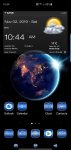
However, I cannot find the weather/clock app/widget that I had on my home screen, and cannot remember what it is called.
I have uploaded a screenshot of it and was wondering if anyone recognised it, please?
(Wasn't sure whether to post this under the phone or app section).
Many thanks.

Attachments

  • Screenshot.jpg
    Screenshot.jpg
    177.7 KB · Views: 273

[App][Free] - Fanya - Create & Organize Todo lists and Tasks

Hi!

Recently, we developed a new modern app to organize your "To-Do" list.
The app has a flowless and trending user interface to manage your daily or ongoing tasks.
We would be happy to cooperate with you and review or publish our app.

The app is only for Android devices and should be live in the Google play store at the first days of April 2021.
Link for the app: https://play.google.com/store/apps/details?id=dekoa.apps.fanya

Best regards,
Fanya Team

Help Notification Problems

Hello, Recently I have just purchased my mother a Lenovo Tab M8 (Cheap she just uses it for a few simple games and social media) one thing I've noticed is whenever she is supposed to get a new notification from.. Let's say Kik, the notification won't come through unless she has the app opened in the background. I've pulled all the stops I know to do myself to fix it, so I was hoping one of you may have some ideas how I can get her notifications working for her.

Steps so far: Made sure push notifications were on in both the apps and in the settings apps, Disabled all battery optimization for all apps and system apps (just incase that was causing any issues in the background), and also reset the Tablet another time and redownloaded all her apps.

I'm at a loss.

Running Android 10
Link to Tablet: Amazon.com: Lenovo Tab M8 Tablet, 8" HD Android Tablet, Quad-Core Processor, 2GHz, 16GB Storage, Full Metal Cover, Long Battery Life, Android 9 Pie, ZA5G0102US, Slate Black: Computers & Accessories

Alert Dialog

Hello.

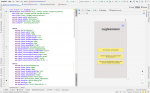
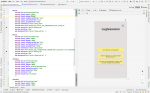
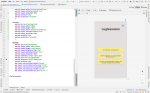
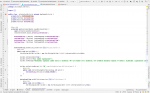
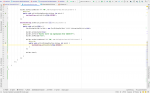
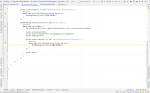
I am trying to display alert dialogs on my emulator for three of my buttons. However, whenever I try to do this it only displays it for my second button "Hvorfor mister jeg lugtesansen?" (don't mind the different language) and not for the button above.

I have no clue what's wrong. Can someone please help med? pleeeeaaaasee

-Balos
Thanks in advance

Attachments

  • Screenshot 2021-03-26 at 18.58.51.png
    Screenshot 2021-03-26 at 18.58.51.png
    282 KB · Views: 145
  • Screenshot 2021-03-26 at 18.59.01.png
    Screenshot 2021-03-26 at 18.59.01.png
    272.2 KB · Views: 149
  • Screenshot 2021-03-26 at 18.59.07.png
    Screenshot 2021-03-26 at 18.59.07.png
    247.4 KB · Views: 149
  • Screenshot 2021-03-26 at 18.59.26.png
    Screenshot 2021-03-26 at 18.59.26.png
    221.8 KB · Views: 156
  • Screenshot 2021-03-26 at 18.59.38.png
    Screenshot 2021-03-26 at 18.59.38.png
    159.2 KB · Views: 142
  • Screenshot 2021-03-26 at 18.59.40.png
    Screenshot 2021-03-26 at 18.59.40.png
    159.2 KB · Views: 165

Help Help: apps don't open on boot

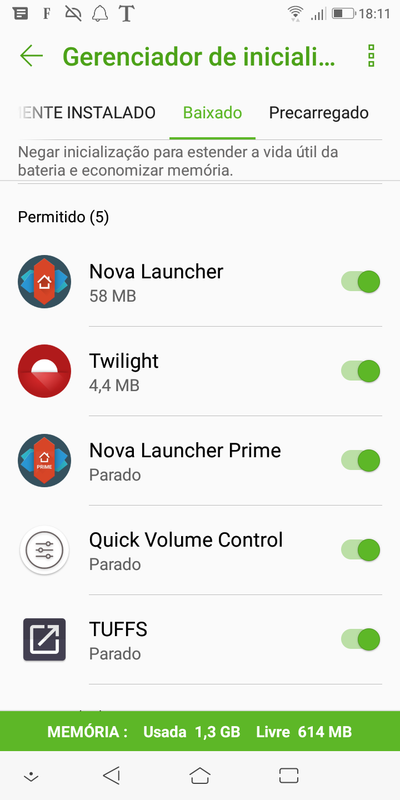
I have two apps I've been using for a long time on an everyday basis: TUFFS and Quick Volume Control.

They worked OK on my previous phones and still works OK on my good old Galaxy Tab A SM-P555M tablet.

And by work OK I mean not only do what they're expected to do, but also start up with the system and stay there near the notification area.

But I can't find a way to make TUFFS and Quick Volume Control behave the same way on my Asus ZenFone Live L1 ZA550KL (ASUS_X00RD). Before you ask, it has 2 GB of RAM.

This phone has a kind of startup manager to allow or deny apps to start up with the system, but though these two apps are set as allowed, they never start up after the boot! I have to open them manually every time I turn on my phone!


Screenshot-20210326-181149.png


Do you guys know why that happens and how I can fix it?

The tablet runs Android 7.1.1. The phone runs 8.0.0.

TIA.

Android App, Let's Choose the Database

Hey Folks,

Yes, I want to launch a poll about the right choice of the database.
Let's analyze together the pros and cons of the most famous databases to define the correct choice for our app. Indeed of course, the choice varies depending on the final purpose of our App, so let's try to give a general line to follow:

Firebase: A NoSql with many libreries that make our life easier,like an automatically managment of Auth ID, registration of users, modify passwords and email..etc.. but cons? for sure, you have to planning the structure of your database very well at the beginning, cause change the structure if project is in advanced stadium, make this choice not confortable, especially if you have to change completely the part of database rules... objects grafted for collections then inevitably require careful analysis before the project begins, to avoid heavy refactoring of the structure (less flexibility). Definitely not indicated if we want to create a social network type app ... Do you agree with me? Do you think this statement is also valid for Cassandra,MongoDB and others NoSQL Databases?

SQLite(Base knowledge):
PRO:
Extremely fast and efficient related SQL Database.
extremely portable, cause the one file structure.
The library is simple to set up and simple to use.

CONS:
Advanced databases provide user support, i.e. control of connections through a set of database and table access privileges. Given the purpose and nature of SQLite (no high level of multi-client concurrency), no such feature exists.
For most applications it is excessive to use an additional process to test the operating logic (ie the main purpose of the application: functionality).
One of the limitations of SQLite is the write operations. This DBMS allows a single single write operation for every single instant, thus allowing for limited throughtput.This make SQLlite bad choice for multi-user platforms,for my opinion.


MySQL: The most popular related DBMS.
It must be said that, given the popularity of the product, there are a lot of third-party applications, tools and built-in libraries that give a great deal of help on many aspects of using this RDBMS.
PRO:
MySQL supports a lot of the SQL functionality that is expected of an RDBMS, directly or indirectly.
In MySQL we find a lot of security-related features, some quite advanced.
MySQL is capable of handling a large amount of data, also it can be scalable if needed.
CONS:
As it was designed, MySQL does not intend to include all possible features and some of those present have limitations. These missing features may be required by some latest generation applications.
The way MySQL treats certain features (such as references, transactions, auditing, etc.) makes it a little less reliable than other RDBMSs.
Since MySQL does not [try to] implement the full SQL standard, this tool is not fully compatible with SQL. Should you ever need to switch to such RDBMS, the transfer from MySQL will not be easy

POstGresSQL:Compared to other RDBMS, PostgreSQL stands out for its support for the categorical and integralist functionality of object-oriented and / or relational databases, for example the complete support for secure transactions, i.e. Atomicity, Consistency, Isolation, Durability (ACID)
PRO:
PostgreSQL is open source and free and also a powerful relational database management system.
PostgreSQL is backed by a dedicated and knowledgeable community that can be accessed through knowledge base sites and Questions / Answers for free, 24/7.
PostgreSQL is not only a relational database management system, it also manages object-oriented databases, with support for nesting and more.
CONS:
For simple but burdensome reading operations, PostgreSQL can be excessive and may appear less performing than its counterparts, such as MySQL
Unless you are willing to spend time, energy and resources, creating replication with MySQL may be easier for those who have no experience with systems and database administration.

So what do you think?Which is for you the best choice for:

-Static app (No multiple connections,no chats,not graphs structure)
-Chat app in real time
-Videogame app without online challanges
-Videogame app with online challanges
-Social Network style app, no graphs style (Instagram)
-Social Network style app, graphs style (Facebook)

I'm curious to listen your opinions!!

PS: Sorry for my English, I'm a bit rusty...and I'm Italian! :p


,

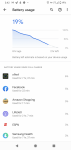
Pixel 4 XL battery life

My battery life, I'm lucky to get 8 hours. Yesterday 4 hours in and my phone was almost dead. I am attaching what android says is using my battery. Nothing looks excessive. I don't want to turn on any battery saver because I have some alerts for work and the last thing I need is for an app that I need an alert for not work because it was put to sleep. I want the battery to work using built in apps. I just switched my note 20 for the pixel 4 xl because it has some features that work really well for my job that a non pixel phone doesn't offer. Note 20 can't be rooted. I know I could root this pixel, but I don't want to. I think my work apps and profile might quit if I rooted it. Also, when I've rooted phones in the past and it always introduces new issues. I like non rooted and supported. I also bricked a pixel years ago because I rooted it. I know better now and would never make that mistake again. I couldn't get the phone to boot. I kept reading articles and getting nowhere. So after hours of frustration, I thought maybe if I lock the bootloader, it will fix the boot issue. Well, it locked in the boot problem and I couldn't get back into the os to enable developer mode to unlock the bootloader again. I know better now. But, still... My wife would flip if she heard I rooted a phone again. That mistake cost me a new phone.

Ok, so I'm rambling on. Ultimately I think a stock phone should be able to last a full day. The only time a phone is dying 4 hours into the day is because an app is draining the battery. But, I can't see that from the image.

Attachments

  • Screenshot_20210326-154221.png
    Screenshot_20210326-154221.png
    687.9 KB · Views: 338

GMAIL for Android setting

RE: GMAIL for Android
I can’t find the setting that does not delete the email from the server when I delete it from my phone.
I like to have a permanent copy of the email on my laptop but if I erase it on my phone it removes it from the server and it doesn’t show up subsequently on the laptop.
When I have finished with each email I delete it on my laptop and that removes it from the server.
That setting (do not delete from server when deleting locally) is available on all my other email apps.
I’m sure it is buried somewhere. I just can’t find it.
S

My RCA Voyager Tablet is in a bootloop and I can't get into recovery mode

Can anyone help me please, My RCA Voyager Tablet is in a bootloop and it keeps showing the logo screen. I was trying to install the trwp for my tablet but I think I accidentally put the worng trwp file into my RCA tablet. I tried to go into recovery mode but nothing happened and I tried flashing it but I couldn't find any firmware file for my model ( my model is rct6873W42) I also tried connecting my computer to my tablet and it's not detecting my RCA Voyager Tablet. I hope someone can please help? P.s I also think it's brick but I am not completely sure.

Filter

Back
Top Bottom