• After 15+ years, we've made a big change: Android Forums is now Early Bird Club. Learn more here.

How to limit sound notifications to 2 only

How to set up? I want sound notifications:
  1. When a Google calendar event will occur in 1 hour. I want Beijing Bass, which is to be found under "Sounds"
  2. When I am called on my mobile - a ring-like sound.
I don't want any other notifications. At present I am plagued by Beijing Bass erupting seemingly randomly. That may be because many App notifications cannot be switched off under Settings | Notifications. So I don't know how to get what I want.

Hide notification content?

New adopter of an s21 here after my S8 threw itself carelessly on the floor one too many times...

On my old phone, when I received an SMS or other notification, the phone would show a notification 'new SMS received'. On the new phone, the notification tells me the sender and displayed the content of the message (also, emails, push notifications from chrome and just about everything else). I do not wa t to see the content of the messages in the notification, I would just like to be alerted to the fact that I have 'a' notification, but without being shown the contents.

Googlefu has failed me and all I seem to be able find is a million guides on how to hide content on the lock screen.

Can anyone advise on how I can prevent the content of messages/emails etc from being shown in the pull down notifications bar please?

Pretty please??

ZXing scanner trigger

Hello everybody,
I am carrying out the reading of the QR code and with the result search within a database to obtain information.
My problem is this: I use the ZXing library and the codes are read without problems. Once the scanner activity that displays the camera is launched, it continuously reads and processes the first valid code it finds.
I would like to give the operator time to go to the desired code (already viewing the camera of course), then press a button to perform the reading.
Can you give me some suggestions?
Thanks so much.

Help Bulk import of autocorrect definitions in Android word processing apps

In Windows 10 on my desktop computer, I have set up a large number of autocorrect definitions in Microsoft Word. So, for instance, if I type "fi" the computer replaces that with "for instance." I am able to copy the MSO1033.acl file containing these definitions to other computers. With effort, I have also managed to import those definitions into other desktop word processing (WP) software (e.g., LibreOffice).

In Android, I see that there are WP apps with autocorrect capabilities (e.g., Google Docs, WPS Office). Unfortunately, there does not seem to be anything like the MSO1033.acl file. Instead, these apps seem to require the user to enter autocorrect definitions manually. For users with thousands of autocorrect definitions, that would be a chore.

Ideally, I would be able to delete any existing autocorrect definitions provided with the app. For me, unfamiliar definitions tend to cause more problems than they solve.

Is there a way to bulk-import autocorrect definitions into any WP apps running on mobile Android devices?

Help E:unable to rename file /cache/update.zip: Cross-device link

The device is ASUS FonePad 7 ME175CG
My computer can run in ubuntu and win7/win10
Because the tablet can't update its firmware, I have to update it manually
I downloaded some official update packages, rename it as "update.zip" and run "fastboot flash update update.zip"
But... After sending the ota update file ,I got a error message: E:unable to rename file /cache/update.zip: Cross-device link
I have no idea on this kind of issue..

Unoffical/HavocOS Alcatel Tetra 5041C and Offcial TWRP

Custom recovery flashable zip of HavocOS based on Android 10 and modded to fully function on Alcatel Tetra.

First if you haven't already installed a custom recovery (we at A-Team have compiled a total of 8 different custom recoveries), then go here and you will find all you need to install TWRP.

HavocOS based on Android 10 for Alcatel Tetra


Based on the official gsi from HavocOS, but modified to function on the Tetra


A-Team Digital Solutions

Your warranty is now void. Please do some research if you have
any concerns about features included in this ROM before flashing it!WE ARE NOT RESPONSIBLE
IN ANYWAY FOR ANYTHING, IDEA, DISASTER, COSMIC EVENT, OR ANY OTHER NEGATIVE RESULT ENCOUNTERED
DUE TO YOUR DECISION TO MAKE USE OF THE SOFTWARE!!!
IN SHORT, IT IS A DECISION YOU ALONE MUST MAKE.


That being said, this product is still a work in progress. However, great effort
has been exerted to test this product. The developers have worked many hours to make this possible
and do this work as a hobby. For this reason, the software is available at no cost, so please keep
this in mind when you comment on their work. Credits, further contact resources, and donation links will
be made available at the end. There is no requirement to checkout the available links, or to donate.
These are only available if you chose to explore them. If you enjoy this product, find it helpful,
love it, or hate it; let us know. If you see fit, buy these developers a drink to show them some love.
Enough with the soap box, let get to the reason you searched and found yourself her!


REQUIREMENTS

Custom recovery and a little time.

INSTALLATION

Do a backup
Do a factory reset
Wipe cache
Wipe dalvik cache
Flash rom of your choice
Flash gapps
Reboot
Enjoy!!
If you have any issues with apps, try to your wipe dalvik cache / cache and fixing permissions

Features

-What's working
As of the writting of this post, everything should be working, I will address any issues if they arise.

-What's not

Download Links

Androidfilehost:
HavocOS based on Android 10 for Alcatel Tetra

A-Team Home Page:
Check us out.

CREDITS

Everyone at A-Team, HavocOS Team, PHH for his work with gsi's, and xEugW for most of the work that made this possible with his official gsi.
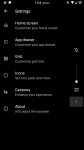
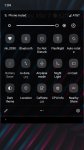
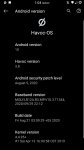
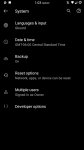
Screenshot_20210307-130435.jpg Screenshot_20210307-130424.jpg Screenshot_20210307-130415.jpg Screenshot_20210307-130405.jpg Screenshot_20210307-130340.jpg

Attachments

  • Screenshot_20210307-130325.jpg
    Screenshot_20210307-130325.jpg
    96.2 KB · Views: 805
  • Screenshot_20210307-130321.jpg
    Screenshot_20210307-130321.jpg
    92.7 KB · Views: 638

Alcatel Idol 5 Secret Codes

So here are a couple of dialer codes for the 6060C.

Engineering Mode: *#*#825364#*#*
[GALLERY=media, 1120]Engineering menu 1 by lehmancurtis147 posted Mar 6, 2021 at 6:50 AM[/GALLERY][GALLERY=media, 1119]Engineering menu 2 by lehmancurtis147 posted Mar 6, 2021 at 6:50 AM[/GALLERY][GALLERY=media, 1118]Engineering menu 3 by lehmancurtis147 posted Mar 6, 2021 at 6:50 AM[/GALLERY][GALLERY=media, 1117]Engineering menu 4 by lehmancurtis147 posted Mar 6, 2021 at 6:50 AM[/GALLERY][GALLERY=media, 1116]Engineering menu 5 by lehmancurtis147 posted Mar 6, 2021 at 6:50 AM[/GALLERY]


Advanced Logging Options Menu: *#*#82533284#*#*
[GALLERY=media, 1121]Debug Logging by lehmancurtis147 posted Mar 6, 2021 at 7:00 AM[/GALLERY]

Help How to upgrade from android 4.4.4 to android 6+ ?

Hello.

I have a Galaxy S4 (SGH-M919) running on android 4.4.4. (I can give you more details if needed).
I need to install an application (EHTERAZ) which is a Qatari government application that only works on android version 6 and up (or IOS 13.5 and up).

Q: Is there a way to make the application work on my 4.4.4 android ?
Q: if not, how can I safely and easily upgrade my android to a newer version? (can you give me a full tutorial or video link)
Q: how to choose an android version that is most suited for my S4 that won't make it too slow or drain the battery too fast ?
Q: will I loose my files during this process ?

Thank you so much for your help, I really appreciate it.

Can't find action overflow

I'm working on an older pixel 3 xl, with Android 11. I've been referencing Android for Dummies. On the chapter for web browsing (page 119) I've noticed there's a diagram for a Google page. Problem is, my phone doesn't the action overflow icon (and Tabs). This is driving me crazy. Is there something I'm missing, because without it I can't do much. Thanks.

Filter

Back
Top Bottom