• After 15+ years, we've made a big change: Android Forums is now Early Bird Club. Learn more here.

Create multiple table row

Dear Team,

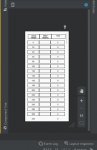
I want to create multiple table rows as shown in the picture. The total no of rows is 250. how to create these 250 rows through the java program.

HTML:
<?xml version="1.0" encoding="utf-8"?>
<ScrollView
    xmlns:android="http://schemas.android.com/apk/res/android"
    xmlns:tools="http://schemas.android.com/tools"
    android:layout_width="match_parent"
    android:layout_height="match_parent"
    android:paddingBottom="@dimen/activity_vertical_margin"
    android:paddingLeft="@dimen/activity_horizontal_margin"
    android:paddingRight="@dimen/activity_horizontal_margin"
    android:paddingTop="@dimen/activity_vertical_margin"
    tools:context=".Aggre20_Ascending" >


    <TableLayout
        android:id="@+id/tableLayout1"
        android:layout_width="match_parent"
        android:layout_height="wrap_content"
        android:layout_marginStart="0dp"
        android:layout_marginEnd="0dp">


        <TableRow
            android:id="@+id/tableRow1"
            android:layout_width="match_parent"
            android:layout_height="match_parent"
            android:padding="10dp">

            <TextView
                android:id="@+id/textView1"
                android:layout_width="110dp"
                android:layout_height="45dp"
                android:background="@drawable/border"
                android:padding="5dp"
                android:textAlignment="center"
                android:text="Actual          Weight"
                android:textStyle="bold"
                android:textAppearance="?android:attr/textAppearanceMedium"
                android:textColor="@color/black"
                android:textSize="15sp">

            </TextView>

            <TextView
                android:id="@+id/editText1"
                android:layout_width="110dp"
                android:layout_height="45dp"
                android:background="@drawable/border"
                android:padding="5dp"
                android:text="Meter     Reading"
                android:textStyle="bold"
                android:textAlignment="center"
                android:textAppearance="?android:attr/textAppearanceMedium"
                android:textColor="@color/black"
                android:textSize="15dp">

            </TextView>

            <TextView
                android:id="@+id/error1"
                android:layout_width="110dp"
                android:layout_height="45dp"
                android:background="@drawable/border"
                android:padding="5dp"
                android:text="Error"
                android:textAlignment="center"
                android:textStyle="bold"
                android:textAppearance="?android:attr/textAppearanceMedium"
                android:textColor="@color/black"
                android:textSize="15dp">

            </TextView>

        </TableRow>

        <TableRow
            android:id="@+id/tableRow2"
            android:layout_width="match_parent"
            android:layout_height="wrap_content"
            android:padding="5dp">

            <TextView
                android:id="@+id/textView2"
                android:layout_width="wrap_content"
                android:layout_height="wrap_content"
                android:background="@drawable/border"
                android:padding="5dp"
                android:text="0"
                android:textAlignment="center"
                android:textAppearance="?android:attr/textAppearanceMedium"
                android:textColor="@color/black">

            </TextView>

            <EditText
                android:id="@+id/editText2"
                android:layout_width="wrap_content"
                android:layout_height="wrap_content"
                android:background="@drawable/border"
                android:padding="5dp"
                android:textAlignment="center"
                android:textAppearance="?android:attr/textAppearanceMedium"
                android:textColor="@color/black">

            </EditText>

            <TextView
                android:id="@+id/error2"
                android:layout_width="wrap_content"
                android:layout_height="wrap_content"
                android:padding="5dp"
                android:background="@drawable/border"
                android:text="0"
                android:textAlignment="center"
                android:textAppearance="?android:attr/textAppearanceMedium"
                android:textColor="@color/black">

            </TextView>
        </TableRow>


    </TableLayout>
</ScrollView>

The first text view should update automatically by an interval of 20 (0, 20, 40, 60, .....) and edit text will be edited manually and 2nd text view should calculate automatically (first text view - edit text)


Can anyone guide me on how to do this program?

Attachments

  • 123.jpg
    123.jpg
    77.9 KB · Views: 182

Help to fix the Audio Music Player Errors!!

Hello good morning for everyone I´m a beginner on the Android Studio, and i need a help for you to place well the app, that means working perfectly. It´s a good app, and it could serve me as a example to understand its funcionality.

I´m building an audio music player app., but on my MainActivity.java file ,


In the code i faced with some mistakes, see below the images that i sent you. How could you fix them?


MainActivity.java


Java:
package com.example.musicaudioplayer;


import androidx.annotation.NonNull;

import androidx.annotation.Nullable;

import androidx.appcompat.app.AppCompatActivity;

import androidx.core.app.ActivityCompat;

import androidx.core.content.ContextCompat;

import androidx.fragment.app.Fragment;

import androidx.fragment.app.FragmentManager;

import androidx.fragment.app.FragmentPagerAdapter;

import androidx.viewpager.widget.ViewPager;


import android.content.Context;

import android.content.pm.PackageManager;

import android.net.Uri;

import android.os.Bundle;

import android.provider.MediaStore;

import android.widget.Toast;


import com.google.android.material.tabs.TabLayout;


import java.util.ArrayList;

import java.util.jar.Manifest;


public class MainActivity extends AppCompatActivity {

    public static final int REQUEST_CODE=1;

    ArrayList<MusicFiles>musicFiles;

    [USER=1021285]@override[/USER]

    protected void onCreate(Bundle savedInstanceState) {

        super.onCreate(savedInstanceState);

        setContentView(R.layout.activity_main);

        permission();

        initViewpager();

    }


    private void permission() {

        if(ContextCompat.checkSelfPermission(getApplicationContext(), Manifest.permission.WRITE_EXTERNAL_STORAGE)

        != PackageManager.PERMISSION_GRANTED) {

            ActivityCompat.requestPermissions(MainActivity.this, new String[]{

                            Manifest.permission.WRITE_EXTERNAL_STORAGE}

                    , REQUEST_CODE);

        }

                else

        {

            Toast.makeText(this, "Permission Granted!", Toast.LENGTH_SHORT).show();

            musicFiles = getAllAudio(this);

        }

    }

    [USER=1021285]@override[/USER]

        public void onRequestPermissionsResult (int requestCode,@NonNull String[]permissions,

                                                @NonNull int[] grantResults){

        super.onRequestPermissionsResult(requestCode,permissions,grantResults);

        if (requestCode==REQUEST_CODE)

        {

            if(grantResults[0] == PackageManager.PERMISSION_GRANTED){

                {

                  //Do whatever you want permission related

                    Toast.makeText(this, "Permission Granted !", Toast.LENGTH_SHORT).show();

                    musicFiles =getAllAudio(this);


                }

                else

                {

                    ActivityCompat.requestPermissions(MainActivity.this, new String []{Manifest.permission.WRITE_EXTERNAL_STORAGE,

                            REQUEST_CODE);

                    }

                    }

            }


    private void initViewpager(){

        ViewPager viewPager =findViewById(R.id.viewpager);

        TabLayout tabLayout = findViewById(R.id.tab_layout);

        ViewpagerAdapter viewPagerAdapter = new ViewpagerAdapter(getSupportFragmentManager());

        viewPagerAdapter.addFragments(new SongsFragment(), "Songs");

        viewPagerAdapter.addFragments(new AlbumFragment(),"Album");

        viewPager.setAdapter(viewPagerAdapter);

        tabLayout.setupWithViewPager(viewPager);

    }

    public static class ViewpagerAdapter extends FragmentPagerAdapter{


        private ArrayList<Fragment> fragments;

        private ArrayList<String> titles;

        public ViewpagerAdapter (@NonNull FragmentManager fm){

            super(fm);

            this.fragments = new ArrayList<>();

            this.titles = new ArrayList<>();

        }

        void addFragments (Fragment fragment, String title){

            fragments.add(fragment);

            titles.add(title);


        }


        @NonNull

        [USER=1021285]@override[/USER]

        public Fragment getItem (int position){

            return fragments.get(position);

        }

        [USER=1021285]@override[/USER]

        public int getCount(){

            return fragments.size();

        }


        [USER=1996173]@nullable[/USER]

        [USER=1021285]@override[/USER]

        public CharSequence getPageTitle(int position){

            return titles.get(position);

        }

    }

}

    }

}

public static ArrayList <cMusicFiles> getAllAudio(Context context){

  ArrayList<MusicFiles> tempAudioList = new ArrayList<>();

    Uri uri= MediaStore.Audio.EXTERNAL_CONTENT_URI;

    String[] projection = (

            MediaStore.Audio.Media.ALBUM,

            MediaStore.Audio.Media.TITLE,

            MediaStore.Audio.Media.DURATION,

            MediaStore.Audio.Media.DATA, // FOR PATH

            MediaStore.Audio.Media.ARTIST,

};

        Cursor cursor = context.getContentResolver().query(uri, projection, null,null,null);

        if (cursor!=null)

                {

                while(cursor.moveToNext())

                {

                String album = cursor.getString(0);

                String title = cursor.getString(1);

                String duration = cursor.getString(2);

                String path = cursor.getString(3);

                String artist = cursor.getString(4);


                MusicFiles musicFiles = new MusicFiles(path, title,artist,album,duration);

                //take log.e for check

                Log.e("Path: " + path, "Album : " + album);

                tempAudioList.add(musicFiles)

                    }

                cursor.close();

                 }

        return tempAudioList;

                }

                }

unknown1.png


unknown2.png


AndroidManifest.xml

Code:
<?xml version="1.0" encoding="utf-8"?>
<manifest xmlns:android="http://schemas.android.com/apk/res/android"
    package="com.example.musicaudioplayer">
    <uses-permission android:name="android.permission.WRITE_EXTERNAL_STORAGE"/>
    <application
        android:allowBackup="true"
        android:icon="[USER=22138]@Mipmap[/USER]/ic_launcher"
        android:label="[USER=696546]@String[/USER]/app_name"
        android:roundIcon="[USER=22138]@Mipmap[/USER]/ic_launcher_round"
        android:supportsRtl="true"
        android:theme="[USER=19691]@Style[/USER]/AppTheme">
        <activity android:name=".MainActivity">
            <intent-filter>
                <action android:name="android.intent.action.MAIN" />

                <category android:name="android.intent.category.LAUNCHER" />
            </intent-filter>
        </activity>
    </application>

</manifest>


AlbumFragment.java

Java:
package com.example.musicaudioplayer;

import android.os.Bundle;

import androidx.fragment.app.Fragment;

import android.view.LayoutInflater;
import android.view.View;
import android.view.ViewGroup;


/**
* A simple {@link Fragment} subclass.
*/
public class AlbumFragment extends Fragment {

    public AlbumFragment() {
        // Required empty public constructor
    }


    [USER=1021285]@override[/USER]
    public View onCreateView(LayoutInflater inflater, ViewGroup container,
                             Bundle savedInstanceState) {
        // Inflate the layout for this fragment
        View view = inflater.inflate(R.layout.fragment_album, container, false);
        return view;
    }
}

MusicFiles.java

Java:
package com.example.musicaudioplayer;

public class MusicFiles {
    private String path;
    private String title;
    private String artist;
    private String album;
    private String duration;

    public MusicFiles(String path, String title, String artist, String album, String duration) {
        this.path = path;
        this.title = title;
        this.artist = artist;
        this.album = album;
        this.duration = duration;
    }

    public MusicFiles() {
    }

    public String getPath() {
        return path;
    }

    public void setPath(String path) {
        this.path = path;
    }

    public String getTitle() {
        return title;
    }

    public void setTitle(String title) {
        this.title = title;
    }

    public String getArtist() {
        return artist;
    }

    public void setArtist(String artist) {
        this.artist = artist;
    }

    public String getAlbum() {
        return album;
    }

    public void setAlbum(String album) {
        this.album = album;
    }

    public String getDuration() {
        return duration;
    }

    public void setDuration(String duration) {
        this.duration = duration;
    }
}


fragment_album.xml

Code:
<?xml version="1.0" encoding="utf-8"?>
<FrameLayout xmlns:android="http://schemas.android.com/apk/res/android"
    xmlns:tools="http://schemas.android.com/tools"
    android:layout_width="match_parent"
    android:layout_height="match_parent"
    tools:context=".AlbumFragment">

    <!-- TODO: Update blank fragment layout -->
    <TextView
        android:layout_width="match_parent"
        android:layout_height="match_parent"
        android:text="[USER=696546]@String[/USER]/hello_blank_fragment" />

</FrameLayout>

SongsFragment.java

Java:
package com.example.musicaudioplayer;

import android.os.Bundle;

import androidx.fragment.app.Fragment;

import android.view.LayoutInflater;
import android.view.View;
import android.view.ViewGroup;


/**
* A simple {@link Fragment} subclass.
*/
public class SongsFragment extends Fragment {

    public SongsFragment() {
        // Required empty public constructor
    }


    [USER=1021285]@override[/USER]
    public View onCreateView(LayoutInflater inflater, ViewGroup container,
                             Bundle savedInstanceState) {
        // Inflate the layout for this fragment
        View view =inflater.inflate(R.layout.fragment_songs, container, false);
        return view;
    }
}

fragment_songs.xml


Code:
<?xml version="1.0" encoding="utf-8"?>
<FrameLayout xmlns:android="http://schemas.android.com/apk/res/android"
    xmlns:tools="http://schemas.android.com/tools"
    android:layout_width="match_parent"
    android:layout_height="match_parent"
    tools:context=".SongsFragment">

    <!-- TODO: Update blank fragment layout -->
    <TextView
        android:layout_width="match_parent"
        android:layout_height="match_parent"
        android:text="[USER=696546]@String[/USER]/hello_blank_fragment" />

</FrameLayout>


Ps.: I send also the ZIP file about the audio music player app, My Android version is below:

android_studio_version.png


Another trouble is the emulator that in my pc doesn´t work, i think it´s because my Pc doesn´t have the Intel processor but the AMD Processor. Could you help to fix this problem too? see the images

unknown3.png


unknown4.png


Could anyone, help me, please to fix this problems?

I expect your answer as soon as possible.

Best regards

José Moreira

Attachments

Open With Bad Choices

I'm on Android 8.0. When downloading files the 'open with' dialogue gives me choices of apps that cannot open the given file type, e.g., when downloading a .md (markdown) file I'm only given the choice of opening the file in a calendar app, a flashcard app, and a mindmapping app. None of which have the ability to open .md files. However, the app I do have installed which can open .md files is never an option. Before given the suggestion I have reset the defaults on all of my apps and still these are the only 3 choices available. I've reset permissions on all of my apps. Does anyone know a solution to this most annoying problem?

Thanks in advance.

Help Unable to install NORTON w LIFELOCK

I have been trying to get my Norton reinstated after Comcast no longer offers it free since Jan 1, 2021. After 4 attempts & giving my bank info 4 times, the screen just stops after completing the application. I'm already having problems with my brand new phone & that, was getting a blank screen for the NORTON website that said something like "This page no longer available" ? I havent had a properly working device in over a year! My business has been destroyed!
At some point is it too far fetched to believe I am the victim of a targeted attack? Is that something that can be found out? Does anyone recommend "The Geek Squard"?

Notifications Error Message

I am using a MotoE 2020. I had music assigned so I would be notified of any incoming text messages and it was working fine until today.
Now I do not get a incoming musical alert when I receive a text message and I don't even get the dot by messages on the "home screen" that I used to see if I missed the ringtone alert. TThe ringtone I chose is still there and still working when I tested it so the app does have an assigned ringtone.

When go to APP Info and click on Messages it says notifications are OFF
When I click on that it takes me to a new screen that says Show Notifications in Blue with a white circle and
when I click on that it says :" At Your Request , Android is blocking this apps notifications from appearing on this device "

I don't know what I have done as it was working fine yesterday .

Help how can i pay someone to create a simple app?

i'm not a programmer, but i was wondering if there's a way to commission a simple app from a programmer, like how artists can be commissioned for art. i've tried googling, but i didn't find anything. is there a different term for it?

(if you need clarification on what i mean by "simple", i mean a program that can format a txt file a certain way. basically, "if a line starts with character string A, copy that line to list 1 at the end of the file and add a space before the original, if it starts with character string B, copy it to list 2 and add a space before the original", etc. something that lets me instantly sort a long and unorganized list based on strings at the beginning of each item that note which category each entry belongs to. there would be a few other features i would specify such as being able to move any bullet lists as part of the entry and other things like that, but that's the gist. and even a barebones version without those features would be okay)

i don't really know how to find out if anyone does this. i've never seen a programmer offering it on social media or anything. but it seems like something that would exist, and this would help me immensely so i don't wanna give up on it too soon. if you know anything about commissioning things for a program on pc, that would be helpful too. i'm asking here because an android app would be more convenient, but a pc program would be useful as well. any help would be appreciated.

  • Poll Poll
Did someone give me a CUSTOM ROM?

Have you purchased a pre-pay phone at a local store and had problems?

  • I have had problems with the phone

    Votes: 2 100.0%
  • I believe my data is being stolen

    Votes: 2 100.0%

I purchased a brand new Boost LG-K51 phone at Walmart. Put it in my safe, moved, & 11 days later opened it & added my $60 unlimited card. 7 days later my 35 GB high data was gone without any good reason. (My last 3 phones Ive had this same problem) Ive spent 13 days now on the phone with Boost & LG & online with Google ..that Play Protect is not certified due to custom rom. I've had 6 extra data packs added, & while on the phone with LG is disappeared!
I went in Walmart and discover something I found at the LAST store (Dollar General) where I got the PREVIOUS PHONE! ONLY THE PARTICULAR PHONE THAT IS ON SALE (that gone was a Verizon Avalon Alcatel) HAS THE BOX TURNED AROUND! WITH THE STICKER with all the codes & numbers including IMEI# FACING THE ISLE & CUSTOMERS. The last phone all my data was stolen also, by the 8th day EVERY MONTH!. ISNT THERE ALOT SUSPICIOUS ABOUT THIS? & WHAT DO I DO? The tech people they have at Walmart from noon-6pm, I caught lying twice about the IMEI having no use! What do I do?
& isn't the STORE responsible to protect the devices IMEI# until it is in the hands of the new owner?? & Why did the tech person lie and say she can stack the boxes anyway she wants the IMEI has nothing to do with my problems! But they're ONLY doing it with the sale phones. Almost targeting data theft on those with lower incomes!

Apps How to run app in background with other apps

I am an Android beginner (but experienced Java programmer) and I would like to know if it is possible on Android to write an app that can do something similar to what a "normal" windowed program in the following respects:

1) Place an application access button with very simple features "always on top", that allows the user to open the application, or paste data from other running applications that has been copied to the clipboard into my app and other simple functions. The button could be a simple circle that is always on top, and certain gestures on the button invoke certain commands in my app.

2) When other apps are running (e.g a browser or a PDF viewer), allow the user to "drag and drop" information (e.g. copied text, URLs from a browser, text copied from a PDF being viewed) into my app which is sleeping (since the other app is currently running). I'm guessing that if my app is "always on top", focusing on its "access button" will make it active?

I know all this can be done in Java Swing, but with Android I anticipate problems. My app will be running in its own protected space (as will all the other apps), so when another app is running, like the browser, I am not clear on how my app can access data from other apps. Would this be a case of requesting permissions to access the data of all the standard apps I would like to access in my app (e.g. browser, PDF viewer, word, excel viewers etc)?

Many thanks for your help,

-Blue

Help "onTaskRemoved" event implementation

Hello,
I've come here to ask how to implement onTaskRemoved event in Sketchware. I tried to do it multiple times, but i was getting some errors all the time. Simply, I want to make my app do some things, when it's closed (onStop event helps here) and removed from stack (onTaskRemoved would definetely help here, but I don't know how to implement it). Any ideas?

WeChat chat migration fail. Can't connect when scan QR code.

Hi
I'm trying to migrate my WeChat chat history from old mobile Galaxy S10 to new mobile Galaxy S21.
Tried to do backup from mobile to mobile but it fails when scanning QR code on old phone from new phone, says can't connect to the link.
Tried to backup old phone onto mobile to PC wechat app, but can't log on to PC wechat because it requires scan of QR code on PC from phone, but that also fails saying it cannot connect to the link.
Tried wechat web to do it but then when I sacan QR code on webpage, my phone responds to say my app is not compatible version and links my Android to the Apple store to get current version.
The error on the 'can't connect' responses is ERR_HTTP_RESPONSE_CODE_FAILURE
All devices are on same WiFi network. WeChat versions is same on both phones, current version per Play store, 7.0.21.

Located in USA.
Anyone have a fix to resolve this hangup?

Filter

Back
Top Bottom