• After 15+ years, we've made a big change: Android Forums is now Early Bird Club. Learn more here.

Help Cannot connect to Google anymore

Hi everyone,

I have a Xiaomi Note 3 bought in China some years ago.
Since a couple of weeks I cannot access google play anymore:
- first I had the error DF-DFERH-01, so I tried to clear cache of the play store, but no improvement.
- I therefore clear cache and uninstalled the account manager, service framework, google play service and the play store.
- I have re-installed those 4 apps with especially the google play service 20.50.66_(100400-351698872)-205066028_minAPI28(arm64-v8a,armeabi-v7a)(nodpi) which I think is adapted to my Mi Note with Android 9 and arm64-v8a architecture.
- I rebooted

but now I have the error message "here Was A Problem Communicating With Google Servers"
I tried again but no success.

Anybody can help me to diagnose the issue and fix it?

thanks in advance for your help !!!

Laurent

Toshiba Excite AT15-A ROM Flash

I just purchased a Toshiba Excite AT15-a and it cannot update past Android 4.2. I want to run an app called 'GranBoard' and it required Android 4.3 and up. I see that you can flash a custom ROM to get it up to Marshmallow. I started to try the process with OmniROM and when taken to the download page, there are countless ones to pick from. Can anyone help me decide which one is correct or maybe provide streamlined directions to do this?

Disappearing mouse pointer

I have a Q Plus Android 9 TV box which is great except when browsing in any browser the pointer disappears just below the toolbar on the browser.
I've tried Chrome, Firefox, Edge and Opera without success and replaced the standard remote with an MX3 Air mouse, it also exhibits the same behaviour with a wireless mouse.
Any ideas? Thanks

AUB3 update for Global S21 series

This latest update is the 4th for the Global, Exynos, S21 series and is currently being rolled out by Samsung.

The Galaxy S21 Global, Exynos, devices that will receive this update are...
  • S21 5G model SM-G981B
  • S21+ 5G model SM-G996B
  • S21 Ultra 5G model SM-G998B
This latest release replaces the G99*BXXU1AUAC January build.

It is a FOTA, (Firmware Over The Air), update and you can check... Settings > Software update... to see if it is available for you

Changelog

February security patches (Samsung Android Security Updates)

    • The performance of Camera has been improved
    • Overall stability of functions improved
    • The security of your device has been improved
The update = G99*BXXU1AUB3

Build date = 03 February 2021

Release date = 04 February 2021

Camera version = TBC

One UI version = 3.1

Android Security patch = February 2021

This is the 4th stable update in +8 days

AUB3 update for Global S21 series

This latest update is the 4th for the Global, Exynos, S21 series and is currently being rolled out by Samsung.

The Galaxy S21 Global, Exynos, devices that will receive this update are...
  • S21 5G model SM-G981B
  • S21+ 5G model SM-G996B
  • S21 Ultra 5G model SM-G998B
This latest release replaces the G99*BXXU1AUAC January build.

It is a FOTA, (Firmware Over The Air), update and you can check... Settings > Software update... to see if it is available for you

Changelog

February security patches (Samsung Android Security Updates)

    • The performance of Camera has been improved
    • Overall stability of functions improved
    • The security of your device has been improved
The update = G99*BXXU1AUB3

Build date = 03 February 2021

Release date = 04 February 2021

Camera version = TBC

One UI version = 3.1

Android Security patch = February 2021

This is the 4th stable update in +8 days

AUB3 update for Global S21 series

This latest update is the 4th for the Global, Exynos, S21 series and is currently being rolled out by Samsung.

The Galaxy S21 Global, Exynos, devices that will receive this update are...
  • S21 5G model SM-G981B
  • S21+ 5G model SM-G996B
  • S21 Ultra 5G model SM-G998B
This latest release replaces the G99*BXXU1AUAC January build.

It is a FOTA, (Firmware Over The Air), update and you can check... Settings > Software update... to see if it is available for you

Changelog
  • February security patches (Samsung Android Security Updates)
  • The performance of Camera has been improved
  • Overall stability of functions improved
  • The security of your device has been improved
The update = G99*BXXU1AUB3

Build date = 03 February 2021

Release date = 04 February 2021

Camera version = 11.0.02.44

One UI version = 3.1

Android Security patch = February 2021

This is the 4th stable update in +8 days

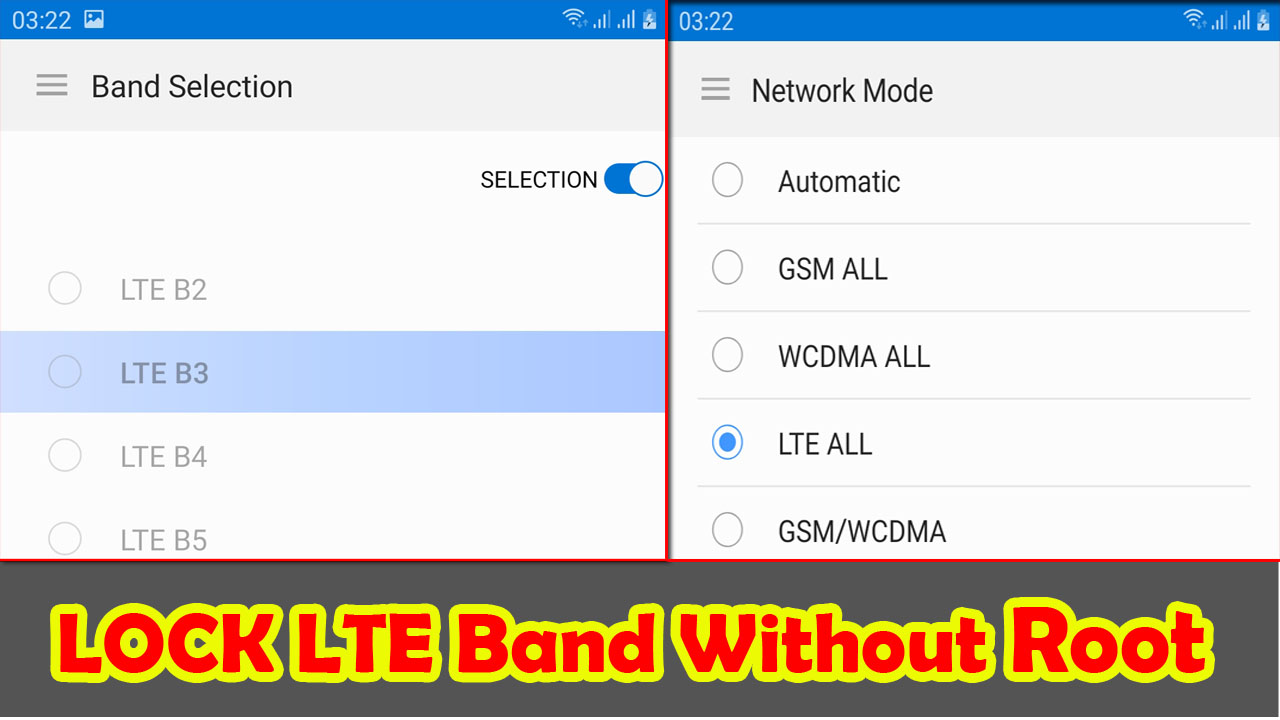
How to Lock LTE Band Selection On Samsung Galaxy Without Root

Hello Everybody ! now i will Share tips how to Lock LTE Band on Samsung Galaxy device. With this tutorial we can lock Frequency of LTE Band frequency networks. so that the connection becomes more stable.


This method is specifically for Samsung Galaxy. Because the default hiddennetwork system application is available. for devices with other brands and types, I haven't tried it.

Please follow the following methods:

1. DOWNLOAD Force 4G LTE Only 2020 Pro application from Google Play

2. Run the Application

3. Select SIM 1 Only menu, then Hidden Activity

4. wait to load until 100%

5. tap the search box type Hiddennetwork

6. In the call setting section, there is a hiddennetwork activity.

7. Long Tap 3 options will appear: Create Shortcut, Launch Activity, Edit Shortcut. I recommend Select Create Shortcut to make it easier for us to enter network activity mode without having to bother opening the Force 4G LTE Only 2020 Pro application.

8. Please select Launch Activity to enter the system Network Mode to select network mode.

9. tap the three-line menu in the left corner. select Band Selection to lock LTE band. please select a frequency band then slide the toggle selection to activate it.

Kindle Oasis

I bought the first generation Kindle when they were first released. It's likely still around somewhere but I can't put my hands on it. I read a book now and then on my tablet but the battery drains before I'm ready to stop reading. They say that the glare from a tablet could cause a problem with going to sleep which I suffer greatly from and need not contribute to the problem. I checked into Audible but the price of the service is more than I want to subscribe to. So, long story short, I'm considering the purchase a new Kindle. From reviews the Oasis seems to be the model to purchase with the Paperwhite model being the second to consider. I plan to read a lot now that I've retired from one of my jobs. I'm seeking advice from those I respect. (AF family) Any hands on experience with either of these models? Are the ad supported models over run with BS. There is a considerable difference in pricing between ad supported and ad free models. I truly appreciate any guidance on my upcoming purchase.

Data transfer from S6 to S21

Hi,

I received my S21 today and I'm going to be transferring all my data across from an S6 - trouble is the charging socket on the S6 has long stopped working so I cannot connect the phones directly via cable.

I'm happy to use Smart Switch wirelessly, altho apparently it could take 6hrs+ but I'm wondering, would it be quicker to back the S6 up to Google or Samsung cloud (I've never done this before so it would be a full backup, don't know how long that would take) and then download or restore to the S21 ?

There's approx. 60GB of data to transfer.

Many thanks for your time.

Help com.samsung.android.messaging

Buonasera, sul mio Galaxy A50, nelle attività google trovo spesso la dicitura "hai usato com.samsung.android.messaging" anche se non ho affatto usato l'applicazione "Messaggi SMS" sul mio smartphone.

Si tratta forse di una log generalistica, non necessariamente prodotta a causa dell'invio o ricezione di SMS?

Grazie

611611 error

Hello.

Galaxy S10e with Android 10 on StraightTalk.

StraightTalk has a text help service by sending keywords to 611611 using SMS. When I send such a keyword message to 611611, I get an error "Couldn't send message". How can i fix this? (I've already cleared phone app date and cache)

White explanation point with a circle replacing my images

I've got a new SD card (a cheap one) it was working fine at first but now all my photos & videos are being replaced with a circled white explanation point & grey background. I've only used 16 of the 256 GB. I post videos to YouTube & have 2 small children so I use my camera often & every good video lately is lost. Today is my daughter's 2nd birthday & the video of her leaving before school not being viewable is the last straw. My cloud is synced with my phone & as far as I can tell, none of my apps can view them. Can I recover these, HELP!

Problem With Case App and Samsung Note7s

After the last Chase update they updated their site menu. Now there is a fast select menu that includes deposit checks. It is supposed to make it easier than clicking the full menu (3 line square in the upper left) and scrolling down to deposit checks. However I can't use it. Whenever I select deposit checks from that new quick selection menu, I get a message that Chase security doesn't allow deposits on phones that are rooted etc. I had my IT department check out my phone and there is nothing wrong with it. However if I go back to the old way and click the full list and select deposit checks from there I have no problem.

screen sharpness config ??

I have a projector with an Android OS,
Long story short, it shutdown itself, and when I turn on it back, the display is blurry, I've been rotating the lens to find the focus point is still blurry at the best focus point,
At this point I thought it was a problem with the lens, so I took it apart, and I didn't find any damage, everything was normal.
finally, I took the initiative to reset the Android OS, and it turned out that it was true, the screen became more focused like before the problem arose,

the question is ?
What causes the Android OS to show a blurry screen?
so it means there is a config for screen sharpness in android os?
how to access that config? because I think my projector is still not sharp enough, and we can assume it because of the firmware itself right ??

ZTE Blade A3 Prime Thread

ZTE BLADE A3 PRIME GENERAL THREAD

PHONE SPECS
As we find out more about the device I will list it here. Again I do not have one of these myself so I'm relying on people that do to feed me this info
  • Codename: Z5157, could be V or Y as a suffix depending on if it's Visible or Yahoo
  • Android: 10 stock
  • OS level 32 or 64 bit: 32 bit, with 64 bit binders (for GSIs)
  • Chipset: Quad Core MTK6761 2GHz, aka Helio A22
  • RAM: 2GB DDR4 (LPDDR4 I think)
  • Display: 5.4 inch 720x1440
  • Battery: 2660mAh removable
  • Storage: 32GB on board, up to 2TB SD card expansion
  • Headphone Jack: yes, 3.5mm
  • USB: Type C
  • Connection: up to 4G LTE
  • Network: Visible Mobile, Yahoo Mobile, or GABB. Not sure if network unlockable. Stock firmware can be switched while retaining original network capabilities (see below)

BOOTLOADER UNLOCKING (DO THIS FIRST)
Unlocking the bootloader is a pretty standard affair. No additional hoops to jump through. As far as I am aware this works on the latest security patch/firmware update so there's no reason not to update. Big shoutout to XDA user zaduma for finding this out, check out his original XDA thread HERE.
  • Enable OEM Unlocking in the Development Menu in Android
  • Reboot to bootloader, plug the phone into your computer where you have ADB/Fastboot installed
  • Plug it into the computer and issue a "fastboot flashing unlock" and confirm
  • Then issue a "fastboot flashing unlock_critical" and confirm
  • Reboot with "fastboot reboot". Phone should wipe itself, yada yada, standard bootloader unlocking affair
VBMETA/VERITY BYPASS (DO THIS RIGHT AFTER)
Reboot to fastboot mode and flash over the vbmeta partition with this one here. Extract the IMG file out of the ZIP before flashing. Thanks to XDA user lopesom for providing this to me. You must unlock your bootloader prior to doing this. The command is as follows:
fastboot --disable-verity --disable-verification flash vbmeta /path/to/custom/vbmeta.img

KERNEL SOURCE
Believe it or not ZTE actually made it available on their ZTE Open Source website. It's the Z5157V_Q source, kernel version 4.4. HUGE thanks to XDA user zaduma again for this. Great find! GitHub mirror HERE contains both kernel and vendor tree source.

STOCK ROM DUMP
Stock ROMs confirmed to work by XDA user Talysdaddy, flashable via SPFT v5.1924. He started out with the Visible variant but bricked it, using these to try and restore functionality. There are multiple variants for this phone for multiple carriers, however this user confirmed that firmwares for other carriers will indeed work on this phone if you brick it and you'll at least retain basic device functionality.
  • GABB variant: HERE. This is a network aimed at kids. Features like Developer Options will be locked out. Pretty stripped down and useless, but only linking for archival purposes
  • **Yahoo Mobile variant: HERE. Similar in function to Visible Mobile. This is the one Talysdaddy recommends because he thinks it's the more complete ROM. XDA user tlopez51 confirmed that Yahoo Mobile firmware works on Visible Mobile devices WITH cellular.
  • Visible Mobile variant: HERE. Thanks once again to XDA user tlopez51 for pulling all of this and posting it up online for everyone to benefit from. He's confirmed that this firmware is 100% functional, you can do a full Format All + Download in SPFT with this firmware package and it'll restore everything just fine.
**Yahoo firmware highlighted in red because, as of now, this appears to be the gold standard for modding. All Magisk/boot image/GSI flashing mods were done with Yahoo Mobile firmware as a base. Flashing from another firmware like Visible over to Yahoo shouldn't affect your network/cellular status, your Visible phone will still work on Visible's network for example. If you want to mod your device, we recommend flashing over to Yahoo first as a base

STOCK ROM FLASHING VIA SPFT

As stated in the section above, this was tested using SPFT version 5.1924. Flashing this phone via SPFT will be the same as any other MediaTek device, the only difference being when you plug this phone in to flash, it must be completely off, and you need to be holding Volume Down as you plug it for flashing/reading to work.

Make sure when flashing, set the mode to Download Only.

When flashing over my phone from Visible to Yahoo, I flashed everything EXCEPT THE PRELOADER. That might be safe to flash, but I choose not to touch that because if you screw up your preloader, your phone is pretty much toast. But I can confirm that Yahoo-everything else with Visible-preloader seems to work just fine.

ROOT PRIVILEGES WITH MAGISK
This took us a long time to get. We're pretty sure it was just due to a glitch in Magisk that (at the time of writing this) is only present in Canary testing and not in the normal stable release branch. Anyway, do the following steps below, and if that doesn't work then patch your boot image further before flashing with the OSS Patcher.
  • Download the stock firmware that corresponds with your phone, and in the archive pull out the boot.img file. Send the boot.img to your phone's storage for later
  • Install the Magisk Manager app on your phone. For now you want to use the CANARY testing branch because the normal release branch doesn't have some patches needed to make it work.
  • In the Magisk app, select Install, then Select and Patch Image (the one that implies you're giving it a boot image to patch, NOT direct patch mode). Browse and select the boot.img you put on your phone earlier.
  • Once it's done, pull the image Magisk spit back out to your computer
  • Reboot the phone to fastboot, and on a computer flash the boot image that Magisk spit back out with the following command: fastboot --disable-verity --disable-verification flash boot /path/to/magisk/boot/image.img
  • Reboot the phone again and you should now have full root privs!
If you don't want to do any of this, XDA user tlopez51 has a guide HERE with completed images that you should be able to use for Visible firmware.

If you have Yahoo Stock firmware, follow THESE steps instead from XDA user Jerry12798

CUSTOM RECOVERY
It appears that the recovery partition is stored in the boot image. I think the Xperia Z2 did something similar. Custom recovery on this phone might be possible, albeit very tricky.

CUSTOM ROMS VIA GSI IMAGES
XDA user tlopez51 helped us out a lot with this part. The GSI used for his instructions was this one here, but in theory any Android 10+ GSI should work. You need to do the vbmeta stuff outlined above before flashing a GSI or it might not work. When picking a GSI, look for the following 3 things or else it won't work:
  1. Built for A/B partition
  2. "a64", not "aarch64". This means 32 bit Android, with 64 bit binders
  3. VNDK support built in

I will outline below the steps I used to get GSI's working on here, starting from a Yahoo Mobile firmware base flashed with SPFT. You will need the LATEST FASTBOOT, you can install the latest ones from XDA RIGHT HERE. I say this because if you're running an old version, you'll probably end up soft bricking your phone like I did. I used the adb and fastboot from Linux Mint 20.2's sources, but it was too old and didn't have all of the commands listed below. Anyway, without further ado:

  1. From powered off, hold Vol Up and Power until you see ZTE then let go. This will boot you to recovery
  2. Select Boot to Fastboot from recovery. This will get you to fastbootd. This is where you want to be
  3. fastboot -w to erase userdata and cache and all that
  4. fastboot delete-logical-partition system to nuke the system partitions, you need to clean them out to give the GSI enough space to install into
  5. fastboot --disable-verity --disable-verification --skip-reboot --slot all flash system PATHTOIMAGE.img to flash the actual image. When you download the image, it will probably be a .img.xz file. You need to extract the .img file itself from the .img.xz before flashing.
  6. Reboot the phone, wait a while, and then it should boot!

Local Hotspot - Personalized and Fixed SSID

Hello everyone. I am quite new in the Apps development. I have been reading so many Q&A, forums, and post from so many people around. I have a question, and I hope someone of you could kindly give me support to clarify my doubts. I would like to enable a local hotspot on a tablet (Huawei Mediapad T5 with Android 8 - Oreo). I am developing an App with different functionalities, but I realized I need to switch between my Wireless connection and to enable my Local Hotspot (One it is already saved and configured on my tablet). And I have managed to do the switch in between the networks. The big problem comes with the SSID. If I enable manually my Local Hotspot, it connects automatically with my other device (Arduino MKR 1010), but if I do it programmatically, the Hotspot that I enable, changes every single time the SSID. Is there any way set a fixed SSID with this methodology? I read in some posts that this is already hardcoded and it is not possible to do as I wish. I hope you can help me to understand it better, clarify or to find a solution. Thank you so much in advance. I post my activity code, and the Logcat with two attempts. :-)
Java:
public class WiFi extends AppCompatActivity {

    private Button on_off_wifi;
    private Button discover_wifi;
    public TextView connectionState_tv;
    private ListView peerListView;

    WifiManager myWifiManager;
    private WifiManager.LocalOnlyHotspotReservation mReservation;
    private boolean isHotspotEnabled = false;
    private final int REQUEST_ENABLE_LOCATION_SYSTEM_SETTINGS = 101;

    public WifiP2pManager myWifiP2PManager;
    public Context context;
    WifiP2pManager.Channel myChannel;

    BroadcastReceiver myReceiver;
    IntentFilter myIntentFilter;

    List<WifiP2pDevice> peers = new ArrayList<WifiP2pDevice>();
    String[] deviceNameArray;
    WifiP2pDevice[] deviceArray;

    @Override
    protected void onCreate(@Nullable Bundle savedInstanceState) {
        super.onCreate(savedInstanceState);
        setContentView(R.layout.activity_wifi);
        initialize();

        on_off_wifi.setOnClickListener(new View.OnClickListener() {
            @RequiresApi(api = Build.VERSION_CODES.O)
            @Override
            public void onClick(View v) {
                if(myWifiManager.isWifiEnabled()){
                    myWifiManager.setWifiEnabled(false);
                    on_off_wifi. setText("WiFi ON");
                    enableLocationSettings();
                }else {
                    turnOffHotspot();
                    myWifiManager.setWifiEnabled(true);
                    on_off_wifi.setText("WiFi OFF");
                }
            }
        });
    }

    @RequiresApi(api = Build.VERSION_CODES.O)
    private void enableLocationSettings() {
        LocationRequest mLocationRequest = new LocationRequest();
        /*mLocationRequest.setInterval(10);
        mLocationRequest.setSmallestDisplacement(10);
        mLocationRequest.setFastestInterval(10);
        mLocationRequest.setPriority(LocationRequest.PRIORITY_HIGH_ACCURACY);*/
        LocationSettingsRequest.Builder builder = new LocationSettingsRequest.Builder();
        builder.addLocationRequest(mLocationRequest)
                .setAlwaysShow(false); // Show dialog

        Task<LocationSettingsResponse> task= LocationServices.getSettingsClient(this).checkLocationSettings(builder.build());

        task.addOnCompleteListener(task1 -> {
            try {
                LocationSettingsResponse response = task1.getResult(ApiException.class);
                // All location settings are satisfied. The client can initialize location
                // requests here.
                toggleHotspot();

            } catch (ApiException exception) {
                switch (exception.getStatusCode()) {
                    case LocationSettingsStatusCodes.RESOLUTION_REQUIRED:
                        // Location settings are not satisfied. But could be fixed by showing the
                        // user a dialog.
                        try {
                            // Cast to a resolvable exception.
                            ResolvableApiException resolvable = (ResolvableApiException) exception;
                            // Show the dialog by calling startResolutionForResult(),
                            // and check the result in onActivityResult().
                            resolvable.startResolutionForResult(WiFi.this, REQUEST_ENABLE_LOCATION_SYSTEM_SETTINGS);
                        } catch (IntentSender.SendIntentException e) {
                            // Ignore the error.
                        } catch (ClassCastException e) {
                            // Ignore, should be an impossible error.
                        }
                        break;
                    case LocationSettingsStatusCodes.SETTINGS_CHANGE_UNAVAILABLE:
                        // Location settings are not satisfied. However, we have no way to fix the
                        // settings so we won't show the dialog.
                        break;
                }
            }
        });
    }
    @RequiresApi(api = Build.VERSION_CODES.O)
    private void toggleHotspot() {
        if(!isHotspotEnabled){
            turnOnHotspot();
        }else {
            turnOffHotspot();
        }
    }

    private boolean isLocationPermissionEnable() {
        if (ActivityCompat.checkSelfPermission(this, Manifest.permission.ACCESS_COARSE_LOCATION) != PackageManager.PERMISSION_GRANTED) {
            ActivityCompat.requestPermissions(this, new String[] {Manifest.permission.ACCESS_COARSE_LOCATION}, 2);
            return false;
        }
        return true;
    }

    @RequiresApi(api = Build.VERSION_CODES.O)
    private void turnOnHotspot() {
        if (!isLocationPermissionEnable()) {
            return;
        }
        WifiManager manager = (WifiManager) getApplicationContext().getSystemService(Context.WIFI_SERVICE);

        if (manager != null) {
            // Don't start when it started (existed)
            manager.startLocalOnlyHotspot(new WifiManager.LocalOnlyHotspotCallback() {

                @Override
                public void onStarted(WifiManager.LocalOnlyHotspotReservation reservation) {
                    super.onStarted(reservation);

                    System.out.println(reservation.getWifiConfiguration() + "*****************************************************");
                    //Log.d(TAG, "Wifi Hotspot is on now");
                    mReservation = reservation;
                    isHotspotEnabled = true;
                }

                @Override
                public void onStopped() {
                    super.onStopped();
                    //Log.d(TAG, "onStopped: ");
                    isHotspotEnabled = false;
                }

                @Override
                public void onFailed(int reason) {
                    super.onFailed(reason);
                    //Log.d(TAG, "onFailed: ");
                    isHotspotEnabled = false;
                }
            }, new Handler());
        }
    }

    @RequiresApi(api = Build.VERSION_CODES.O)
    private void turnOffHotspot() {
        if (!isLocationPermissionEnable()) {
            return;
        }
        if (mReservation != null) {
            mReservation.close();
            isHotspotEnabled = false;
        }
    }

    @RequiresApi(api = Build.VERSION_CODES.O)
    @Override
    protected void onActivityResult(int requestCode, int resultCode, Intent data) {
        super.onActivityResult(requestCode, resultCode, data);
        final LocationSettingsStates states = LocationSettingsStates.fromIntent(data);
        switch (requestCode) {
            case REQUEST_ENABLE_LOCATION_SYSTEM_SETTINGS:
                switch (resultCode) {
                    case Activity.RESULT_OK:
                        // All required changes were successfully made
                        toggleHotspot();
                        Toast.makeText(WiFi.this, states.isLocationPresent() + "", Toast.LENGTH_SHORT).show();
                        break;
                    case Activity.RESULT_CANCELED:
                        // The user was asked to change settings, but chose not to
                        Toast.makeText(WiFi.this, "Canceled", Toast.LENGTH_SHORT).show();
                        break;
                    default:
                        break;
                }
                break;
        }
    }

    private void mylistener() {
        on_off_wifi.setOnClickListener(new View.OnClickListener() {

            @Override
            public void onClick(View v) {
                if(myWifiManager.isWifiEnabled()){
                    myWifiManager.setWifiEnabled(false);
                    on_off_wifi. setText("WiFi ON");
                }else {
                    myWifiManager.setWifiEnabled(true);
                    on_off_wifi.setText("WiFi OFF");
                }
            }
        });

        discover_wifi.setOnClickListener(new View.OnClickListener() {
            @Override
            public void onClick(View v) {
                myWifiP2PManager.discoverPeers(myChannel, new WifiP2pManager.ActionListener() {
                    @Override
                    public void onSuccess() {
                        connectionState_tv.setText("Discovery started");
                    }

                    @Override
                    public void onFailure(int reason) {
                        connectionState_tv.setText("Discovery starting failed");

                    }
                });
            }
        });

        peerListView.setOnItemClickListener(new AdapterView.OnItemClickListener() {
            @Override
            public void onItemClick(AdapterView<?> parent, View view, int position, long id) {

                final WifiP2pDevice device = deviceArray[position];
                WifiP2pConfig config = new WifiP2pConfig();
                config.deviceAddress  = device.deviceAddress;
                myWifiP2PManager.connect(myChannel, config, new WifiP2pManager.ActionListener() {
                    @Override
                    public void onSuccess() {
                        Toast.makeText(getApplicationContext(),"Connectect to "+device.deviceName,Toast.LENGTH_SHORT).show();
                    }

                    @Override
                    public void onFailure(int reason) {
                        Toast.makeText(getApplicationContext(),"Not connectected ",Toast.LENGTH_SHORT).show();
                    }
                });
            }
        });
    }

    private void initialize() {
        on_off_wifi = (Button) findViewById(R.id.on_off);
        discover_wifi = (Button) findViewById(R.id.discover);
        connectionState_tv = (TextView) findViewById(R.id.connectionState);
        peerListView = (ListView) findViewById(R.id.peerListView);

        myWifiManager = (WifiManager) getApplicationContext().getSystemService(Context.WIFI_SERVICE);

        myWifiP2PManager = (WifiP2pManager) getSystemService(Context.WIFI_P2P_SERVICE);
        myChannel = myWifiP2PManager.initialize(this,getMainLooper(),null);

        myReceiver = new recovics.htwk.recovics_exo_hand.WifiDirectBroadcastReceiver(myWifiP2PManager,myChannel, WiFi.this);

        myIntentFilter = new IntentFilter();
        myIntentFilter.addAction(WifiP2pManager.WIFI_P2P_STATE_CHANGED_ACTION);
        myIntentFilter.addAction(WifiP2pManager.WIFI_P2P_PEERS_CHANGED_ACTION);
        myIntentFilter.addAction(WifiP2pManager.WIFI_P2P_CONNECTION_CHANGED_ACTION);
        myIntentFilter.addAction(WifiP2pManager.WIFI_P2P_THIS_DEVICE_CHANGED_ACTION);

    }


    WifiP2pManager.PeerListListener peerListListener = new WifiP2pManager.PeerListListener() {
        @Override
        public void onPeersAvailable(WifiP2pDeviceList peerlist) {
            if(!peerlist.getDeviceList().equals(peers)) {
                peers.clear();
                peers.addAll(peerlist.getDeviceList());

                deviceNameArray =  new String[peerlist.getDeviceList().size()];
                deviceArray = new WifiP2pDevice[peerlist.getDeviceList().size()];
                int index = 0;

                for (WifiP2pDevice device : peerlist.getDeviceList()){
                    deviceNameArray[index]=device.deviceName;
                    deviceArray[index]=device;
                    index++;
                }

                ArrayAdapter<String> adapter = new ArrayAdapter<String>(getApplicationContext(),android.R.layout.simple_list_item_1,deviceNameArray);
                peerListView.setAdapter(adapter);

                if(peers.size()==0){
                    Toast.makeText(getApplicationContext(),"No Devices found",Toast.LENGTH_SHORT).show();
                    return;
                }
            }
        }
    };

    WifiP2pManager.ConnectionInfoListener connectionInfoListener = new WifiP2pManager.ConnectionInfoListener() {
        @Override
        public void onConnectionInfoAvailable(WifiP2pInfo info) {
            final InetAddress groupOwnerAddress = info.groupOwnerAddress;
            if(info.groupFormed && info.isGroupOwner){
                connectionState_tv.setText("host");
            }else if(info.groupFormed){
                connectionState_tv.setText("Client");
            }
        }
    };
    @Override
    protected void onResume() {
        super.onResume();
        registerReceiver(myReceiver,myIntentFilter);
    }

    @Override
    protected void onPause() {
        super.onPause();
        unregisterReceiver(myReceiver);
    }

}


The Logcat looks as next:

D/WifiManager: LocalOnlyHotspotCallbackProxy: handle message what: 0 msg: { when=-2ms what=0 obj=* ID: -2 SSID: AndroidShare_6018 PROVIDER-NAME: null BSSID: null FQDN: null PRIO: 0 HIDDEN: false
NetworkSelectionStatus NETWORK_SELECTION_ENABLED
hasEverConnected: false
KeyMgmt: WPA2_PSK Protocols:
AuthAlgorithms:
PairwiseCiphers:
GroupCiphers:
PSK: *

Enterprise config:
IP config:
IP assignment: UNASSIGNED
Proxy settings: UNASSIGNED
cuid=-1 luid=-1 lcuid=0 userApproved=USER_UNSPECIFIED noInternetAccessExpected=false roamingFailureBlackListTimeMilli: 1000
target=android.net.wifi.WifiManager$LocalOnlyHotspotCallbackProxy$1 }
================
OR
================
D/WifiManager: LocalOnlyHotspotCallbackProxy: handle message what: 0 msg: { when=0 what=0 obj=* ID: -2 SSID: AndroidShare_6787 PROVIDER-NAME: null BSSID: null FQDN: null PRIO: 0 HIDDEN: false
NetworkSelectionStatus NETWORK_SELECTION_ENABLED
hasEverConnected: false
KeyMgmt: WPA2_PSK Protocols:
AuthAlgorithms:
PairwiseCiphers:
GroupCiphers:
PSK: *

Enterprise config:
IP config:
IP assignment: UNASSIGNED
Proxy settings: UNASSIGNED
cuid=-1 luid=-1 lcuid=0 userApproved=USER_UNSPECIFIED noInternetAccessExpected=false roamingFailureBlackListTimeMilli: 1000
target=android.net.wifi.WifiManager$LocalOnlyHotspotCallbackProxy$1 }

Filter

Back
Top Bottom