• After 15+ years, we've made a big change: Android Forums is now Early Bird Club. Learn more here.

Help Weird coding message pops up when starting tablet.

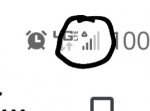
I've noticed that a weird message would pop up a few seconds after turning on my tablet. The message appears a few seconds after my home screen is loaded (before clicking on any apps) and disappears after a few seconds.

I am not familiar with any coding languages.
That's why I'd greatly appreciate any help

My device is a Samsung Galaxy Tab A

Attachments

  • 20210116_200834.jpg
    20210116_200834.jpg
    169.3 KB · Views: 351

Restricted Wi-Fi

Hi there! So I'm on a restricted WiFi network and most android apps and sites are blocked/denied on the connection, regardless of wheather I use VPNs or not.

For apps I can download the app via Google store, no problem but when I load the app it says there is no connection. Websites are unreachable, messanger won't send or receive messages. My VPN app won't even connect to any server.

So my question is, can I set certain apps to use my mobile data plan and not the WiFi so the apps/sites will work.

I tried this in - settings /mobile network/data usage/network access, There are options to allow specific apps to be granted access to Mobile Network or WiFi. I deselect WiFi, and still no connection.
I could use my mobile Internet all the time, but my monthly data usage is limited.
Thanks.

Moto E Photo ?

Hello, I am slowly getting used to my new Android MotoE. My question is about photos. Is there a setting that I can use that will pre set all the photos I take to a smaller version than they are now and also add the date the photo was taken? The camera takes good photos, but I am always having to compress them or wait for ever when attaching to an email. Thank you.

Cases Cases may introduce untouchable S-pen area just like in 2013!

Using my case with the S20 Note, I found an oval area in the middle of the right hand side of the screen become untouchable by S-pen. A little online search showed it happened before. Touching with fingers was okay!

https://androidforums.com/threads/a-small-portion-of-my-screen-wont-recognize-my-s-pen.812196/

Taking it out of the case solved it. But weird behaviour!
I wish I could get the booklet like case I used to have for the Note8. Clearly there is some clever detection going on I can use it with a good case....

Help members

Hello All , I am happy to be on this forum. I have a serious doubt . I am getting frequent messages from toyota and other app 99 acres stating that " thanks for contacting Toyota . Your query will be solved and our executive will call you."

But I have not contacted any one. Why am I getting this kind of messages . Contacted Toyota company but to of no help..they say my phone is being used by some one . Can any out here help me out with this one. Thanks

Trouble with Android Studio Install

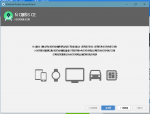
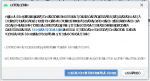
This is my second time reinstalling android studio on this machine and honestly no clue why this is happening.
upload_2021-1-16_18-13-0.png

upload_2021-1-16_18-13-6.png

All the text is weird and unreadable. I actually faced the same problem with my MATLAB install and wasn't able to resolve it. But on MATLAB there were some pop-ups that allowed me to select the text, and when I pasted the weird text into notepad, it rendered in proper English. I couldn't find anything about this online and even when I showed the weird Matlab install on the Matlab forum I didn't get any proper responses so I'm hoping I have better luck here. So any ideas about what could be going wrong would be appreciated.

Attachments

  • upload_2021-1-16_18-12-22.png
    upload_2021-1-16_18-12-22.png
    62.4 KB · Views: 277
  • upload_2021-1-16_18-12-30.png
    upload_2021-1-16_18-12-30.png
    41.7 KB · Views: 256

The Plan Icon Pack

The Plan Icon Pack

Reveal the basic structure of app Icons with The Plan a fine line Icon Pack.

Introducing The Plan icon pack. Created carefully with fine lines, textures and patterns to fulfill every minimalist's dream. The Plan icon pack have been created masterfully with an awesome blend of lines, textures and patterns to experience the high level of details in each and every app icon. Every app icon contains many layers and lots of time to provide you a great visual experience on mobile/tablet devices. Experience the unique concept and fresh design with the Plan Icon pack.

Features:
1800+ Icons and more to come in every Update.(It's Just Beginning)
Fresh and Unique Design with Fine lines, textures and patterns.
29 wallpapers.
Dozens of Launchers Supported.
Dynamic Calendar.
Auto Icon Masking to support un-theme app Icons.
Lots of alternate Icon to chose from.
Icon request Supported.
Cloud based wallpapers.
Slick Material Dashboard.
Alternate app drawer, Folders, System app icons.
Regular updates.

https://play.google.com/store/apps/details?id=com.creativepixels.theplan.iconpack

Feature.png

Hdmi adapter with Ethernet port

Hello all,

I am trying to do some streaming online from my android VIVO IQOO neo 3.

I bought a Video Capture Card and a USB c hub with hdmi output but it did not work. I tried with another one and I get the same thing!

On Amazon sellers are claiming that the Hub is working with android phones but I did not get noting on mine.

I did some research and have seen people using a simple adapter with jus one HDMI output and it worked for them. But the issue here that I wanna try playing games with Ethernet and I really need and adapter with both of them (HDMI + Ethernet). I noticed also that even if these Hubs cost money they don't deliver a fast recharge to the phone and it keeps draining battery while connected to them.

Have you guys any idea of how I can connect my phone to the Capture Card with HDMI without using any app (as apps use CPU with results in game lag) and have Ethernet in the same time while my phone is charging well?

I also thought to connect a splitter with 3 type C female and put:

- recharge caple
- hdmi simple adapter
- Ethernet simple adapter

But I really don't have a clue if this will work or broke my phone :)


Thank you in advance!

Help "Android/Data" empty. Why?

Hello everyone.
I was checking for app data on my phone when I noticed it was empty. I pretty sure this is a feature introduced by Android 11 called "scoped storage" (I think). What I'm trying to figure out is how can I view and edit app data if I can't view them in the first place. In the "My Files" app under "Android/Data" it reads that there are 0 files but when I click the "detail" option it states that there are 173 files present. Wth? I need help accessing the files for the apps I have downloaded.
Screenshot_20210115-170848_My Files.jpg
Screenshot_20210115-174511_My Files.jpg

USB-C DAC converter

Hey guys, I've been using a Usb c DAC to allow me to both charge and use my headphone output at the same time for going on a year... This weekend a random update to the phone came through and now I can only charge or use the headphones at one time... You try both and it won't play out the headphones but will charge..and play thru the phone speaker only....I cannot find any setting that would affect this so I must be missing something...

Anyone have an idea what may be going on... Any help would be appreciated.

Thanks

Dekero

Spam Capture

All,

I do not want a "SPAM BLOCKER" but a "SPAM CAPTURE" app that show me: "SAVE THIS CALL" everytime a spam or suspected spam call comes in.

As an owner previously of 3 phone companies we had tools that could "back trace" a call to it's originator. Since it is now internationally illegal to SPAM or SPOOF, with a $250K fine for every occurrence, I need this "capture" app that 1.) Saves the call info packet, 2.) Submits the info packet to a back trace server, 3.) Replies and adds the "originator" information to the original "saved" file, 4.) Notifies you when the information is complete.

Additional "nice to have" would be an auto submit to the IISC, fining the company and awarding the 10% finders fee ($25K) the IISC pays.

If you know of such an app, or the start of the same, let me know! Totally interested in getting this! I will gladly volunteer as a tester for any such app.

Cheers!

TBNK

UA3 Global update rolling out bugfixes & camera update

Only 4 days after the previous update, TL5, Samsung have started rolling out their 3rd stable Android 11 update to their Global, Exynos, S20 flagship devices... SM-G98*F/B

This release appears to be mainly for bugfixes and an update to the camera.

It is a FOTA, (Firmware Over The Air), update and you should check... Settings > Software update... to see if it has arrived for you.

Be advised, initial roll-out is mainly to stock Samsung unbranded devices and it may take longer to arrive on some carrier branded models.

The update = G98*F/BXXU5CUA3

Download size = 450.69MB

Build date = 07 January 2021

DOWNLOAD

m7OFckkl.jpg


One UI version = 3.0

Camera version = 11.0.01.20

Android Security patch = January 2021

This is the 19th stable update in 307 days = 1 update every 16 days on average

Filter

Back
Top Bottom