• After 15+ years, we've made a big change: Android Forums is now Early Bird Club. Learn more here.

Tower Shooter Pro 3D

Tower Shooter Pro 3D

Fire balls casual shooter game. Shoot rotate tower with cannon and make best score. Brake 3D twist tower Levels are randomly generated. Tower Shooter PRO 3D contains beautiful graphics. Easy gameplay. No time limit. Stack shooting - Tower Breaker - Fire Shooter. 3D Ball shooter will make you happy.

- Hit tower
- Offline gameplay
- Tap screen to shoot the balls
- Long tap to multiple shooting
- Do not hit obstacles
- Amazing 3D graphics
- Most addictive ball shooter games 2020
- Best fire shooter game 2019
- Best Ball blast game
- Best tower shooter game
- Unlimited Stack Ball game

Google Play: https://play.google.com/store/apps/details?id=com.thedgames.towershooterpro3d

Facebook: https://www.facebook.com/towershooterpro3d

Screenshot: https://i.imgur.com/T6QHhjW.png
Help How can I tell what method I used to sign into my SwiftKey account?

I just installed SwiftKey onto a new device, but I can't figure out which method to use to log in to my account. The only options seem to be Google or Microsoft.

On my other devices where I'm already logged into the account in the SwiftKey app, I can see my email address, but there's no indication of the login method.

I tried the Microsoft method but when I entered my email address, it said there wasn't an account with that email address. That would seem to leave Google as the only option, but I checked my Google Account and SwiftKey is not listed as one of the apps for which I use "Signing in with Google."

So I'm stumped as to how I should log into the app. Any thoughts on how I can be sure which is the correct method?

I created a SwiftKey account long ago, well before Microsoft even took over, and I feel like I used an email/password method to create a new account, but that doesn't seem to be an option.

Thanks!

Screen goes from normal to blurry or misty in just seconds

I have a Moto G7 Power that I have been using for about 10 months now, and recently, whenever I open it, the screen will start from normal and go to misty in a matter of seconds; specifically, one line will appear, then two, then three, and then all over the screen. Can anyone make a suggestion as to how to take care of the problem? I love this Moto G7 Power, I think it's the best phone I've ever used out of all the Android phones I've used, and I don't want to spend more money on another phone, I need help. Has anyone else experienced this issue? If so, were you able to fix it, and how?

Attachments

  • IMG_20201014_150041.jpg
    IMG_20201014_150041.jpg
    279.5 KB · Views: 341

Transferring data from a phone with broken screen

Hi Everyone,

I dropped my s9+ and cracked the screen the other day, I will be using a pixel2 as a temp phone until the new galaxy comes out next year but I was wondering if there is a way to transfer my data over to the pixel2, the usbc port still works and parts of the screen still work.. any suggestions? I'd also like to find a way to wipe the phone after transferring the data so i can sell it as a parts phone.

Thanks,

S7 died in its sleep

My brother's S7 literally died overnight. It was fine when he went to bed but when he woke up the phone was completely unresponsive except for a blue light that blinks in the top left hand corner every five seconds or so.
I've tried all the combinations of button holds to no effect, and the phone doesn't even respond to having a charger plugged in. I've tried connecting it to my laptop as a drive, but the laptop couldn't see anything connected. Is there anything else i can do before taking it to a repair shop?

S20 ultra screen burn

Hi can anyone offer advice pls
I have a s20 ultra that is displaying ghost icons from my home screen
Mainly visible on a white background
Ive had the phone for 5 months
Ive had dialogue with samsung and they arranged for a mobile engineer to come to my adress and replace the screen
On arrival i got the impression he was looking for a way out of repairing it siting miniscule marks on the edges of the frame (phone has been in a case with a screen protector since new)
He took the phone to his van but returned saying there was a crack on the screen so he couldnt do anything as the 2mm ,what i thought was a scratch, was a crack and the phones warranty was invalid because of it
So the tiny damage on the screen which has nothing whatsoever to do with the original screen burn issue has invalidated my warranty on a £1400 flagship phone
Im absolutely gutted and wondered if anyone has experienced similar?
Thank you

Help My Sony Xperia Z3 Compact is locked

I have a Sony Xperia Z3 Compact phone and it is blocked. It has the PIN lockscreen but I cannot remember it.
I tried to do the hard reset, but the buttoms do not work (power buttom + up/down), when pressed have no answer.
I tried Xperia Companion, but it says that is locked, then I cannot use it.
I tried Emma or Flash Tool, but is the same, it says I need to unlock the phone to have access.
And still, I tried those codes at the Emergency Call, it has no answer. I have no option with Google Account, because this option does not appear. And also, when I try many times, like 15 times, I have no other option offered to acess.
It has no wifi connection or anything.
I just wanted some way to have access to do a hard reset or else it is lost forever.
Can anyone help me?
Thank you.

Help Free shooting game

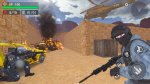
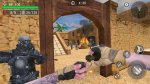
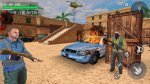
FPS commando top mission shooting game free shooting game https://play.google.com/store/apps/details?id=com.counter.terrorism.top.gun.commando.survive.master In the anti-terrorist training ground, you will Become a well-trained fighter and meet all terrorists, use gun shooting skills, and destroy all terrorist enemies in a free shooting game. We are honored to provide counter-terrorism missions for all fps game lovers. The addictive gameplay and modern weapons of war in the counter-terrorism training ground game will make your free time exciting. You are a special force of fps secret mission and must eliminate all terrorists. You are a professional army commando, so be responsible and complete the real commando shooting mission on the front line.

Attachments

  • 01.jpg
    01.jpg
    226.2 KB · Views: 234
  • 02.jpg
    02.jpg
    238.6 KB · Views: 205
  • 03.jpg
    03.jpg
    104.6 KB · Views: 197
  • 04.jpg
    04.jpg
    308.2 KB · Views: 214
  • 05.jpg
    05.jpg
    256.3 KB · Views: 207
  • 06.jpg
    06.jpg
    253 KB · Views: 213
  • 07.jpg
    07.jpg
    216.9 KB · Views: 203

Help New application:FPS commando top mission--early access

FPS commando top mission shooting game-free shooting game
https://play.google.com/store/apps/details?id=com.counter.terrorism.top.gun.commando.survive.master

In the counter-terrorism training ground, you will be a well-trained fighter and meet all terrorists, use your gun shooting skills, and destroy all terrorist enemies in a free shooting game. We are honored to provide counter-terrorism missions for all fps game lovers. The addictive gameplay and modern weapons of war in the counter-terrorism training ground game will make your free time exciting. You are a special force on the secret mission of fps and must eliminate all terrorists. You are a professional army commando, so be responsible and complete the real commando shooting mission on the front line.

Attachments

  • icon08.png
    icon08.png
    436.8 KB · Views: 225

Filter

Back
Top Bottom