• After 15+ years, we've made a big change: Android Forums is now Early Bird Club. Learn more here.

How do I block calls from private numbers?

I've been awaken by calls from private numbers well before I normally get up for the last two mornings and I find that I can't get back to sleep after that. I don't know if both calls were from the same person or two different people that coincidentally called at almost the exact same moment but it needs to stop so I can get a reasonable amount of sleep.

How do I block these calls? I'm running Android 8.0 which seems to be the newest version of Android available on this phone since I haven't been able to update the OS for a couple of years now. I've googled but that brings up options which my phone doesn't have.

I've also tried using *57 to find out who made the calls and also *77 but neither code worked with my provider.

I can see both calls in my Recents but I can't find any option to block them in Android. I'm hoping someone has a solution for me because my sleep is precious to me.

Secret Hearing Amplifier (by justkidsgames u.k.)

***PLEASE NOTE *** HEADPHONES REQUIRED.
Failure to use headphones will result in awful audio feedback. You have been warned!

Alternative app that improves your hearing using your Android devise & earphones
Depending on how good your phone is, it can become a high-powered listening device (like a hearing aid).

Fitting a hearing aid is not like buying glasses. Your hearing has decreased slowly over a long time and your brain was able to compensate. You only start noticing that you have a hearing problem, when your brain is at it's wits' end. Using a hearing aid will make noises explode in your head, because all compensation mechanisms are set to maximum. Please give your brain a few weeks time to re-calibrate it's audio system...

Whether you want to listen to nature, have a conversation, or just hear the TV better, this app aims to give you superior hearing and improve what you hear. There's more going on around you than you might realise. It's time to hear it and be amazed.

** Features **
- Control in the volume, pitch, sensitivity, stereo pan, spatial blend 2D/3D...
- 11 Options To Create Your Own Effect.
- 26 Audio Reverb Zone Effects.
- 4 Advanced Audio Filters.
- All Options Documentation.

NOTE : HEADPHONES REQUIRED. Failure to use headphones will result in awful audio feedback. You have been warned!

***MORE INFO***
Priority : Determines the priority of this audio source among all the ones that coexist in the scene.
(Priority: 0 = most important. 256 = least important. Default = 128.).
Use 0 for music tracks to avoid it getting occasionally swapped out.
Volume : How loud the sound is at a distance of one world unit (one meter) from the Audio Listener.
Pitch : Amount of change in pitch due to slowdown/speed up of the Audio Clip. Value 1 is normal playback speed.
Stereo Pan : Sets the position in the stereo field of 2D sounds.
Spatial Blend : Sets how much the 3D engine has an effect on the audio source.
Reverb Zone Mix : Sets the amount of the output signal that gets routed to the reverb zones.
The amount is linear in the (0 - 1) range, but allows for a 10 dB amplification in the (1 - 1.1)
range which can be useful to achieve the effect of near-field and distant sounds.

* The Audio Low Pass Filter passes low frequencies of an AudioSource
* The Audio High Pass
Filter passes high frequencies of an AudioSource
* The Audio High Pass Filter passes high frequencies of an AudioSource

* The Audio Chorus Filter takes an Audio Clip and processes it creating a chorus effect.


MaxDistance : The distance from the centerpoint that the reverb will not have any effect. Default = 15.0.
MinDistance : The distance from the centerpoint that the reverb will have full effect at. Default = 10.0.

Room : Room effect level (at mid frequencies).
RoomHF : Relative room effect level at high frequencies.
RoomLF : Relative room effect level at low frequencies.

DecayHFRatio : High-frequency to mid-frequency decay time ratio.
DecayTime : Reverberation decay time at mid frequencies.
Reflections : Early reflections level relative to room effect.
Reverb : Late reverberation level relative to room effect.
HFReference : Reference high frequency (hz).
LFReference : Reference low frequency (hz).
Diffusion : Value that controls the echo density in the late reverberation decay.
Density : Value that controls the modal density in the late reverberation decay.


Price:Free
Download link:https://play.google.com/store/apps/details?id=com.secrethearingamplifier

Help Water damaged Samsung Galaxy J6

So, my question is my Samsung Galaxy J6 got water damaged, now it won't start, just vibrates over and over again when i plug in the charger. When i connect it to the computer it is only recognized in the download mode. When i launch Odin, it says Added, but when i try to flash it with a combination file or a stock rom, it says Fail. I took it apart and cleaned water damage with a brush and alcohol. But still same result. Does this mean that the motherboard is damaged and there's nothing I can do about it?

N20 Ultra sim card tray in a regular N20 5g

This is the 2nd time I've posted this question, apparently the last time didn't take or was deleted for unknown reasons so here it is again.

Has anyone tried to use a Note 20 Ultra sim card tray in a non Ultra Note 20 5g? I looked down into the slot and it looks like there's contacts for reading an sd card which can't be used because of the tray slot being blanked in above the sim card slot.

(Note) If my 1st question was deleted I'd like to know why.

Testing to make sure this thing is on.

Help Can an LG Stylo 3 be just a pda ?

I have seen an acquaintance using the LG Stylo 3 and really like the way it looks and the stylus capability. It is just the right size for my hand and I plan to purchase one used. I'm not very keen on using it for a phone, but would love to use it as a pda, and maybe in the future activate it with tracfone. My question is, can this be used as just a pda with wifi without any sim card ? Can apps be side-loaded ? And, can a phone presently locked/unlocked from another carrier be eventually used with tracfone ? Thanks in advance.

Root How to ROOT the Moto E 2020 using Magisk

Alexenferman is not responsible for any damages or bricks made to your device. Please do some research if you have any concerns about rooting, its features and downsides. You are choosing to make these modifications, you should blame yourself for any mistakes you make.
Rooting may require a factory reset, please backup your data. Rooting will void your device warrany. By rooting your device, you will not be able to install OTA updates on your phone.
US carrier specific devices such as Verizon and Sprint might not be bootloader unlockable, therefore, not rootable.


Video:

Due to the limited layout options of an AndroidForums thread, I have made an article on my website and a video about rooting this phone with images and better layout. You can follow my article here: https://www.alexenferman.com/articles/MotoE2020/root-moto-e-2020-magisk


If you wish to follow the tutorial on this thread, feel free to do so.

You will need:
  • Platform Tools (Download from here)
  • Motorola Drivers
  • Windows or Linux PC
  • Bootloader Unlocked Moto E 2020
Your phone must be bootloader unlocked. Rooting your phone and not unlocking the bootloader will result in a soft brick.

Download the latest Magisk Manager APK from Github
Install the APK file. Make sure to enable "Unknown Sources" in the Settings app

PATCHING THE BOOT IMAGE

To retrieve the boot image in order to patch it, you will need to download the stock ROM for your specific variant.
Download the ROM from your variant from here or here.
Make sure you download the correct version with the exact same build number, otherwise the touchscreen, fingerprint, Wifi, Bluetooth may not work and you will have to re-flash the correct boot image or even ROM to re-gain this functionallity.

To check which region is your device, go to Settings > About Phone > Software Channel.

After downloading, open the ROM zip file with an archive manager.
Extract the boot.img file only.
Transfer the boot.img file on your phone.

On your phone, open the Magisk app.
Select "Install" > "Install" > "Select and Patch a File"
Locate the boot image in the internal storage on your phone. Select the boot.img file.

Transfer the magisk_patched.img file on your computer.

ROOTING THE DEVICE

Boot the device into fastboot mode by holding the [Volume Down] and [Power] buttons.

Connect your phone to your PC.
On your PC, open a fastboot console window.
Type:
  • fastboot devices
Your phone serial number should be displayed along with the word "fastboot" or "device" in the console.
Now, type the following commands:
  • fastboot flash boot_a patched_boot.img
  • fastboot flash boot_b patched_boot.img
Replace patched_boot.img with the path to your boot image we patched previously.
To reboot the device, type:
  • fastboot reboot
Once the device rebooted, open the Magisk app.
If you see the "Magisk is installed" message, you have successfully rooted your device!
:cool: You are done!

How can I keep a location history of my bluetooth devices?

Ok, I can't figure out how I did this. Less than a week ago, I bought a $150 Jabra bluetooth hands free set. It's the kind that just goes on one ear and has a small boom out of it. It worked great. My last headset no one could hear me. This one was working perfect. I was wearing it today when I went to the store. After I got home, I don't know how it happened, but all the sudden I noticed it wasn't on my ear. I've looked everywhere and backtracked my steps. I can't find it. I would've felt if it fell off my ear. Everytime I take it off, I plug it in to charge.. I haven't yet (that I'm aware of...) just taken it off and intentionally left it in a spot not charging. I know you can't help me find it...

I'm probably going to have to order a new one. Are there any apps I can install that would keep a location of my bluetooth devices so, when it disconnects because I misplaced it, my phone would track it on a map the last place it was connected? It would also be nice too if the headset was in range that it would tell me how close I was to it.

Do Front Cameras Reduce Notification Icon Space?

I'm considering picking one of these up (refurb) and I've never had a phone with notch or with cameras in the screen area. Front camera has been in the bezel area right above the screen. It looks like the two front cameras on this device are essentially embedded into the screen. Does that mean there is less display areas for notification icons or does the device allow for two rows of notification icons + time/battery display up top?

Microsoft Surface Laptop Go

so i just bought this computer as both of my chromebooks (Asus chromebook and the Pixelbook) just decided to crap out on me.....and yes i have done all of the troubleshooting to no avail.....i will be contacting both Asus and Google for any warranty replacements.

in the mean time i decided to get the new laptop that will be released Oct 13th. so in a few weeks i will have a pretty legit laptop. it comes with 4gig of ram 64 gigs of ssd and an I5 processor. for $549 that is not bad.

so until then it might be harder for me to reply here as i will be using a Samsung Tab A and my note 10+ to hang out here.

i will post a review when i get the laptop. i did forget to ask when i will be getting the device. it is supposed to be mailed to my house. do i get it on release day? or do i have to wait extra for it to arrive to my house?

Adware on tablet too!

My security check has come up with adware and it cannot be deleted. So it's a security risk. Samsung went into my tablet and the file isn't even in the tablet files but still getting the same ad ware security issue. Originally I was looking up V8 featured apps. All kinds of posts about the government phones through Assuranceand the adware problems. I have to say my UMXU 693CL, is the biggest piece of crap I've ever encountered for a device . This is my second phone and I'll be talking to someone and all of a sudden they can't hear me so the screen goes black you have to hold the screen after you use the power button then put in your passcode try to find the phone app and switch it to speakerphone or regular and sometimes they have to do with a couple times.
Of course you get overseas customer service who do not know anything about the products will talk over you to tell you all they know and what they're reading. They repeat my problem to me and it's nothing I said. I asked for a supervisor and they never called me back in 15 minutes as promised. The FCC regulates any telecommunications. And if this is a United States government phone but the customer service was outsourced overseas. You have no recourse.

Listen to this and listen close!
If you ever call customer service for any company and you get overseas it's the law in the United States that you have the right to ask for someone to speak to in United States. If they do not or say they cannot you tell them it's the law and if they do not connect you with someone in the United States call the FCC and fire the complaint.
Again what the hell bring the jobs back people in United States for these companies consult the problem in minutes you fight with these people overseas.

Quick share buttons

I called my post "quick share buttons" but I can't seem to find what the proper term is. I'm talking about the window that first pops up when you click on share. There is a row of quick sharing buttons (like "send by text to Mr.x" or "send by email to Mrs. Y"). Really handy buttons.

So my question is: Can we manually add some of those to the suggested list? I have a few key people in my life with whom I regularly share pictures/documents, so I would like to add certain people from my contacts and certain ways to share for each. Is that possible? If so, how?

I have a Samsung S7.

Thank you!

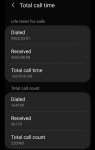
ALMOST 300K TOTAL CALLS

Any ides how my phone was able to make and receive almost 300K calls totalling close to 13K hours of talk time in that short amount of time? It's a Metro Samsung Galaxy A10e. Any thoughts would be appreciated.

Attachments

  • Screenshot_20201003-101222_Settings.jpg
    Screenshot_20201003-101222_Settings.jpg
    193.4 KB · Views: 280
  • Screenshot_20201003-101215_Settings.jpg
    Screenshot_20201003-101215_Settings.jpg
    154.2 KB · Views: 278
  • Screenshot_20201003-092836_OneDrive.jpg
    Screenshot_20201003-092836_OneDrive.jpg
    77 KB · Views: 269

Decypher gaming news, video game release and news[FREE][APP]

Decypher gaming news, video game release and news[FREE][APP]
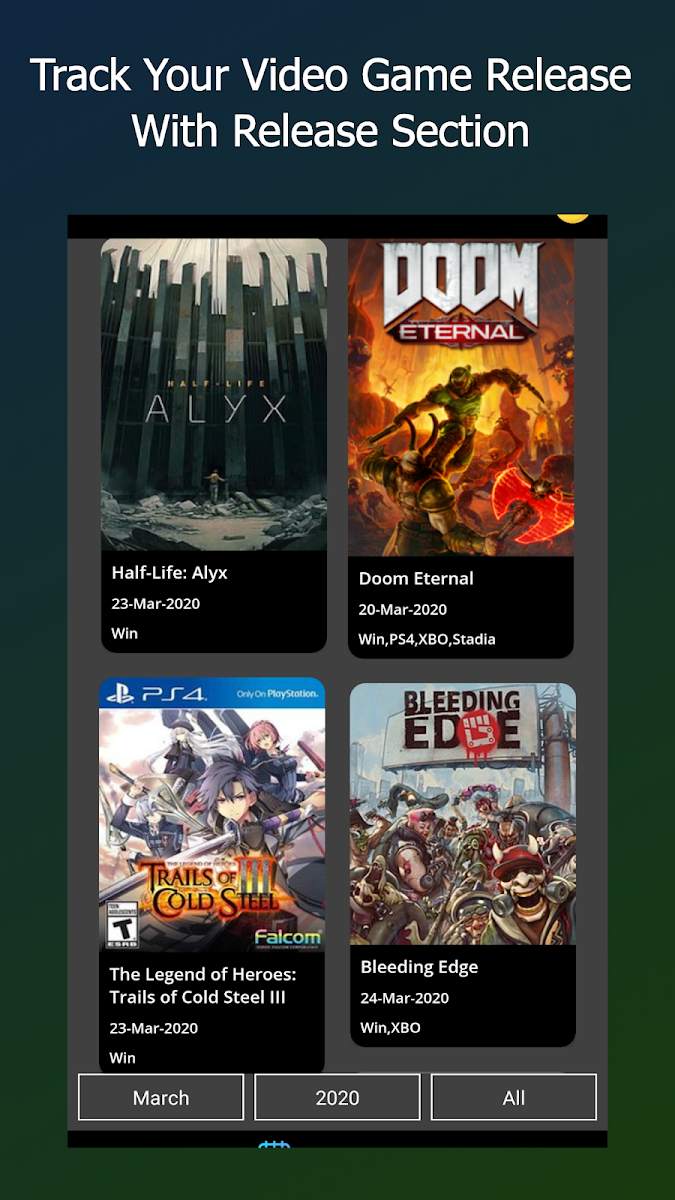
A cool new app Decypher gaming news, video game release and news
* Decypher Gaming News is new version of our beloved Gamify Gaming News app.
It is the highest rated gaming news app available on playstore, also with tons of new features and old enhances functionality.
Decypher video game news app lets its users to access gaming, gaming release and topic based gaming news in a simple, sleek interface optimized for smartphones and tablets. It has all the major gaming sources.
- Fully customizable for those who wants to personalize their news.
- You can also search gaming news for selected sources only
- Platform specific video game news and gaming news release available
- In app browser so that you do not have to leave app while reading your favorite gaming news.
- Bookmark, like and share your favorite gaming news articles
- Include video game release date, reviews, metacritic score reviews.
- You can see previous notification liked bookmark.
- First app to implement category based news where you can get gaming news base on various categories available in market.
- Dynamic theme support is also available so you can enjoy your video game news in more customized environment.
- Explore section to create your own feed section, you can fully customized your video game news.
- Dynamic Notification System so that you not miss out your favorite gaming news.
- Carousel for similar gaming news so that you can choose different sources for same game news.
- Infinite scrolling! we have millions of gaming news in out database, so that you can access previous gaming news.
Link to Download: https://play.google.com/store/apps/details?id=gamingnews.videogames.videogamenews.news
apIB0dmWsY6VW16GVPrD0daDTXVM8Q7PRp4rcV3cZm0auzaOeouelElPa-NtwdM8K6Q=w2504-h1200
de7htp9yZwymr_UbcsZE1vZLaJDQH63cYaOP_YASfp51qLRfo_PGl9KNEdgNyyD1IIKc=w2504-h1200

Samsung S7 Edge and smart door bell problems

I have a video doorbell with PIR movement detection using the XHS.cam app. The phone responds to both the bell press and movement with only a minor delay of between two or three seconds unless it has gone into sleep mode. In sleep mode the time lag for the phone to notify me that the bell or PIR has activated is between two and eight minutes in the dozen or so times I have checked. If I press the bell button or activate the PIR within three minutes of the previous working connection between the phone and the bell then there is almost instant notification on the phone. My wifi setting on the phone is set at always connected. All of the previous is the same if wifi is disconnected and I use the phone with data usage only.

Can anybody out there please suggest a fix for this before I send the phone, bell and probably the router to the bin. Thanks in anticipation, Dave.

Problem updating Android Kitkat

Hello;

I have a Galaxy S4 samsung GT - I9505 with Android 4.4.2 (Kitkat). Initially I have rooted the device Now I would like to update my Android because some apps don't work with this old version of Android anymore.

When clicking on Software update I get the message "your device has been modified. Software updates are not available" so I removed the root and did a factory reset, but I still get the same message. Tthen I tried to flash a stockfirmware with Odin 3, but at the end of the process Odin displays FAILED . I tried to install the GT-I9505_1_20161212162218_82z7glgfyj.zip firmware once, but I'm not sure if it's the right one, nor where to find the right firmware.

I'm wondering how to proceed..

patrice

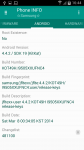
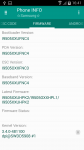
Phone info displays

galaxy S4 samsung GT - I9505

android build number KOT49H. I9505XXUFNC4

version I9505XXUGNK2

RF1D478W82J

modem board MDM9215M

Firmware

CSC version: I9505OXXFNC3
PDA version: I9505XXUFNC4
pda version: baseband version

CSC et firmware code: ORX (slovaquie)

Android 4 2  apre f reset.PNG
Android 4 2  apre f reset.PNG Android 4 2  apre f reset.PNG

Attachments

  • phone info 2 oct 20 apres f rest.png
    phone info 2 oct 20 apres f rest.png
    183.2 KB · Views: 331

Filter

Back
Top Bottom