• After 15+ years, we've made a big change: Android Forums is now Early Bird Club. Learn more here.

Accessories Lunashops: avoid this store

Hello, just a quick heads-up for those of you who might have come across this website while looking for phone/audio accessories: DON'T BUY FROM THEM.
I just bought a Bluetooth adapter there, and it stopped working after a couple of months. Upon my complaints they answered, and I quote "We should make sure you can use it forever when you buy a item?", and refused to further discuss the matter. I threw away my money, but at least now I know I'll never buy from them again.

Screen Freeze on Brave browser

Hi all,

An unwanted update to Firefox on my S5E tablet made it "Firefox for Android", which I wasn't impressed by as it took away visible tabs, making navigation of tabs just more cumbersome. I also had a curious experience when loading the Daily Telegraph site. The screen froze after loading. All other sites work normally. By cleaning data, restarting, etc, I managed to overcome the Telegraph freeze issue but thought I'd switch to Brave browser, where the tab system remains. The problem of screen freeze was there again and won't go away. I installed Brave on to my A5 and it was the same. I installed Opera on both devices and the site operated correctly.

I've been talking to the Brave forum without success and I'm awaiting a reply from the Telegraph tech support. Any ideas, meanwhile?

Thanks,

Ian

Help Help with Location on Android

So, I need help with my offline GPS.
Once upon a time, I needed an offline map. So I went on Google Play Store, installed the one with the best review and now I have it. I downloaded England on the map so, I was good to go.
But when I started my journey, my GPS didn't move. Hmm... that was strange. Luckily I was or motesting it and went to another house. But when I got there, the location suddenly moved to that house. Then it hit me. The location was where the internet was. But why? So I began to investigate...
I went to settings, I searched Location, I clicked Mode and I found this:

Battery Saving
Use WLAN, Bluetooth or mobile networks to determine location

That was the ONLY option and that was selected.
So I need help :|

My Device is a Lenovo Tab E7.

Please help me so I can use offline maps :D

Also I had a phone before and it worked so... I think there is something wrong with the device. Can anybody help me?

Galaxy 10 loses internet during phone call

On a Galaxy S10, current Android version. Whenever I am on a call and try to use the internet, there is no connection. I will also lose internet on all devices, like my laptop. If I disengage WiFi, it will return (it took weeks to figure that out). I happens in all locations. I have Comcast internet, and the tech told me he'd never heard of this (they're not always a lot of help). Anyone else experience this? Is it a setting on my phone? On the modem (altho, as I said, it does it in other locations)?

Problem with fastboot in LG G3 vigor

Hello.

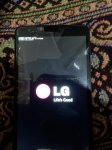
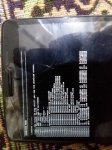
I have a problem with my mobile (LG G3 vigor LS885 sprint), You can see to image "Pic_1" which appear this problem when I try to reboot the mobile whereas show some lines about fastboot and I want to alert you about the mobile not show on PC (only show a message about connecting with unknow device) though I installed some drivers LG mobile on PC.
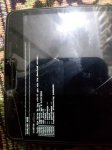
I searched about this problem and I tried to solve it by some solves, such as: make a factory reset for the mobile but show alert about can't format the mobile, then I tried to access to download mode but in it showed same these lines (please see to image: Pic_2), also I tried use LGUP but I can't use it because not access to the port after connected mobile with PC, also I used ADB but here also mobile not show after wrote a command: adb devices, and if I want to reboot mobile in this state then this process not completed (please see to image: Pic_3), and also I changed the mobile battery.

Please help me to solve this problem.
Thank you.

Attachments

  • Pic_1.jpg
    Pic_1.jpg
    398.8 KB · Views: 311
  • Pic_2.jpg
    Pic_2.jpg
    340.8 KB · Views: 280
  • Pic_3.jpg
    Pic_3.jpg
    493.7 KB · Views: 281

Help HELP! Factory Rest Note 8, 3G works but Not LTE Despite Fixing APN settings (MetroPCS+TMo)

Hi I reset my Note 8 because after using this thing for a year and half, with all the security updates, my GPS location would stop working mid drive or my push notifications would stop working.

I booted into recovery and factory reset my phone. Now the phone won't work with mobile data. Well it only works with mobile data when I am on a phone call and my signal switches from LTE to 4G. THis is the most bizzare thing I have ever seen. I only get internet when I am on a phone call

This is supposed to be the opposite behavior. I've called Metro and they couldn't help me. I suspect this might be some weird Google Security issue. I can't seem to find anyone with the same issue I am having. I have tried all sorts of settings and now just reset my phone to factory again and I am getting the same issue

Thik Thak – Short Video Sharing Community[Free][App]

Thik Thak – Short Video Sharing Community

ThikThak is a free short video app and social platform for video creators and influencers. Watch unlimited short videos, funny videos and entertainment videos by popular video creators that will make your day! Designed for people to showcase their innovative videos online, ThikThak Short video app provides an easy and seamless interface for users to create, edit and share their videos across the globe.
Features of ThikThak short video community app
- Full screen video experience with high quality short video content
- Meet new people online, make friends, chat online and watch amazing short video clips
- Create & Upload interesting short videos and get famous on ThikThak with thousands of likes and followers! Be a social media star for Free!
- Discover amazing music and short video to keep you entertained
- Light short video sharing app for you and your friends!
- Enjoy short funny videos with light humour and entertainment
- 100% Free short video sharing app
Download to Google Play: Thik Thak
PRtum-5OSWeYrGvE6MWBaM0fq0jMV0tbEgvSlSmJ-8gboGi0ugQYQa_BmBJu6Z61rnQ=w2504-h1200

Factory reset seems to have killed it

Just been given my brother's old Note 4 as a backup. Charged it up and it worked fine. On 02 Network in UK but no SIM in the phone. It still had all his accounts on it so I decided to do a factory reset. As soon as I hit the reset button the screen went off and the phone appears to be totally dead, not even responding to the battery charger. Any ideas about how to resurrect it?

Insta Downloader

Intro: Insta Downloader lets you browse instagram and includes a download button to let you download the Instagram video to MP4 (video) or MP3 (audio) format.
It's one of the easiest Instagram to video/audio downloaders available.

For more https://insta-downloader.online/
Contributor: https://apkpure.com/insta-downloade...sde.instagramdownloader/download?from=details

Attachments

Bubble Shooter Max (by DPTOOL)

"Bubble Shooter Max" is the best fun game and the most popular games for all of kind age, very exciting game, very simple and the best way to spend time when you waiting for something. Finally! A good adaptation of Puzzle Action, one of the most addictive Puzzle Action game is now available FREE for the Android market.

Now you can play single player game with 200+ levels of difficulty selectable! This version is NOT the original game from the 90's,

This is the must have game for all the fans of the bubble games genre on this platform.

This is the best bubble shooter with cool graphic, and simple themes suitable for kids baby even adults, especially the kids, they will love it so much.


How to play this game:
1. Tap on the screen to shoot the bubble in that direction With Pet.
2. Make formation of 3 or more than 3 bubbles with the same color and pop them. The more bubbles you hit the more points you will earn in this game.
3. Clear the current puzzle level to unlock the next one.
4. Match as much bubbles as you can before you run out of the move.
5. You can even choose to play previous completed levels.
6. More bubble you eliminate, higher scores you can obtain.
7. In this game there is no time limit, just try to shoot all the bubbles out to move to the next level.
8. Don't use the arrows on the bottom; just tap on the game board where you specifically want the ball.
9. Use the menu key to select the pervious done methods.


The screen of the game consists of a grid of cells, filled with rows of colored bubbles. The color scheme of the bubbles varies depending on the complexity of the game. The player sees the current and next ball for a shot. The limit of misses depends on a level of difficulty. The trajectory of the bubbles shot changes by moving the cursor. If you shoot a bubble towards an exposed wall, it will not stick to the wall but will bounce right back. This feature can be really helpful when the center of your screen is filled up with balls.

Features of "Bubble Shooter Max" game:
1. Enjoy more than 200 levels in single player game.
2. More than 100 levels in arcade game.
3. This game enables automatic saving your progress in the levels.
4. Android OS version 2.0 or newer is recommended.
5. This game is very easy to learn and flexible, even small kid can enjoy this game.
6. You can easily choose previous level of games to play.

“Bubble Shooter Max” provides high quality and lovely UI that will get you addicted for this game. Let’s download this fun game on you android device, you can even share this game with your friends and get them addicted too!


Price: Free
Download link:
https://play.google.com/store/apps/details?id=com.bubbleshooter.max

Updated to Android 10

Moto g7 power

Hardware version : PVT1

Model Number: XT1955-5

Build Number : QPO030.85-18

Software Channel : Comcast

Sim Status : Connected/In Service

Network : Xfinity Mobile

Mobile voice/data nework type: LTE


Since taking the upgrade a couple of days ago I no longer have wifi access. I have a "not in range" nag when trying to connect and my xfinity modem is about 3 foot from my phone.

The wifi works fine on my lapttop and my streaming device, just my phone is having issues.

I have tried adding my credentials manually, resetting the xfinity modem and resetting the phone connection.

The phone works otherwise, getting email and voice/text appear to be working fine.

Really do not want to roll back the update, afraid of getting in deeper water than I am in now.

Any suggestions ?

Filter

Back
Top Bottom