• After 15+ years, we've made a big change: Android Forums is now Early Bird Club. Learn more here.

How can I completely remove "Do not disturb"

I used to get notification from all sorts of apps. This helped me a lot not to forget my schedule. But since some day a few weeks ago, no app sent any notification. I started to miss meetings.

I realized it was just because "Do not disturb" mode was on. This phone might have activated it or I might have inadvertently clicked it. I don't know.

I made it "off". But how can I completely remove "Do not disturb" so that I can't even make a further mistake again? My phone is already rooted.

Help Where do I find my saved app passwords?

So I have my thumbprint activated on the side button, and it has passwords saved for apps such as snapchat, instagram etc so I don’t have to type the passwords in every time,

I need to find out what my password is as I have forgotten it but where do I go to access all my saved passwords? I tried going onto the chrome app and then passwords but only 3 things are listed for saved passwords and they are only websites?

where in settings would I need to go, smart lock? Biometrics?

g7 play twrp issues

so ive been trying to install twrp to root with magisk i have unlocked bootloader but when im in the command prompt my device does show there with the command fastboot devices but once i try to fastboot boot twrp-3.3.1-0-river.img it gives me an error downloading 'boot.img'... OKAY [ 1.353s] booting... FAILED (status read failed (Too many links)) finished. total time: 2.905s PS and boots my device up again. any idea why? any way i can fix this? cant seam to find anything online that help. thanks in advance.

Help Device Maintenance problem

Haven't seen this yet on this forum. A friend has a Galaxy j3 from Verizon. The other day I was working on her phone, when I went to settings, the Device Maintenance app came up immediately. It was impossible to get to the settings screen. Any time I went to settings it went immediately to Device Maintenance. If I pressed the back button on the Device Maintenance screen, it would show the settings screen for a second, then immediately go back to the Device Maintenance screen. Any ideas other than a hard reset. I would prefer not to lose all of the data.

Help Emojis

I have never purchased a Sony phone but am interested now ? Can someone tell me if the Xperia 1 or Sony phones in general have the emojis similar to Apple IOS or Samsung ? Not ghost emojis like the LG phones ?
Interested in getting the Xperia 1 mark ll.

Do not dumb here. Not a dumb area.

This story is about no one in particular.


One day, several years ago, I was leaving my place of employment. Changing back into my civies. Do my make sure I got it dance.

Wallet, check.

Keys, check.

Shades, check.

Phone, phone, where's my phone?


Now I rummage through my backpack, not in there.

On top of my locker? Nope.

In my locker? Nope.

Maybe if I check my pockets again. Nope, still not there.


In my backpack,? Nope.

My locker? Nope.

Oh, it must be in my pocket, nope.


Half way through the thrid take, I realize that I am only searching with one hand.

Why, you might ask.

Because I am dumb, I've been talking on the phone the whole time.

Samsung black screen

Don't know the details. But came home to find girlfriend's Samsung S6 active with black screen, she said phone fell off bed, picked it up and had black screen, she did a internet search tried some things, doesn't remember what. Now still black screen, with the words "recovery booting" slowly flashing upper left corner and every one to two minutes a image of android with the words "installing system update " appears for a couple seconds any idea to bring this phone back ?

An app for this

I'm after an app that will let me lock my phones screen, but keep say youtube or a video file i'm playing and not switch off.
Basically Netflix has this feature when playing a video, which is what i want but for watching youtube or a video file.
I've used a few apps that supposedly do this in the past, but they haven't worked very well if at all (can't remember what they were called)

Main reason for wanting this is when i'm busy working on the car, i need to have my phone in my pocket for the bluetooth signal to my headphones to still connect, but sometimes i may knock my phones screen and it will either exit the app or change position of the video.

Often i tend to listen to a video rather than watch it, if that makes sense, as i don't have a lot of spare time to sit down and watch something lol, so i prefer to just listen.

Thanks

Apps Android App Bundle not generating in Android Studio

I am trying to launch my Ionic Angular app on the Google Play Store, but no .aab file is being generated in Android Studio.

When I open the app in Android Studio, I go to Build > Generate Signed Bundle / APK

Choose Android Signed Bundle

And enter the following details:

  • Key store path: C:\my_project_path\keystore
  • Key store password: myPassword
  • Key alias: key0
  • Key password: myPassword
  • Check Export encrypted key for enrolling published apps in Google Play App Signing
  • Encrypted key export path: C:\my_project_path\android
Click Next

  • Build Variants: release
Click Finish

After this, I don't get any prompts, error messages, etc. to say whether or not the APK was created.

When I go to android or android/app, there's no release folder appearing.

I'm able to run the app using an emulator without any issues also if that's useful.

If I go to `Build` > `Build Bundle(s) / APK(s)` > `Build Bundle(s)`, an `app-debug.aab` file is created in `android/app/build/outputs/bundle/debug`.

But can't find any `release` .aab file.

Can someone please tell me what I'm doing wrong?

Rubik Wheels (by Liban Entertainment)

A challenge worthy puzzle for genius puzzle solvers!

Love puzzles or brain games? Here’s the most fun and unique puzzle which is the round version of Rubik's Cube.
RubikWheels - Fun Rubik’s Puzzle is a fun and challenging brain puzzle game that is a great exercise for your brain. The game is suited for players or puzzle lovers of all age groups. The goal of the game is simple - you must match all wheels to have the same color or just follow the color map, but the catch is that as you move one wheel, the colors in the other wheels change too, so you need to be very careful and thoughtful before making a move with RubikWheels.

The game is for genius puzzle solvers. Enjoy solving the hardest puzzle of all time. Challenge yourself and test your IQ, or challenge your friends to solve the RubikWheels Puzzle Game. The game comes with multiple game modes -
- The Rubik Wheels
- Feast of Colors
- The Door of Knowledge
- Chain Reaction (Coming Soon)
The game difficulty keeps increasing as you unlock new levels and game modes. After solving all puzzles, you can apply for contests and get a chance to win real money starting from a $1,000.

Game Highlights
Still looking for features that make “RubikWheels - Fun Rubik’s Puzzle” the most challenging and unique puzzle game? Here are highlights of the game that make it incredible and much better than the classic Rubik’s Cube Challenge -
⚙️ Multiple game modes to keep you engaged
⚙️ Beautiful and engaging game graphics
⚙️ Difficulty increases with more wheels as you advance with levels
⚙️ Play with limited moves throughout the game
⚙️ Reset and start again at any time
⚙️ Free to play

Are you excited to try it out and challenge yourself? Download this amazing RubikWheels game now to get started.

Support Us
We are constantly working hard on making the “RubikWheels - Fun Rubik’s Puzzle” game more entertaining for you by adding new game modes. We need your constant support to get going. Please feel free to email us for any queries/suggestions/problems, we will be happy to hear from you. If you have enjoyed any feature of the “RubikWheels - Fun Rubik’s Puzzle” game, please rate us on the play store.


Price:Free

Download:

https://play.google.com/store/apps/details?id=com.LibanEntertainment.RubikWheels

Android 10 feelings.

I was just updated to Android 10 today and I was excited!

That is untill after the update installed. Now I want my previous version back!.

The new feel of the system is bulky to me, the re-arrangement of a lot of the visual aspect is breaking my eyes and hurting my brain... Dark mode is cool, I immediately turned it off, no real reason to have it. Not having the option to go full screen in my apps unless its enabled by default is annoying. There was this nice little option on the nav bar that if you double tapped it, the app would go full screen and the nav bar would go away. Thats no longer an option. The way the settings are displayed feel awkward and look foreign to me. We have no option to select how our lock screen will display our date/time anymore! I liked it in the middle of my device. Now its in the upper left corner where my eyes do not naturally wander. The update to the camera software is a very nice touch. And no longer having to restart my device after a security update is a very nice feature. So we lost some features which were nice and useful in the previous version and gained a few new nice and not so nice features.

Alternative to online database to read and write files?

Hi. I am new to android development and is looking to develop and app that can read and write text files from online. It can be any website that just allow me to store files, without being a back-end. I upload the text file through my app and other people can read them from their phones. I have seen sites like box.com.

So is it possible to achive this? I can write the code myself. All I need is information on some websites like that.
Thank you.

[FREE] x=1: Learn to solve equations!

Hello and good morning!

My little math-app ‘x=1: Learn to solve equations!’ is finally available in the completely rebuild version 2.0.
Its free and without any adverticement. Link: https://play.google.com/store/apps/details?id=com.dg.eqs

e1bcfb44b56b4575bc322fb7a7d70f25.xgleich1.gif


What is it about?

Solving equations often causes difficulties, either in school or later in life. At first glance they consist of cryptic characters, which are also subject to strict rules! It gets even worse: Every time we take a step to find the desired X - we have to note down the whole equation on paper again!

For fun, to learn or to refresh your knowledge – with x=1 you can now try to find the hard to catch X without any paperwork at all! Try different approaches and find out which solution works, so you get a good feeling for the rules and dependencies.

At the moment equations build with the basic arithmetic operations + -, *, / can be solved. The rules of bracketing are also included and of course you can bring everything you like from one side of the equation to the other – if the rules allow it!

I am realy happy about your feedback!

With mathematical regards
Daniel Gronau

Rooting a Cubot King Kong 3 - a few general questions

Hello,

I'm interested in rooting a Cubot King Kong 3 phone (MT 6763 phone), which features Oreo 8.1, and I hope that I am currently posting in the correct forum category.

For my general understanding, I have a few questions and I really that somebody is so kind to help me shed some light on the following:

1. Is it possible to root any random phone just by unlocking the bootloader with ADB, flashing TWRP and then installing SuperSU in the recovery?

Is this the general approach I can use also on the Cubot King Kong 3? Or do I need a TWRP which is modified / customized for this phone? I would like to clarify this, before I do something and brick the phone.

2. What are some safety measures to take, before trying to root, so that I can reinstate the phone to the original state, if something goes wrong?

3. Do I have to disable any kind of data partition encryption so that I can root the phone? Or can I still root the phone without doing this?

4. What is a scatter file and for what is it used? I've read a lot of guides and it seems to be used only with SPFlash. Does this mean, that I do not need this, if root by going the ADB+TWRP+SuperSU route?

5. If after unlocking the bootloader with fastboot, I am getting the message "Orange State Your devices has been unlocked and can't be trusted. " at boot, then what went wrong and can this be fixed?

6. If after flashing the stock ROM, which Cubot provides on their forum, I get a red text "Not Verify" in the upper right corner of the screen every time the phone is on, then what went wrong and can this be fixed?

I am really thankful for your advice, you can't imagine!

Night Light - Blue Light Filter for android

nl0.png

Night Light
is an application that helps filter the blue light of the phone screen to protect your healthy eyes at night. This application will adjust the color of your screen to reduce blue light and reduce eye strain and trouble sleeping. A useful and worthwhile health app to have in your app collection.

What is blue light?

It's part of a natural light spectrum, which disturbs the circadian rhythm and causes sleeplessness, headache and bad eye health. Unlike red light night shade, screen light blue light blocks the secretion of melatonin, sleep hormone, and causes restlessness. Retinal neurons are in danger if night filter anti glare is not used after twilight for eye care.

Night Light reduce blue light by adjusting the screen to natural color so it greatly improve sleep.

Night Light keeps the eyes healthy by reducing the amount of blue light that reaches them.

Features:
1. Reduce blue light
2. App filter settings
3. Schedule settings
4. Save power
6. Easy to Use
7. It's FREE!

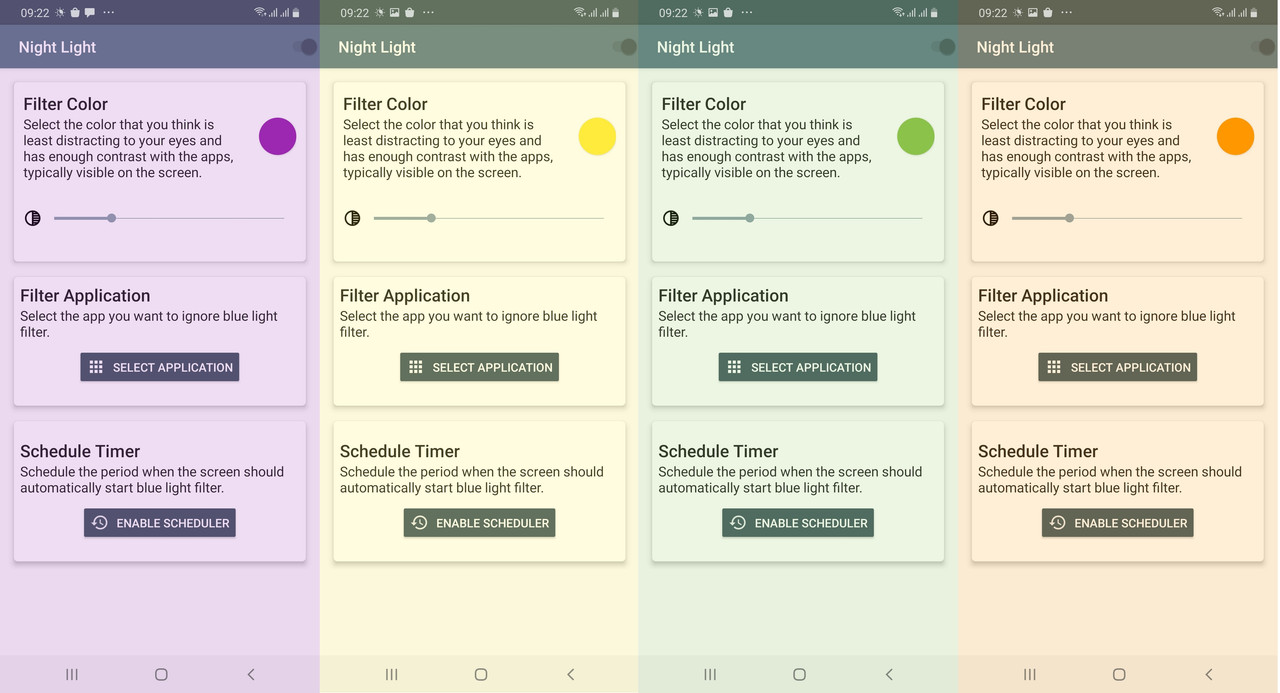
Night-Light.jpg


Reduce Blue Light
The screen filter can change your screen into natural color, so it can reduce the blue light which will affect your sleep.

App filter settings
Can set the filter on/off for each apps.

Schedule settings
Turn filter on/off automatically every day at the set time.

Save Power
Practice shows it can greatly save power because of reducing screen blue light.

Easy to Use
Handy buttons and auto timer will help you turn on and turn off the app in one second. Very useful app for eye care.

It's FREE
Night Light is free and always will be.

Night Light uses accessibility service to detect when an app is launched or closed and allows you to change the filter actions for each app.

Link download:
DOWNLOAD BLUE LIGHT FILTER

Filter

Back
Top Bottom