• After 15+ years, we've made a big change: Android Forums is now Early Bird Club. Learn more here.

Google Play Services not working

bb0ce182-f5fd-4a68-a4d2-4be29982d1ad

9758b8c2-0ddd-4150-84f7-b815804b0c25

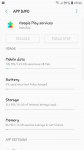
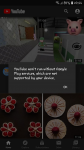
Does anyone know how to fix this. Google Play disappeared from my home screen and when I go to certain apps like youtube I get the above error message.
I've tried to uninstall and it says it was unsuccessful. Force stop, disable it greyed out. Really don't know what to do.
I have a Samsung A3 2017.

Attachments

  • upload_2020-5-31_20-47-13.png
    upload_2020-5-31_20-47-13.png
    828.6 KB · Views: 357
  • upload_2020-5-31_20-47-27.png
    upload_2020-5-31_20-47-27.png
    182 KB · Views: 325
  • upload_2020-5-31_20-48-50.png
    upload_2020-5-31_20-48-50.png
    182 KB · Views: 320

Help No OS, Broken Buttons and I'm stuck with "No Command"

Hello, I'm YellowYoshi and I have a BIG Problem (I think)..
I would appreciate it if someone could help me as soon as possible!!!

I wanted to Root my Xiaomi Mi A1 and followed the steps of Method 1 in this guide: https://www.xiaomigeek.com/root-xiaomi-mi-a1.html

Right at part 1 from the first method I ran into a Problem, it says: "2) Now, Turn off your device & Boot your device into fastboot mode. Press Power on button with Volume down button to boot into fastboot mode."

So that didn't work in the first place because my buttons are kind of broken, my volume up/+ key didn´t work at all and when I wanted to start my phone I had to press both the volume down/- and the Power button at the same time in order to start my phone normally. If I only pressed the Power button it got stuck at the "No Command" Screen...

I followed this: (https://www.xiaomigeek.com/boot-fastboot-mode-xiaomi.html) tutorial to get my phone into fastboot mode using the ADB Command method.

First Problem solved, the second one came right away:

I got stuck in part 2 of the first method, the 7th point says: Select “Swipe to allow modification“. From the menu select “Install“. Choose “twrp-installer-tissot.zip” & “Magisk-v14.0.zip” file & Install this files.

There I encountered myself with the second problem: My phone didn't mount the /data directory, so I couldn´t access the twrp-installer zip file to flash twrp onto my phone. I searched online and found this:

Second problem solved, i was able to access my internal storage but, the zip file got deleted because of the wipe i did from the tutorial. There i did not think properly...
I mounted the twrp.img file with the power shell on my computer and because of the wipe i couldn´t flash the twrp zip file onto my phone, I followed the steps in the video and also wiped the system (together with Dalvik/ART Cache, Data, Cache) off my phone, then i wanted to reboot my phone to copy the twrp zip file back to my phone and restart fastboot mode on my phone with the Power Shell. My phone didn't start up normally because of the broken button problem and showed "No Command", when i pressed the Volume Down/- and Power buttons it seemed to start normally but got stuck in a continuous Bootloop, It's then I realized that I couldn't access anything because I deleted the OS...
I searched online in order to find a tutorial on how to get the phone with Power Shell while in that "No Command" screen to get into fastboot so i could flash the twrp zip file directly onto my phone with the ADB Commands. I didn´t find anything...

So, here is where I am and what I have:
1. Unlocked Bootloader
2. Broken Buttons (means I can't access the stock recovery or bootloader)
3. My phone hangs in a continuous loop between the "No Command" Screen and the attempt to restart.
4. My Computer doesn´t recognize my phone in this state so i can´t use Power Shell in order to force restart into recovery or fastboot.

Can I (or someone else) fix my phone or do I have to consider buying a new one (which I can't afford anytime soon)?

I would be really thankful if someone could give me a solution!
Greetings and thanks to anyone who has taken the time and read this far!

Video Saving With Filter

I've been trying to record videos with this phone (recently bought) and whenever I save videos they have this awful grey filter on them. How do i rid myself of this? The video quality is gorgeous, but i cant stand the filter.

Attachments

  • Screenshot_20200531-134535.png
    Screenshot_20200531-134535.png
    1.3 MB · Views: 216
  • Screenshot_20200531-134455.png
    Screenshot_20200531-134455.png
    1.3 MB · Views: 239

App to set system date and time and then call an app?

Is there any such thing available?

Long story short: I have a backgammon app that I am sure is cheating - the developer has hidden the dice rolling routine behind ProGuard so I can't be sure.

He claims the app uses the system date and time to set the random number generator seed and then everything runs from there.

So I'd like to reset the system date and time and then call the backgammon program.......that way, I can see if the dice rolls are the same each time (they won't be I'm sure).

Any advice appreciated!

Help Nexus 10 stuck in bootloop

Hi there, I'm hoping someone can offer an idea. Our Nexus 10 took a very brief partial dip in the hot tub, had a little moisture behind the cover plate on the back but couldn't find any other moisture. It was working for a few minutes and then shut off and has been trying to restart since. It vibrates, gets to the Google screen and starts over every 10 or 15 seconds. If I hold down the power and volume down button I get to the boot screen (note at bottom says "Do not turn off target" and am unable to select or change anything on that screen before it starts over again and ends up back at the boot screen. I've also tried plugging it into my laptop to see if the connection might break the cycle and have disconnected the battery when not trying to figure it out. The Nexus slept overnight without the back cover in a gallon ziploc bag with some rice. Note - I have an old Nexus 10 that stopped working and could use parts from it if necessary. Thanks!

Update ruined phone (playlists especially)

Hi. My phone a Nokia 2.2 decided to update a couple of weeks ago. After the reboot I can't use lots of features. My main bug is the playlists. I use a number of apps for music. Phonograph, playlist creator, Playlist backup etc... but none of them will work now. The problem that's happening is that I can no longer add to my playlists. I can delete items from the existing ones but not add to them. I'm a musician and work on several pieces every day and then tend to live with them for a couple of days on my phone before deciding how to finalise the mixes. Since this update this is impossible. Since the initial update I've updated again but still have the same problem. I tend to add to the playist in playlist creator then back up to text via playlist backup then copy the text file to my laptop for editing before returning it.. None of the programs will run now. I've tried several media players and encountered the same problem on all of them.
Other programs have also been affected as Outlook no longer gives me notifications although, after doing a full phone reset to try and solve this issue Outlook now occasionally sends me a notification but it used to notify me every time I received an email and now it's only once in a while.
If there is no solution to this then does anyone know how I can roll back the updates as , if I can't use the phone like I want to , then what's the point?

Help Open specific file with Specific application

Please help i have a file that i need to open with a specific application
but i cant get to to open


public String get_mime_type(String url) {
String ext = MimeTypeMap.getFileExtensionFromUrl(url);
String mime = null;
if (ext != null) {
mime = MimeTypeMap.getSingleton().getMimeTypeFromExtension(ext);
}
return mime;
}
private void openovpn(){

Intent intent = new Intent(Intent.ACTION_GET_CONTENT); Uri uri = Uri.parse(Environment.getExternalStorageDirectory().getPath() + "/Downloads/");
intent.setDataAndType(uri,"*/*");
intent.setAction(Intent.ACTION_DEFAULT);


startActivityForResult(intent, RQS_OPEN);

Toast.makeText(VpnConfig.this,
"Single-selection: Tap on any file.\n" +
"Multi-selection: Tap & Hold on the first file, " +
"tap for more, tap on OPEN to finish.",
Toast.LENGTH_LONG).show();


}

Help Do Outlook contacts sync on Samsung?

I have just purchased my first Android phone (Samsung). I've been using Windows phones since 2012. My Nokia Lumia 830 Windows 8.1 phone has never had any problems, and still doesn't. And I could install and run apps on an SD card. But I need to move on because Windows phones are no longer updated or manufactured, unfortunately.

I'm accustomed with Windows phones for all information in Outlook to automatically sync (once I set it up syncing in Settings) in both directions with my phone. I've not yet installed my SIM into the Samsung. I do have Outlook active on it with my email accounts created.

Am I to expect the same seamless sync of contacts to this new phone that I am accustomed to? Anything I should be aware of? Where will I find the contacts on this Android phone? I think I've read that it is only possible to sync to the phone but not from the phone? If so, might this be that Microsoft does not wish Android to write to its servers?

Thanks for any comments and advice.

Filter My Recyclerview

I'm trying to implement a search view for my hockey app this is the error I get.

java.lang.NullPointerException: Attempt to invoke virtual method 'java.lang.String java.lang.String.toLowerCase()' on a null object reference

Here is my code

public class HockeyAdapter extends RecyclerView.Adapter<HockeyAdapter.ViewHolder> implements Filterable {

private ArrayList<Player> playerList;
private List<Player> playerFull;
RequestOptions option;
private Context context;

public HockeyAdapter(ArrayList<Player> playerList, Context context) {
this.playerList = playerList;
this.context = context;
playerFull = new ArrayList<>(playerList);


//request glide
option = new RequestOptions().centerCrop().placeholder(R.drawable.loading_shape).error(R.drawable.loading_shape);

}


@override
public ViewHolder onCreateViewHolder(ViewGroup parent, int viewType) {
View view;
LayoutInflater layoutInflater = LayoutInflater.from(parent.getContext());
view = layoutInflater.inflate(R.layout.hockey_cell, parent, false);
return new ViewHolder(view);
}


@override
public void onBindViewHolder(@NonNull ViewHolder holder, int position) {
final Player player = playerList.get(position);


//Load image with glide
Glide.with(context).asBitmap()
.load(player.getImage())
.centerCrop()
.apply(option)
.into(holder.pImg);


//Load text
holder.name.setText(player.getName());
holder.position.setText(player.getPosition());
holder.team.setText(player.getTeam());


}


@override
public int getItemCount() {
return playerList.size();
}

@override
public Filter getFilter() {
return exampleFilter;
}

private Filter exampleFilter = new Filter() {
@override
protected FilterResults performFiltering(CharSequence constraint) {
ArrayList<Player> filteredList = new ArrayList<>();
if (constraint == null || constraint.length() == 0) {
filteredList.addAll(playerFull);
} else {
String filteredPattern = constraint.toString().toLowerCase().trim();
for (Player item : playerFull) {
if (item.getName().toLowerCase().contains(filteredPattern)) {
filteredList.add(item);
}
}
}
FilterResults results = new FilterResults();
results.values = filteredList;
return results;
}

@override
protected void publishResults(CharSequence constraint, FilterResults results) {
playerList.clear();
if (results.values != null) {
playerList.addAll((Collection<? extends Player>) results.values);
}
notifyDataSetChanged();
}
};


public class ViewHolder extends RecyclerView.ViewHolder {

public final ImageView pImg;
public final TextView name, position, team;


public ViewHolder(@NonNull View view) {
super(view);
this.name = view.findViewById(R.id.name);
this.position = view.findViewById(R.id.position);
this.pImg = view.findViewById(R.id.imageView);
this.team = view.findViewById(R.id.team);
}
}
}


Cases Clear case with dark border/surround

Hello,

I am looking for a clear case with a black or dark surround for my S20. I like the Otterbox Symmetry case because it has a hard back and good protection but the border/surround is clear TPU which is already turning yellow. Most of the other clear cases I have found are either entirely flexible TPU or really thin and don't offer much protection compared to the Symmetry.

Can anyone recommend a clear case, with good protection, that has a black or dark border/surround?

Thanks!

Help root android permissions and access

Can anyone advise where to start?

I'm looking for advice on how you go about getting root control over a phone remotely with full co operation of the user.

I have looked into using GHOST on kali linux to establish a shell connection to an android device by using an APK exploiting the android debug bridge.

How would I from here elevate permissions further? I also would want this process, beyond the user agreeing and giving any permissions necessary to be as invisible as possible and not change anything on the users phone. e.g if someone got there phone and tried to look for this application it would be invisible.

Any one have any experience and could help? or could point me in the right direction??

[GAME] Total Racing

Total Racing is a free android racing game :

Drive top-class racing cars made by known manufacturers, customize ,upgrade your car and participate in races full of exciting challenges and professional racers.

Game Modes :

- Career : Win races, unlock levels to earn more credit and buy your dream car.

- Multiplayer : Join an exceptional Realtime Multiplayer experience and face racers from all over the world.

- Real cars
- Real tracks
- Career and Multiplayer mode
- Real driving physics
- Rich tracks and incredibles levels

full


full


full


Link To Play Store : https://play.google.com/store/apps/details?id=com.mobgames.totalracing

Help How to remove assosciation of Google account and phone

Hello all,

I signed out of my Google account ("Account 1") on my phone and removed it as an account on my phone. I then signed in to a different Google account of mine ("Account 2"), on my phone.

A later day, on a computer, I changed the password for Account 1. My phone popped up with a message telling me that the password has recently been changed for Account 1.

I have signed in to Account 1 via a Web browser on both my phone and on a computer to try to remove all assosciation of my Google Account 1 with my phone, but have not been able to figure out how to do so. I did also search the Web for an answer, but found nothing.

I will appreciate support, please.

Redmi 7a Not Working

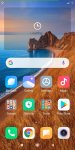
Hi. In the UK, I bought a Redmi 7a last autumn. It'll still be under warranty if the problem is something I can take to them. I don't use it that much; the only apps I've installed are Firefox and BT Wi-Fi (from my ISP). Twice now I've had the same problem, maybe a couple of months apart. The last time I fixed it by resetting the phone, but obviously I want to avoid doing that over and over. The issue is: the alarm doesn't work in the morning, I unlock and look at the phone and the whole screen is flashing, I reboot and get a home screen with a big square area at the top saying "Loading" (see screenshot). I've tried the built in "find and fix issues" app, clearing cache, searching for viruses. Help appreciated.

Attachments

  • Redmi Home Loading.jpg
    Redmi Home Loading.jpg
    821.9 KB · Views: 255

Help getting US Samsung Pay on international model of S10 Lite

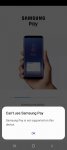
I live in the US, I purchased an international Dual SIM model of the Samsung Galaxy S10 Lite. Everything is great with the phone except the Samsung Pay app claims to not be compatible with my device... even Samsung themselves state on the description of their phone that the S10 Lite is compatible with Samsung Pay... My phone happens to be a international model which people on other sites have told me is the reason why I keep getting this Samsung Pay error, the firmware or CSC is apparently from Panama and they dont support Samsung Pay so I can't do anything when I open the app.

Is flashing the firmware of a country that supports Samsung Pay a possible solution to my issue? From the research I've done, there is no CSC available for the 'SM-G770F/DS' which is the exact model number the packaging of my phone says. There is a CSC available for the 'G770F' but it is from Mexico and while they support Samsung Pay I don't know if they would allow me to use the US version that way... not to mention the Dual SIM feature might be affected. Do you guys recommend flashing Mexico firmware onto my phone as a solution for Samsung Pay? I use Samsung Pay a lot and I would hate to be forced to buy a different phone altogether...

Attachments

  • Screenshot_20200529-204229_Samsung Pay.jpg
    Screenshot_20200529-204229_Samsung Pay.jpg
    76.7 KB · Views: 402

Filter

Back
Top Bottom