• After 15+ years, we've made a big change: Android Forums is now Early Bird Club. Learn more here.

s20 Plus camera issues

love the phone but can't seem to access the live focus mode im used to on my note 8. If I use the single take mode I sometimes get photos that I can change the background...i really like the ability to zoom the back ground or the color point option but I don't know how to access these options everything I like..does anyone know how to do that?? Thank you

Voice to Text Sluggish

This problem occurred some time back, not sure if it was related to an app installation or not. My voice to text became very sluggish and inaccurate, as if the processor was struggling to keep up. It works fine on the OK Google, but all other apps that can use voice to text respond the same, sms messages, whatsapp, anything. I did a full factory reset and then a restore and it did not solve the problem? Anyone else experience this?

Help Nextbook Tablet constantly freezes and crashes

Can someone please help me. I'm ready to throw my tablet against the wall. All I m wanna do is play games but the only apps that will run smoothly are Spotify and Droidware. I know my sec patch needs to be updated but can't figure out how. When I click on it takes me to Android open source project sec bulletins page with no instructions on how to update. I'm no programmer so this site is over my head. I'm I'm running. Android 7.1.1 but my endless research says my sec patch shud b newer than purchase date in 2017. So how's it been updated to 7.1.1. When I do for software update response is fw utd. I've done a factory reset... No help. Have sd card sharing internal memory.... Plenty of room. Droidware confirmed I'm running 7.1.1 so went to apkmirror and downloaded 7.1.2 hoping to fix and it says I'm already running 7.1.2 when I installed. Can anybody help me out please???

Hackers Keybord where's the question mark?

I have installed Hacker's Keyboard, and I think for the most part it's really great. The biggest reason I use it is because of the 4 cursor control keys. Also it has a better selection of punctuation then most other Android keyboards.

However, when using the five row keyboard, there is a sixth row above the keyboard that has all the punctuation marks. When I start typing, that row disappears in favor of showing you the word that you are typing.

There are many keys that serve multiple functions, if you press and hold a key a little pop-up allows you to select alternate things but none are a question mark.

Does anyone know of a better keyboard that allows the punctuation to still stay visible while typing and has cursor control?

Thanks, Mark.

Help Email app hasn't sync since jan 10 2020 from gmail

My galaxy s8 email app hasn't sync since jan 10 2020 .

When I open the email app it opens a box

1*)"Sign in again , there was a problem signing into your account. Enter your password again. If you changed your password recently, make sure you enter new password

XXXXXXXX@gmail.com

Password


When I start to enter password 1st character it opens :

2*)Please allow cookies
You reach this page because we detected that cookies are disabled on your browser
The page you attempted to load cannot display properly if cookies are disabled.

Please enable cookies and retry the operation or go back in your browser.

1*) I was vacation in the bahamas when I needed to access my email for vacation intinery but my password wouldn't work so it told me to my google account to change it, which I did
2*)Well cookies are enabled on my browser

Please any suggestions welcome

Note 9 update to android 10

Still waiting for my update. I'm using an SM-N960U on T-Mobile, and i'm still running android 9 with the Oct.2019 security patch. Samsung will never jump ahead of Google, until they straighten out their update system.

Still waiting for my update. I'm using an SM-N960U on T-Mobile, and i'm still running android 9 with the Oct.2019 security patch. Samsung will never jump ahead of Google, until they straighten out their update system.

No update yet, and I see that my SM-N960U has the wrong baseband for Tmo.

No update yet, and I see that my SM-N960U has the wrong baseband for Tmo.


Got tired of waiting and did it myself, via Odin.

Spyware, malware, hacker? HELP!!

I have a galaxy tab 4 7.0 (T230NU), which is rooted as well. I used a simple one click root method. I am NOT an expert so i went to google ti help me find a si ple way to root my device. I tried a few download methods and i believe that one of those links or websites had a virus in it.
You might not believe me when i tell you about what this virus or hacker even is doing to me but believe me, its the truth and i need some serious help. Ever since the day i ropted my device and went on all those different websites my tablet has beem acting very weird and so has the wifi. I randomly get new files multiple times a day witn very very long codes in different colors. All tne file names are VERY similar to thr actual android system apps but theyre fake. I went online and figured out which ones are fske and which are real and confirmed that i do have both spyware and malware on my tablet. Here is where thingd stsrt to get weird, my IP adress is always foreign now, my google searches all come back to my birthdsy. EXAMPLE - Ill search up how to bake brownies amd every single result that c,omes back shows it was posted on my birthday. The day, year and month. My talking assistant will ramdomly say 'dont do that' or she will say 'give up'. BOTH of my emails have someone else controlling them and they send out strange emails in code to at least 50 people. Someone messaged my daughter using my device remotely asking for her passwords to her games, my daughter thought it was me asking!! There was strange social media accounts that try to add me and talk to me and they all have my same first name, similar last name and always look just like me. It makes it look like i do things i dont do, search things i dont search, talk to people i dont talk to and go places i have never been. Out of nowhere on my locstiom history it says i went to georgia a few months ago and then to Russia and i have never been to either. Almost every website i go to now, my web browser always warns me thst my connection is not secure and the urls seem different too. EVEN THIS HAPPENED, i logged into my on XDA forums and it said the last time i logged in was January 1st, 1970. Im only 28 years old so thst information is impossible. My device keeps turning off ramdomly, apps keep crashing, battery dies very fast. Apps appear that i didnt download. All my phome calls have echos. Messages get deleted amd sometimes it will shoe a text sent to NO NUMBER and the message wil contain a bunch of letters. These files are extremely strange, theyre not normal. My logcat shows my camera and mic beind accessed and shows warnings about other device connections and malicious intent. I could keep going but itll tske me forever to type. I factory reset my tablet and though everything would be ok after thhat but i was wrong becsuse all of the files and apps are back with strage photos and weird words, which leads me to believe its in the wifi as well which also explaims all the unknown connections i see. Whoever hacked into my stuff is basicslly me now and has created other accounts that look like me to do idk what... whaat do i do? How can i get my accounts back or at least deleted. Is there anyway i can check to see if my informatiom is forsale on the internet, and etc.. i just want this to go away and get my stuff back. Any help would be greatly appreciated.

Attachments

  • Screenshot_2020-03-06-23-53-11.png
    Screenshot_2020-03-06-23-53-11.png
    114.8 KB · Views: 502

Accessories Caseology Parallax for Galaxy S20

I'm looking for a premium case for the phone, but I'm waiting for my Samsung credit so I can use that on a case from them. In the , I didn't want to risk running the phone naked and damaging it. As you learned in the unboxing video the phone comes with a preinstalled screen protector, which is good. Now I wanted something reasonably priced to protect the rest of the phone.

I went with the Caseology Parallax case in blue from Amazon. It's a good mix of protection and aesthetics without breaking the bank.

All the geeky stuff about material and what not, I don't know. I do know this is the style case I've used on the last three phones and none of them have broken after multiple reasonable falls (i.e. off the arm of a couch or kitchen table). My understanding is the ribbing inside has something to do with impact absorption, as shown below. If you want drop tests however, you ain't getting it from me. :p

upload_2020-3-7_11-12-13.png
The texturing on the back is subtle but gives a good grip whether in your hand or on the arm of the couch (yeah, I leave it there a lot).
upload_2020-3-7_11-18-7.png
As you will see in the images below, the buttons are prominent and easy to find by touch, and all of the cutouts are in the right places. Not earth shattering, but important if you want your phone to work correctly. One thing I will make a not of is that there is ample room around the USB port to not interfere with cables that may have a slightly wider collar. I've had problems in the past where certain cables (or earphones where applicable) wouldn't seat properly.
upload_2020-3-7_11-17-23.png

upload_2020-3-7_11-17-44.png
Finally, if you want to see it in all angles a quick video. :)
20200307_121913.gif

Raccoon: The Orc Invasion

algkl051m8l41.png

Racoon lives in a forest with his friends. He had a happy and a joyful life, until in the mountains appeared a portal.
From the portal came out some strange creatures he never saw before. They are orcs.
Your mission is to protect the forest and your friends from invaders.
Join this platformer game with a lot of levels, forest and mountains.
Every level it's unique with it's sounds wich corespond to the landscape.
An adventure waits fot you with a lot of fun and emotions.
Don't forget only you can win the orvs and close the portal.


DOWNLOAD NOW FREE:
https://play.google.com/store/apps/details?id=com.BlackDevil.RaccoonOrc

Umidigi Power 1 and power 3 owners - i have a question

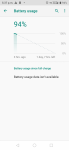
I used to own a Power 1 and it had a killer battery life when i first got it - 2 sometimes more full days on a charge. but after a few weeks it dropped to one day, then even less. But when i tried to find out what apps were draining my battery, i got a blank screen saying "battery usage data unavailable" (see screenshot)

Im wondering if this has been fixed for the umidigi power 3

im also wondering if other Power 1 owners have the same issue.

Attachments

  • umidigi.png
    umidigi.png
    582.1 KB · Views: 204

Help 101 Escape Room Mystery - Free New Games 2020

Can you escape New Escape Games 2020?

053we29caTb8ZPuYVh_27n_JMFckU2BPwcaRa5ms7-BEfJ3PlzPHUlwMgVdGX__KLKo=s180-rw


Welcome to 101 Escape Room Mystery - Free New Games 2020, the official new escape games 2020 of Adventure escape mysteries. Enjoy endless mystery in the escape room. Have fun with free new games in 2020!

https://play.google.com/store/apps/details?id=air.TTNG.EscapeGameA32

Escape Room 2020 has been specially designed for the fan of escape game lovers.in which you will enjoy different kinds of brainstorming puzzles solving and challenging by using your memory skills

Are you ready for the new free challenge of 101 room escape games?

In this game, you must escape through the different rooms and exit through the doors. The main objective is to test your escape skills. Solve the riddles to break the doors. Check if you have what it takes to be one of the chosen ones to escape from this complicated and unique puzzle game.

Escape 50 + 51 escape games are a collection of room escape, fantasy escape, classic point and click adventure games, puzzle panic rooms, and door escape. You can play these 101 escape games for girls and train your brain to make it work better and addictive games that make you challenge your brain.

101 New Escape games 2020: a collection of logical puzzles in a great design, many games in one game. The escape game 101 Doors is one of the best games of the genre, the game of escape rooms, mysterious house, floors, house escape, horror escape room, escape garden, escape from the rooms, fantasy category, forest, cave, and mystery adventure.

Can you escape the mysterious room and unlock 101 levels of escape game? A great challenge for your brain and trying to escape from all unlocked rooms. More than 100 escape games are waiting for you! and more levels to come and exciting rooms.

Explore the 101 games of the mysterious escape room inside the monument. Discover the hidden mystery found in the rooms, escape from the room and discover clues. You must find the right ways to use them to exit panic rooms. Solve your puzzle to unlock the doors.

101 Escape Room - New escape games 2020 can you escape from all rooms and overcome this amazing graphic adventure? You will definitely have the feeling of actually escaping skills.

NEW 101 LEVELS ARE HERE! Escape from the room in a Mystery world & enjoy.

Can you escape 101 rooms and beat this incredible best escape adventure? Mysterious hidden rooms obtaining special objects and beating each stage by unlocking the door.

This is the fantasy escape game in the 101 room escape series. And also games for girls and everyone will help you. Try the best games in the world!

101 Escape Room Mystery - The new free adventure game and escape games 2020 is fun! Get ready for a crazy escape room and get into a real room escape fever that makes you go crazy in these escape games. Download it for free today and join the 101 Escape Room games!

Randomly not registering the first touch?

I am noticing that in the last month or so (possibly casued by the update) my phone doesnt always register the first touch. If im about to send a text message for example, I have to hit twice. Almost like the first touch is to wake it up.

Come to think of it, as I type, I have to touch it twice sometimes. I have vibration activated (heptic feedback) as well and it doesnt vibrate when it doesnt register. Its not just with the text app, it can be with a notepad or when im playing chess. I have to repeat the "grabbing/touching" of the piece sometimes. Super annoying.

Is anyone else experiencing this problem?

How to stop Stock ROM overwriting the Custom Recovery?

I was trying to flash a Custom Recovery(TWRP) on my Friend's phone(Realme 3) It was officialy supported by TWRP and was listed on their website so I downloaded the Custom Recovery. Then I unlocked the bootloader of his phone but yes a strange thing happened there after it asked for pressing the volume button to be pressed it unlocked the bootloader but after that there was option "Select boot type". It had three options Boot to Bootloader, Boot to recovery and last Normal boot and also there was a arrow on the bootloader option. And there were some instructions something like volume up for select and volume down to move. But I tried every button but the arrow was stuck on the bootloader option. So I connected it to my device and used the "fastboot reboot" command to restart the device after restarting at the realme logo it was saying "You are unlocked you cannot be trusted" Butafter it booted normally and the phone was Factory Reset. After this in the Developer options the OEM unlocking was grayed out saying Bootloader is unlocked. Ok so we were successful in unlocking the bootloader. After that I pasted the twrp img file in the platform tools directory and put the command adb reboot bootloader and after the device was in bootloader I used the command fastboot flash recovery name.img to flash the recovery. It said sending and then writing in my terminal after that I used the command fastboot reboot and the the key combinations(power+volume down) for the device which used to get into recovery for that phone but this time instead of going into recovery it was in the bootloader. So again I tried fastboot reboot command and this pressing the power+volume up but the phone booted normally so this time I tries adb reboot recovery but it booted into stock recovery so again I tried flashing the recovery and tried using fastboot reboot recovery but it didn't work. And yes I know that after flashing the custom recovery the phone should first boot into the recovery but as I said neither the key combinations nor the fastboot reboot recovery command so what can I do to prevent the system from overwriting? PS: Sorry for long paragraph...

Filter

Back
Top Bottom