
Install the app
How to install the app on iOS
Follow along with the video below to see how to install our site as a web app on your home screen.
Note: This feature may not be available in some browsers.
-
After 15+ years, we've made a big change: Android Forums is now Early Bird Club. Learn more here.
You are using an out of date browser. It may not display this or other websites correctly.
You should upgrade or use an alternative browser.
You should upgrade or use an alternative browser.
Filters
Show only:
Motorola G5 Plus dosen't recognize my Sim card
- Smartphones
- 4 Replies
Hi,
What can be a problem of it?
Is this problem fixable?
Thak you
What can be a problem of it?
Is this problem fixable?
Thak you
Automated routine app
- By smfoley1
- Smartphones
- 1 Replies
Anybody have a good app for automating routines? For instance, I would like the bluetooth to turn off when my phone connects to either of my home wifi signals.
How to get rid of Call Services Notifications
- By RonX2
- VIP Lounge
- 5 Replies
When I carry my phone (and it's not locked), very often my hand touches the New Voicemail notification and that causes the Voice Mail to run. I don't need such a reminder. Is there a way to get rid of this notification? Thanks and hopefully this is the right forum to ask such a question in.
Help No longer have access to Google account
- By Dushka
- Smartphones
- 6 Replies
Hi,
I've got about 3 e-mail addresses associated with my S7. I recently lost access to my old uni e-mail and am now unable to update apps from the play store or download new ones (though there are some I can update manually which is strange). I believe the play store is linked to the e-mail I can no longer access which is causing the problems. I can't even seem to remove it from my phone as just get re-directed to university website to login when I attempt to do anything.
Spent some time searching for a solution as I figured it would be pretty common but found nothing (nothing helpful anyway). Does anyone have any ideas? Maybe a factory re-set or something? Not much on there that I care about, just want a functioning phone.
Cheers!
I've got about 3 e-mail addresses associated with my S7. I recently lost access to my old uni e-mail and am now unable to update apps from the play store or download new ones (though there are some I can update manually which is strange). I believe the play store is linked to the e-mail I can no longer access which is causing the problems. I can't even seem to remove it from my phone as just get re-directed to university website to login when I attempt to do anything.
Spent some time searching for a solution as I figured it would be pretty common but found nothing (nothing helpful anyway). Does anyone have any ideas? Maybe a factory re-set or something? Not much on there that I care about, just want a functioning phone.
Cheers!
Help Weird ads

- By Dracyn
- Ask a question
- 15 Replies
Hi all,
Before I get to the problem, I know ads are a necessary evil, I don't mind them much if they are SFW. And that's the problem...
For some reason Google decided that I should get dating ap ads, fine if they are SFW, well... The ones I'm getting lately are not...
Furthermore, it decides to give me wish ads, I needed a cheap wallet a while back, decided to search for a leather wallet and some funny/punny shirts, well, you can guess what kind of "leather clothing" wish ads are now suggesting...
Is there a way to block certain ad categories? (the dating app is the worst I don't want my boss to walk by and see a photo of a girl suggesting BJ's...)
Before I get to the problem, I know ads are a necessary evil, I don't mind them much if they are SFW. And that's the problem...
For some reason Google decided that I should get dating ap ads, fine if they are SFW, well... The ones I'm getting lately are not...
Furthermore, it decides to give me wish ads, I needed a cheap wallet a while back, decided to search for a leather wallet and some funny/punny shirts, well, you can guess what kind of "leather clothing" wish ads are now suggesting...
Is there a way to block certain ad categories? (the dating app is the worst I don't want my boss to walk by and see a photo of a girl suggesting BJ's...)
Xperia - Samsung Galaxy watch notification problem
- By Mutak94
- Smartphones
- 0 Replies
Hi,
I have a Samsung Galaxy Watch paired to my Xperia L3 smartphone.
On my Xperia, I have two user profiles. Whenever I switch from my main profile to my secondary profile and then back to main, I get a notification "Can't show notifications on the smartwatch - please allow Galaxy Wearable access to the notifications". The problem is, Galaxy Wearable was already allowed access to the notifications.
Furthermore, I installed Galaxy Wearable to my secondary profile too and gave it access to the notifications too in hopes that this would go away. However, it didn't.
The notification is very annoying because it can't be swiped away, the only way to get rid of it is to restart my phone.
I am also never getting this notification on my secondary profile, just the main one.
How can I prevent this from happening?
I have a Samsung Galaxy Watch paired to my Xperia L3 smartphone.
On my Xperia, I have two user profiles. Whenever I switch from my main profile to my secondary profile and then back to main, I get a notification "Can't show notifications on the smartwatch - please allow Galaxy Wearable access to the notifications". The problem is, Galaxy Wearable was already allowed access to the notifications.
Furthermore, I installed Galaxy Wearable to my secondary profile too and gave it access to the notifications too in hopes that this would go away. However, it didn't.
The notification is very annoying because it can't be swiped away, the only way to get rid of it is to restart my phone.
I am also never getting this notification on my secondary profile, just the main one.
How can I prevent this from happening?
Annoying Screen Locking
- By caprionyx
- VIP Lounge
- 3 Replies
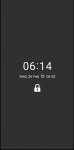
Hi all, Since last two days my phone suddenly is locking with a black screen floating padlock symbol with a digital clock and date and alarm symbol.This display turns on immediately as soon as screen idle / not used and blocks everything until home button hard pressed or power key depressed which is very annoying and pin code screen comes after that. pic posted belowhttps://paste.pics/86BJ8[/IMG]
I have turned on / off AOD and this screen display is not AOD as AOD is being displayed separately if turned on.I have tried every option and setting I can think of but this screen does not disable.
Is there any way or app or option to disable this screen locking my phone.
I have tried all options from settings /lockscreen/etc...
I have turned on / off AOD and this screen display is not AOD as AOD is being displayed separately if turned on.I have tried every option and setting I can think of but this screen does not disable.
Is there any way or app or option to disable this screen locking my phone.
I have tried all options from settings /lockscreen/etc...
Attachments
Wanna seal some good old memories? Secure it with Folder Vault (FV) - No Ads Privacy app
- Apps & Games
- 0 Replies
Folder Vault (FV)

FolderVault (FV) for Android is a file hide expert to keep safe your phone from annoying snoopers and prying eyes. With Folder Vault app your privacy is well protected
File Locker Highlights:
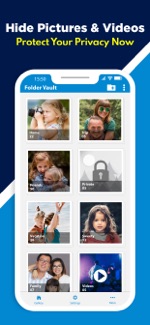
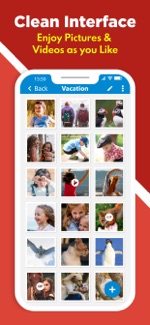
FolderVault is the best Gallery Locker app for your device. You can easily manage the folders or albums of gallery and view, move, delete and export locked pictures and videos.
More features:
Special Features of Photo and Video locker app:
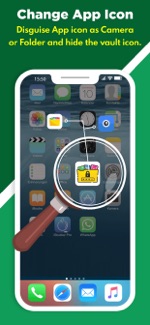
1. Change App Icon
You can change the app icon displayed on the device. Camera and Folder icon can be selected to disguise.
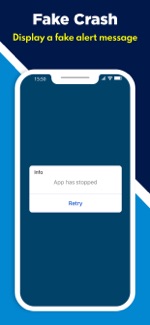
2. Fake Crash
Display a fake alert message as app has stopped with retry button on every app open.
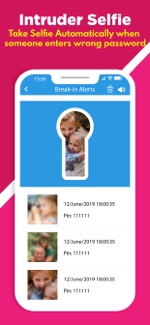
3. Break-in Alerts (Intruder Selfie)
Takes a selfie photo of the person when entering wrong password on the app lock screen. You can enable option to play a Siren horn sound too.
4. Recycle Bin
Photos, video and private files deleted inside the app are stored on the recycle bin for 60 days after delete. So you can restore or recover if you have mistakenly deleted them.
5. Random Password Keyboard
When you open the secret app, the keyboard arrangement is different each time. So near by person cannot guess the secret app password.
6. Share to FolderVault
You can lock photos and hide videos with out opening the app. Choose your private files and click share and select the Folder Vault app icon. All selected private pictures and videos are automatically locked inside the app.
7. Fake Password (Dual gallery)
In critical case if you are required to open the locker app, you can use the option to show a fake gallery. You can also use this as a secondary locker too.
Note: Settings will not be available on the fake gallery locker.
8. Hide icon
The vault app icon can be hidden from the device icon list. No one will know you are using folder and file locker app to hide pictures and private videos. Make sure you try how to bring back or open the app when its hidden.
9. Disable Keypad
The app keypad can be locked for few seconds if entered a wrong password. This feature can prevent anonymous access easily.
10. Screen Off Action
In Emergency case you can assign an action when needs to be done. Either lock the app or quit app and goto device home screen. This is really helpful in many cases like, you receive a call when viewing hidden photos or videos
11. Export and Unhide
if you have too many files and folders locked in the app. this feature helps to unlock or export a copy of locked files in one click.
12. Backup and Restore
Very useful feature when you wanted to take a backup of the secured files. You can easily backup data and transfer lock files, hidden photos, private videos, audio recording and confidential documents to a new Android device.
13. Theme
20 Colour themes to choose according to your mood.
14. Lock Folder
If you have many folder, sub folder & files to lock at once, this feature will help you to lock all files under one main or base folder.
Website: https://FolderVault.app/
Download from playstore (Android): https://play.google.com/store/apps/details?id=fv.foldervault.pro
Download from Appstore (iOS): https://apps.apple.com/in/app/folder-vault-fv-photo-locker/id1473913187
With FolderVault, your privacy is secured.
FolderVault (FV) for Android is a file hide expert to keep safe your phone from annoying snoopers and prying eyes. With Folder Vault app your privacy is well protected
File Locker Highlights:
- Photo Locker, you can hide your personal pictures.
- Video Locker, hide your private or comedy video easily.
- No storage limitation to hide cool photos and hd video.
- Disguise App (Change app icon) no one knows the existence of Folder vault except you.
- Deleted files by mistake? No problem Recycle Bin contains all deleted files (helps to Keep Safe your files)
FolderVault is the best Gallery Locker app for your device. You can easily manage the folders or albums of gallery and view, move, delete and export locked pictures and videos.
More features:
- Password recovery (email & security questions to keep safe)
- Bulk photo locker and unlock the vault folder easily
- Create Unlimited Folder & lock files easily, it helps to organise.
- Change folder thumbnail
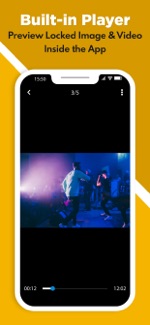
- Photo locker has an in-built Viewer to preview pictures
- Video player support HD Video files
- Support GIF file locker and can preview GIF animations
- Move files between folder vault album
- Share locked files from app directly
- App is hidden on the Recent task list
Special Features of Photo and Video locker app:
1. Change App Icon
You can change the app icon displayed on the device. Camera and Folder icon can be selected to disguise.
2. Fake Crash
Display a fake alert message as app has stopped with retry button on every app open.
3. Break-in Alerts (Intruder Selfie)
Takes a selfie photo of the person when entering wrong password on the app lock screen. You can enable option to play a Siren horn sound too.
4. Recycle Bin
Photos, video and private files deleted inside the app are stored on the recycle bin for 60 days after delete. So you can restore or recover if you have mistakenly deleted them.
5. Random Password Keyboard
When you open the secret app, the keyboard arrangement is different each time. So near by person cannot guess the secret app password.
6. Share to FolderVault
You can lock photos and hide videos with out opening the app. Choose your private files and click share and select the Folder Vault app icon. All selected private pictures and videos are automatically locked inside the app.
7. Fake Password (Dual gallery)
In critical case if you are required to open the locker app, you can use the option to show a fake gallery. You can also use this as a secondary locker too.
Note: Settings will not be available on the fake gallery locker.
8. Hide icon
The vault app icon can be hidden from the device icon list. No one will know you are using folder and file locker app to hide pictures and private videos. Make sure you try how to bring back or open the app when its hidden.
9. Disable Keypad
The app keypad can be locked for few seconds if entered a wrong password. This feature can prevent anonymous access easily.
10. Screen Off Action
In Emergency case you can assign an action when needs to be done. Either lock the app or quit app and goto device home screen. This is really helpful in many cases like, you receive a call when viewing hidden photos or videos
11. Export and Unhide
if you have too many files and folders locked in the app. this feature helps to unlock or export a copy of locked files in one click.
12. Backup and Restore
Very useful feature when you wanted to take a backup of the secured files. You can easily backup data and transfer lock files, hidden photos, private videos, audio recording and confidential documents to a new Android device.
13. Theme
20 Colour themes to choose according to your mood.
14. Lock Folder
If you have many folder, sub folder & files to lock at once, this feature will help you to lock all files under one main or base folder.
Website: https://FolderVault.app/
Download from playstore (Android): https://play.google.com/store/apps/details?id=fv.foldervault.pro
Download from Appstore (iOS): https://apps.apple.com/in/app/folder-vault-fv-photo-locker/id1473913187
With FolderVault, your privacy is secured.
Charging problem with Samsung S2 Tablet
- By donald_s1
- Ask a question
- 5 Replies
My wife has an 8" Samsung S2 tablet that she virtually lives on. She sometimes uses it 10 hours a day. Between reading books, sending email, playing games, etc.
The tablet has a charging problem that is driving me up a tree. The charger has a base that you plug a USB/Micro USB cable into. If my wife keeps it plugged in, the tablet will stay charged. Until...
After awhile something happens with the cable. The tablet decides that essentially it's a data cable. So instead of drawing 2 amps, it's drawing something like 50 milliamps. It's charging, but just barely. We are now on cable number 5, which has also gone to the dark side.
So I decided heck with it, I'll just get her a new tablet. But now I learn that the industry has decided that a light, powerful 8" tablet is something that no one wants. But a 10" tablet is awful big and heavy to hold and use all day long.
So my questions:
1. Is there a way I can convince this stupid tablet to continue to draw current at 2 amps?
Or
2. Is there a nice, light, powerful 8" tablet on the market that I can get her? I personally have a Samsung Tab A, and it won't do the job.
Thanks for any help!!!!
Don
The tablet has a charging problem that is driving me up a tree. The charger has a base that you plug a USB/Micro USB cable into. If my wife keeps it plugged in, the tablet will stay charged. Until...
After awhile something happens with the cable. The tablet decides that essentially it's a data cable. So instead of drawing 2 amps, it's drawing something like 50 milliamps. It's charging, but just barely. We are now on cable number 5, which has also gone to the dark side.
So I decided heck with it, I'll just get her a new tablet. But now I learn that the industry has decided that a light, powerful 8" tablet is something that no one wants. But a 10" tablet is awful big and heavy to hold and use all day long.
So my questions:
1. Is there a way I can convince this stupid tablet to continue to draw current at 2 amps?
Or
2. Is there a nice, light, powerful 8" tablet on the market that I can get her? I personally have a Samsung Tab A, and it won't do the job.
Thanks for any help!!!!
Don
Help Call recorders not working

- By lemarre
- VIP Lounge
- 2 Replies
Hi all,
I have an s8 which is rooted. I have tried a few different call recorders, I can hear my own voice in the recordings but not the caller. It's legal to record conversations in Australia as long as you're party to the conversation. Any ideas?
I have an s8 which is rooted. I have tried a few different call recorders, I can hear my own voice in the recordings but not the caller. It's legal to record conversations in Australia as long as you're party to the conversation. Any ideas?
Convert mp4 to mp3
- By Rgarner
- VIP Lounge
- 16 Replies
Is there a good, reliable way to do that? I looked it up but it all seemed to be for computers. I just want to get the music out of a video.
When watching videos

- Smartphones
- 5 Replies
Why does this happen when I'm watching videos
Attachments
Down loading appts
- By nbkcuxx
- Apps & Games
- 3 Replies
Is there a way to down load apps without wifi? I don't have wifi at home but I have unlimited data on my phone.
Free Beer for Leap Day!!!!!!!!!!!!!!!!!!

- By Unforgiven
- Food and Beverage
- 8 Replies
I'm not sure if this is real or not, but I can guarantee I'm going to check it out on Saturday.
https://www.thrillist.com/news/nation/miller-lite-free-beer-leap-day
https://www.thrillist.com/news/nation/miller-lite-free-beer-leap-day
Samsung's Galaxy S20 smartphones are the first to reach 'Certified USB Fast Charger' status

- By NightAngel79
- Smartphones
- 5 Replies
Via Techspot:
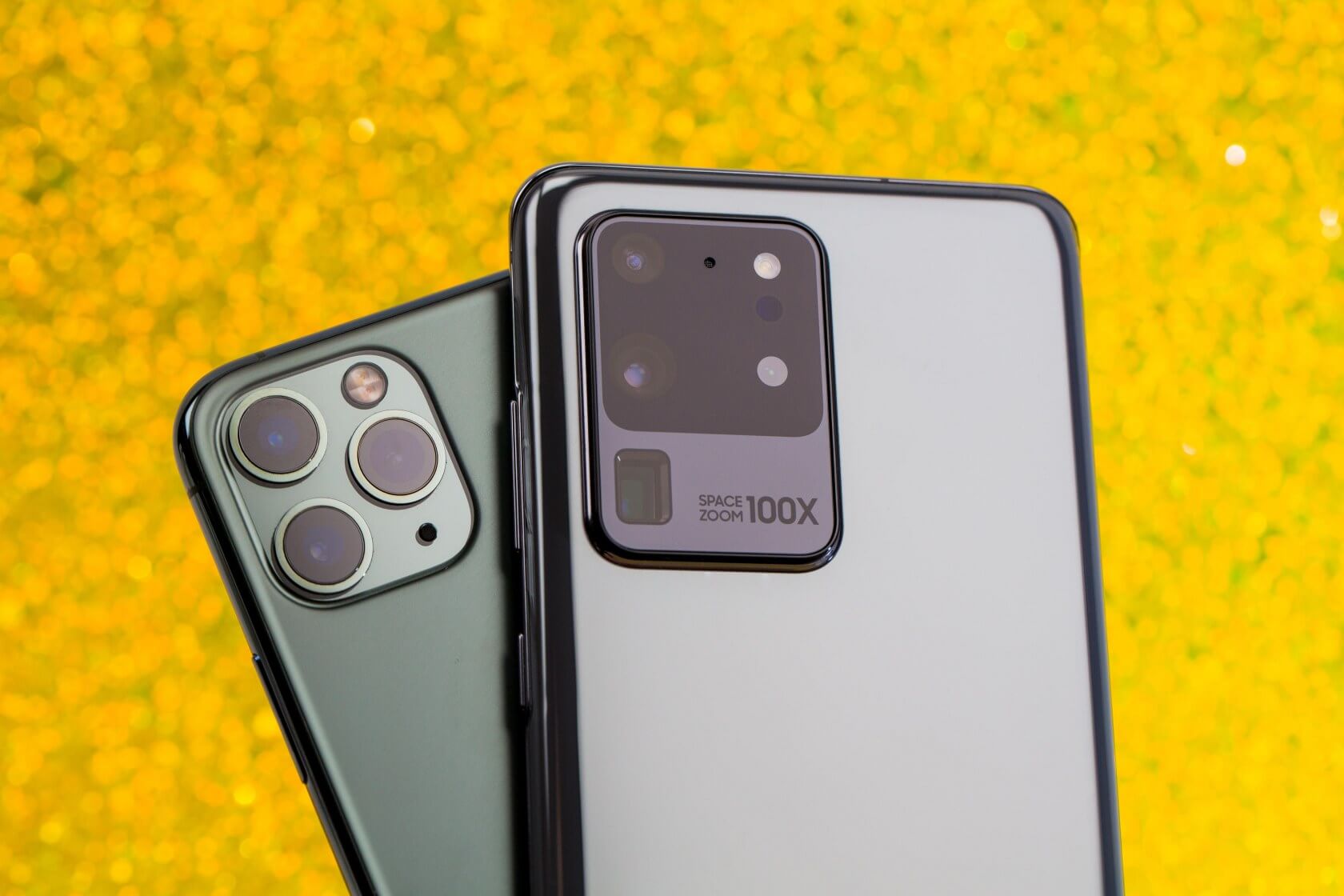
What just happened? The USB Implementers Forum (USB-IF), the organization responsible for establishing standards for the USB interface, has announced that Samsung's Galaxy S20 family of smartphones are the first devices to achieve "Certified USB Fast Charger" status.
Certified USB Fast Charger status comes with a few requirements, which Samsung has fulfilled. To meet the certification, a given device must support the Programmable Power Supply (PPS) feature of the USB Power Delivery (USB PD) 3.0 specification. This technology enables smartphones to charge faster while "better" managing thermals.
In theory, this news should mean Samsung's devices will officially work with a much broader range of certified Fast Chargers. The USB-IF hopes the USB Fast Charger certification will increase the "reusability and sharing" of chargers across "all compliant devices," reducing electronic waste and paving the way for a more convenient user experience.
"Galaxy S20 series has been certified to be compliant to the USB standards which means Galaxy S20 has met the highest standards in the industry," Samsung VP of "Power Solution" Kisun Lee said in a statement. "We believe that a convenient user experience is the most important value and using a robust and inherently safe USB PD standard ensures interoperability and an optimized charging experience."
The standard Galaxy S20 and S20 Plus will reportedly boast fast charging speeds of up to 25W, with the S20 Ultra kicking it up a notch to 45W. The first S20 devices are expected to hit the market early next month, with price tags starting at $1,000.
https://www.techspot.com/news/84156-samsung-galaxy-s20-smartphones-first-receive-certified-usb.html
What just happened? The USB Implementers Forum (USB-IF), the organization responsible for establishing standards for the USB interface, has announced that Samsung's Galaxy S20 family of smartphones are the first devices to achieve "Certified USB Fast Charger" status.
Certified USB Fast Charger status comes with a few requirements, which Samsung has fulfilled. To meet the certification, a given device must support the Programmable Power Supply (PPS) feature of the USB Power Delivery (USB PD) 3.0 specification. This technology enables smartphones to charge faster while "better" managing thermals.
In theory, this news should mean Samsung's devices will officially work with a much broader range of certified Fast Chargers. The USB-IF hopes the USB Fast Charger certification will increase the "reusability and sharing" of chargers across "all compliant devices," reducing electronic waste and paving the way for a more convenient user experience.
"Galaxy S20 series has been certified to be compliant to the USB standards which means Galaxy S20 has met the highest standards in the industry," Samsung VP of "Power Solution" Kisun Lee said in a statement. "We believe that a convenient user experience is the most important value and using a robust and inherently safe USB PD standard ensures interoperability and an optimized charging experience."
The standard Galaxy S20 and S20 Plus will reportedly boast fast charging speeds of up to 25W, with the S20 Ultra kicking it up a notch to 45W. The first S20 devices are expected to hit the market early next month, with price tags starting at $1,000.
https://www.techspot.com/news/84156-samsung-galaxy-s20-smartphones-first-receive-certified-usb.html
The all new LG V60 THINQ 5G

- By LG
- Smartphones
- 0 Replies
LG V60 ThinQ 5G
World Class Cameras and Audio/Video Quality
LG has equipped the LG V60 ThinQ 5G with its most advanced camera features and technologies yet, to offer next-level videography experiences. The LG V60 ThinQ 5G features two rear cameras and a time of flight (ToF) sensor array, including a 64MP main camera lens for sharper, brighter images regardless of lighting conditions. Also available is a 13MP wide angle lens for more agile and all-encompassing shots. For the first time ever on an LG device, LG V60 ThinQ 5G supports 8K video recording for capturing videos in stunning 8K quality and jaw-dropping detail.
Alongside the latest camera and video innovations, LG’s latest smartphone continues the company’s legacy of leveraging the very best technologies for superior audio performance. Four brand-new, high-performance microphones allow for recording sounds from various directions to deliver realistic audio experiences no matter the surroundings. The device also offers Voice Bokeh, a feature that separates users’ voices from background noise, allowing content creators to place more focus on the subject while reducing excess noise. Also included is the LG 3D Sound Engine, an audio processing technology first introduced on LG OLED TVs. This innovation recognizes the type of content and optimizes the sound accordingly for a more cinematic quality.
All-Day 5G
Built to get the most from 5G, LG’s newest V series device packs a generous 5,000mAh battery for extended use of the 6.8-inch OLED display and LG Dual Screen, meaning more time for streaming high quality games, movies and video calls. The LG V60 ThinQ is also equipped with the flagship Qualcomm® Snapdragon™ 865 Mobile Platform with the Qualcomm® Snapdragon™ X55 5G modem to enable staggering multi-gigabit 5G connectivity.
Modern, Functional Design
Both the phone and the upgraded second screen accessory come with super sharp 20.5:9 ratio FHD+ P-OLED displays that are almost a half inch larger than before. Even so, the new Dual Screen tips the scale at the same superbly portable weight as its predecessor, thanks to the thinner OLED panel. With a ribbed back for a more secure grip and the same-sized OLED panel found in the V60 ThinQ 5G, LG Dual Screen doubles the available screen real estate to make multitasking, productivity, gaming and entertainment more enjoyable than ever. What’s more, users can set the LG Dual Screen’s 2.1-inch Cover Display to always display key information for easy access at a glance or configure it to time out after 10 seconds.
LG V60 ThinQ 5G also features a design that seamlessly brings together metal and glass for a premium feel in the hand. Coupled with two exciting new colors, chamfered edges and a spacious 6.8-inch OLED display, the smartphone up-levels design for the 5G era.
“Our strategy is to introduce differentiated 5G devices to meet the rise in consumer demands as the global 5G market matures,” said Morris Lee, president of LG’s Mobile Communication Company. “The LG V60 ThinQ 5G with the Dual Screen is the ideal device for consumers who love to create, consume and share content in the 5G era.”
The LG V60 ThinQ 5G will roll out in key markets of North America, Europe and Asia starting next month.
http://www.lgnewsroom.com/2020/02/l...-screen-designed-for-a-truly-mobile-future-3/
- Chipset: Qualcomm® Snapdragon™ 865 Mobile Platform with Snapdragon X55 5G Modem
- Display: 6.8-inch 20.5:9 FHD+ P-OLED FullVision (2,460 x 1,080 / 395ppi)
- Memory:8GB RAM / 128GB or 256GB ROM1 / microSD (up to 2TB)
- Camera:
– Rear: 64MP Standard2 (F1.8 / 0.8μm / 78˚) / 13MP Super Wide (F1.9 / 1.0μm / 117˚) / Z Camera (ToF Receiver / Emitter)
– Front: 10MP Standard (F1.9 / 1.22μm / 72.5˚) - Battery: 5,000mAh
- Operating System: Android 10
- Size: 169.3 x 77.6 x 8.9mm
- Weight: 214g
- Network: 5G / LTE / 3G / 2G
- Connectivity: Wi-Fi 802.11 a, b, g, n, ac, ax / Bluetooth 5.1 / NFC / USB Type-C (USB 3.1 Compatible)
- Biometrics: In-Display Fingerprint Sensor
- Colors: Classy Blue, Classy White
- Other: Stereo Speaker / 4Ch Microphones / AI CAM / Google Lens / 32-bit Hi-Fi Quad DAC / LG 3D Sound Engine / HDR10+ / Qualcomm Quick Charge™ 4+ / MIL-STD 810G Compliance / IP68 Water and Dust Resistance / LG Pay / FM Radio
- Display: 6.8-inch 20.5:9 FHD + P-OLED FullVision (2,460 x 1,080 / 395ppi)
- Cover Display: 2.1-inch Mono
- Size: 175.9 x 86 x 14.9mm
- Weight: 134g
- Contact Type: USB Type-C
- Folding Type: 360 Freestop Hinge
- Colors: Black, White
World Class Cameras and Audio/Video Quality
LG has equipped the LG V60 ThinQ 5G with its most advanced camera features and technologies yet, to offer next-level videography experiences. The LG V60 ThinQ 5G features two rear cameras and a time of flight (ToF) sensor array, including a 64MP main camera lens for sharper, brighter images regardless of lighting conditions. Also available is a 13MP wide angle lens for more agile and all-encompassing shots. For the first time ever on an LG device, LG V60 ThinQ 5G supports 8K video recording for capturing videos in stunning 8K quality and jaw-dropping detail.
Alongside the latest camera and video innovations, LG’s latest smartphone continues the company’s legacy of leveraging the very best technologies for superior audio performance. Four brand-new, high-performance microphones allow for recording sounds from various directions to deliver realistic audio experiences no matter the surroundings. The device also offers Voice Bokeh, a feature that separates users’ voices from background noise, allowing content creators to place more focus on the subject while reducing excess noise. Also included is the LG 3D Sound Engine, an audio processing technology first introduced on LG OLED TVs. This innovation recognizes the type of content and optimizes the sound accordingly for a more cinematic quality.
All-Day 5G
Built to get the most from 5G, LG’s newest V series device packs a generous 5,000mAh battery for extended use of the 6.8-inch OLED display and LG Dual Screen, meaning more time for streaming high quality games, movies and video calls. The LG V60 ThinQ is also equipped with the flagship Qualcomm® Snapdragon™ 865 Mobile Platform with the Qualcomm® Snapdragon™ X55 5G modem to enable staggering multi-gigabit 5G connectivity.
Modern, Functional Design
Both the phone and the upgraded second screen accessory come with super sharp 20.5:9 ratio FHD+ P-OLED displays that are almost a half inch larger than before. Even so, the new Dual Screen tips the scale at the same superbly portable weight as its predecessor, thanks to the thinner OLED panel. With a ribbed back for a more secure grip and the same-sized OLED panel found in the V60 ThinQ 5G, LG Dual Screen doubles the available screen real estate to make multitasking, productivity, gaming and entertainment more enjoyable than ever. What’s more, users can set the LG Dual Screen’s 2.1-inch Cover Display to always display key information for easy access at a glance or configure it to time out after 10 seconds.
LG V60 ThinQ 5G also features a design that seamlessly brings together metal and glass for a premium feel in the hand. Coupled with two exciting new colors, chamfered edges and a spacious 6.8-inch OLED display, the smartphone up-levels design for the 5G era.
“Our strategy is to introduce differentiated 5G devices to meet the rise in consumer demands as the global 5G market matures,” said Morris Lee, president of LG’s Mobile Communication Company. “The LG V60 ThinQ 5G with the Dual Screen is the ideal device for consumers who love to create, consume and share content in the 5G era.”
The LG V60 ThinQ 5G will roll out in key markets of North America, Europe and Asia starting next month.
http://www.lgnewsroom.com/2020/02/l...-screen-designed-for-a-truly-mobile-future-3/
Is anyone interested in this bad boy?

- By Steven58
- Smartphones
- 17 Replies
This phone comes out in the Spring, but I must admit this phone intrigues me. I'm not a fan of 5G.. Why? Because I can't find it ANYWHERE!!!! 
On the other hand, did you see the size of this battery? Man! 5k mAh should last me a full day, hopefully! (I'm a phone hog).
I'd love to hear impressions of anyone who has this monster and if you have been able to use 5g, when the phone comes out Thanks!
On the other hand, did you see the size of this battery? Man! 5k mAh should last me a full day, hopefully! (I'm a phone hog).
I'd love to hear impressions of anyone who has this monster and if you have been able to use 5g, when the phone comes out Thanks!
So *$!)%#@! hard on the eyes!

- By MoodyBlues
- Suggestion Box & Feedback
- 15 Replies
Good grief, it's really getting to me! The JARRING (thanks, @Hadron) bold black text:

Blue, beautiful blue, even when you're bold, underlined, you're still so easy on the eyes.
I miss you...beautiful blue...
Blue, beautiful blue, even when you're bold, underlined, you're still so easy on the eyes.
I miss you...beautiful blue...
Snb file transfer
- Ask a question
- 1 Replies
Hi I have loads of lyrics I'd wrote on s memo on my Samsung s4 it's long broken but I managed to copy them all onto my micro sd before it did. I wanted to get to them but don't have a p.c so bought a Samsung tab a6 thinking they would be compatible with its version but can't view them, I've downloaded the s memo apk but still can't open them. When i try in my file manager it says open in s note but the version on app store isn't compatible on my device does any one pleeease have an answer as to what I can do to get to them even just in an image format not to edit ...ANYTHING thanks
No media help
- By Oshhshwwn
- Smartphones
- 0 Replies
I left my phone for a few minutes and it suddenly muted the sound. I tried rebooting it but that didn't work. I turn all the ringtone and media all the way up but that didn't work. I searched for solutions on google but all they say was that the 'do not disturb ' was on. I checked it and I am sure it wasnt on .It muted the media, so whatever app I use there isn't any sound at all. Even when the screen indicates that the media is ' all up'.There is sound on my earphones but I want to get the problem fixed insteadof just using earphones. My phone is pretty new so I hope someone will help me find a solution to this so I dont have to reset everything again.
LGV60
- Smartphones
- 0 Replies
Are any current US candidates...

- Politics and Current Affairs
- 2 Replies
Running against my current Impeached President in the Republican party?
Load more