• After 15+ years, we've made a big change: Android Forums is now Early Bird Club. Learn more here.

Oneplus One data recovery/unlock

So I broke my Oneplus One a few years back, in 2017 I believe and I recently bought an OTG cable to access the data. The problem is that I do not remember the pin to the phone and I can't log in to the phone via google since I guess that is not set up from the beginning, I obviously don't want to do a reset since I don't care about the phone but the data, does anyone know a solution?

indoor navigation using smartphone with inbulit sensors

Hi,
This is the code for saving readings of accelerometer and gyroscope sensor readings from smartphone .
I need to add the sampling period between these readings for position estimation.
Please help with this code.

package com.example.sensorsave2;

import android.content.Context;
import android.hardware.Sensor;
import android.hardware.SensorEvent;
import android.hardware.SensorEventListener2;
import android.hardware.SensorManager;
import android.os.Build;
import android.os.Bundle;
import android.util.Log;
import android.view.MotionEvent;
import android.view.View;
import android.widget.Button;

import androidx.annotation.RequiresApi;
import androidx.appcompat.app.AppCompatActivity;

import java.io.File;
import java.io.FileWriter;
import java.io.IOException;

@RequiresApi(api = Build.VERSION_CODES.P)
public class MainActivity extends AppCompatActivity implements SensorEventListener2 {

SensorManager manager;
Button buttonStart;
Button buttonStop;
boolean isRunning;
final String TAG = "SensorLog";
FileWriter writer;


@override
protected void onCreate(Bundle savedInstanceState) {
super.onCreate(savedInstanceState);
setContentView(R.layout.activity_main);

isRunning = false;

manager = (SensorManager) getSystemService(Context.SENSOR_SERVICE);

buttonStart = (Button)findViewById(R.id.buttonStart);
buttonStop = (Button)findViewById(R.id.buttonStop);

buttonStart.setOnTouchListener(new View.OnTouchListener() {
@override
public boolean onTouch(View view, MotionEvent motionEvent) {
buttonStart.setEnabled(false);
buttonStop.setEnabled(true);

Log.d(TAG, "Writing to " + getStorageDir());
try {
writer = new FileWriter(new File(getStorageDir(), "sensors_" + System.currentTimeMillis() + ".csv"));
} catch (IOException e) {
e.printStackTrace();
}

manager.registerListener(MainActivity.this, manager.getDefaultSensor(Sensor.TYPE_ACCELEROMETER));
manager.registerListener(MainActivity.this, manager.getDefaultSensor(Sensor.TYPE_GYROSCOPE));
manager.registerListener(MainActivity.this, manager.getDefaultSensor(Sensor.TYPE_GYROSCOPE_UNCALIBRATED));

isRunning = true;
return true;
}
});
buttonStop.setOnTouchListener(new View.OnTouchListener() {
@RequiresApi(api = Build.VERSION_CODES.P)
@override
public boolean onTouch(View view, MotionEvent motionEvent) {
buttonStart.setEnabled(true);
buttonStop.setEnabled(false);
isRunning = false;
manager.flush(MainActivity.this);
manager.unregisterListener(MainActivity.this);
try {
writer.close();
} catch (IOException e) {
e.printStackTrace();
}
return true;
}
});
}

private String getStorageDir() {
return this.getExternalFilesDir(null).getAbsolutePath();
// return "/storage/emulated/0/Android/data/com.iam360.sensorlog/";
}

@override
public void onFlushCompleted(Sensor sensor) {

}

@override
public void onSensorChanged(SensorEvent evt) {
if(isRunning) {
try {
switch(evt.sensor.getType()) {
case Sensor.TYPE_ACCELEROMETER:
writer.write(String.format("%d; ACC; %f; %f; %f; %f; %f; %f\n", evt.timestamp, evt.values[0], evt.values[1], evt.values[2], 0.f, 0.f, 0.f));
break;
case Sensor.TYPE_GYROSCOPE_UNCALIBRATED:
writer.write(String.format("%d; GYRO_UN; %f; %f; %f; %f; %f; %f\n", evt.timestamp, evt.values[0], evt.values[1], evt.values[2], evt.values[3], evt.values[4], evt.values[5]));
break;
case Sensor.TYPE_GYROSCOPE:
writer.write(String.format("%d; GYRO; %f; %f; %f; %f; %f; %f\n", evt.timestamp, evt.values[0], evt.values[1], evt.values[2], 0.f, 0.f, 0.f));
break;
}
} catch (IOException e) {
e.printStackTrace();
}
}
}

@override
public void onAccuracyChanged(Sensor sensor, int i) {

}
}

Acces other partition

Hello, I installed dual boot android with my windows 10.
i installed Phoenix OS

I wanted to mount other partitions (NTFS) from computer to be visible in my gallery (I wanna be able to see my pictures in gallery and google photos)
As I can see it is already mounted by default in folder /System/storage/,
but it is still not visible neither in gallery or google photos.
Is this kind of mounting not possible or is there any workaround

Tried installing Prime OS, whitch also default mounts all partitions that i can acces from file explorer but are not visible from gallery.

Tried manually mounting partitions to /storage/ with no success

thanks.

P875 Specs

The LG Optimus F5 (P875) release date was Feb 2013. It includes a 4.3" ips screen, 5MP camera, 1GB RAM, Snapdragon S4 Plus processor, and 2150mAh battery. Its specs are close to the Verizon Lucid 2. ^This just does not show in the forum page

Attachments

  • p875 medium01.jpg
    p875 medium01.jpg
    54.6 KB · Views: 173

Help NFC tags for Mobile data, Location, Bluetooth and Syncing?

Android Phone : Some years ago I used NFC tags and Tasker/Trigger/to switch on Bluetooth on the phone when entering/leaving the car along with various other tasks.


I have not used this facility of late and am now needing to use an NFC tag to switch on Bluetooth, Mobile Data, Synchronisation and Location.


The options for all four does not seem to appear within Trigger or am I missing something?

Personal Finance: Expense tracker, Money manager

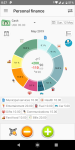
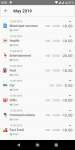
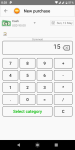
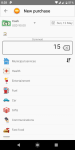
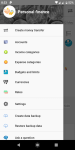
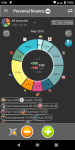
The Personal Finance application allows you to keep track of expenses.
Identify weaknesses and strengths in their personal finances, optimize costs, increase revenues, improve monthly balance.
If You do not know where the money disappears, then Personal Finance will help with the effective management of Your expenses. This is an extremely simple but very effective cost accounting application.
The Personal Finance app for mobile phone is a very convenient way to control and plan Your personal budget.
If You have already tried to keep records in an Excel spreadsheet or just a handwritten notebook, and then threw the case, the application Personal Finance, because of the simplicity of working with it, and instant availability, will help You bring it to its logical end - creating an effective ballance, output in plus and as a result of achieving Your financial goals.
If You haven't been able to save up for a long time: a vacation, a car, or any other major purchase, then using the app to account for expenses on a daily basis, You can quickly achieve these goals. With constant use of the application, You will quickly find weaknesses in Your budget and start saving wisely.
The free version of the application has all the necessary basic functions for cost accounting. But if You want to use all the features of accounting, we recommend using the Pro version of the application, with advanced features.

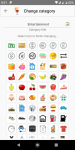
EN1.png EN2.png EN3.png EN4.png EN6.png EN8.png EN9.png EN10.png

Google Play. Free version:
https://play.google.com/store/apps/details?id=vitalypanov.personalaccounting.free

Pro version Features:
✓ Multi-currency accounting
You can create and manage accounts in different currencies. You can monitor total values of all accounts and articles in one, base currency
✓ Get more accounts
You can create more accounts. You can create and manage accounts as many as you want. And you can assign any available currencies
✓ New income and outcome articles
You can add more new articles. You can create new income and outcome articles. And use any available icons for them
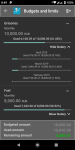
✓ Budgets and limits
You can create and use any number of budgets. This allows You to control Your finances more effectively
✓ Parsing SMS messages from banks
Full functionality. You can create and manage any number of parsing rules for sms processing. This will allow you not to be distracted by manual data entry. Bank transactions will be created automatically in the application.
✓ QR voucher barcode
You can scan QR barcode from Your cash voucher. This allows you to enter new outcomes more faster and conveniently for Your. You can make an expense directly in the store by simply scanning the cashier's check
✓ Widgets. Full functionality
You can add a widget to Your phone screen. This will allow you to always have in front of your eyes the most important information on the state of Your finances. And also get quick access to the most frequently used functions of the application from the widget
✓ Dark theme
You can use the dark (night) theme in the app interface. The dark theme reduces the brightness emitted by Your device's screen and also helps to improve visual ergonomics by reducing eye strain, and makes it easier to use the screen in low light conditions. Also, the dark theme saves battery power
✓ Password protection
You can protect Your data in the app by setting a password and security question
✓ Fingerprint authentication
You can use your fingerprint to enter the app. Just one touch and the app is unlocked. This saves time, and you do not need to remember anything (Note: the fingerprint can only be used together with the pin code and the secret question, in which case it was possible to restore access to the application)
✓ Backup and Restore
You can backup and restore Your data from Free version of Personal Finances to Pro and vice versa. If you already have transactional data in free version you can easily transfer it to the Pro version

Google Play. Pro version:
https://play.google.com/store/apps/details?id=vitalypanov.personalaccounting.pro

Youtube app won't appear in app drawer

My stepmother has a Samsung device. I have no idea what model, but it is about a year old, and according to her it was "the cheapest Samsung device that I could get from Verizon".
It seems ridiculous that this thing was about $650.

So anyway, she wants to cast Youtube onto the TV.
But she cannot find the Youtube app.

So I go into her settings, and sure enough, it is there- but it does not appear in her app drawer.

The only way that I can find to open the app is to open the Play Store app and then open Youtube from there.

Luckily the TV recognizes her phone as also being Samsung and on the same Wi-Fi, so her phone will show a pop up offering to connect (she just moticed this, after almost a year).

But I still have no idea why the Youtube app is not showing up in her app drawer, or even on her homescreen.

In fact, her app drawer is so difficult to access that she wants all her apps on her homescreen.

Problems like these are what keep me far, far, far (far) away from ever desiring a device from Samsung.
My $40 device puts every app I download right into the app drawer, which is accessible with a smple tap to my homescreen.
I have no want of spending $600 more to make this more difficult or (apparently) impossible.

I feel that if Samsung were the only manufacturer of Android that I never would have gotten involved in the first place.

If someone that has the secret Samsung key to unlock the evidently magical method of placing an app into the app drawer and the homepage of a Samsung device, I will forever be in your debt.

Verizon Note 9 will not charge via cable

So Former Tax Deduction #1 has a recurring problem with his Verizon Note 9: it will NOT charge with a USB-C cable. ANY cable. Wireless charging, yes. But something in the firmware boogers up connected charging. He spent 2 hours with Verizon tech support, only to have them tell him what he already knew... but this is apparently a firmware problem that was referred to Samsung by Verizon.

How many Verizon Note 9 users here are experiencing that? And does anyone here know of a fix or workaround? Other than wireless charging...

Google Nest Outdoor Camera

Hey guys!

If you are on the fence about getting one of these, I hope by sharing my experience with it this far helps you make your decision! Feel free to ask me anything about it and I would love to share.

First , let's start with the installation process. This is definitely one of the easiest device to install. It literally does not take a professional for this lol. If I actually tell you the steps then it would probably sound longer than if I just showed you lol here is the install video.


Also in the video you will find that it has video quality snap shots for the Daytime and Night Vision as well! Drop your questions below. I love my Google nest outdoor!

browse gallery without transition animation

Consider two similar images with a slight different. I want to be able to compare them IN FULL SCREEN MODE and delete the worse. Like this is easily available in camera roll (in iPhones). is there any android application that has this feature?
Simply rephrasing: an app in which photos appear and disappear at once when switching, with no transition animation while browsing (just like windows photo viewers). thanks in advance ;-)

Email Print Problem

When printing using the stock Samsung Email program on my S8, I find the "from" and date will not print, only the body of the email. I haven't found any options to change. Any suggestions? When I access my email through the Gmail email app, or on a computer, I have no issues. Thank you.

Cannot CAST from phone to TV

I have had a MiNOTE 7 Android 9 phone for over a year but have only just started to try the facility of casting from it to a smart TV.

I can can cast directly to my TV from apps, for example by tapping a photo in Google Photos, but I cannot cast the screen, either via WiFi or Chromecast. The phone does not identify my TV as being available, though it does detect my PC. The TV is on the same WiFi network, and my phone must be able to communicate with it or I would not be able to cast successfully from apps, as above.

In the Shade, when I click the CAST BUTTON it does not respond in any way, eg. change colour, as other buttons do. Should it? However, I do get the notification which has the 'not found' report.

External antenna (USB or inductive) ??

Hi Guys
would like to utilise external aerial on my car....

my car has phone preparation, bluetooth & a slot for you to purchase a cradle
containing USB for charging and inductive plate,
however this won't work for me....

I would like to add a dock where I can charge, use the external antenna & add an external GPS
to use NAV & make calls without (so many!!) dropouts

thanks in advance
Paul1966

Help

Hi,
my Samsung Gear fit2 smartwatch does not show time (main reason for using it), & when I press the buttons it keeps asking to connect to phone, which I do not have, down the Samsung app which I tried but do not know how to etc. etc.. I keep charging it in case it needs to but no Date Time shows up.

Please help me to get the Date Time, the only thing I need. ……thanx …... nick

Redmi Note 8 Pro or Realme 5 Pro

Going to buy one of these very shortly.

1. Which one would you buy and why?

2. Which one offers best support /updates?

3.Which one would offer best second hand resale value in 12 to 18 months time? Thanks in advance!

Edit - RNP8 is 6/64gb while Realme is 8/128gb. I'm in Ireland but will probably buy from amazon Spain or Germany as its cheaper.

How to build a database with an editable form that stores the item and its quantity, and...

Good day everybody

Im very new on Android coding. Please, anyone, tell me how build a database (or another function that stores data) with an editable form (item name and quantity) that stores the item and its quantity, and then on another page and editable form for notes (with save) that you can select and use quantities of the items on the first page :)

I know its simple, but I cant get the code to take the quantity list into the second page.

Thanks

Peace and love

Filter

Back
Top Bottom