• After 15+ years, we've made a big change: Android Forums is now Early Bird Club. Learn more here.

PNG or SVG for the best result for WearOS ?

Hi! I am graphic designer who hired a freelance developer to develop an Wear OS application. I made all neccessary graphics in illustrator, main background, second hand, hour hand, minute hand. The size is 320x320 and the graphics that i saved out in PNG format is pixelated and when he trying to insert it to wach face it looks like nothing like on examples i attached to the topic. I've tried to export it in SVG but my freelancer show me the same pixelated result. May to make graphics clean we need to use some secrete trick of what. How they did so nice and clean graphics?

Attachments

  • reference.jpg
    reference.jpg
    71.5 KB · Views: 451
  • reference2.jpg
    reference2.jpg
    30.9 KB · Views: 364

Best rootable phone?

I want to switch to a rootable phone so that I can delete Youtube apps and other useless hard-coded apps. But I read only old phones are easily rootable and new ones generally make it harder to root. But old phones are worse.. So I am wondering what is the best rootable phone with the best spec.

OnePlus Concept One Event

It looks like OnePlus is taking their concept phone on the road with satellite events across the world giving people the opportunity to play with the phones. There's only 1 event in the USA (Seattle) but several in Europe and India.

Here is the full list:

North America
  • Seattle, US
    February 6, 2020 | 6:30pm
Europe
  • Paris, France
    February 5, 2020 | 6:00pm
  • Cologne, Germany
    February 7, 2020 | 5:30pm
  • Amsterdam, The Netherlands
    February 12, 2020
  • McLaren HQ, Woking, UK
    February 13, 2020
  • Helsinki, Finland
    February 17, 2020 | 5:00pm
  • Copenhagen, Denmark
    February 19, 2020
India
  • Delhi
    February 8, 2020
  • Mumbai
    February 8, 2020
  • Bangalore
    February 8, 2020
To attend an event you'll need to RSVP!

Full information here:
https://forums.oneplus.com/threads/announcing-the-concept-one-world-tour.1174333/

Motorola Razr Specs

These are the official specs for the Motorola Razr 2020:
  • Release Date: February 6th
  • Price at launch: $1500
  • Operating System: Android 9 Pie
  • Memory: 6GB RAM
  • Processor: Qualcomm Snapdragon 710, octa-core, 2.2 GHz
  • Storage: 128GB
  • Sensors: Fingerprint reader, Accelerometer, Magnetometer (compass), Gyro, Proximity, Ambient Light, GPS, Ultrasonics
  • Battery: 2510 mAh, non-removable
  • Charging: 15W TurboPower charging
  • Display: 6.2” foldable pOLED, HD resolution (2142 x 876p), 21:9 Cinemavision
  • External Display: 2.7” gOLED, 600 x 800p, 4:3 aspect ratio
  • Main Camera: 16 MP, f/1.7, 1.22um, EIS,
    • Dual Pixel autofocus (AF)
    • Laser AF, Color Correlated
    • Temperature (CCT)
    • dual LED flash
    • Video: MPEG4, H.263, H.264, H.265, VP8, VP9
  • Second Camera: 5 MP, f/2.0, 1.12um, screen flash
  • Audio: Bottom-ported speaker
  • SIM Card: eSim
  • Ports: USB 3.0 (Type C) reversible connector
  • Dimensions: Unfolded: 72 x 172 x 6.9mm, Folded: 72 x 94 x 14mm
  • Bluetooth: Bluetooth 5.0
  • NFC: Yes
  • WiFi: 802.11 a/b/g/n/ac, dual band 2.4 & 5GHz, hotspot
  • Location: GPS, AGPS, LTEPP, SUPL, GLONASS
  • Weight: 205g
  • Water Protection: Splash-proof with water resistant nanocoating§
  • Colors: Noir Black
What comes in the box:
  • Motorola Razr (duh)
  • razr earbuds
  • accessories case
  • TurboPowerTM charger
  • USB-C cable
  • headset adapter cable
  • Guides and paper that you will inevitably throw directly in the trash

How the Moto Razr Folding Screen Works

This Razr video snippet shows how the phone's hinge works:

it actually looks pretty well thought out in terms of screen repairability. Doesn't seem like it will be difficult to repair a cracked Razr screen. And that's a good thing because I bet people will be clicking and clacking them open and closed alllll day... which leads to you know what (knock on wood).

Pretty sweet promo video for the Motorola Razr:

Motorola Razr: How to insert SIM Card

The Motorola Razr 2020 Flip Phone will soon begin shipping and the first thing users will do when they rip it out of the box and load it up is realize they don't have mobile connectivity. They'll look for a SIM Card slot so they can transfer their SIM card from their old phone into the RAZR but realize the Razr doesn't have a SIM Card slot or tray!

So how do you insert a SIM Card in the Motorola Razr 2020?
  • The Razr uses an eSIM (electronic SIM card)
  • To locate your eSIM number go to:
    • Settings > About phone > SIM status > ICCID
  • Connect your device to the internet via WiFi
  • Download the My Verizon app to input your eSIM number
  • Or call Verizon to add service to your eSIM at 1-800-922-0204
Let us know how it goes!

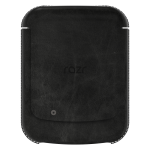
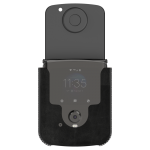
Motorola RAZR Case: the RAZR Sleeve ($99)

The Motorola RAZR isn't your average Android Phone thanks to its nostalgic flip. That means regular cases won't work- Motorola had to go back to the flip phone drawing board. The result: the Razr Sleeve.

The Razr Sleeve is basically the only officially supported Motorola Razr case and it'll set you back $100. Considering the phone is $1500 itself- that's nuts. But we can't say we're surprised.

razr-sleeve-case.png razr-sleeve-case2.png razr-sleeve-case3.png 1.png

This is how Motorola officially describes it:

Travel in style: the razr sleeve keeps the razr protected when you’re on the go. A soft microfiber interior cradles the phone, providing 360 degree protection. Premium leather exterior and thread stitching complement the stylish razr design.

Quick access: a secure magnetic closure keeps the sleeve closed. Flip open the front to get access to key features on the razr using the Quick View display. Respond to notifications, make phone calls, take selfies, and more, all while the phone is closed and protected inside the sleeve.
The only color available color is Black but we expect that to change after the device's launch. It remains to be seen if other popular cases by the likes of Spigen, Otterbox, and Incipio. You can bet your bottom dollar they'll have specialized screen protectors as well... but if you already forked out $1600 for the phone and a case, we're guessing a $50 screen protector won't be your bottom dollar.

Motorola RAZR: Worth it? (Price: $1,500)

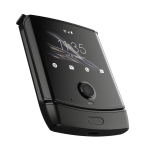
Motorola has been touting their brand new "RAZR" Android Phone with it's unique dose of next generation nostalgia: it's a flip phone with a foldable interior screen and custom exterior display.
razr.png


There is no doubt it's unique - especially in form factor - but detractors would point to less than stellar specs, a very high price point, possibly better performing alternatives like the Galaxy Bloom, and gimmicky features.

What do you think- is the new 2020 Motorola Razr worth it?

razr.png

$1500 for a flip phone!!!!??!?!??!??!

I got the email to preorder this over the weekend. At first, I was intrigued. I don't need a larger phone screen, *but*, getting a similar screen size in a smaller form factor was intriguing. Plus, I'm nostalgic having owned an original RAZR from back in the day.

Well, I clicked through the email, and soon discovered it is a VZW exclusive, so I'm out already. I was VZW for a looooooong time, and the service and coverage are great, but I'm just not willing to pay that premium anymore since I get as good of coverage for a fraction of the price per month.

But, I'm not here to bash of VZW, because this is still a wicked cool looking phone. By the time I got to see the price on the preorder page it was $1499!!!!!!!!!!!!!!! :eek: :wtfdroid: At least the Galaxy fold gives you a big screen for the price of your first born. This is a glorified flip phone for cripes sakes.

What say you?

View User Profile by Hovering User Name

We removed a lot of "data" for each user (number of posts, rank, sign up date, etc...) to try to make the site cleaner and more enjoyable to read. Some members understood the change but expressed wanting to see this information more easily. We've since adjusted the thread view so that whenever you hover over a user's name it automatically pops up their user profile stats.

Let us know if this works for you!

Alexa, Mind Your Manners! (Please & Thank You)

When Alexa successfully completes a task, I often follow up by saying "Thank You". In a perfect world, Alexa would follow up with, "You're welcome!"

But she doesn't.

To my surprise I'm not the only one requesting this feature!
https://forums.developer.amazon.com...l-me-how-to-make-alexa-say-youre-welcome.html

I would try building this feature myself but since it's part of Alexa's core code and not a separate skill it cannot be adjusted. I was hoping to create a skill called "Mind Your Manners" that would put Alexa in a "polite" mode of sorts and adjust her responses to incorporate good etiquette a la Emily Post. What a bummer.

Anyone have any ideas on how this could be achieved? Or maybe how a separate skill could approach this? Or maybe we just need to tweet incessantly to @AlexaDevs pestering them to please add this option.

Okay, okay... not pester incessantly. Ask politely over and over.

ADB Amulator Running SDK 29 Remount

Hi friends,
Recently I've created a new AVD instance via Android Studio that runs SDK 29 (Android 10).
Before version 29 I could:
1. Run the AVD from the command line.
2. Switch to root.
3. Remount
4. Copy an alternative hosts file to AVD's etc/hosts

For some reason I can't do that in with SDK 29 and after I run "./adb remount" command, I get the out put below.
What does it mean and how can I overcome this problem?

Skip mounting partition: /product_services
Skip mounting partition: /product
Skip mounting partition: /product_services
Skip mounting partition: /product
Skip mounting partition: /product_services
Skip mounting partition: /product
Skip mounting partition: /product_services
Skip mounting partition: /product
Skip mounting partition: /product_services
Skip mounting partition: /product
Skip mounting partition: /product_services
W Disabling verity for /system
E Skipping /system
Skip mounting partition: /product
Skip mounting partition: /product_services
Skip mounting partition: /product
Skip mounting partition: /product_services
Skip mounting partition: /product
Skip mounting partition: /product_services
Skip mounting partition: /product
Skip mounting partition: /product_services
Skip mounting partition: /product
Skip mounting partition: /product_services
Skip mounting partition: /product
Skip mounting partition: /product_services
Skip mounting partition: /product
Skip mounting partition: /product_services
Skip mounting partition: /product
Skip mounting partition: /product_services
Skip mounting partition: /product
Skip mounting partition: /product_services
Skip mounting partition: /product
Skip mounting partition: /product_services
Skip mounting partition: /product
Skip mounting partition: /product_services
/system/bin/remount exited with status 7
remount failed

Media sound stops but controls still continue when a notification is received

I have recently started having problems with keeping sound coming from my phone to by Bluetooth headset.

Basic symptoms: While listening to VLC (or Audible or Chirp) with a Bluetooth headset (This happens with multiple headsets, not just one) when a notification from Life 360, Outlook or some other application sounds a notification. After the notification completes audio tends to disconnect but otherwise the Bluetooth headset maintains it connection with the phone. During the notification an app tells me what just happened ("SMS Message from 123-456-7890. Ducks are all in a row.") or ("@Life360. Andrew has left work.") or for Outlook a simple sound is played. Previously, after the event completed its notification, the previously executing media application would resume audio. This stopped about a week or two ago. Now the audio does not resume. Connection with the Bluetooth headset is still in effect (Stop and Start buttons still work) but not volume up or down (normally, one sees a volume indicator in response to up/down but not after the loss of audio). The phone is a Galaxy S9+. This happens with multiple Bluetooth headsets, a Bth240, Bose and JBL headsets. Sometimes a simple Stop and Start command restores audio but not usually. Sometimes going to a different audio application works but not usually. Turning off the headset and turning it back on usually works but not always.

The app that converts SMS to speech is Read It To Me 2.0. It was installed more than a year ago. I do not know if it has updated lately but given that the problem happens on both TTS and chime notifications it does not seem likely to be the primary issue.

A few weeks back I installed the Windows application that links a phone with Windows 10. It worked without issue. It was uninstalled a few days ago but that didn't seem to make the issue any better.

Outlook is my primary email. I have Outlook on both my phone and laptop. Incoming email seems to induce the audio disable pretty reliably. When an email comes in my laptop displays a notification and my phone's audio stops.

Note: While entering this missive just had a Smartnews notification arrive while listening to VLC. This notification sounded a chime with no voice. While the chime sounded VLC continued playing (although at a reduced level) and was still playing after the notification finished.

Note: Just had an email notification come in. The sound in this case was just sound, no text to speech, and audio failed to resume. VLC is still playing but the music is not making it to the headset. On the phone, I touched the Stop button then the Start. Audio did not resume. On the headset did the same. Audio did not resume. Headset volume up and down are not effective. The headset beeps when the up/down buttons are pushed. Pressing the volume up on the phone works and the audio level indicator is displayed. I pushed the Play button on the phone out of desperation and, surprisingly, audio resumed.

Note: Just had a @Life360 notification come in. While the notification was being announced the sound level of the audio channel was reduced but did not stop. After the notification completed VLC's volume was restored and it continued playing. I would have expected VLC to have paused during the announcement.

Note: Another email received. Sound played as a notification and audio stopped. Sound up and down on the phone. The phone indicated that it increased and then decreased volume. Pressed Start button on VLC. Audio did not resume. Stop and Start button on headset. Audio did not resume. Volume up and down on headset still an 'illegal' command as indicated by the error beep when up or down button is pressed. As far as VLC is concerned, it is still playing the song but no sound is delivered to the Bluetooth headset nor is it coming out of the phone's speaker. Turned off Bluetooth on the phone and then reenabled. Reconnected the phone to the headset and audio resumed.

So, as you can see, there is no one easily duplication condition or remedy for the problem Any help in understanding what is happening and how to fix it would be greatly appreciated.

Update: After observing multiple occasions where a sound and notification appeared on my Win 10 laptop at the same time that the phone went wonky I put the laptop to sleep and the problem went away. The Windows pc/phone link app was uninstalled and the phone was rebooted. What possible means can the phone and laptop interact?

Filter

Back
Top Bottom