• After 15+ years, we've made a big change: Android Forums is now Early Bird Club. Learn more here.

Root [ROM] ApeX 1.3.1 for Droid X - Running, running, as fast as it can (12/16/10)

Very bizarre bug found. When typing a text message using Moto text app, Gingerbread keyboard, and typing a word like 'don't', if you use the text prediction words, it will take about 60 or 70 characters (according to your character counter). If I type the word using the keyboard, it takes 5.
 
Can I just say that my love for the Apex line of Roms is bordering on religious fanaticism? I was content on the 2.3.15 and the apex 1.02 but I, me, notorious for disliking p3 and everything team blackhat stands for, downloaded the TBH app paid that guy two bucks for his "leaks" just to upgrade to .320 so I could download THIS rom. ABSOLUTELY outstanding Fab. I will definitely be sending a few beers your way!!!
 
thanks again!!!

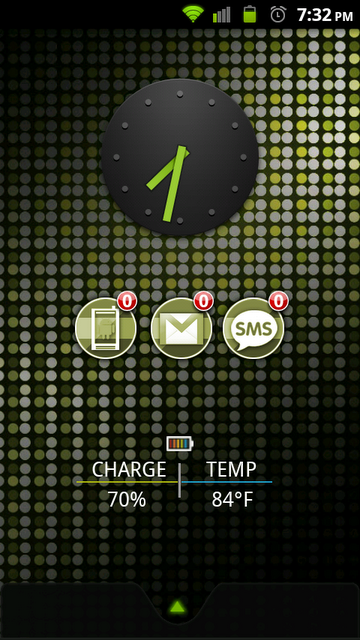
20101210193258.png

PLEASE LIST EVERYTHING ON THIS SCREEN!!!!!!!!!!

It looks awesome!

(I've found Clarus Battery and know the clock) But where do you get the phone, gmail, and sms unread icons, your background, and your dock image??
 
Is there a market fix that I'm missing on 1.3? If I look up something in the market like launcher pro, it doesn't show up. Also, I'm using revolution theme 1.2.
 
Wondering if someone can help. I came from Tranquility 3.6.1 to Apex 1.3. Everything is great, except when I reboot my phone. Instead of getting the M logo, I get the Tranquility Screen where you would normally see the M logo, then it goes to the Apex Bootanimation. Is there anyway to get the M logo back. Thanks in advance.
 
Wondering if someone can help. I came from Tranquility 3.6.1 to Apex 1.3. Everything is great, except when I reboot my phone. Instead of getting the M logo, I get the Tranquility Screen where you would normally see the M logo, then it goes to the Apex Bootanimation. Is there anyway to get the M logo back. Thanks in advance.

Free app in the market: Boot Logo Changer

Lots of logos to choose from, including the stock M. I'm rocking the Decepticon logo tho :D
 
It looks there is the same issue with Quick Office on this build as the previous build before the quick fix that Fab put up. I was able to use an old .apk that I have on my SD card. I uninstalled the version on the phone using Titanium and then used the script in Terminal Emulator to install the old apk and it works great.

Tried uninstalling then restoring from a Titanium backup and still no go for me... Cleared data too.
 
What's the best way to overclock Apex 1.3? I have no problem with what I have, but I really liked the 1.0.2 way of overclocking via terminal
 
Free app in the market: Boot Logo Changer

Lots of logos to choose from, including the stock M. I'm rocking the Decepticon logo tho

search for this app in the market and on appbrain yields two results Jrummy's and TBH's both of which are .99. Where is the free one of which you speak?
 
I modified the black Droid X keyboard that WJD made that is downloadable on ROM Manager to have green highlights when the keys are pressed to go along with the green of the GB theme.
If anyone wants it, here is a link to it. Just install it in bootstrap recovery.
Pay no attention to the g pop up with j highlighted. Trying to get a screen cap with the highlight on while shaking the phone took a few tries :p

snap20101211_115134.png
 
Fab~ This is my first ROM. Have been using themes for a while, but saw this and decided to give it a try.

I have to say, I am glad I decided to take the plunge. This is SWEET!

Great job and I really appreciate your time and effort.

For those of you on the fence, deciding whether to try a ROM or APEX 1.3.0 specifically, DO IT. You will not be disappointed. :D
 
I modified the black Droid X keyboard that WJD made that is downloadable on ROM Manager to have green highlights when the keys are pressed to go along with the green of the GB theme.
If anyone wants it, here is a link to it. Just install it in bootstrap recovery.
Pay no attention to the g pop up with j highlighted. Trying to get a screen cap with the highlight on while shaking the phone took a few tries :p

snap20101211_115134.png

Constant FCs and it replaces the GB keyboard...how can I undo this.
 
Fab - I know you've answered this before, but I cannot find your response. What clock/temp widget are you using on your homescreen (op)?
 
Fab - I know you've answered this before, but I cannot find your response. What clock/temp widget are you using on your homescreen (op)?

It's beautiful widgets, with airportone skin, and boca weather icons.

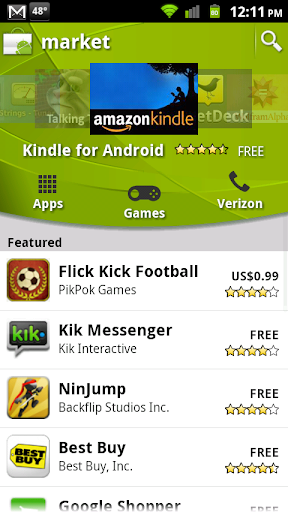
Also, a friend of mine gave me the new market apk, so if you guys want it, here it is:

http://fabdroid.com/goodies/Vending.apk

You can install it like any other app, if you want it on /data/

Otherwise, you can put it on your sdcard and install to system with:

su
install Vending.apk

snap20101211_121131.png
 
Everything seems to have installed correctly :)
Expect me to be back later with a million questions :P

Ok first question, im assuming I don't have to reactivate seeing as im posting from 3g right now lol. Am I correct?
 
Fab, how can I get the GB keyboard back? I installed the BMT keyboard that was posted a bit ago, but it FC's all the time and the GB keyboard won't come back when I select it within Terminal.
 
wow... im a converted man!! Came from RubiX Focused but now i will NEVER look back. This Apex rom is just too fast, and too clean. Great work man!! Donations coming your way!!!! quick question tho... any chance in the future that you'll be theming things like the dialer or market to match your roms??? thats the ONLY thing i miss from RubiX was the theming support/
 
Fab, how can I get the GB keyboard back? I installed the BMT keyboard that was posted a bit ago, but it FC's all the time and the GB keyboard won't come back when I select it within Terminal.

In Rom manager there in Fab's section there should be a GB keyboard.
 
Back
Top Bottom