Install the app
How to install the app on iOS
Follow along with the video below to see how to install our site as a web app on your home screen.
Note: This feature may not be available in some browsers.
-
After 15+ years, we've made a big change: Android Forums is now Early Bird Club. Learn more here.
You are using an out of date browser. It may not display this or other websites correctly.
You should upgrade or use an alternative browser.
You should upgrade or use an alternative browser.
swype or slideit?
- Thread starter aardys
- Start date
-
- Tags
- htc desire


deanshep85
Android Expert
oopzs , that should read swype or swiftkey , anyway
what one do you pefer. and are there anyonther swipe type k,b's
actually there is 'slide it', which is actually what I thought you wrote in the title anyway

I havent tried any swype style keyboards on the Desire, but I did try both swype and slide it on my old nokia 5800 last year...swype was in a beta and a lil rough but still good, but I found slide it to be much better at the time..
I know that doesnt help GREATLY to you lol...

I use Slideit, tried Swype briefly but just didn't get along with it.
Slideit got updated a few weeks ago, the new version is great, really responsive & I like the fact you can easily resize it on the fly. I usually keep it quite small, but for car use & drunk use - big is good Well worth the couple of quid.
Slideit got updated a few weeks ago, the new version is great, really responsive & I like the fact you can easily resize it on the fly. I usually keep it quite small, but for car use & drunk use - big is good
Well worth the couple of quid.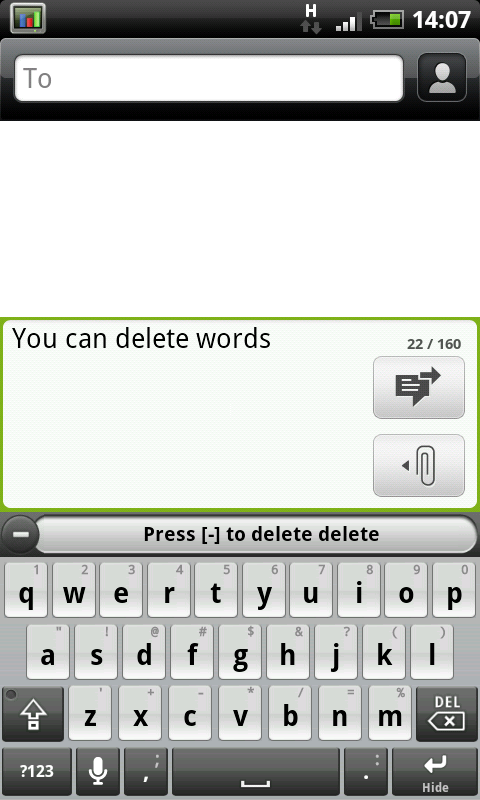
D
Deleted User
Guest
i love Swype

Sak01
Android Expert
Here's a comparison if anyone is wondering what the difference is:
Swype vs. SlideIT: Battle of the Android keyboard swipers
Swype vs. SlideIT: Battle of the Android keyboard swipers
looks like swype takes the prize thenHere's a comparison if anyone is wondering what the difference is:
Swype vs. SlideIT: Battle of the Android keyboard swipers
only annoying thing is , on reboot you have to re-enable swype on the desire even running leedroid

still im getting used to the swyping , oh yeh and being free helps
chitchatjjj
Member
Swype, definitely swype. I'm swyping right now.
I've tried SlideIT but tbh what time I saved in typing I lost in correcting wrongly selected words.
Couldn't find Swype on market or app brain.
it took me a bit of getting used to, after a couple of days I found it loads quicker and going back to a normal keyboard now I'm very slow
Sak01
Android Expert
You have to register on the website then they'll email you a download link. Read their installation guide for a hassle free set up.I've tried SlideIT but tbh what time I saved in typing I lost in correcting wrongly selected words.
Couldn't find Swype on market or app brain.
Swype | Text Input for Screens

DesireMe
Android Expert
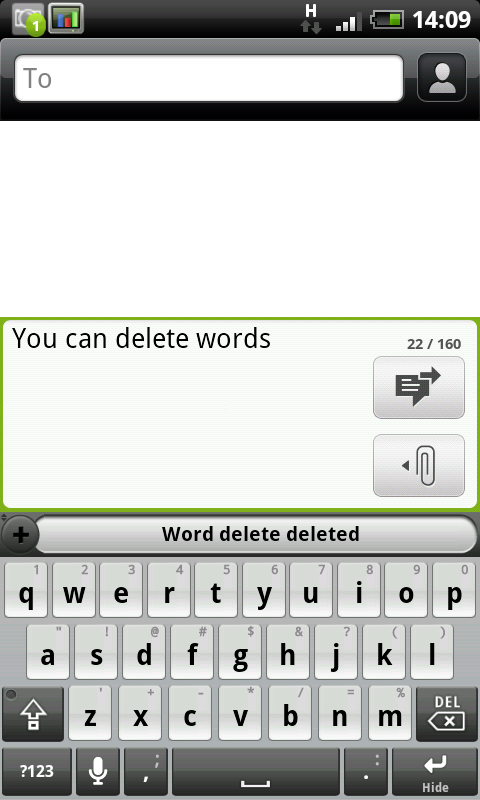
you can delete words, after it's typed your random word scroll back to it and the little + sign will turn into a - sign. If you click it the word will be deleted
Thanks Phil, i never knew that. Might make things a whole heap faster for me.
DesireMe
Android Expert
Here's a comparison if anyone is wondering what the difference is:
Swype vs. SlideIT: Battle of the Android keyboard swipers
SlideIT was much better at grammar in selecting It's, There's etc etc over Swype. That's what made me change.

chris 290
Android Enthusiast
SlideIT, much better for me. You can add any 2 or more letter abbreviation to write a long phrase, I use em to write my whole email address, that's brilliant.
It shows predicted words at the top always. You can correct by clicking on a word and the options at the top come back. SlideIT for me is miles better than swype.
It shows predicted words at the top always. You can correct by clicking on a word and the options at the top come back. SlideIT for me is miles better than swype.

bryandrummer
Member
Ive tried both but i like slide it more. i do think when trying to "swipe" fast that swype can be mroe accurate but i think that slideit is a much better choice for a phone that lacks a physical keyboard. i like the fact that slideit makes you manually add new words. about 20% of the time i like to type in landscape and swype was difficult and hard to use in that way. if i manually misspelled from typing a word too fast in landscape when tapping, swype added it automatically and this really started to bug me when i went back to swiping. also i felt that when i started deleting random words from slideit that i never used (sometimes i wonder if some of the things slideit comes up with are even real words lol) it became more accurate. i found myself deleting about 3-4 words a text just to get random letter combinations out of the dictionary but now that i did that, i feel that the accuracy is on the same level as swype. thats my two cents, maybe this helps someone.