
• After 15+ years, we've made a big change: Android Forums is now Early Bird Club. Learn more here.

Help how to get an invisible icon dock?

beesknees

Member
i was just wondering how to make an invisible icon dock that will still show notifications? i have an invisible icon to use, but when i go through folder organizer and make a shortcut with an icon, i don't get the notifications. basically, i want this, which i saw someone post a long while back.
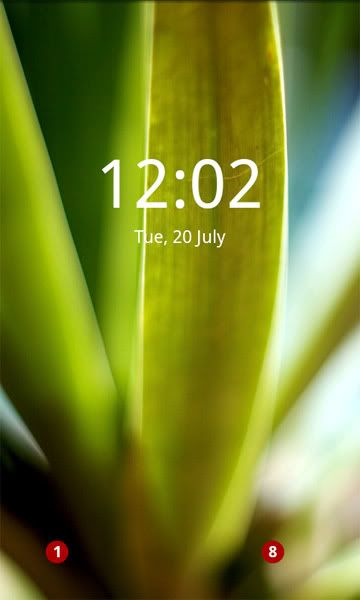
snap20100720_000212.jpg


also; does anyone know the name of that background/where to get it?
 
What launcher are you using? Needs to be launcherpro, go or something like that. Can't do it with HTC sense, which means you can't use HTC widgets either
 
What launcher are you using? Needs to be launcherpro, go or something like that. Can't do it with HTC sense, which means you can't use HTC widgets either


i'm using launcherpro. and i was just using a folder organizer shortcut to my text messages. i can set the icon up, etc. it just doesn't give me a notification when i get a message.
 
The notifications are only on the dock, not shortcuts. You need to create an SMS icon on the dock, then change that for an invisible one. Make sure notifications are on in settings.
 
The notifications are only on the dock, not shortcuts. You need to create an SMS icon on the dock, then change that for an invisible one. Make sure notifications are on in settings.

how do you know so much about so much? haha. i'm so impressed by you. thank you so much. i think i just had the notifications turned off. didn't know it wasn't automatically set to that.
 
Back
Top Bottom