• After 15+ years, we've made a big change: Android Forums is now Early Bird Club. Learn more here.

UPDATE optimus M prl Using QPST

santia213

Well-Known Member
This is what I did I have LG optimus m
1. Make sure USB debugging is enabled
2. Download USB driver and install on your computer
3. Download 3020 prl or New Prl 3022 Credit goes to LockLady OR even newer PRL 3023 latest prl 3024
4. Download and install qpst 2.7
qpst 2.7
5. Connect phone to computer
6. Open device manager expand ports and make note of what com port your USB device is on
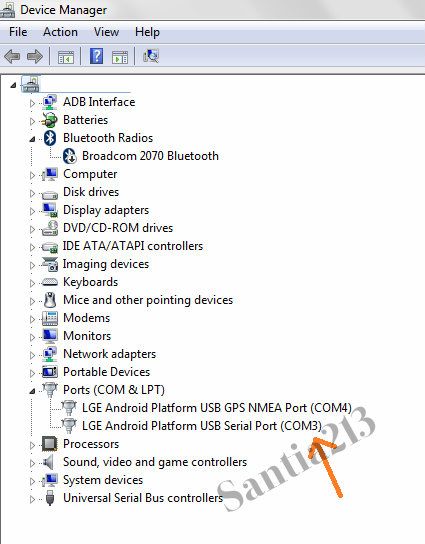
1-6-1_zps69de0ab7.jpg

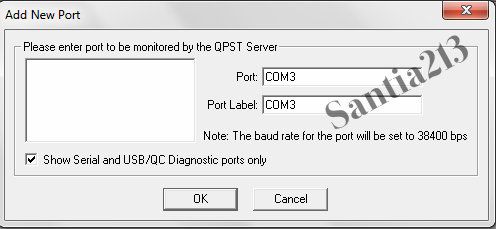
7. Open up qpst configuration if com port is not shown select add port and enter com# (# being the one seen @ device manager)
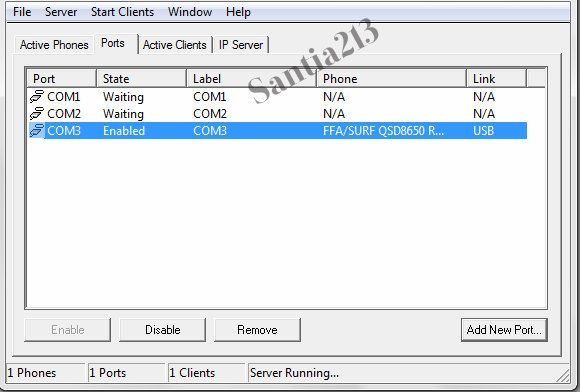
3-6-1_zpsf633b02f.jpg

2-4-1_zps5718233e.jpg

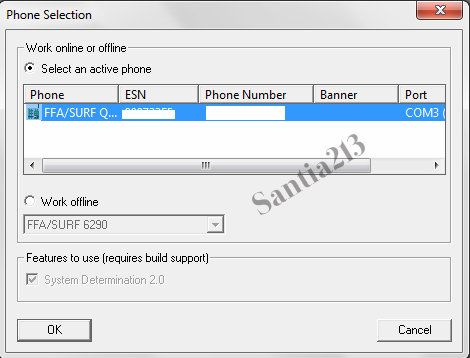
8. Select service programming (phone must be selected to continue)
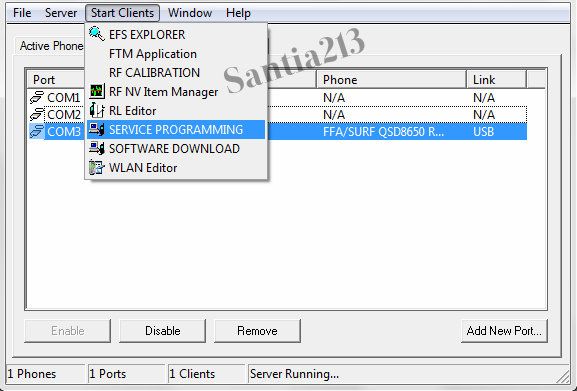
4-2-1_zpsaf395dd0.jpg

5-2-1_zps4741b258.jpg

9. On the main menu setting tab click read from phone and will obtain phone info it will ask for ur spc
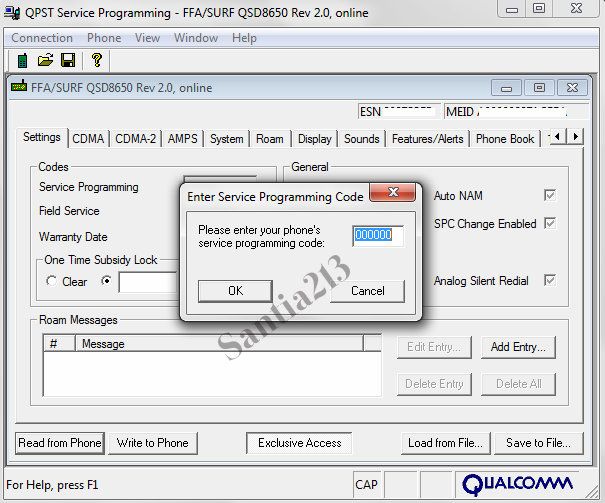
6-2-1_zps01bb4a08.jpg

10. Spc code can be obtained through cdma workshop or by using checkesnfree.com Get Spc
11. Look for roam tab and there will be an option under preferred roaming to search for new prl locate it and select write it will ask for ur spc code again
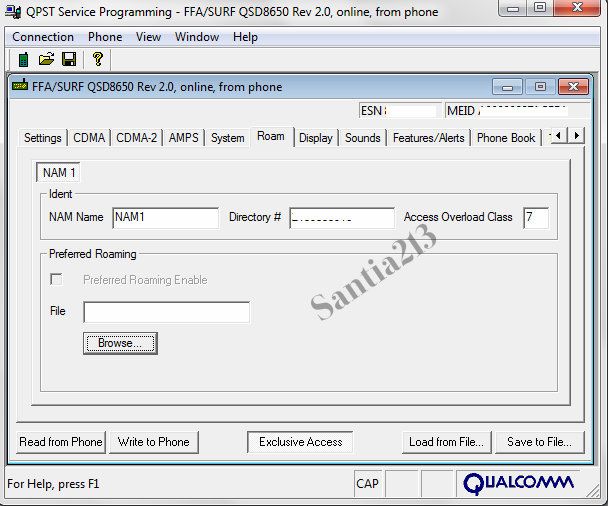
8-2-1_zps58c71fe6.jpg


note I'm not responsible for bricking ur phone I've done this before and familiar with the software even though this quick tut should be noob friendly
 
this did not work
it does workwith optimus m
you must have usb driver installed and enable usb debugging for it to work

after i manually update to prl 3020 i did 228 update and it reverted back to 3019 so i redid the whole process and it worked

where are u stuck?
 
Is this safe? If it messes up can a nandroid restore fix everything?

its safe as long as you follow steps provided and dont venture within qpst and start changing random things within the program

im running stock so im unsure if nandroid restore will work in case u misread or fail to follow instructions

again ive recreated the above steps couple times and had no problem everything worked smoothly
 
its safe as long as you follow steps provided and dont venture within qpst and start changing random things within the program

im running stock so im unsure if nandroid restore will work in case u misread or fail to follow instructions

again ive recreated the above steps couple times and had no problem everything worked smoothly
if you do something to your programming a nand restore will not fix it, So as he says dont mess with anything other then what is listed.:D
 
pretty r-**** proof, tried it out even though i doubted it would get me 3g, but just to confirm my thoughts did it and yea Los Angeles doesn't have 3g, but atleast i got the new prl eh
 
pretty r-**** proof, tried it out even though i doubted it would get me 3g, but just to confirm my thoughts did it and yea Los Angeles doesn't have 3g, but atleast i got the new prl eh

yeah no go on 3g in LA area been to burbank sun valley westwood dwntown LA and no 3g showed up

least we got latest roaming list :D
 
it says session terminated and wrong spc and its not

when you get your spc from the site maker sure its meid dec
press far left left key this will get u into settings
select about phone > status
and look for meid dec
when entering meid on site make sure metropcs option is selected

when does it say session terminated?
 
did you get the spc from the checkesnfree.com website?

did you at any point change the spc for your phone?
was the phone new when you got it.

like new optimus said if phone was bought new spc should be same as checkesnfree.com but, if bought used there is a possibility previous owner changed it, most users change spc to all zeros but that may not be the case
 
I did this last night and it was amazingly quick and easy. Literally took less than five minutes after I got the program downloaded. I was ripping my hair out trying to get LGNPST to work yesterday.
 
MEtropcs on the esn check doesnt work, any alternative methods? thanks


edit found another one that works ... whiterabbit.org
 
Thank god for this tut.. Just like the guy above I was literally about to kickbox with my computer while trying the LGNPST method.. How come this post isn't on top? so simple, so fast.. Thank you! But still no 3G.. Lol
 
Back
Top Bottom