
• After 15+ years, we've made a big change: Android Forums is now Early Bird Club. Learn more here.

Milestone Music Player w/ Coverflow

Fabolous

Superuser
UPDATE: there is now no need to flash the 3.5MB update.zip, as Pete has updated his ROMs to include the new player.
--------------------------------------

I already posted this in the Bugless thread, but I figured people who weren't interested in the ROM might still be interested in this.

Pete's just released an update.zip for his ROMS (but should work with any 2.0.1) that does some fixes and also introduces his port of the Milestone music player.

It is completely stock 2.0.1 music player (buttons instead of tabs), but it does include this nice little feature:
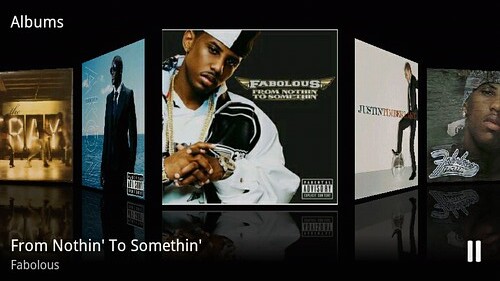
4320793016_6c8f901315.jpg


Enjoy!

P.S. Unfortunately, there is no EQ, just 3D album scrolling for now.
 
don't see this mode in the player, and now my wifi doesn't work....i updated to 8.4 earlier in the day, you say this is a new update to 8.4? music player looks the same to me...
 
I already posted this in the Bugless thread, but I figured people who weren't interested in the ROM might still be interested in this.

Pete's just released an update.zip for his ROMS (but should work with any 2.0.1) that does some fixes and also introduces his port of the Milestone music player.

It is completely stock 2.0.1 music player (buttons instead of tabs), but it does include this nice little feature:

4320793016_6c8f901315.jpg


Enjoy!

P.S. Unfortunately, there is no EQ, just 3D album scrolling for now.

Wait, where I download this from? Is this a new Bugless Beast? Sorry Im a noob to rooting and ROMS.
 
Sorry, let me clarify.

This is not included in 0.8.4 or 0.7.2, but rather is included as a separate update.zip in a separate thread in Pete's section.

He says he's working out some issues at the moment though, so it may be wiser to just wait a bit.
 
I was hoping for the EQ but the coverflow is cool. My wifi didn't break but it did knockout my 1.1 O/C.
 
Well, his Bugless Beast feature list says it includes this, and it doesn't...

It also doesn't include the multi-touch browser, nor does it remove the visual voice mail app. :(
 
Well, his Bugless Beast feature list says it includes this, and it doesn't...

It also doesn't include the multi-touch browser, nor does it remove the visual voice mail app. :(

What you said is right, except for that it does support multi touch on the browser.. I though the same but multi touch is for full websites only no mobile websites.
 
Are you sure you're running the Bugless Beast 0.7.1? Because that's exactly what I'm running and i have pinch/zoom browser and no visual voicemail app. Maybe your running an older bugless version? Like the bugless beauty 0.8. something. I can confirm no coverflow, although I think the OP stated that Pete is working on it for upcoming roms possibly.
 
Well, his Bugless Beast feature list says it includes this, and it doesn't...

It also doesn't include the multi-touch browser, nor does it remove the visual voice mail app. :(


Mine has the multi touch browser but it doesn't have the visual voice app because he says that you can download that from the market. I'm running 0.7.2
 
It has multi touch browser and gallery but no coverflow. I doubt it could beat this next gen. Rock On music player anyways. I can wait until this is perfected.

The ROM is great though.
 
aha! that was it :)
now to find a way to get rid of vvm...

in your terminal emulator:

su
mount -o remount,rw -t yaffs2 /dev/block/mtdblock4 /system
cd /system/app
rm VVMStub.apk (I think that is the name, if not type 'ls' to see all the files in the folder)
mount -o ro,remount -t yaffs2 /dev/block/mtdblock4 /system
sync
reboot
 
in your terminal emulator:

su
mount -o remount,rw -t yaffs2 /dev/block/mtdblock4 /system
cd /system/app
rm VVMStub.apk (I think that is the name, if not type 'ls' to see all the files in the folder)
mount -o ro,remount -t yaffs2 /dev/block/mtdblock4 /system
sync
reboot

could you specify up to where you type into the emulator... is reboot typed into the emulator or do you mean reboot the phone?
 
Am I missing something here. Pete's thread says that it is included in his roms. I have beauty 8.4 and I cant find the cover flow
 
Sorry, let me clarify.

This is not included in 0.8.4 or 0.7.2, but rather is included as a separate update.zip in a separate thread in Pete's section.

He says he's working out some issues at the moment though, so it may be wiser to just wait a bit.

I dont get that, if you put that update.zip for cover flow in your phone and click install, will that delete my Bugless Beast or what?
 
There's the 60MB update.zip file for bugless beast, and a 3.5MB update.zip which you install AFTER installing bugless beast which adds the music app and some other bugfixes.
 
I dont get that, if you put that update.zip for cover flow in your phone and click install, will that delete my Bugless Beast or what?

No it won't. The beauty of an update.zip is that it can range in size and effect. In this case, the only effect is the new music player and some various fixes.

The update.zip's you d/l from his actual ROM pages replace the entire /system partition.

could you specify up to where you type into the emulator... is reboot typed into the emulator or do you mean reboot the phone?

All of those commands are typed INTO the emulator.

And btw, the VVM app is called VVMStub.apk.

Others you may want to get rid of: AmazonMP3.apk, CorpCal.apk, Email.apk
 
No it won't. The beauty of an update.zip is that it can range in size and effect. In this case, the only effect is the new music player and some various fixes.

The update.zip's you d/l from his actual ROM pages replace the entire /system partition.


All of those commands are typed INTO the emulator.

Oh, I understand now...good to know, Thanks. So in the Terminal Emulator do you type reboot as well or is the last thing you type sync?
 
Oh, I understand now...good to know, Thanks. So in the Terminal Emulator do you type reboot as well or is the last thing you type sync?

reboot is a command you can type into the terminal, it's very handy

even more handy is the command 'reboot recovery', which boots you right into the recovery image, bypassing all that holding down x bologna.
 
FYI
the coverflow is on the current roms.
Pete updated the roms but left the version numbers the same
 
I had to do all that from a cmd line. I installed Terminal Emulator from the market and it FCs every time I try to start it up.
 
Back
Top Bottom