
• After 15+ years, we've made a big change: Android Forums is now Early Bird Club. Learn more here.

Root New "Bugless" 2.01+2.1 apps ROM...

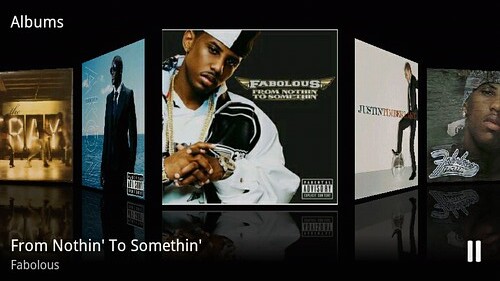
Check out the Pete's new update.zip w/ Milestone's 3D music app.

Coverflow anyone?
4320793016_6c8f901315.jpg


Update killed my OC, had to reflash image. Did not have to re-fix wifi though.

Fab...are you running Bugless Beast (the 7.x overclocked ROM)?

Reason I ask, is the only update.zip posted at this point is for Bugless Beast...wondering if you went ahead and applied it to the 8.x Bugless Beauty ROM, or ?

<edit>never mind, just found the Bugless Beauty update.zip in the original ROM thread...confusing when he releases an update but doesn't up the version number! :)
 
FYI: Pete has pulled 8.4...he accidentally posted it w/the 800 overclock this afternoon, he may have mixed up his ROMs a bit. :)
 
Running the latest version of Bugless Beauty, and it seems to have broken TubeDroid. Before it would work just fine, and now it only downloads audio, but no video (just a black screen)

Anyone else getting this?
 
Sweet, Beast just got bumped to 950. Was planning on upping to 900 by other means tomorrow, but now I guess I'll just update the rom. Updates are flying too fast for me to keep up. :D
 
Sweet, Beast just got bumped to 950. Was planning on upping to 900 by other means tomorrow, but now I guess I'll just update the rom. Updates are flying too fast for me to keep up. :D

heh, yeah, I remember when he went from v1 to v4 in like a day and a half. And back then, he didn't have update.zip's, so we were all just flashing new nandroid images.
 
heh, yeah, I remember when he went from v1 to v4 in like a day and a half. And back then, he didn't have update.zip's, so we were all just flashing new nandroid images.

It certainly feels novel after weeks of hanging upon every word of 2.1 anticipation! Now I could really care less about the official update, except to wonder how awesome it'll be when peeps like pete get ahold of it.
 
Mmmm, guess I need to update then.

Quick question about Bugless Beast & Overclocking: I noticed it defaults to 800/250, and I wanted to set it to 800/125, but every time I adjusted the sliders in SetCPU the max would drop to 550. Do I need to flash a custom kernel on top of Bugless Beast to make SetCPU behave?
 
Mmmm, guess I need to update then.

Quick question about Bugless Beast & Overclocking: I noticed it defaults to 800/250, and I wanted to set it to 800/125, but every time I adjusted the sliders in SetCPU the max would drop to 550. Do I need to flash a custom kernel on top of Bugless Beast to make SetCPU behave?

Do you have the latest version of SetCPU?

Also, do not choose 'Droid' as your device. Instead, scroll all the way down and 'Auto Detect'. That should fix it.
 
I've been selecting Droid
I'll give auto-detect a try... after I update to the 950 version of BB

Yeah, the new version is awesome. It's basically what I had set up before (BB 0.8.4 + 950MHz + Coverflow music player), but it also has Wifi tether pre-enabled.

All I needed to download was Bezerker's fixed .apk. Now I'm hooked up to my Hackbook Mini and cruising at nice 3G speeds, all sans wire. Exciting!

701607839.png
 
Strange, after I installed the update I'm still only getting 800 max :(

Did you flash the 0.7.2 (2/1/10) update.zip or the quickfix update.zip in the 3D music app thread? The one in the music app thread is at 800MHz, while the Beast update.zip should allow 125/250/550/800/950.
 
Damn you Joe, Fabolous, and you others...Damn you for getting me addicted to custom ROMs and overclocking. I don't remember the last time I slept.
 
I'm hooked as well damn it...i had beast...worried about temp...went to beauty...now i wanna go back to the beast...I want some concrete evidence that I will not fry my CPU tho...
 
Could some be so helpful to PM me a detailed instruction on flashing the bugless rom. I am rooted, and have downloaded the update.zip and the nandroid back up from all droid Pete's thread. Thank you.

P.S Im not looking to start a war here any useful info will be appreciated.
 
Could some be so helpful to PM me a detailed instruction on flashing the bugless rom. I am rooted, and have downloaded the update.zip and the nandroid back up from all droid Pete's thread. Thank you.

P.S Im not looking to start a war here any useful info will be appreciated.

I just followed the instructions on Pete's thread at Alldroid to use the update.zip. I've done it three or four times and it works perfectly. Do you have Sprecovery?
 
Guides?? anyone??? I install the update.zip from sd card in recovery mode but it only gets to about a quarter of the way and stops. Is this the boot animation it is getting hung up on? Come on man all the knowledge in here.Help a father of four who works average of 55-65 hrs a week and go to school full time. I wish I had more time to read all the threads.

I want to show off to my teenage son who's phone has got the juice!!
 
Guides?? anyone??? I install the update.zip from sd card in recovery mode but it only gets to about a quarter of the way and stops. Is this the boot animation it is getting hung up on? Come on man all the knowledge in here.Help a father of four who works average of 55-65 hrs a week and go to school full time. I wish I had more time to read all the threads.

I want to show off to my teenage son who's phone has got the juice!!

Just PMed you.
 
Guides?? anyone??? I install the update.zip from sd card in recovery mode but it only gets to about a quarter of the way and stops. Is this the boot animation it is getting hung up on? Come on man all the knowledge in here.Help a father of four who works average of 55-65 hrs a week and go to school full time. I wish I had more time to read all the threads.

I want to show off to my teenage son who's phone has got the juice!!

From Pete's thread on Bugless 7.2: AllDroid - View topic - [ROM] Bugless Beast [950MHz & Wifi] V0.7.2 (2/1/10)

About half way down the first message:

Update.zip Installation Info & Instructions (No Data Loss):
-You can upgrade from any rooted ROM that is 2.0.1
-Be sure to have signed into your Google account before installing
-Update (if available) all of your apps before installing
-Download update.zip
-Place update.zip on the root of sdcard
-Reboot into recovery
-Install
-Allow update.zip installation
-Install /sdcard/update.zip (deprecated)
-Enjoy!

His instructions include the following which I removed because it doesn't relate: -Uninstall any apk & odex files I previously moved to /data (Only If Installing Over 0.7 Or Previous ROMS)
 
Back
Top Bottom