
I'm coming from an iPhone 4 with a micro sim, and will be purchasing the Galaxy S2 international version with no contract. Will I be able to put in my microsim with an adapter into the S2 and be able to use data, voicemail, calls, MMS, SMS, etc? Or am I better off buying the AT&T version?
Install the app
How to install the app on iOS
Follow along with the video below to see how to install our site as a web app on your home screen.
Note: This feature may not be available in some browsers.
-
After 15+ years, we've made a big change: Android Forums is now Early Bird Club. Learn more here.
You are using an out of date browser. It may not display this or other websites correctly.
You should upgrade or use an alternative browser.
You should upgrade or use an alternative browser.
Galaxy S2 International for use with AT&T?
- Thread starter Kevintech
- Start date
-
- Tags
- samsung galaxy s2

Baldilocks
Android Expert
I am using the international version. I use a microSIM with an adapter.
One good thing about it is that you can use the cheaper Unlimited MediaNET internet plans...
I pay $10 a month for Unlimited Internet.
One good thing about it is that you can use the cheaper Unlimited MediaNET internet plans...
I pay $10 a month for Unlimited Internet.
When I use my friend's phone who is using Tmobile to see if I can use it with ATT network, I can only do the voice call but can't use data plan. I have data plan with my Samsung Infuse but when I put my microsims in GalaxyS2 it is saying network is blocked. Any suggestion why it's happening?
Baldilocks
Android Expert
Because his phone is locked to T-Mobile. It needs to be unlocked to work on AT&T. Even when it's unlocked, it will only work with 2G network and not AT&T's 3G network.
Baldilocks
Android Expert
I just bought one off eBay for my AT&T number. It works fine..except I can't receive MMS..I can send though. Internet and everything else works fine..it shows 3G or H+. How do I fix that?
Do you have auto retrieve turned on in the message settings under MMS?
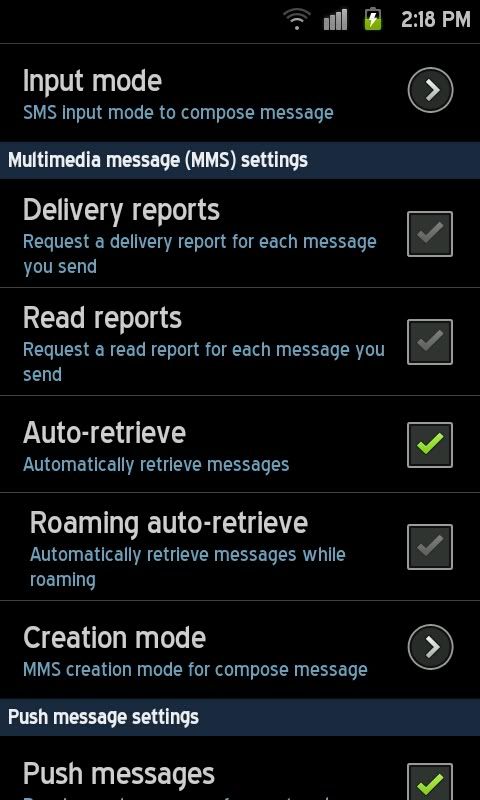
Do you have auto retrieve turned on in the message settings under MMS?
I do...but it still doesn't work
 How did you set up your APN anyway?
Baldilocks
Android Expert
I didn't. Just popped in a iPhone 4 SIM (with adapter) and everything worked fine.
But, anyway, here are the settings:
Go to Settings/Wireless and network/Mobile Networks/Access Point Names
Hit the menu button, then "new APN". The settings are as follows:
Name: AT&T (or whatever name you like)
APN: wap.cingular
Proxy: leave blank (Will read: <not set>)
Port: leave blank (Will read: <not set>)
User name: WAP@CINGULARGPRS.COM (Not sure if it's case sensitive, but I left it all capital letters)
Password: CINGULAR1 (Not sure if it's case sensitive, but I left it all capital letters)
Sever: leave blank (Will read: <not set>)
MMSC: http://mmsc.cingular.com
MMS proxy: wireless.cingular.com
MMS port: 80
MCC: 310
MNC: 410
Authentication type: none
APN type: internet+mms
But, anyway, here are the settings:
Go to Settings/Wireless and network/Mobile Networks/Access Point Names
Hit the menu button, then "new APN". The settings are as follows:
Name: AT&T (or whatever name you like)
APN: wap.cingular
Proxy: leave blank (Will read: <not set>)
Port: leave blank (Will read: <not set>)
User name: WAP@CINGULARGPRS.COM (Not sure if it's case sensitive, but I left it all capital letters)
Password: CINGULAR1 (Not sure if it's case sensitive, but I left it all capital letters)
Sever: leave blank (Will read: <not set>)
MMSC: http://mmsc.cingular.com
MMS proxy: wireless.cingular.com
MMS port: 80
MCC: 310
MNC: 410
Authentication type: none
APN type: internet+mms
That's how I set my APN but it still didn't work.....So I had to call AT&T and they asked for EMEI # to update...so it works now. It might be my SIM card or something...IDK 'cause my original phone was just a regular Nokia, then I switched to an unlocked BB Bold with a Data plan...then this one SGII. They'd better not do any tricks once they updated my EMEI no. Anyway..I'm happy now..the phone is fantastic, snappy and pretty..lol. Thanks a lot anyway 
dublinlover
Newbie
please help help help help
i bought a Samsungs galaxy s II (0r s 2)--7days a go and i love it -today i plug it in the my computer and kies software on my computer told me (i have a new firmware update )so i did download the new one now i have (android version 2.3.5)(Kernel version 2.6.35.7 I9100xwk18.....)Now the problem i can see a light shadow on the screen when i touch end of the screen touch or if i put my finger on the end or top the screen i can see (blue light shadow) i didn’t have this experience before i just wondering what’s going wrong instead better performance on the phone I end something don’t see it before .
Please could anybody help ???did anybody have same problem as me ??
Help
i bought a Samsungs galaxy s II (0r s 2)--7days a go and i love it -today i plug it in the my computer and kies software on my computer told me (i have a new firmware update )so i did download the new one now i have (android version 2.3.5)(Kernel version 2.6.35.7 I9100xwk18.....)Now the problem i can see a light shadow on the screen when i touch end of the screen touch or if i put my finger on the end or top the screen i can see (blue light shadow) i didn’t have this experience before i just wondering what’s going wrong instead better performance on the phone I end something don’t see it before .
Please could anybody help ???did anybody have same problem as me ??
Help