• After 15+ years, we've made a big change: Android Forums is now Early Bird Club. Learn more here.

Verizon Rezound Window and Dash Vehicle Mount

Did you initiate nav from the car panel app in both scenarios? Perhaps it's the car panel app running that is such a resource hog.

No, both tests were launched after a fresh reboot and not from Car Panel. During the 2nd test I actually closed car panel after docking the device.

And yes, "AC charging" in battery status on both tests.
 
Hey there guys i did a little more testing... this time to see if the battery will charge better without the car dock and if the Car Panel (6-icon software) makes a difference.

I went from A to B, stopped and drained some battery checking emails/webs with the phone, and then from B to C. (A= across town, B= halfway across town (wife said to stop there to pick up something), C= home.) Using the same BB-RF 3.1A dual-port USB charger and the HTC V-Cast sync cable (the cable with the HTC micro-rectangular USB-kinda connector that comes with the phone).

From A to B:
Started at 44%. No dock (power cable into phone). Searched/started the hidden Car Panel, then started Googrrl Navi and picked a route. On the way there i answered an incoming phone call (bluetooth earpiece) and went "Where's my map?? I'm lost!! Where's my route?? I'm lost!!!" (because it displays/holds the name/number of the person on the screen). Then figured if we hit the return/back (left arrow) button it'll jump back to the map/navi while talking on the phone. 20 minutes later arrived at location B... same 44%.

From B to C:
Started at 41%. Also no dock (power cable into phone). Started on the HTC Sense desktop and picked Google Navi... and a route home. 18 minutes later... 39% (lost a little at the last minute).

Looks like it really can't charge the phone with the navi running (with or without the car dock). Also looks like there isn't a difference if we start from the Car Panel (6 icon page) or from the regular HTC/Sense desktop.
bye
 
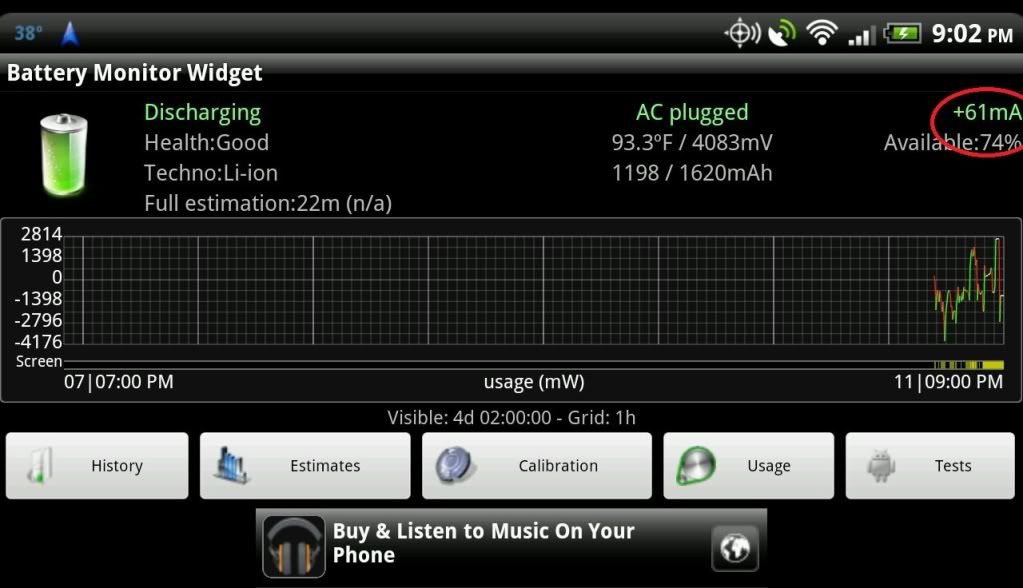
in the dock
2011-12-11_21-02-27.jpg


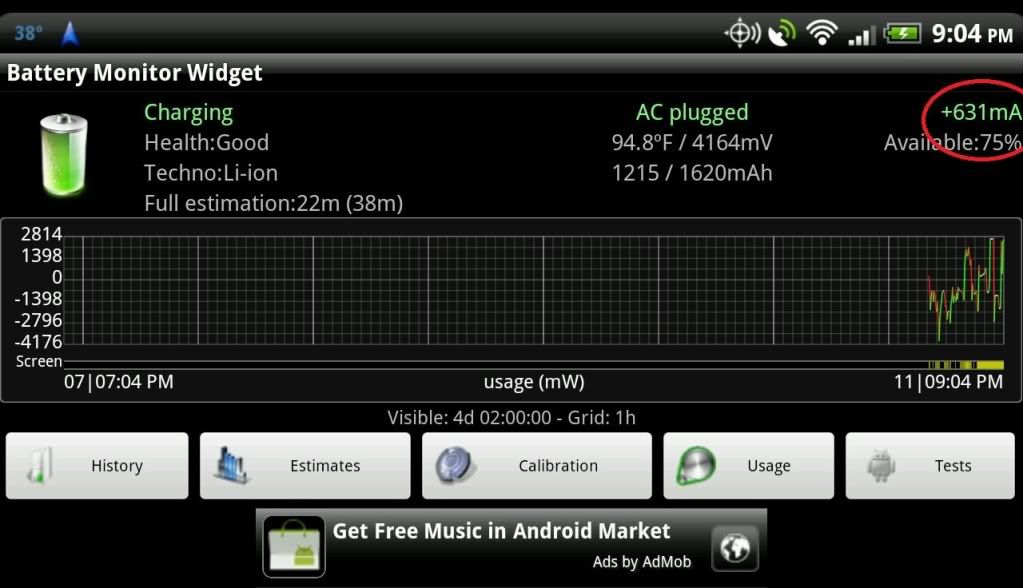
on the charger direct
2011-12-11_21-04-48.jpg
 
I just tested my tunelink car charger which has a 2amp output.

After 23 minutes of using google nav, the battery went up by 6%. Not bad. :)
 
^ hey did you drive around for the 23 minutes?
(mine went up 7% in 25 minutes when using G Navi but not moving)
 
wow cool!! Now i'll have to be looking for more adapter/chargers to try!
Have a good trip and do let us know how it works.
bye.
 
icon1.gif

Quote:
Originally Posted by MrSmith317
Quick question about the dock. I just started thinking about grabbing one. Does it still accommodate the extended battery?

Yes, the car dock does. It also has inserts to accommodate the regular battery, and the regular battery with a case. It will not work with the extended battery plus a case.


will it fit the extened battery w/ case if the back of the case has been cut out where the battery sticks out?
 
Somebody.... please help Firedive with the correct answer!! Thanks.

(i'm thinking it will not work after trimming the back because the "bottom" part (the seating area/tray) is shaped in certain way.)
 
I went to Office Max earlier and bought a 2.1 A USB charger (I haven't plugged it in yet... still at work). I was toying with it and found it comes with a 4" long dongle/cable. Please see the attached picture below.

The instruction sheet said this extra cable/dongle is for a Galaxy Tab. So for a moment I was wondering why in the world does a Galaxy Tab need an extra cable?! So I googled around and it turns out the Galaxy Tab will will only charge at max power (2 amps) only when there is a special USB cable modification (2 resistors on the USB data line, etc)... otherwise the battery will flatten itself while people think it's charging (only does a low power charge on the Galaxy Tab without it and good only when it's not in use). I think the Blackberry Playbook has the same issue/requirement too (from some other web page).

That all made me start wondering maybe we need this dongle too (or have the resistors built into the 3rd-party USB charger) so that we can get more current to the HTC phone...(?)

Also there's something about that USB connector and I'm trying to figure it out. On the USB charger itself it's a black color USB port. After plugging in the dongle/cable it becomes a white color tab/port. I think I've seen some other USB charger with 2-color ports (one marked for low-power and one for high-speed/power charge). Are they trying to tell us the white color port/tab is the more powerful one...? I think I saw a Schoche at Best Buy with 2 color ports with different power ratings on each port.

I haven't plugged it in yet... i'm still looking at it on the desk wondering if it's going to be a hot smoking phone after I plug it in ha ha :)

Any thoughts? (other than yeah plug it in quick and tell us!!)
 

Attachments

  • Targus-APD0401US-USB-Charger.JPG
    Targus-APD0401US-USB-Charger.JPG
    143.3 KB · Views: 174
No love :( I tried that Targus with that dongle/cable (white port... phone didn't get hot... didn't smoke or popcorn itself).

I drove for 23 minutes while the navi girl was busy recalculating and loudly (max volume) saying various new street names/turns because I purposely kept taking all the wrongs turns everywhere to see if she's nice all day or will eventually get mad and yell at me for not following the simplest directions ha ha!!

Started with 62% and 23 minutes later ended with 63% which means it didn't really charge. Hmm... maybe I should consider myself lucky the battery level comes out the same instead of dropping 1% every minute without the dock... :\
 
Already bought and returned this. It would not charge with the screen on period. Tried two 1a chargers. The only thing running was battery monitor widget and I was losing atleast 100ma the entire time. Doing the same thing with the same charger without the dock and I charged at 300ma, so the dock is causing a loss of about 400ma. Basically that means its a piece of shit and they dont deserve your money. Wait for a better product.
 
See http://androidforums.com/htc-rezound/444731-official-accessories-thread-4.html#post3570531

The last two bullets showed "A/C charging" when charging from a 110V charger in my Jeep.

Hi wsettle,

an other question :)
When you have your Vizio charger on the car dock and you put the phone in the dock, does you phone go directly in this car mode (like in the first posts of this thread described)?
Or have you to set it manually?

I ask because I think, maybe phone's car mode itself prevents the poperly charging (shows "AC" charging but doesn't really charges in "AC" modus).

So your Vizio charger could be able to manipulate this car mode.

The phone "sees" car mode when the dock's microUSB plug has a resistor between pin4 (ID) and pin5 (0V).
If there isn't a resistor then the phone wouldn't put in car mode.
I tried this with my HTC Sensation.

My old HTC Desire was put in car mode with this pins 4&5 simply shortend.
Maybe your Vizio charger does this trick ;)

Harry
 
Hi wsettle,

an other question :)
When you have your Vizio charger on the car dock and you put the phone in the dock, does you phone go directly in this car mode (like in the first posts of this thread described)?
Or have you to set it manually?

I ask because I think, maybe phone's car mode itself prevents the poperly charging (shows "AC" charging but doesn't really charges in "AC" modus).

So your Vizio charger could be able to manipulate this car mode.

The phone "sees" car mode when the dock's microUSB plug has a resistor between pin4 (ID) and pin5 (0V).
If there isn't a resistor then the phone wouldn't put in car mode.
I tried this with my HTC Sensation.

My old HTC Desire was put in car mode with this pins 4&5 simply shortend.
Maybe your Vizio charger does this trick ;)

Harry

I placed my phone in the dock while at a Verizon store debating on whether or not to get it. It went into car mode immediately ... the dock was not plugged into anything.
 
I placed my phone in the dock while at a Verizon store debating on whether or not to get it. It went into car mode immediately ... the dock was not plugged into anything.

I see, my expression wasn't clear :)

This resistor is placed in the dock's plug in which you put the phone.
So for dock mode is no need to have a charger on dock.

But when you connect a charger on the dock and this charger would have pin 4&5 shortend (or also a resistor on it) the value of the dock's resistor would be manipulated.
So the phone would "see" an other value of the resistor and also an other mode.

But I've to say I take it that the dock hasn't electronic circuits of its own ;)

Harry
 
I see, my expression wasn't clear :)

This resistor is placed in the dock's plug in which you put the phone.
So for dock mode is no need to have a charger on dock.

But when you connect a charger on the dock and this charger would have pin 4&5 shortend (or also a resistor on it) the value of the dock's resistor would be manipulated.
So the phone would "see" an other value of the resistor and also an other mode.

But I've to say I take it that the dock hasn't electronic circuits of its own ;)

Harry

I see, your comment makes sense now. But ... if the charging cord plug has the proper pins/resistance will that information be transmitted through the dock plug? Seems to me that it wouldn't since the phone isn't really seeing that charging plug.
 
I see, your comment makes sense now. But ... if the charging cord plug has the proper pins/resistance will that information be transmitted through the dock plug? Seems to me that it wouldn't since the phone isn't really seeing that charging plug.

The phone sees the charging plug, it's shows "Charging (AC)", look at Race Director's screenshots.
But the phone doesn't really charge with that current for which "AC" stand for.
And the reason for this behavior could be that the phone detects the dock.
But this speculation ;)
And the reason to ask wsettle if his phone goes in dock mode when his Vizio charger is connected.
Maybe on this Vizio charger connected the phone won't detect any dock.

Harry
 
Another annoying feature of this dock is that it appears to turn WiFi on automatically. WTF?

I have this app that puts a up a notification when I leave a wifi area and I can turn off wifi with one touch from this app. Every time I dock this thing it pops up and I have to turn it off.

So I'm driving down the road with wifi off, I get an inbound call, remove the phone from the doc to answer the call. When I return the phone to the dock I have to turn wifi off again.

Very disappointed. I like the way the phone sits in this thing with the case on but its becoming more trouble than its worth.
:(

I can only hope another manufacture produces one that actually works
 
I thought the point of this dock was hands free operation. You can answer your call while docked. The car panel mode puts the phone into speaker phone mode. Am I missing something? I, too, am disappointed in the dock for it's lack of charging while docked. However, my desire to use the dock was for hands free operation and not a charging dock. I can charge the phone without a docking station... have for years.
 
I thought the point of this dock was hands free operation. You can answer your call while docked. The car panel mode puts the phone into speaker phone mode. Am I missing something? I, too, am disappointed in the dock for it's lack of charging while docked. However, my desire to use the dock was for hands free operation and not a charging dock. I can charge the phone without a docking station... have for years.

Not missing anything. My phone connects to my vehicles via Bluetooth for hands free operations, I can even use the steering wheel controls. However it doesnt work when I exit the vehicle for example, to fuel up.

Why would this dock launch WiFi? Its becoming aggravating
 
Not missing anything. My phone connects to my vehicles via Bluetooth for hands free operations, I can even use the steering wheel controls. However it doesnt work when I exit the vehicle for example, to fuel up.

Why would this dock launch WiFi? Its becoming aggravating

Connecting via BT is way cool. My truck is an 03 and has an AM/FM radio lol. I don't mind holding my phone while driving for conversations and it's still allowed here in Oz but there is no way I'm going to text while in transit. With the dock I can at least voice a text... I like that.

As for the wifi.. Beats me my friend. If anything, I would think the wifi would be disabled while docked. I'm getting ready to make a shopping run so I'll see if mine also initiates wifi. I can see zero point in wifi being enabled while in my truck.

(back from shopping)
I'm afraid that my dock performed the same ignorant enabling wifi routine as your dock. I understand that the drain on the battery is likely minimal with wifi enabled but still.. why wifi in transit? I never enable wifi unless I'm home now that I have 4g service. It's pointless to be searching for a connection while I'm driving. My admiration for the dock has diminished.
 
Hi wsettle,

an other question :)
When you have your Vizio charger on the car dock and you put the phone in the dock, does you phone go directly in this car mode (like in the first posts of this thread described)?
Or have you to set it manually?
...
Maybe your Vizio charger does this trick ;)
Harry

My phone goes into dock mode in every configuration I've tried. I've not found a setting that turns that off.

My desk dock DOES have a setting to disable auto-dock but I can't find a similar setting when using the car dock mode. I wish it had one.
 
Back
Top Bottom