• After 15+ years, we've made a big change: Android Forums is now Early Bird Club. Learn more here.

Firmware update 8.8.3.33

rsarno

Thank Me, Im Irish!
Asus is pushing out a minor software update for Eee Pad Transformer Prime. Dubbed as version 8.8.3.33, this update is said to be bringing speed boost, reduce the time-lag when launching the camera app, better GPS lock and touchscreen smoothness.

You can see the full change-log here:
http://androidos.in/wp-content/uploads/2012/01/Transformer-Prime-update.jpg

From Asus:

Until the great Ice Cream Sandwich release, there will not be long. Tomorrow will be the first small firmware over-the-air update to the Eee Pad TF201. The improvements and resolved issues relating explicitly only the Eee Pad TF201, TF101, there is an update to this time not because of it. The TF201 supplies now meet on a regular basis so that all interested persons may soon hold a device in your hands. Happy New Year!
You can manually check for the update by going to Settings>>About Tablet>> Software Update. Do let us know about your experience after the update in the comments.

Asus Transformer Prime getting software update | AndroidOS.in
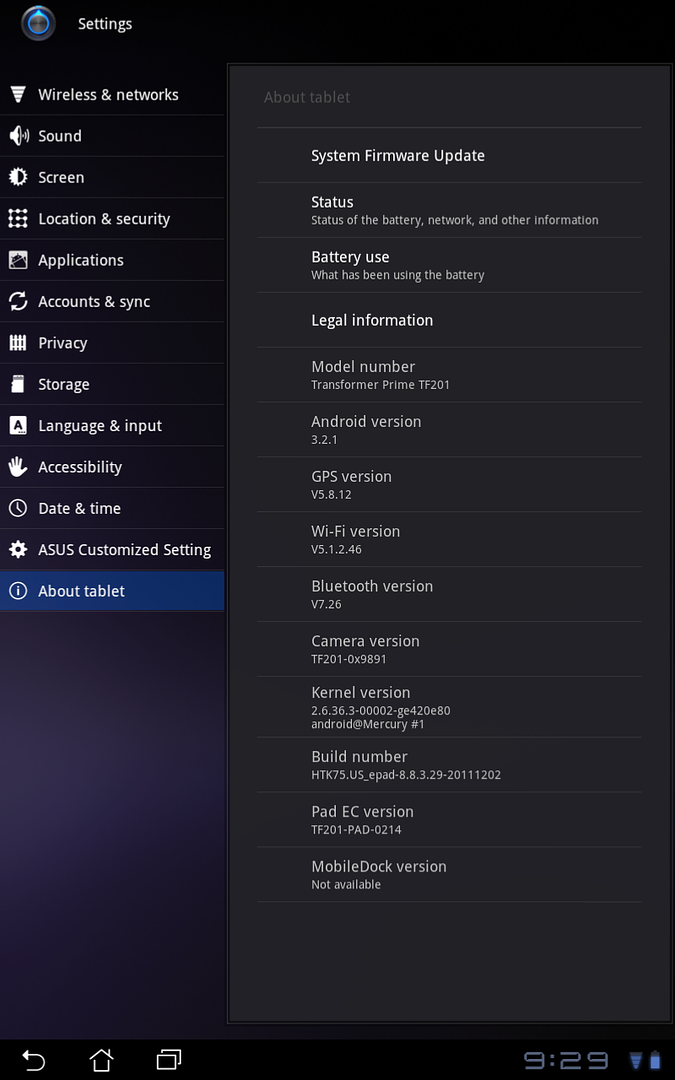
 
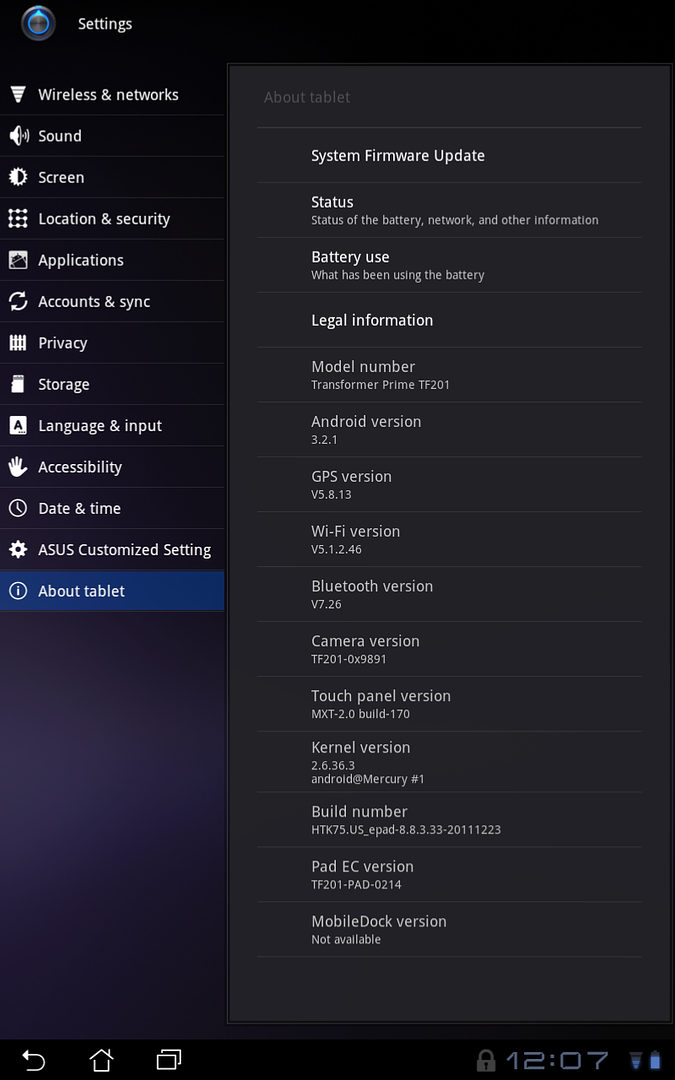
Mine updated fine and fast. Only appears to have updated GPS and added some touchscreen info.

Before...

P20111231212955.png


After...

P20120102120716.png
 
someone posted this on XDA:


thetruth1983 said:
right after installing the update, I did a GPS test and I'm able to get 8-10 satellites from my home office. I used to never get a signal here. I will test more and report back.

EDIT, nvm he had wifi location turned on lol ... but others are reporting GPS is definitely improved. Not completely fixed, but better.
 
Be careful everyone..about 6 reports of bricked TP's already when getting the update on the TF forum.

It's been said the update takes awhile and seems like it will freeze but
DO NOT TOUCH IT while it's updating and looks like it doing nothing.

Those that did get the update are reporting positive results .
 
I had no issues but not sure about changes. I have read people stating they get an update notification for the camera in addition to the main update ? I got the one update and it took about 5 minutes. The change log I found stated that one improvement was MyZine Widget is removed from the desktop but it did not remove it on mine. Can anyone confirm ?

Other than the updated version numbers mentioned I see no real change or improvement.
 
I just got the notice. I delayed intstall for a day with all the brick talk associated with this. For those who received 2 or three different updates did they arrive at the same time or after you installed the first one? The reason I ask is I've only received one so far.
 
I just got the notice. I delayed intstall for a day with all the brick talk associated with this. For those who received 2 or three different updates did they arrive at the same time or after you installed the first one? The reason I ask is I've only received one so far.

Based on the posts I have seen it seems they got all the update notifications together. At most I think the main update was installed and then it prompted for two more updates, one being the camera.
 
I was thinking maybe I just needed to wait a while after the one update I was prompted to install and would see the other two later but it has been all day now. It apprears I have all the version numbers as those who got the three updates.
 
For those that have seemingly bricked devices, try letting the battery completely die and then restart your device. Mine was resurrected doing this. The update that originally crippled my TP seems to have been pulled.
 
someone posted this on XDA:


EDIT, nvm he had wifi location turned on lol ... but others are reporting GPS is definitely improved. Not completely fixed, but better.

Mine updated fine and using GPS Status, I got 8/10 locks in 23 seconds in the house whereas before the update I had to go outside to get locks

For those that have seemingly bricked devices, try letting the battery completely die and then restart your device. Mine was resurrected doing this. The update that originally crippled my TP seems to have been pulled.

It's always best before applying any sort of update to have at least a 50% charge. Updates on a tablet/phone with minimal battery % will for sure do some damage if there isn't sufficient battery;)
 
It's always best before applying any sort of update to have at least a 50% charge. Updates on a tablet/phone with minimal battery % will for sure do some damage if there isn't sufficient battery;)[/QUOTE]

I had plenty of battery power. It still froze my device and then I had to wait 12 hours for the battery to die. See transformer forums for a dozen other stories like mine.
 
Prime arrived yesterday.
Plugged it in, logged onto account, noticed prompt for firmware update.
It didn't take all that long really (5-10mins) and it works great.
 
Prime arrived yesterday.
Plugged it in, logged onto account, noticed prompt for firmware update.
It didn't take all that long really (5-10mins) and it works great.

Same here, got ours yesterday (2 of them) and they updated without issue. Leave them alone while they update and make sure you have enough battery to go through the update without issue.
 
I braved the updates last night. Did the camera update first, followed by the firmware update. Both were successful. I don't really notice much difference at this point though, since I wasn't seeing any unusal issues. I "fixed" my browser lag already by switching to a different browser, and I used the Android keyboard instead of the Asus one to avoid the lag there. I already received good WiFi signal in my unit.
 
So its still not clear to me how some people got 3 update and others got just 1. Even people that updated after me got 3 updates.

Im wondering if I applied all three not at once not know it ? I distinctly remember is saying 1 update though.
 
So its still not clear to me how some people got 3 update and others got just 1. Even people that updated after me got 3 updates.

Im wondering if I applied all three not at once not know it ? I distinctly remember is saying 1 update though.

Yeah, I'm in the same boat... I got 1 update (and an update for the dock firmware today when it arrived after my tablet).
 
So its still not clear to me how some people got 3 update and others got just 1. Even people that updated after me got 3 updates.

Im wondering if I applied all three not at once not know it ? I distinctly remember is saying 1 update though.

Mine said one update, but down in the lower right where the click is, after the download finished I had two icons for applying the updates. One was for camera, the other I believe said firmware. My very first update was done the day I got my Prime, on the 30th of Dec.
 
Back
Top Bottom