• After 15+ years, we've made a big change: Android Forums is now Early Bird Club. Learn more here.

Root HELP!! Not receiving mms

stock or rom? and what version/rom?

try sending one to yourself
if your on wifi turn it off then refresh your profile and try again with wifi off
 
k guys so i am also having this problem.
i am rooted and such a noob. and i accidently deleted my messaging pak. i reinstalled with some help from another forum. so now i can receive pic messages(mms) all day long. which is great. but now for some reason i cant send them? i am pretty sure it was stock mms pak i installed but i cant promise that. can anyone please help me send my girl pics again? lol
thanks guys
 
ps i searched the forum for this and read a lot of suggestions before asking my question. and so far none have worked(even the above about wifi and 3g and rebooting etc)
thanks again guys
 
I had the same problem on 2 separate phones. This fix worked both times. Use a file explorer with SU, and navigate to /data/data/com.android.providers.telephony/databases/telephony.db and delete that file, then restart your phone. After the restart, you should be able to send and receive MMS
 
I had the same problem on 2 separate phones. This fix worked both times. Use a file explorer with SU, and navigate to /data/data/com.android.providers.telephony/databases/telephony.db and delete that file, then restart your phone. After the restart, you should be able to send and receive MMS

I did this. Still not working. Anyone else got any ideas??
 
i could really use some more help on this guys. btw when i did the above now sometimes i cant download mms too. seems to be hit or miss. and in order to download i have to reboot my phone. please help. this is driving me insane.
thanks in advance
james
 
Try using go sms pro it is a great app and you're sms goes thru go servers it works for me when I use a custom rom because a lot of custom roms have trouble with sms and mms.
 
I had the same problem on 2 separate phones. This fix worked both times. Use a file explorer with SU, and navigate to /data/data/com.android.providers.telephony/databases/telephony.db and delete that file, then restart your phone. After the restart, you should be able to send and receive MMS


Thanks! This solved my issue!
 
I had the same problem on 2 separate phones. This fix worked both times. Use a file explorer with SU, and navigate to /data/data/com.android.providers.telephony/databases/telephony.db and delete that file, then restart your phone. After the restart, you should be able to send and receive MMS

Just wanted to confirm this fix worked for me.
 
I haven't been receiving text messages and my email new message indicator quit working. Instead I get an OZMAIL text and from what I read that is a Handcent issue. Can someone help me cause Verizon hasn't been able to do a thing! Now my voice mail indicator quit working :(
 
I had the same problem on 2 separate phones. This fix worked both times. Use a file explorer with SU, and navigate to /data/data/com.android.providers.telephony/databases/telephony.db and delete that file, then restart your phone. After the restart, you should be able to send and receive MMS

This also helped me ty :)
 
I had the same problem on 2 separate phones. This fix worked both times. Use a file explorer with SU, and navigate to /data/data/com.android.providers.telephony/databases/telephony.db and delete that file, then restart your phone. After the restart, you should be able to send and receive MMS

I have tried many methods to try to resolve my mms problem. None work and When I perform a file search I cannot find the above file or even anything close. This problem has been ongoing for months now. I contacted credo and they told me to do a factory reset. I don't want to do that and start from scratch.. Please help!
 
I have tried many methods to try to resolve my mms problem. None work and When I perform a file search I cannot find the above file or even anything close. This problem has been ongoing for months now. I contacted credo and they told me to do a factory reset. I don't want to do that and start from scratch.. Please help!

This file will not be on your sdcard. Its in the /data partition of your phone.

You need to use a file explorer with root access (and have to be rooted)
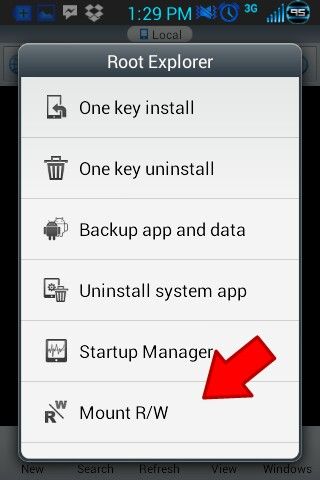
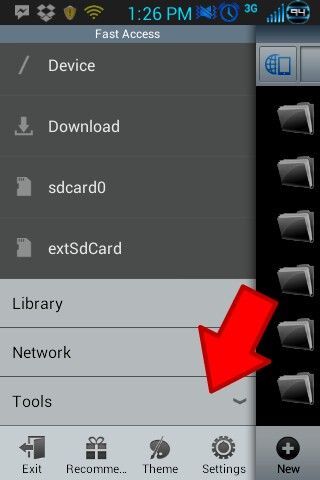
If you use esfile explorer then you need to press menu, select the tools menu:

Screenshot_2013-08-27-13-26-21-picsay_zps6b3f087d.jpg


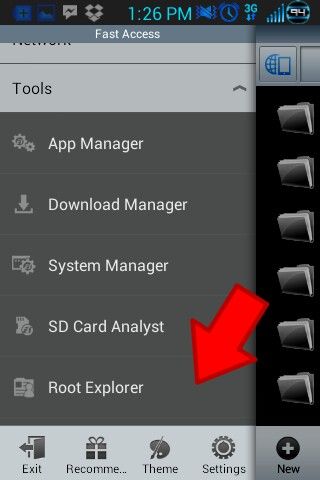
Then select 'root explorer':

Screenshot_2013-08-27-13-26-29-picsay_zpsa334192d.jpg


It will ask for su permission.
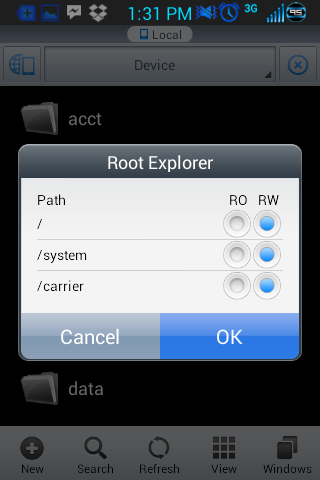
Once you grant it su, select 'mount r/w'

Screenshot_2013-08-27-13-29-10-picsay_zps385f83ba.jpg


and make sure everything is set to r/w.

Screenshot_2013-08-27-13-31-23_zpsa7537ad4.png


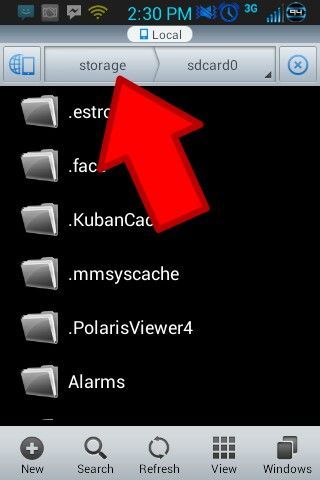
Now back up to the area where you see your files, and at the top you should see a bar that says something similar to this

picsay-1377628260_zps6c562bcd.jpg


You're going to want to press the tab on the left (the one the arrow is pointing to in the picture above) until it says device
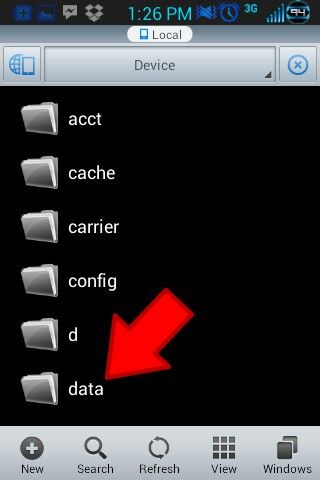
You should then see the data folder:

Screenshot_2013-08-27-13-26-51b-picsay_zpsdb3e33a2.jpg


The file you are looking for is in that folder.
 
Back
Top Bottom