• After 15+ years, we've made a big change: Android Forums is now Early Bird Club. Learn more here.

Help HTC ONE battery discussion (usage, charging, etc.)

Well I do know my data connection is slow as heck where I live

This alone will eat battery like yours truly @ an AYCE Buffet............ :D

Hopefully,there are other things you find that will increase battery life.

A co-worker of mine was wondering why battery life was so awful & mine was stellar.

Set aside that his phone is a SAMSUNG GALAXY S2 (EPIC 4G TOUCH),he finally let me take a look @ his settings.

He wasn't utilizing 3G or 4G WIMAX.Once enabled,he's now making it to the 7-8 hr point before popping-in another battery.

I'd start from the general phone settings & look @each & every available option.

Then,go to your app drawer & look @ each apps own settings.You may be able to increase battery life w/o uninstalling any of your favorite applications,or,sacrificing performance/convenience.

One tip that seems to have a two-fold effect of better performance/battery life:

Disable the system apps that you do not use.No harm in disabling,as you can always re-enable if you begin to experience otherwise unexplained issues.

Some are more straightforward as to what they do than others,disable those first (ex:FACEBOOK),has no effect on other apps if you do not use FB,safe to disable.

Please keep us posted on your progress/results. :)
 
Wow I must have something set up wrong, I am only getting 5 to 6 hours before needing to recharge
sorry godzilla didnt see your reply

tbf it wasnt alot of wifi use i dont have it on all day-ive also heard about certain apps draining battery and lack of signal will drain it aswell
 
I just installed 4.3 and I'm gonna let my battery drain completely then recharge and see if it's any better then it has been. I've only had my phone about 2 weeks so I still do play with it a lot
 
(about HTC ONE)
How do i change the threshold that power saver mode automatically turns on (from 10% to say 50%). I know the default is 10%, but i cant find (i tried Google) where the option to change the threshold was, can someone please tell me? It would be much appreciated.
 
I just updated my htc one to android 4.3 (stock) not rooted, and the battery has been a lot worst since. when i go to app usage it shows that the (android system) is using 79% all the time, including after a reboot of the phone. im guessing its android 4.3 because this didnt happen on 4.1.2 :confused, please help if you have a solution
 
Try adding a battery monitoring app (GSam is popular round here) so you can get more information on how the power is being used, e.g. some particular wakelock.

@Zer0BurnX: I'm not aware of any such setting, and the feature is probably a bit too device-specific for Tasker to know about it (I had a quick look and couldn't see it anyway).
 
I was wondering what the average screentime should be for HTC one. Last time I checked, I got 3.5 hours screentime by the 16% left on battery.
 
That's like asking how long a person's legs should be. It depends on the temperature, what you have enabled, the signal strength of the various radio signals, which apps are running, etc., etc.
 
Not to mention screen brightness and standby time. I've seen almost a factor of 3 range in screen on time with my phone depending on usage, and that's the same device.
 
Battery is driving me nuts on this phone at the moment, went from getting nearly 2 days out of it, now lucky to get 10hrs.. I've been told from some snotty cow from my carrier that 10hrs is perfectly acceptable and could be made better by doing a factory reset, using the power saver and turning down the brightness. I informed her I may as well pull out my old Nokia 3310 as I've already done those things, now I've been given the dreaded number to contact HTC to send it in for repair :D
 
That's like asking how long a person's legs should be. It depends on the temperature, what you have enabled, the signal strength of the various radio signals, which apps are running, etc., etc.

I meant what the average should be under normal circumstances. I just want to know the range should be for light use, medium use, and heavy use.

For example. Is it 1-2 hours for heavy? Or 18-24 hours for heavy usage?
 

Attachments

  • Screenshot_2013-10-08-23-39-36_1.jpg
    Screenshot_2013-10-08-23-39-36_1.jpg
    304.9 KB · Views: 98
  • Screenshot_2013-10-08-23-39-51_1.jpg
    Screenshot_2013-10-08-23-39-51_1.jpg
    355.2 KB · Views: 104
With heavy usage (screen on non stop while playing games or browsing the Internet on 3G/4G) battery life for me is around 3 hours with maximum brightness.
 
With heavy usage (screen on non stop while playing games or browsing the Internet on 3G/4G) battery life for me is around 3 hours with maximum brightness.

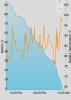
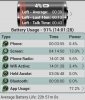
Thanks I see. I just uploaded images of my battery life to my previous post. Does it look normal? When I have screen on during the day, it was only for texting and browsing the internet and facebook.
 
I have a strange problem with my HTC One.

Until last night, I was getting even 2 days of battery life if my screen was off.Last night, I fully charged my phone (100 %) and then went to sleep.When I woke up my phone was at 50 %, and untl 4 pm it was almost empty so I had to charge it again.The screen was off almost all the time, because I don't really use the phone in weekends since I'm home.

I was normally loosing max. 5-10 % of the battery over the night, so why the big change to 50-55 % ? Not to mention that since my phone fully charged like 2 hours ago, I lost almost 20 % of battery life, and the screen was off all this time.

I don't remember changing any settings so I don't understand what the hell happened.Why I suddenly loose so much battery ? And yes, I rebooted the phone twice.
 
Also, do the ten seconds hold on the power button to do a hardware reset - you won't lose any data.

If it's not a runaway app or service, it could be something stuck in silicon and that will clear it.
 
Also, do the ten seconds hold on the power button to do a hardware reset - you won't lose any data.

If it's not a runaway app or service, it could be something stuck in silicon and that will clear it.

So I just need to hold the power button for ten seconds ? How do I know if the hardware reset ?
 
Hey

So there was a 'USB Power Surge' warning on my computer with the HTC One connected, and at the same time the One asked me to to connect it to a support adapter. The wire I was using was the the one the mobile was shipped with. The wire had gotten really hot when I unplugged it.

Following this, the mobile has not charged at all. I tried an USB adapter, and a travel charger.
Is there anything other than visiting the service centre that can be done?

Edit: The computer isn't recognising it as a USB device either. Is it fried?
 
try an different computer.
try to connect to AC power
use yet another usb cable

do you have a battery app on the phone? see if it shows any battery charge activity

what OS version are you running?

is it rooted?

what carrier?

how long have you had the phone? under the stores grace (return) period?

worse case, factory reset.

if not coming back, phone may be damaged beyond these steps and repair at htc is needed.
 
Back
Top Bottom