
Install the app
How to install the app on iOS
Follow along with the video below to see how to install our site as a web app on your home screen.
Note: This feature may not be available in some browsers.
-
After 15+ years, we've made a big change: Android Forums is now Early Bird Club. Learn more here.
You are using an out of date browser. It may not display this or other websites correctly.
You should upgrade or use an alternative browser.
You should upgrade or use an alternative browser.
Help Annoying Message "Prevention Information"
- Thread starter chris2464
- Start date

jwither
Android Enthusiast
No it's called Build number, just below Kernel Version, on the "About phone" screen.You mean the:
4.3_0012 number?
Else there is no other numbers.
It's also the last three digits of the Baseband version.
chimphappyhour
Android Enthusiast
You've connected at Subway previous to this and not had the issue until now?
Same deal for me. I've been connecting to the public wifi at work for a good month without issue before this popped up.

Ametz
Newbie
No it's called Build number, just below Kernel Version, on the "About phone" screen.
It's also the last three digits of the Baseband version.
Ok this then:
XXUDMJ7
(My phone is not in english so i don't see the names as you say)
jwither
Android Enthusiast
Gotcha.Ok this then:
XXUDMJ7
(My phone is not in english so i don't see the names as you say)
That's also the version Verizon sent out in its update last week.
Now we just need to find out what version those that still have the error are running.

If you're not getting the Over the Air (OTA) updates download KIES 3 on your computer and hook up your Note 3. When you connect your phone or tablet to Kies via a USB cable, you will be automatically notified of any available software updates for your device.Mine is UBMJ1... how can I get those updates?

dynomot
Android Expert
Gotcha.
That's also the version Verizon sent out in its update last week.
Now we just need to find out what version those that still have the error are running.
Here you are, dial *#1234# from the dialler to get this :
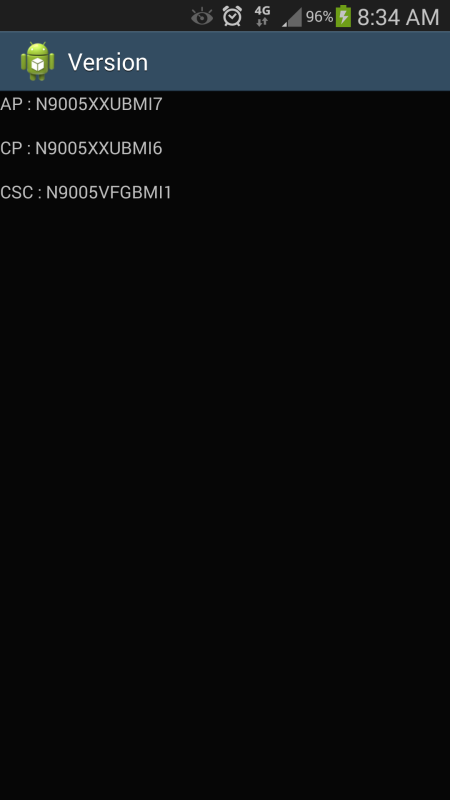

zipred
Android Expert
The latest update i got yesterday seems to have fixed this issue. I have no more message anyway since the update..
What carrier did the update come from?
jwither
Android Enthusiast
His firmware version looks like an N9005, which is factory unlocked.What carrier did the update come from?
dynomot
Android Expert
Just to clear something up. Here in the UK we only have the Note 3 SM-N9005 (Qualcom) as far as I know all international Note 3s (which mine and everyone sold in the UK is) are not carrier locked. I can pop in any UK carriers SIM and it will work. If you get your Note 3 via a carrier it usually comes with added carrier bloatware. For instance my CSC has the letters VF (for Vodafone) GB (Great Britain) because I got mine "free" with a 24 month contract, and it has their version of the firmware on it. Apart from the extra bloat and waiting longer for my carrier to add their bloat to new firmware it operates exactly like one bought from Samsung.
I understand in the US there are different versions of the Note 3. All the versions look the same but yours are different to an international version, are SIM locked to your carriers and not all are LTE (4G) capable.
We appear to have all versions of the Note 3 having this "bug", probably because Knox is identical on all phones. I suspect that if you have the problem/bug mentioned it matters not who your carrier is, what model Note 3 you have, or what firmware you are running.
It would be interesting to know if you have the bug, then recieve an update and the bug dissapears exactly what *#1234# produces (a screen shot us ideal, but not essential), and what model you have.
I understand in the US there are different versions of the Note 3. All the versions look the same but yours are different to an international version, are SIM locked to your carriers and not all are LTE (4G) capable.
We appear to have all versions of the Note 3 having this "bug", probably because Knox is identical on all phones. I suspect that if you have the problem/bug mentioned it matters not who your carrier is, what model Note 3 you have, or what firmware you are running.
It would be interesting to know if you have the bug, then recieve an update and the bug dissapears exactly what *#1234# produces (a screen shot us ideal, but not essential), and what model you have.
jwither
Android Enthusiast
I don't think Verizon users have this issue, possbily because they stripped down the Knox install on it.We appear to have all versions of the Note 3 having this "bug", probably because Knox is identical on all phones.

Simon_Gardner
Android Expert
Just to clear something up. Here in the UK we only have the Note 3 SM-N9005 (Qualcom) as far as I know all international Note 3s (which mine and everyone sold in the UK is) are not carrier locked. I can pop in any UK carriers SIM and it will work.
Hmm.
Are you sure that is true? It's rather surprising if it is and they certainly don't do that with iPhones. They don't bother locking feature phones or cheaper any more. But a Note 3?
You think you can go to Paris and put a French SIM in your UK carrier Note 3? Or a competing UK network?
I don't necessarily disbelieve you but have you tried it? (I can't try it as mine came from Samsung.)
dynomot
Android Expert
Hmm.
Are you sure that is true? It's rather surprising if it is and they certainly don't do that with iPhones. They don't bother locking feature phones or cheaper any more. But a Note 3?
You think you can go to Paris and put a French SIM in your UK carrier Note 3? Or a competing UK network?
I don't necessarily disbelieve you but have you tried it? (I can't try it as mine came from Samsung.)
Yep I have my contract SIM with Vodafone, a Tesco mobile SIM (O2 network) a T-mobile SIM and an Orange SIM all work (never tried a '3' SIM).
Vodafone I know for sure don't SIM lock and haven't done for years. The last contract phone I had off of them that was SIM locked was my Nokia N95, and they changed policy half way through my contract. I called them and got the unlock code from them for free. I've never had a SIM locked phone from them since. I belive it is the same for all networks in the UK. Now as for a French SIM, I wouldn't know, I know the Note 3 is supposed to be region locked to stop "grey" imports but I would imagine it would work.
Phones in the UK are nearly always carrier branded but not locked. The exception is to buy a contact from an independent like Phones4U or Car Phone Warehouse, from them you'll get a stock unbranded device.
Simon_Gardner
Android Expert
Yep I have my contract SIM with Vodafone, a Tesco mobile SIM (O2 network) a T-mobile SIM and an Orange SIM all work (never tried a '3' SIM).
Thanks for checking.

Found this info on Samsung's website. If it is Knox that's creating the problem, uninstalling Samsung Knox Personal might fix it. Here's how:
How do I Remove/Uninstall Knox Personal on my Samsung Galaxy Note
How do I Remove/Uninstall Knox Personal on my Samsung Galaxy Note

sjfwhite
Newbie
Found this info on Samsung's website. If it is Knox that's creating the problem, uninstalling Samsung Knox Personal might fix it. Here's how:
How do I Remove/Uninstall Knox Personal on my Samsung Galaxy Note

Omicron Note 3
Member
I'm on Sprint and received a notification of an automatic installation of a Security Update over the Veteran's Day weekend.
Have not had that "Prevention..." notification since.
Build No. ...PUBMJ4
Have not had that "Prevention..." notification since.
Build No. ...PUBMJ4
I'm on Sprint and received a notification of an automatic installation of a Security Update over the Veteran's Day weekend.
Have not had that "Prevention..." notification since.
Build No. ...PUBMJ4
I received the same notification last night. I figured I'll give it a few days to see if that fixes this annoying message I'm getting as well. I'm on Sprint and also have MJ4.
dave
zipred
Android Expert
Found this info on Samsung's website. If it is Knox that's creating the problem, uninstalling Samsung Knox Personal might fix it. Here's how:
How do I Remove/Uninstall Knox Personal on my Samsung Galaxy Note
dynomot
Android Expert
I have one Note 3 from AT&T and one from T-Mobile. When going into Settings / General / App Mgr / KNOX, Uninstall is greyed out.
So I selected the option to download it, Install it, then set it up. Once completed now the Uninstall choice was available. Next I selected Uninstall and followed Samsung's directions precisely. The result? While it was uninstalled it still appears as before in the list of apps and the error message persists.
There is absolutely no doubt in my mind we will have to wait for Samsung to fix this.
Knox is part of the firmware and hardware. You downloaded the application to make it work as a "device within a device", the knox application, and then uninstalled it. Knox, the inbuilt security is still there and cannot be removed. Tap on the Knox shield in the apps drawer and it will want to download and install it's app again.
Knox is much, much more than an app you can unistall and forget about I'm afraid.
Simon_Gardner
Android Expert
I just got my third "annoying message". I had been using public wifi this time.
zipred
Android Expert
Knox is part of the firmware and hardware. You downloaded the application to make it work as a "device within a device", the knox application, and then uninstalled it. Knox, the inbuilt security is still there and cannot be removed. Tap on the Knox shield in the apps drawer and it will want to download and install it's app again.
Knox is much, much more than an app you can unistall and forget about I'm afraid.
You've brought up a very good point. Since my last post I have done further research which confirms your assessment.
jetskibill
Lurker
Believe me when I say this is not an APP related issue its a Wi-Fi issueBut it was only a security certificate update pop up message. It wasn't a firmware update at all since it finished in a few seconds unlike when they updated the software which took a few minutes and a reboot too. Samsung probably will be seeding the same security updates to other countries within the day to correct probably one of their app updates that probably triggered this problem.
Is there a way where I can check what it was? I don't have an idea of where to check the update logs. I'm kinda new to Android and just accepts any updates that pop ups
Good luck.

You can delete as many apps as you want and it wont make any difference at all