
Install the app
How to install the app on iOS
Follow along with the video below to see how to install our site as a web app on your home screen.
Note: This feature may not be available in some browsers.
-
After 15+ years, we've made a big change: Android Forums is now Early Bird Club. Learn more here.
You are using an out of date browser. It may not display this or other websites correctly.
You should upgrade or use an alternative browser.
You should upgrade or use an alternative browser.
Help Photos with contact
- Thread starter xguy
- Start date
breadnatty08
pain rustique
With mine (it's stock KK), head into contact in question, settings (the 3 dots), edit, and click on the "picture" field and you'll be able to add a photo from the phone or elsewhere for a contact pic. 

xguy
Android Enthusiast
With mine (it's stock KK), head into contact in question, settings (the 3 dots), edit, and click on the "picture" field and you'll be able to add a photo from the phone or elsewhere for a contact pic.
OK, I did exactly that and when I get to "take photo or from gallery" it says "unable to save photo edits". I didn't even try to edit but touched on photo and got that message. Little circle spinning on pic, like trying to load.
 I hope it's not the phone, I've got less than 10 days to return it.
Thanks


saptech
Android Expert
Well, I misunderstood. I guess you are having some type of problem.OK, I did exactly that and when I get to "take photo or from gallery" it says "unable to save photo edits". I didn't even try to edit but touched on photo and got that message. Little circle spinning on pic, like trying to load.
Thanks
This is how I just added a photo to a contact.
Open the contact you want to add a pict.
Press the three dots at top right corner, choose Edit, then select the blank photo spot on the right, choose photo from Gallery, select photo you want to add, then I chose 'crop picture', then save.
That should do it.
xguy
Android Enthusiast
Well, I misunderstood. I guess you are having some type of problem.
This is how I just added a photo to a contact.
Open the contact you want to add a pict.
Press the three dots at top right corner, choose Edit, then select the blank photo spot on the right, choose photo from Gallery, select photo you want to add, then I chose 'crop picture', then save.
That should do it.
I followed step by step. When I select photo it appears in a square as to crop, but i don't see a menu to crop picture then save. I just see a "done" with check mark in the top left. When I touch on the done and check mark it says "unable to save photo edits" with a circle spinning like it's trying to load. I'm good til I get to "crop picture, then save. Where is that menu?
Thanks
saptech
Android Expert
I think I see the problem now. When it comes to the 'crop picture', you should have at least two options to crop with, 1) crop photo, which is the picture editor app, 2) crop picture, which is the gallery app.I followed step by step. When I select photo it appears in a square as to crop, but i don't see a menu to crop picture then save. I just see a "done" with check mark in the top left. When I touch on the done and check mark it says "unable to save photo edits" with a circle spinning like it's trying to load. I'm good til I get to "crop picture, then save. Where is that menu?
Thanks
The picture editor app is causing the issue, I just tried it and got same error you're getting.
Try using the default gallery app, which on my phone show, 'crop picture'. That's when I get the Save option after cropping the photo.
We may have found a bug in the picture editor app. I'm not sure why it gives the 'unable to save photo edits' message.
Good luck!
xguy
Android Enthusiast
I think I see the problem now. When it comes to the 'crop picture', you should have at least two options to crop with, 1) crop photo, which is the picture editor app, 2) crop picture, which is the gallery app.
The picture editor app is causing the issue, I just tried it and got same error you're getting.
Try using the default gallery app, which on my phone show, 'crop picture'. That's when I get the Save option after cropping the photo.
We may have found a bug in the picture editor app. I'm not sure why it gives the 'unable to save photo edits' message.
Good luck!
I can't even get that far! OK, touching on contact>touching blank face>choose photo from gallery>touch on face>has square around face= nothing! I haven't seen crop picture. How do I use the default gallery app?
saptech
Android Expert
, at this point it should have open your pictures in the gallery, to choose a picture. Once I choose picture, I get option of which app to use to crop. Photo Editor, or Gallery app, which show next to it, Crop Picture. Then I'm able to edit the picture, once done editing, Save is at the top on left hand side.touching on contact>touching blank face>choose photo from gallery>
If this doesn't work, I guess something is wrong.
If when you first tried this, you made one of the editor apps 'Always use' as the default app and maybe this is why you're not getting other options. You would have to clear the cache for the photo app that is set as default to get the options back.
xguy
Android Enthusiast
, at this point it should have open your pictures in the gallery, to choose a picture. Once I choose picture, I get option of which app to use to crop. Photo Editor, or Gallery app, which show next to it, Crop Picture. Then I'm able to edit the picture, once done editing, Save is at the top on left hand side.
If this doesn't work, I guess something is wrong.
If when you first tried this, you made one of the editor apps 'Always use' as the default app and maybe this is why you're not getting other options. You would have to clear the cache for the photo app that is set as default to get the options back.
Thanks, I must have a bad one because I haven't seen Photo Editor, Gallery app or crop. I couldn't find the photo app. Would it be under all apps? I couldn't find camera.
xguy
Android Enthusiast
I'm at work now but sometime tomorrow maybe I can show a screenshot how mine add pictures. All these apps should be in the App drawer (all apps). Photo Editor & Gallery, they came default on my phone which I bought from Motorola in December.
Thanks saptech, that would be great! I even went to the Motorola forum and XD and couldn't find nothing on it.
OK, I did find gallery and crop, but didn't have an app named Photo Editor
breadnatty08
pain rustique
Couple places of note. I don't believe there's a separate editing app, it's within the Camera/Gallery app itself. The little crayon looking icon will get you into editing and the three dots will pull down more settings, allowing you to set a photo as a contact image.
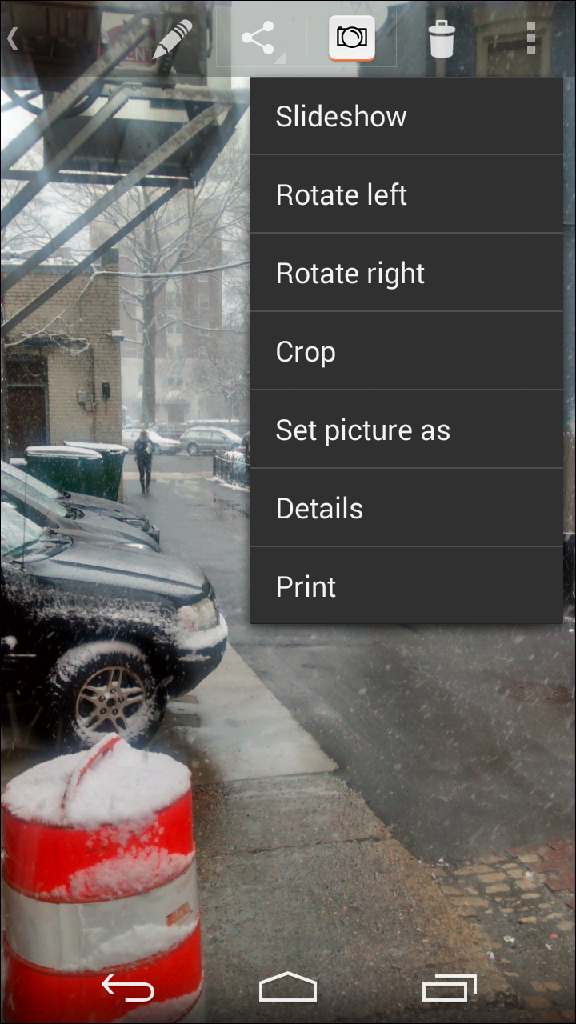
If you're looking for a stand alone photo editing app, Snapseed is one of the best out there; and it's free.

If you're looking for a stand alone photo editing app, Snapseed is one of the best out there; and it's free.
breadnatty08
pain rustique
Just saved a random photo for a random contact. Did have to crop it, but it worked just fine. Can you take a screen shot of that error message?
saptech
Android Expert
I thought the other post would have solved your issue and so I made the Gallery app the default editor. Now it opens up when I need to crop photos automatically.Thanks saptech, that would be great! I even went to the Motorola forum and XD and couldn't find nothing on it.
OK, I did find gallery and crop, but didn't have an app named Photo Editor
I don't know exactly what came on my phone by default but I have separate Photo Editor & Gallery apps. Before I made gallery my default for cropping, it asked which one to use. Using the Photo Editor, I got the same error message as you're getting.
One may have came when I migrated my old phone apps over to the MG, I can't remember.