
Install the app
How to install the app on iOS
Follow along with the video below to see how to install our site as a web app on your home screen.
Note: This feature may not be available in some browsers.
-
After 15+ years, we've made a big change: Android Forums is now Early Bird Club. Learn more here.
You are using an out of date browser. It may not display this or other websites correctly.
You should upgrade or use an alternative browser.
You should upgrade or use an alternative browser.
Help Adding more ringtones to LG G3 - Its says read only and cannot

Are you rooted?
If not, I'm thinking you cannot change files in the /system partition.
What method are you using to move them?
If not, I'm thinking you cannot change files in the /system partition.
What method are you using to move them?

jo69
Android Enthusiast
Not rooted no. Just want to put a few new message tones on my phone.
Tried by plugging into pc but cant get to the system folder that way. It only shows files I have added.
Tried to copy them from a folder on my phone I put them in. Through ES Explorer. Then I got the message read only cannot copy
Tried by plugging into pc but cant get to the system folder that way. It only shows files I have added.
Tried to copy them from a folder on my phone I put them in. Through ES Explorer. Then I got the message read only cannot copy
Yeah, pretty sure you cannot mess with any files under the /system partition without root.
When you are on Zedge.com, are you using your device or the computer?
You can easily use the app also so that when you download the ringtone, or notification tone, it will auto create a "Zedge" folder. Then, when you go into your text messaging app for example, and go to change the notification tone, the option should come up to choose the "Zedge" folder, (or media folder, or other folders)
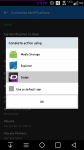
and pick the tone. If it doesn't, prompt you to choose between files, then you need to remove app defaults.
When you are on Zedge.com, are you using your device or the computer?
You can easily use the app also so that when you download the ringtone, or notification tone, it will auto create a "Zedge" folder. Then, when you go into your text messaging app for example, and go to change the notification tone, the option should come up to choose the "Zedge" folder, (or media folder, or other folders)
and pick the tone. If it doesn't, prompt you to choose between files, then you need to remove app defaults.
jo69
Android Enthusiast
Hi didnt know that will try it thanks.
I downloaded them them to the pc first.
The problem is I just want some loud pings or chimes for message tones and it took me ages to find them on zedge as most of them are stupid lol
Was easier on the pc for me.
I have been able to add them to the audio folder before on other phones no problem. And wouldnt know how to root lol
I downloaded them them to the pc first.
The problem is I just want some loud pings or chimes for message tones and it took me ages to find them on zedge as most of them are stupid lol
Was easier on the pc for me.
I have been able to add them to the audio folder before on other phones no problem. And wouldnt know how to root lol
jo69
Android Enthusiast
Hi mike zedge did the trick! Had only ever tried it on pc. Didnt know there was an app.
Found some simple message tones for my LG phone
And my phone recogised the zedge folder !
Great.
But how do I change the defaults?
Last question is there any way i can save then and add them to my next new phone?
Ps. Also love your font in the screenshot.
Found some simple message tones for my LG phone
And my phone recogised the zedge folder !
Great.
But how do I change the defaults?
Last question is there any way i can save then and add them to my next new phone?
Ps. Also love your font in the screenshot.
Last edited:

6th_Hokage
Android Enthusiast
lol i thought it was only an app..learn something new everyday
Cool!! Glad it worked out for ya!Hi mike zedge did the trick! Had only ever tried it on pc. Didnt know there was an app.
Found some simple message tones for my LG phone
And my phone recogised the zedge folder !
Great.
But how do I change the defaults?
Last question is there any way i can save then and add them to my next new phone?
Ps. Also love your font in the screenshot.
To changed the defaults, go into menu/settings/application manager.
Hit the 3-dot menu and choose the "Reset app defaults" and clear what you want cleared.
To save them for the next device, I just transfer the Zedge folder from my old device, to my computer, then to my new device using the same path. i.e. sdcard0/zedge...or whatever the path may be.
I'm thinking there is an option to set up a free account at Zedge to auto backup your ringtones to Zedge cloud? Not sure, I'd have to check into that.
And the font I'm using is from a .zip file I flashed via recovery (yes, I'm rooted) and I have countless fonts to choose from
Edit: oh, the font is called, "AaDiaryFont"
Outside of being rooted I'm not sure, sorry. . I've so been used to root I've not remembered how to install non-stock fontsJust for interest mike can i download new fonts for my lg android tablet too, and if so where do i put them?

However, don't hesitate to start a new thread about it... I'm sure someone can help.
And being as it's not really device specific, you can post in the Android Lounge or Android Questions forum for more exposure
