

King Mustard
Well-Known Member
I disabled it ages ago but now I can't see how to re-enable it.
Any ideas?
Any ideas?
Follow along with the video below to see how to install our site as a web app on your home screen.
Note: This feature may not be available in some browsers.
For example, this is how it looks on the Galaxy S4:Not sure what you're really describing/asking. Are you using Good Lock?
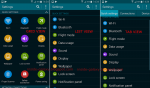

That makes less than 0% sense.Pull down on the Notification Bar with 2 fingers.
I'm sure(ish), when I bought my S7, Settings was in Tab view.My settings are in tab view (which I like). I cannot find any way to change to the alternative list views. I believe these changes were locked in in marshmallow sometime back and are a function of your carrier modifications. My carrier is AT&T (the king of bloat/crapware and inordinately delayed updates)
"Less than 0% sense" – – Please be more precise.

