
Install the app
How to install the app on iOS
Follow along with the video below to see how to install our site as a web app on your home screen.
Note: This feature may not be available in some browsers.
-
After 15+ years, we've made a big change: Android Forums is now Early Bird Club. Learn more here.
You are using an out of date browser. It may not display this or other websites correctly.
You should upgrade or use an alternative browser.
You should upgrade or use an alternative browser.
Could you give me a deleted photos recovery program?
- Thread starter a cooperator
- Start date

a cooperator
Well-Known Member
Thanks a lot,I read some of the posts, so if it's been said before ignore me lol.
Disk digger app works to a certain extent. Running a variety of programs will lessen the chance of recovering much though.
Disk digger app can be for a Windows PC and connect my phone into a PC and start scanning it?

James L
Android Expert
Thanks a lot,
Disk digger app can be for a Windows PC and connect my phone into a PC and start scanning it?
It's a android app.

You'd have to ask Google why they made this choice.However, from your sayings that unfortunately, Android disabled USB Mass storage with version 4.4.2. I became asking myself why Hard Disks, MicroSD Cards .etc connected into a PC's USB port are still connecting as mass storage and can sill be mounted as an unique lettered volume. However, devices (mobile phones) after Android having Android versions 4.4.2 or later are not connecting as mass storage and cannot be mounted as an unique lettered volume when connected to a PC's USB port.
They would probably tell you it's because MTP allows you to use the storage while it's connected to the computer - when they used UMS then mounting the storage over USB prevented the phone from accessing it, which was obviously inconvenient. And I could imagine it might cause bigger problems with the current setup, where /data and /sdcard are virtual volumes which share the same space, than in the days when USM was the norm but /data and /sdcard were distinct (/data being the volume in which user apps and app data are stored, /sdcard the emulation of an SD card in internal storage). However, it's not clear to me that this was a necessary consequence of allowing UMS access, which means I don't completely trust this answer.
As for the serial number, on current my phone it's in Settings > System > Status, on previous ones I think it was somewhere in Settings > About. Samsung tend to do their own thing, but it should be in there somewhere.
It's not generally considered a good idea to post your IMEI or MEID on the web. Some criminals alter the IMEIs of stolen phones (it is illegal to change the IMEI in most countries, so anyone doing this is by definition a criminal), so posting your IMEI is providing the information needed to "clone" your phone. When such cloning is detected it results in the IMEI being barred, so it's not something you want to happen. So I'd suggest removing them from your posts.

I did a little further research about your phone and the Samsung Galaxy Prevail, or the Samsung Core prime or whatever iteration that particular model was sold under were variations based on which carrier they were sold through and which bands they supported. The models that supported CDMA networks were all branded to carriers as far as I could see. Either directly from Verizon or Sprint, or through a few MVNO's like Boost or Tracfone. I don't see any unlocked or international versions ever being sold, so if you bought it as unlocked for use in Yemen, it is what we call "grey market" devices. This means they were sold in other countries for specific carriers but will work on other networks. The catch here is that updates and specific network features won't be available.
Sometimes the only differentiation is the firmware, so if you could find a truly international version of the firmware it may be able to update directly from Samsung. Unfortunately, I don't see one that is not specific to a U.S. Carrier for your device. DO NOT attempt to flash firmware not SPECIFICALLY written for your device, no matter how similar they might look. It is the fastest way to render your phone completely inoperable and unrecoverable.
If an update is critical, it *may* be possible to sideload the official update provided you can find it, and you know the EXACT EXACT EXACT model number for you phone. Samsung is notorious for having many model variations of the same device with only a subtle variation of model number.
Sometimes the only differentiation is the firmware, so if you could find a truly international version of the firmware it may be able to update directly from Samsung. Unfortunately, I don't see one that is not specific to a U.S. Carrier for your device. DO NOT attempt to flash firmware not SPECIFICALLY written for your device, no matter how similar they might look. It is the fastest way to render your phone completely inoperable and unrecoverable.
If an update is critical, it *may* be possible to sideload the official update provided you can find it, and you know the EXACT EXACT EXACT model number for you phone. Samsung is notorious for having many model variations of the same device with only a subtle variation of model number.
a cooperator
Well-Known Member
Could you please help me with my new issue which seemed to happen after registering my phone with creating a US Samsung account and used the IMEI.I did a little further research about your phone and the Samsung Galaxy Prevail, or the Samsung Core prime or whatever iteration that particular model was sold under were variations based on which carrier they were sold through and which bands they supported. The models that supported CDMA networks were all branded to carriers as far as I could see. Either directly from Verizon or Sprint, or through a few MVNO's like Boost or Tracfone. I don't see any unlocked or international versions ever being sold, so if you bought it as unlocked for use in Yemen, it is what we call "grey market" devices. This means they were sold in other countries for specific carriers but will work on other networks. The catch here is that updates and specific network features won't be available.
Sometimes the only differentiation is the firmware, so if you could find a truly international version of the firmware it may be able to update directly from Samsung. Unfortunately, I don't see one that is not specific to a U.S. Carrier for your device. DO NOT attempt to flash firmware not SPECIFICALLY written for your device, no matter how similar they might look. It is the fastest way to render your phone completely inoperable and unrecoverable.
If an update is critical, it *may* be possible to sideload the official update provided you can find it, and you know the EXACT EXACT EXACT model number for you phone. Samsung is notorious for having many model variations of the same device with only a subtle variation of model number.
Now my issue is I see my SIM card is being invalid while it was valid before so.
Could you please help me with my new issue which seemed to happened after registering my phone with creating a US Samsung account and used the IMEI.
Now my issue is I see my SIM card is being invalid while it was valid before so.
Did you update anything after creating that Samsung account? All I could think of is that whatever updated now will only look for US carriers, although I really don't know why it would affect the validity of a previously working SIM card.
Try turning off the phone, removing the SIM card and rebooting without any SIM card in it. Then shut the phone off again, put the SIM back in and then reboot.
a cooperator
Well-Known Member
I
All what I remember that I did is trying
1- to create a Samsung account on my PC, then have tried registering my phone using the IMEI. Then, it has been registered. (screen shot below). Hoping to get receiving updates. But in the settings of my phone , when trying clicking on updating system update"> "check for updates"option, I was prompted with" the operating system on your device has been modified in an authorized way. Try downloading software updates using Samsung Kies on your PC, or visit a customer service center. "
Note before my phone is being registered clicking on system update was returning a network error.

2- Also, in the setting of my phone I tried clicking on an option called "activate this device", which gave me "device self service" sometime I got the task was done. However, other times, I got an unknown error".
Now whenever clicking on "activate this device", I see in the "self service" window, this information " sorry we experienced a system problem during your task, please dial 611 from your phone or call 1-866-402-7366 from a different phone and we will be happy to assist you. "
That is all what I have done.
I followed your steps, but the SIM card is still shown invalid.Did you update anything after creating that Samsung account? All I could think of is that whatever updated now will only look for US carriers, although I really don't know why it would affect the validity of a previously working SIM card.
Try turning off the phone, removing the SIM card and rebooting without any SIM card in it. Then shut the phone off again, put the SIM back in and then reboot.
All what I remember that I did is trying
1- to create a Samsung account on my PC, then have tried registering my phone using the IMEI. Then, it has been registered. (screen shot below). Hoping to get receiving updates. But in the settings of my phone , when trying clicking on updating system update"> "check for updates"option, I was prompted with" the operating system on your device has been modified in an authorized way. Try downloading software updates using Samsung Kies on your PC, or visit a customer service center. "
Note before my phone is being registered clicking on system update was returning a network error.
2- Also, in the setting of my phone I tried clicking on an option called "activate this device", which gave me "device self service" sometime I got the task was done. However, other times, I got an unknown error".
Now whenever clicking on "activate this device", I see in the "self service" window, this information " sorry we experienced a system problem during your task, please dial 611 from your phone or call 1-866-402-7366 from a different phone and we will be happy to assist you. "
That is all what I have done.
Last edited:
a cooperator
Well-Known Member
Thanks a lot,I did a little further research about your phone and the Samsung Galaxy Prevail, or the Samsung Core prime or whatever iteration that particular model was sold under were variations based on which carrier they were sold through and which bands they supported. The models that supported CDMA networks were all branded to carriers as far as I could see. Either directly from Verizon or Sprint, or through a few MVNO's like Boost or Tracfone. I don't see any unlocked or international versions ever being sold, so if you bought it as unlocked for use in Yemen, it is what we call "grey market" devices. This means they were sold in other countries for specific carriers but will work on other networks. The catch here is that updates and specific network features won't be available.
Sometimes the only differentiation is the firmware, so if you could find a truly international version of the firmware it may be able to update directly from Samsung. Unfortunately, I don't see one that is not specific to a U.S. Carrier for your device. DO NOT attempt to flash firmware not SPECIFICALLY written for your device, no matter how similar they might look. It is the fastest way to render your phone completely inoperable and unrecoverable.
If an update is critical, it *may* be possible to sideload the official update provided you can find it, and you know the EXACT EXACT EXACT model number for you phone. Samsung is notorious for having many model variations of the same device with only a subtle variation of model number.
I think you are quite right since when I look at the about device, I see under "Build number" a person name called "Fawzi Bakrama", who never ever used my phone after I had had it, and whom I never ever got to know.

Having a look at a variety of Samsung phones here in Yemen, I see person names under the Build number to whom the phones don't belong.
a cooperator
Well-Known Member
Thanks a lot,It's a android app.
I have installed on it on my Android phone, and then launched it, however, I only saw that 'quick scan' can be applied, however, 'deep scan' is grayed out(unreacheable). I tried rooting my phone by using Kingo ROOT, and my phone was root successfully by connecting it into a PC and running the Kingo ROOT to root it.
However, I still see that 'deep scan' cannot be reachable.
a cooperator
Well-Known Member
Thanks a lot,It's a android app.
I have installed it on my Android phone, and then launched it, however, I only saw that 'quick scan' can be applied, however, 'deep scan' is grayed out(unreacheable). I tried rooting my phone by using Kingo ROOT, and my phone was root successfully by connecting it into a PC and running the Kingo ROOT to root it.
However, I still see that 'deep scan' cannot be reachable.

Last edited:
James L
Android Expert
I'm not sure why you used kingo but there are other ways via a PC to root that device. I'm not sure why deep scan isn't available, maybe install busybox, reboot then try.Thanks a lot,
I have installed it on my Android phone, and then launched it, however, I only saw that 'quick scan' can be applied, however, 'deep scan' is grayed out(unreacheable). I tried rooting my phone by using Kingo ROOT, and my phone was root successfully by connecting it into a PC and running the Kingo ROOT to root it.
However, I still see that 'deep scan' cannot be reachable.
View attachment 125224
As far as any feature related questions, contacting the developer would be the best option.
a cooperator
Well-Known Member
I was advised and recommended to use Lingo by trying recovering my data with using the EASEus’ MobiSaver for AndroidI'm not sure why you used kingo but there are other ways via a PC to root that device. I'm not sure why deep scan isn't available, maybe install busybox, reboot then try.
As far as any feature related questions, contacting the developer would be the best option.
What is wrong with rooting with using Kingo? I don't see any ways via my device to root it.
a cooperator
Well-Known Member
I tried following all your steps, but the SIM card has been still invalid. I wish that I did not try registering my phone by typing it's IMEI through Samsung account. I think my phone became invalid to be used in Yemen anymore.Did you update anything after creating that Samsung account? All I could think of is that whatever updated now will only look for US carriers, although I really don't know why it would affect the validity of a previously working SIM card.
Try turning off the phone, removing the SIM card and rebooting without any SIM card in it. Then shut the phone off again, put the SIM back in and then reboot.
I even tried removing my registered phone from there on Samsung account. But, that made no difference. Can I reset my phone to factory settings to see if it will fix it.
Please help me fix it. I was trying recovering my photos I tried making a big issue????? What a crazy man I am!
Last edited:
Based on your earlier screen capture of the version and build number, it's pretty apparent that this device was flashed with non-standard firmware, possibly to make it work in your country. Frankly I don't know what to do for you at this point. Someone who has direct experience with your carrier should try and help you.
a cooperator
Well-Known Member
T
But, please see that the screen shot below is just for my other LT mobile which has Android version 5 .1(look screen shot below). I posted my other phone here to only let you understand I have tried updating system, but I was notified that it was up to date. It is also not recognised by Recuva.
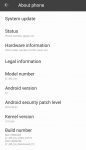
However, this is the screen capture of the version and build number for my Samsung phone, they are still as they were before registering my device. The build number is only down with a person name called "Fawzi Bakrama".
see under "Build number" a person name called "Fawzi Bakrama", who never ever used my phone after I had had it, and whom I never ever got to know.
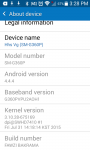
Having a look at a variety of Samsung phones here in Yemen, I see person names under the Build number to whom the phones don't belong.
You don't think resting my phone to the factory setting will fix the issue of invalid SIM card.
Thanks a lot,Based on your earlier screen capture of the version and build number, it's pretty apparent that this device was flashed with non-standard firmware, possibly to make it work in your country. Frankly I don't know what to do for you at this point. Someone who has direct experience with your carrier should try and help you.
But, please see that the screen shot below is just for my other LT mobile which has Android version 5 .1(look screen shot below). I posted my other phone here to only let you understand I have tried updating system, but I was notified that it was up to date. It is also not recognised by Recuva.
However, this is the screen capture of the version and build number for my Samsung phone, they are still as they were before registering my device. The build number is only down with a person name called "Fawzi Bakrama".
see under "Build number" a person name called "Fawzi Bakrama", who never ever used my phone after I had had it, and whom I never ever got to know.
Having a look at a variety of Samsung phones here in Yemen, I see person names under the Build number to whom the phones don't belong.
You don't think resting my phone to the factory setting will fix the issue of invalid SIM card.
Last edited:
I posted my other phone here to only let you understand I have tried updating system, but I was notified that it was up to date. It is also not recognised by Recuva.
Updates are specific to phone models and whether they were from a carrier or direct from the manufacturer. You can't extrapolate any information from this other than there are no updates available for your LT phone.
As we've discussed a great deal, the Recuva app will not be able to see files on any Android phone running version 4.2 or later. There is nothing you can do to change this.
The build number is only down with a person name called "Fawzi Bakrama". see under "Build number" a person name called "Fawzi Bakrama", who never ever used my phone after I had had it, and whom I never ever got to know.
That is exactly my point. That person may have been the developer who modified the firmware so it would work with carriers that phones running the original firmware won't. That's a guess. One thing's for certain -- that is NOT the original firmware the phone shipped with.
Why registering your phone with Samsung changed something so it wouldn't recognize the SIM is puzzling. I have no thoughts on how to resolve that beyond what I've already suggested. Sorry.
a cooperator
Well-Known Member
Updates are specific to phone models and whether they were from a carrier or direct from the manufacturer. You can't extrapolate any information from this other than there are no updates available for your LT phone.
As we've discussed a great deal, the Recuva app will not be able to see files on any Android phone running version 4.2 or later. There is nothing you can do to change this.
That is exactly my point. That person may have been the developer who modified the firmware so it would work with carriers that phones running the original firmware won't. That's a guess. One thing's for certain -- that is NOT the original firmware the phone shipped with.
Why registering your phone with Samsung changed something so it wouldn't recognize the SIM is puzzling. I have no thoughts on how to resolve that beyond what I've already suggested. Sorry.
Thanks a lot,
Then you think rooting my device with Kingo resulted in that issue.
I have removed the registration of the phone from the Samaung. But it made no difference.
So, if that person may have been the developer who modified the firmware so it would work with carriers that phones running the original firmware won't. How could I reinstall the same firmware and do the edit required to fix this issue wih the invaild SIM.
The big issue is that my Samsung Galaxy Prevail LTE phone looks locked in Yemen since I tried inserting my SIM card into another Kind of CDMA Curitel mobile phone, and the SIM was working well.
Last edited:
Thanks a lot,
Then you think rooting my device with Kingo resulted in that issue.
I have removed the registration of the phone from the Samaung. But it made no difference.
So, if that person may have been the developer who modified the firmware so it would work with carriers that phones running the original firmware won't. How could I reinstall the same firmware and do the edit required to fix this issue wih the invaild SIM.
I have no idea if rooting or registering your IMEI was the cause of the problem. It doesn't look like it's easily reversible, though. You could try a factory reset, but if that doesn't work, you'd then have wipe all your user data and still not be able to use your SIM.
As for restoring the modified firmware ... i'd say there was little chance of finding a flashible image.
a cooperator
Well-Known Member
Thanks a lot,I have no idea if rooting or registering your IMEI was the cause of the problem. It doesn't look like it's easily reversible, though. You could try a factory reset, but if that doesn't work, you'd then have wipe all your user data and still not be able to use your SIM.
I am now one hundred percent sure that the issue is with my Samsung phone, and not with my SIM card or my carrier since I tried inserting my SIM card into another Kind of CDMA Curitel mobile phone, and the SIM was working well. Also, I tried inserting another SIM card with the same kind of CDMA, into the Samsung phone, and it was not recognised at all. There is a red cross mark on the transmitter signal.
You mean that resetting my phone to factory settings would wipe all my user data and still not be able to use my SIM if that doesn't work. But, I think this is the only solution left. Also, there are no user data left. I only have about 10 contacts which can be easily written down.
Also, all photos deleted were not recovered at all by any programs, such as diskdigger, EaseUS MobiSaver for Android, or MiniTool Mobile Recovery for Android. So, they wouldn't be recovered anymore. So, no risk I think of trying to factory rest. Or otherwise, you have some experience I should still care about. Before doing factory reset you recommend doing a full backup or even an Android image to be in a safe place. But, 'Factory Data Reset' will only reset all settings and delete all data on device. So, what that is going to do with let my SIM card be valid and work again on my device.
As for restoring the modified firmware ... i'd say there was little chance of finding a flashible image.
Why do you think there is a little chance of finding a flashhible image? I think you have my exact model name and number.
Last edited:
The reason why I think a factory reset would be fruitless is because all that does is wipe the user data partition and clear user information from the system. It doesn't change the base OS and I fear that the original custom firmware was playing games with your IMEI in order to trick the phone to work on international networks. A factory reset will simply give you a phone without any of your information on it, but still won't recognize the sim card. Again, this is a guess based on my experience with Android phones. One other thing to note is that you attempted to root your device and if it was successful at any point you (or an app that you installed) could have inadvertently changed something in the system partition which then can only be restored by re-flashing the original firmware.
I meant finding an image of the firmware that was on your phone when you bought it that allowed it to recognize a sim card from your carrier. This was obviously a modified version of the original stock firmware that the phone shipped with from the manufacturer. Unless you can contact the person or company that sold it to you, there's little chance of finding out what they did to get it to work. I'm sure you can find some sort of factory image to flash on this phone, but seeing as they were all intended for use in the U.S., i wouldn't expect it to work anywhere else.
For an Android image, you'd need to have a custom recovery. To get to that point will require a reset, so any full system image taken from this phone would be AFTER a reset and any data would be lost prior to that. As far as backing up your device, you'd have to determine what information is valuable to you. Any files you created or copied to the phone should be easy to copy back off the phone by connecting it to a PC using the USB cable, putting it into MTP mode and copying everything to a backup folder on your computer.
What that won't save would be any email messages or text messages. Those are stored in a protected database in your system folder and is encrypted and not user accessible. You'll need to use a specific backup app to save them. SMS Backup and Restore will be able to save your text messages. As far as email, if you connect to your email server as an IMAP client, then the messages are stored on the server, not on your phone, so you shouldn't have to back anything up. If, however, you connect to email as a POP3 client, then you'll need to copy those messages off your phone before a reset or they will be lost.
Things like Wifi, email and cloud settings and passwords that you entered will all be cleared so make sure you have them because you'll need to set them up again after a reset. Also make sure you have your Google credentials because you'll need them to get back any paid apps or app history from the play store. It would probably be a good idea to verify them prior to the reset by logging into your Google account on a PC, just to make sure you remember everything correctly.
Why do you think there is a little chance of finding a flashhible image?
I meant finding an image of the firmware that was on your phone when you bought it that allowed it to recognize a sim card from your carrier. This was obviously a modified version of the original stock firmware that the phone shipped with from the manufacturer. Unless you can contact the person or company that sold it to you, there's little chance of finding out what they did to get it to work. I'm sure you can find some sort of factory image to flash on this phone, but seeing as they were all intended for use in the U.S., i wouldn't expect it to work anywhere else.
Before doing factory reset you recommend doing a full backup or even an Android image to be in a safe place.
For an Android image, you'd need to have a custom recovery. To get to that point will require a reset, so any full system image taken from this phone would be AFTER a reset and any data would be lost prior to that. As far as backing up your device, you'd have to determine what information is valuable to you. Any files you created or copied to the phone should be easy to copy back off the phone by connecting it to a PC using the USB cable, putting it into MTP mode and copying everything to a backup folder on your computer.
What that won't save would be any email messages or text messages. Those are stored in a protected database in your system folder and is encrypted and not user accessible. You'll need to use a specific backup app to save them. SMS Backup and Restore will be able to save your text messages. As far as email, if you connect to your email server as an IMAP client, then the messages are stored on the server, not on your phone, so you shouldn't have to back anything up. If, however, you connect to email as a POP3 client, then you'll need to copy those messages off your phone before a reset or they will be lost.
Things like Wifi, email and cloud settings and passwords that you entered will all be cleared so make sure you have them because you'll need to set them up again after a reset. Also make sure you have your Google credentials because you'll need them to get back any paid apps or app history from the play store. It would probably be a good idea to verify them prior to the reset by logging into your Google account on a PC, just to make sure you remember everything correctly.
a cooperator
Well-Known Member
The reason why I think a factory reset would be fruitless is because all that does is wipe the user data partition and clear user information from the system. It doesn't change the base OS and I fear that the original custom firmware was playing games with your IMEI in order to trick the phone to work on international networks. A factory reset will simply give you a phone without any of your information on it, but still won't recognize the sim card. Again, this is a guess based on my experience with Android phones. One other thing to note is that you attempted to root your device and if it was successful at any point you (or an app that you installed) could have inadvertently changed something in the system partition which then can only be restored by re-flashing the original firmware.
I meant finding an image of the firmware that was on your phone when you bought it that allowed it to recognize a sim card from your carrier. This was obviously a modified version of the original stock firmware that the phone shipped with from the manufacturer. Unless you can contact the person or company that sold it to you, there's little chance of finding out what they did to get it to work. I'm sure you can find some sort of factory image to flash on this phone, but seeing as they were all intended for use in the U.S., i wouldn't expect it to work anywhere else.
Thanks a lot,
This phone belongs to my sister's daughter, and it was brought from Tanzania. It was given to her as a gift from another relative of hers. Neither I, nor she knows the the person or company that sold it.
Why not trying to re-flash the system partition with the original firmware.
But, if I have made a full Android image before factory reset, then everything will be restored to what it was before the factory reset.For an Android image, you'd need to have a custom recovery. To get to that point will require a reset, so any full system image taken from this phone would be AFTER a reset and any data would be lost prior to that.
Last edited:
Why not trying to re-flash the system partition with the original firmware.
You could try that, but as I said, all the original firmware for this phone -- the firmware that was installed at the Samsung factory --
would be specifically written for use in the U.S. It's unlikely that it would get your SIM card to be recognized. And, without knowing the carrier for which it was originally intended there is a chance that you could install the WRONG firmware. While the phones of this model between carriers are almost identical, there could be enough of a difference as to render the phone both unusable and permanently bricked. Unless your 100% sure you've got the right EXACT model and matching firmware, i can't recommend you try this.
But, if I have made a full Android image before factory reset, then everything will be restored to what it was before the factory reset.
The only way you can make a full image backup is through a custom recovery like TWRP. In order to install TWRP, you must flash it over the existing stock recovery partition. In order to be able to flash anything to the recovery partition, you must unlock the boot loader. In order to unlock the boot loader, you MUST factory reset.
This means that you must factory reset the phone BEFORE you have the ability to perform a full system image backup (nandroid), so all you would be saving was an image of an empty phone.
Add to that, if you are able to install TWRP and make a nandroid backup, if you flash a later stock rom, it may restore the original recovery partition. A newer rom might be harder to root or flash and thereby eliminating the possibility of re-installing TWRP and restoring your original nandroid backup.
These are some of the risks you must know prior to modifying your phone, because anything you do is entirely your responsibility.
a cooperator
Well-Known Member
Thanks a lot,You could try that, but as I said, all the original firmware for this phone -- the firmware that was installed at the Samsung factory --
would be specifically written for use in the U.S. It's unlikely that it would get your SIM card to be recognized. And, without knowing the carrier for which it was originally intended there is a chance that you could install the WRONG firmware. While the phones of this model between carriers are almost identical, there could be enough of a difference as to render the phone both unusable and permanently bricked. Unless your 100% sure you've got the right EXACT model and matching firmware, i can't recommend you try this.
I have the exact model name and model number and even serial number. But, I don't know if my SIM card would be recognised or not after flashing original firmware or not.
Why do you insist on saying full Android image will not restore my phone to the first case it was before doing factory reset. I think if the full Android image made earlier before doing factory reset, then restoring it will restore my phone to it was before doing factory reset.The only way you can make a full image backup is through a custom recovery like TWRP. In order to install TWRP, you must flash it over the existing stock recovery partition. In order to be able to flash anything to the recovery partition, you must unlock the boot loader. In order to unlock the boot loader, you MUST factory reset.
This means that you must factory reset the phone BEFORE you have the ability to perform a full system image backup (nandroid), so all you would be saving was an image of an empty phone.
Add to that, if you are able to install TWRP and make a nandroid backup, if you flash a later stock rom, it may restore the original recovery partition. A newer rom might be harder to root or flash and thereby eliminating the possibility of re-installing TWRP and restoring your original nandroid backup.
I think of it as I work on restoring PC with a Windows system image which was created before doing a reinstallation of a new OS. So, restoring the old system image will restore my PC to what it was before doing new installation.
What responsibility is left after the phone became unusable inside my country?These are some of the risks you must know prior to modifying your phone, because anything you do is entirely your responsibility.
I think there will be no risk bigger than this one.
Note: I cannot roll back any updates or settings done on my phone, which made my SIM card become invalid. Though I don't see any options in the settings. I can use any apps to roll my phone back to an earlier point.
Last edited:
Why do you insist on saying full Android image will not restore my phone to the first case it was before doing factory reset. I think if the full Android image made earlier before doing factory reset, then restoring it will restore my phone to it was before doing factory reset
I don't think you are following me.
Do you have TWRP recovery installed on your phone? It's not an app, it's the recovery utility installed in its own partition on the phone and only accessible through special commands (either issued through adb or via a special key combination.)
Let's check.
- Turn off the device.
- Press and hold the Volume Up key and the Home key, then press and hold the Power key.
- When the Samsung logo screen displays, release only the Power key
- When the Android logo displays, release the Volume Up and the Home key ('Installing system update' may show for about 30 - 60 seconds before showing the Android system recovery menu options).
- Press the Volume up and down keys to highlight menu options.
- Find the option to reboot or restart the phone (Do not select factory reset now).
- Press Power button to select.
If that happened then you have stock recovery. Making a system image backup is not possible using stock recovery.
If, on the other hand, you have something else display and it says TeamWin or something similar, you have TWRP already installed and you can make a nandroid backup. Let us know what results you get. If you aren't sure, post a screen shot, if possible.