• After 15+ years, we've made a big change: Android Forums is now Early Bird Club. Learn more here.

Root [Themed ROM] NexBeast V1.1 (updated 5/27/2010)

How do I reset this poll!

  • Yes

    Votes: 63 80.8%
  • No

    Votes: 50 64.1%

  • Total voters
    78
Well Fab, I've been running NexBeast v1.0 for the last 24hrs and holy balls this thing is fast. Running at 1.1ghz w/ LauncherPro and my phone is just flyin'. No lockups or reboots so far even w/ many apps/widgets running. Have seen a couple FC's, and a little bit of lag when coming out of certain apps back to Home, but not a big deal. Much much better than Nextheme R2. Nice work!

I'm tempted to try 1.01, but my phone is running so well right now, I don't want to F' it up.

On a side note, it seems like LauncherPro must be making use of the GPU to do it's thing, which is the way it should be. It's so much better than the Android Home app, it's sick. Google would do well to buy out the LauncherPro dev and use his code.
 
I don't think there's a way to save widgets, but you can use Titanium Backup to backup HelixLauncher (with settings). It'll restore everything, but the widgets won't work. They'll be in the right spot, but they're gray and useless.
 
Interesting to see others reporting higher temps as well.

My phone usually runs around 85F when not used for an hour or so, but quickly ramps up to 93-94F under decent usage. I am running P3 1.2Ghz LV. I had the same temp issues with BeKit's 1.2 LV as well.

Fab, I also notice that your battery gauge is displaying 10% higher than my battery monitor program for the most part.
 
has anyone noticed any lag on the ADW launcher when coming out of sleep? i have tried it on this rom, BBv1 and CM 5.0.6.2 and 5.0.7 test 1 and all with the same results. i wish there was a way to keep this launcher in memory.
Yes, it happens frequently for me. Once the processor speed scales up to max (usually a second or two) it is flying along again, but yes I usually see lag or no response to my initial swipe on home screen out of sleep.

ADW in the launcher icon list also doesn't flow very well.
 
Yes, it happens frequently for me. Once the processor speed scales up to max (usually a second or two) it is flying along again, but yes I usually see lag or no response to my initial swipe on home screen out of sleep.

ADW in the launcher icon list also doesn't flow very well.

glad i am not the only one. :)
 
Got a question for you Fab... I'm running NexBeast 1.0 (AWESOME) and I just switched out to one of the P3 kernels. Do I need SetCPU? I checked cpuinfo from a terminal prompt and it looks like the OS recognizes the speed of the new kernel, and my Droid seems to FLY!
 
Got a question for you Fab... I'm running NexBeast 1.0 (AWESOME) and I just switched out to one of the P3 kernels. Do I need SetCPU? I checked cpuinfo from a terminal prompt and it looks like the OS recognizes the speed of the new kernel, and my Droid seems to FLY!

You may still want SetCPU for standby profiles. Otherwise, it may be running close to max speed all the time.


I'm glad you guys are, for the most part, enjoying this ROM!
 
Do you know if Pete is putting in 10% increments in BB1.1? Or is he doing what you did and changing the images?

I think he is actually implementing the framework mod so that you can enable/disable these percentages through spare parts. Then again, I don't really know anything more than anyone else (no insider info here :) )

Is it possible to remove the adw launcher? I prefer Helix.

Yeah, just run:

Code:
su
sysrw
rm /system/app/Launcher.apk
sync
sysro


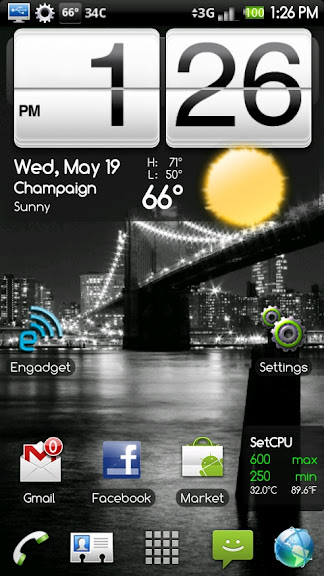
By the way, anyone interested in a themed LauncherPro?

CAP201005191326.jpg
 
Yes please. Just found out about launcher pro and I'm in love with everything about it. I just think the themed icons will look much better.
 
Yea I know it just taking up space though if I'm not using it.

Use the terminal commands I posted a few posts back.

As for the themed LauncherPro, here's what I got done:

-Shortcuts
-Application selection is green
-Application highlight is green

What I haven't done

-Google Search Widget
-App/Home Buttons still light up orange
-4 Shortcuts do not light up when pressed or selected


I'm pretty much at the limits of my photo editing thus far, so if someone else knows how to do these things I haven't done yet, please do so. Then, if you don't know how to sign an .apk, you can send me the res folder and I'll sign it :)

Here's the signed, installable .apk thus far (you'll need to uninstall LauncherPro first). This is the new version w/ auto-rotate.

com.fede.launcher.apk
 
It initially hung... but then I did the almighty battery pull and when it rebooted WAHLAH! everything was fine (needless to say that I am afraid of rebooting now! :D).

Unfortunately, I had to reboot... and sure enough the P3droid 1.2 GHz got to me to an endless reboot cycle. :(

What could be causing this, why would this work fine one time but not another? I think there is something being done during the boot sequence that it is taking some Droids into a spin.
 
Use the terminal commands I posted a few posts back.

As for the themed LauncherPro, here's what I got done:

-Shortcuts
-Application selection is green
-Application highlight is green

What I haven't done

-Google Search Widget
-App/Home Buttons still light up orange
-4 Shortcuts do not light up when pressed or selected


I'm pretty much at the limits of my photo editing thus far, so if someone else knows how to do these things I haven't done yet, please do so. Then, if you don't know how to sign an .apk, you can send me the res folder and I'll sign it :)

Here's the signed, installable .apk thus far (you'll need to uninstall LauncherPro first). This is the new version w/ auto-rotate.

com.fede.launcher.apk

Thanks looks real nice now.
 
Unfortunately, I had to reboot... and sure enough the P3droid 1.2 GHz got to me to an endless reboot cycle. :(

What could be causing this, why would this work fine one time but not another? I think there is something being done during the boot sequence that it is taking some Droids into a spin.

NexBeast V1.0.1 Release

...

BUGS
-If you fast scroll in the music app, the pop up letters do not match the real letters
-If you are using a notification tone from your sdcard, please disable 'SD notification', as it may cause a reboot loop when trying to access the sound file before the card is mounted
-Virtual keyboard on homescreen w/ LWP causes a freeze
-Alarm clock FC's if launched using multimedia dock

Reinstalled my backup and read the instructions again and noticed you had noted that it could go into a reboot frenzy if the SDcard notification was enabled. And indeed, it was enabled. I disabled it and reinstalled both v1.0.1 and P3droid 1.2GHz... and yes I am blazing once again! :D
 
I think he is actually implementing the framework mod so that you can enable/disable these percentages through spare parts. Then again, I don't really know anything more than anyone else (no insider info here :) )


Yeah, just run:

Code:
su
sysrw
rm /system/app/Launcher.apk
sync
sysro

By the way, anyone interested in a themed LauncherPro?

CAP201005191326.jpg

I WANT A THEMED LAUNCHERPRO!!!

Also, Fabo, do you have a changelog for v1.0.1? Was it just the launcher? I didn't do a wipe before installing on top of v1.0, and I'd been using LauncherPro before I updated the ROM.
 
I WANT A THEMED LAUNCHERPRO!!!

Also, Fabo, do you have a changelog for v1.0.1? Was it just the launcher? I didn't do a wipe before installing on top of v1.0, and I'd been using LauncherPro before I updated the ROM.

There's a link to the changelog in the first post (first link actually) :D

The themed LauncherPro is in post #642.

BTW, there's a new version of ADW launcher out. Those of you using ADW should upgrade, as it improves scrolling. Here's the file:

Launcher-rc1.apk

Rename to Launcher.apk, place on sdcard. In terminal emulator:

Code:
su 
switchlnchr

Be sure to set the scrolling speed down to ~250 (that's what the dev says is the best setting)
 
A few Qs & issues so far with 1.0.1:

The ADW launcher was pretty slick and fast when I first loaded it, but after using if for half of a day, it seems to get pretty damn laggy. I can swipe my fingers across the screen 2-3 times and most of the time it wont register or react until my 2nd or 3rd swipe. Also, it skips a lot when I go from one side of my screens to the other if I go though the HTC type zoomed out UI or if I just try to swipe to it. Has anyone else experienced this?

Another prob I've had since I moved to 2.1 (I'm not sure if this is a 2.1 issue or what, but my wife and friend running stock/unrooted 2.1 don't experience this) is if I have an app open for more than a couple mins, then I hit the home button to get to my home screen, a lot of times it takes at least 10-15 secs for it to load up all my icons on my home screen. On a few occasions, it's taken more than 40 secs for it to load my icons/widgets up on the screen. I was about to do a battery pull it was so bad and unresponsive. FYI, I have "Home app in memory" checked in Spare Parts. If I disable this, it runs much worse. I saw this problem with the stock home/launcher in v1.0 ROM and with this new ADW launcher, although it doesn't seem to be quite as bad with the ADW launcher.

I have the donate version of Titanium backup and went from NexBeast 1.0 to 1.0.1, so I did a factory wipe (twice) in SPRecovery and installed the new ROM. About 15 (out of 190 or so) of my apps wouldn't install for some reason. It would tell me "install failed" if I did "app + data" and if I just did "app only" it would say "install successful", but it didn't actually install the app for some reason, anyone seen this? Also, how do I restore my BT paired profiles with Titanium? I couldn't find the backup for it in the menu (I did a full backup of all apps + system data before I switched ROMs).

All issues above I had running with the included kernel for the NexBeast v1.0.1 ROM (e.g. stock speeds), but right now I'm running the Bekit 1.1 GHz low voltage kernel.

So all in all, I'm pretty happy with the ROM. I'm not seeing any major FCs or lockups. Just some moderate performance issues even though I have plenty of RAM available in the ATK.

Thanks for all the help and the EXCELLENT WORK/ROMS, Fab!

Edit: Ooohh, see your post above me with the updated ADW launcher, I'll definitely try that out now and test it out to see if that's a fix for me.
 
There's a link to the changelog in the first post (first link actually) :D

The themed LauncherPro is in post #642.

BTW, there's a new version of ADW launcher out. Those of you using ADW should upgrade, as it improves scrolling. Here's the file:

Launcher-rc1.apk

Rename to Launcher.apk, place on sdcard. In terminal emulator:

Code:
su 
switchlnchr
Be sure to set the scrolling speed down to ~250 (that's what the dev says is the best setting)

Well I installed it using Root Explorer and the standard Package Installer. I hope I didn't mess anything up, but the scrolling speed is back to "Sense" smooth now. Thanks!
 
Back
Top Bottom