• After 15+ years, we've made a big change: Android Forums is now Early Bird Club. Learn more here.

Help Developer Options issue.....

I may be the only person with this problem since I can't find anything in searching around the interwebz....

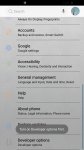
when i tap "Developer Options" it responds, 'Turn on Developer Options first'

When i tap on "Build Number" it responds, 'Developer mode has already been turned on'

What am I missing, that not a single guide I have reviewed has mentioned?

I have turned it on long ago, but rarely if ever used it.

Thanks.

 
You need to tap on build number a few times, like 7 I think, that unlocks developer options.
Now tap on developer option and choose your options from the list.
This is how developer options are enabled. Kapeesh?
 
Could be that it's telling you to turn them on, not just enabling them?
MyScreen_2020-05-28-22-03-04.png
 
Go to developer options, in settings. Make sure it's turned on.

If you read the 2nd line of my OP, that's what it does, and that's all it does. i don't know of any other location in the phone the developer options exist.
 

Attachments

  • Screenshot_20200529-115523_Settings.jpg
    Screenshot_20200529-115523_Settings.jpg
    921.7 KB · Views: 776
Since it appears to be matter where your Developer options menu is stuck in some of kind of weird loop where it might be enabled but you can't access it and you can't re-enable it, try disabling it and then try again.
This article states you can go into your Settings >> Apps menu, find and open the Settings app entry itself, and use the Clear data button. This should disable Developer options (details at the bottom of the article):
https://trendblog.net/enable-disable-developer-options-android/
 
That won't work because it requires tapping on the 'developer options' which DOES NOT get me into Dev options because a popup says 'turn on dev options first', but the phone is telling me they are already on? See the problem?
 
Something is apparently messed up in the Settings configuration file. (Developer options isn't its own app, it's just another integral service that gets shown/hidden in the Settings menu itself). Use Clear data on the Settings app and try enabling Developer options again.
 
Can't remember if it is the same phone or not (betting that it is), and we have seen this problem before.

I don't think that we found a solution to it.

You said that you enabled the Dev Options a long time ago.

Did they work properly then? (Were you able to access them?)

Also, has the device been updated since you enabled them?

As there are some models of the same phone that have the Dev Options blocked from use and some that do not, perhaps an update pushed yours into the relm of the ones that are blocked. (Just a guess.)
 
If you read the 2nd line of my OP, that's what it does, and that's all it does. i don't know of any other location in the phone the developer options exist.

Im pretty sure you have but in case you haven't, tryy manually typing "Developer Options" in the search bar located in your screen shot.

I also happen to agree with @puppykickr .
In fact, I've read similar instances where members of XDA report updating the OS has locked them out of "Developer Options" entirely. If that's the case, downgrading your firmware would be your only option. However, thats only if it's do to an update. Furthermore, if your updated firmware has a higher fused level (aboot) then you will not be able to downgrade. Bootloaders are always upward compatible but never downgrade-able. Attempting to flash a lower bootloader/modem will result in an Odin "sw rev check" fail.
 
Something is apparently messed up in the Settings configuration file. (Developer options isn't its own app, it's just another integral service that gets shown/hidden in the Settings menu itself). Use Clear data on the Settings app and try enabling Developer options again.

Going into the Settings App, there is no option to clear data.
 
Can't remember if it is the same phone or not (betting that it is), and we have seen this problem before.

I don't think that we found a solution to it.

You said that you enabled the Dev Options a long time ago.

Did they work properly then? (Were you able to access them?)

Also, has the device been updated since you enabled them?

As there are some models of the same phone that have the Dev Options blocked from use and some that do not, perhaps an update pushed yours into the relm of the ones that are blocked. (Just a guess.)

When i enabled Dev options long ago they did work properly. I enabled them more out of curiosity to see what was there, but had no intention of really doing anything. While I did consider doing an 'unlock', i never did. Since then I never bothered with it. The reason for me looking at it now, was I'm thinking of changing from Verizon to ATT, maybe, and thought I could just use the same phone and number, which if I understand correctly, need access to Dev options.

The phone has been through numerous updates since then. I got the phone about a year after it came out, unlock the Dev options soon after....so however many years ago that was.
 
Are all your other apps like this too? It seems strange there's no 'Clear data' option, it will be really odd if the same problem exists for all the apps on your S7.
 
Are all your other apps like this too? It seems strange there's no 'Clear data' option, it will be really odd if the same problem exists for all the apps on your S7.

AHHHHHHH, I found it. On mine it's:

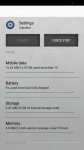
Settings cog > apps > settings > storage > (options for 'clear data' and 'clear cache')

Question then becomes, what will 'clear data' actually get rid of, anything of importance?
 
It's the Settings app itself, there are no user options menu to alter it's appearance or functionality. Look through the entire Settings >> Apps >> Settings menu to note what's there.
Use Clear data on the Settings app, and then see if you can enable Developer options normally again.
 
It's the Settings app itself, there are no user options menu to alter it's appearance or functionality. Look through the entire Settings >> Apps >> Settings menu to note what's there.
Use Clear data on the Settings app, and then see if you can enable Developer options normally again.

That cleared it! Thanks to everyone helping out. Man, what a pain that was. That 'clear data' button seems to be a different location on my phone than others it seems.
 
Back
Top Bottom