• After 15+ years, we've made a big change: Android Forums is now Early Bird Club. Learn more here.

Problems with Google TV

TOM_30

Lurker
Hi guys,

I live in Israel. I Bought Chromecast with Google TV and I have some problem.

Due to bad internet connection on my house and country, I have problems to stream apps like Netflix and PLEX, It doesn't stream smoothly like I watch on my laptop for example.

My main use is to watch movies that I'm downloading in my compute with subtitles I'm adding. Is there another solution to watch movies and Cetra directly throw the streamer and not via PLEX and Cetra?

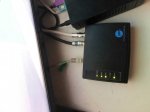
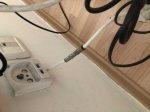
The second question, I'm assuming that if ill connect the strimmer and the laptop directly to the Internet cable things will improve. The problem is I'm in my room and connecting to the Wi-Fi in the living room. I have the cable company equipment here also but I don’t really know what he does. But I think some of them connect the device to the internet.

I'm adding pics of my equipment. I'll be happy if you could help me.

Thanks.
 

Attachments
  • img-6553_optimized.jpg
    img-6553_optimized.jpg
    78.3 KB · Views: 182
  • img-6563_optimized.jpg
    img-6563_optimized.jpg
    67.8 KB · Views: 173
Last edited:
Have you tried lowering the resolution of the TV output?
When I have streaming issues that will normally fix it quick.

Your laptop is probably running at a much lower resolution than your TV, so that is why you can easily watch it that way.
 
Have you tried lowering the resolution of the TV output?
When I have streaming issues that will normally fix it quick.

Your laptop is probably running at a much lower resolution than your TV, so that is why you can easily watch it that way.

I did .It's an internet problem.
 
You are adding the subtitles?
At the same time as the downloading?

Can't you just download subtitles with the movies at the same time?

Last but not least, since you can watch with your laptop, couldn't you do just that and then cast from the laptop to the TV?
Or even use a cable connection?
 
You are adding the subtitles?
At the same time as the downloading?

Can't you just download subtitles with the movies at the same time?

Last but not least, since you can watch with your laptop, couldn't you do just that and then cast from the laptop to the TV?
Or even use a cable connection?

I'm sorry, I didn't understand the question about the subtitles.

I use to watch over cable connection until now, but i dont want to, that is why i bought a steamer for.
 
That is for sure, but like I’ve said, there’s really bad internet connection in israel. I need somehow to contact the chromcast wirely to the internet first. No wirelessly. Then the laptop and also I have to figure out how i move movies that I’m downloading from my computer to the chromcast. There’s VLC, but I don’t know how to do it. There’s got to be a way to do that, no PLEX or any other kind of way on the WI-FI.
 
That is for sure, but like I’ve said, there’s really bad internet connection in israel. I need somehow to contact the chromcast wirely to the internet first. No wirelessly. Then the laptop and also I have to figure out how i move movies that I’m downloading from my computer to the chromcast. There’s VLC, but I don’t know how to do it. There’s got to be a way to do that, no PLEX or any other kind of way on the WI-FI.

If your WiFi is no good, copy the movies to a USB thumb-drive, and plug that into the Chromecast?

I don't have a Chromecast myself of course, but I do have an Android TV box, and that's what I've done before now. Just copied downloaded movies to a USB thumb-drive, and plugged that into the Android box.
 
If your WiFi is no good, copy the movies to a USB thumb-drive, and plug that into the Chromecast?

I don't have a Chromecast myself of course, but I do have an Android TV box, and that's what I've done before now. Just copied downloaded movies to a USB thumb-drive, and plugged that into the Android box.

The problem is that the chromcast doesn’t have any exists on. Not for an internet cable and not for a USB drive . I need to buy some adapter, but i don’t know which is best.
 
That is for sure, but like I’ve said, there’s really bad internet connection in israel. I need somehow to contact the chromcast wirely to the internet first. No wirelessly. Then the laptop and also I have to figure out how i move movies that I’m downloading from my computer to the chromcast. There’s VLC, but I don’t know how to do it. There’s got to be a way to do that, no PLEX or any other kind of way on the WI-FI.

Use NitroShare to move files via Wi-Fi.
Only the router is required, no internet service is needed.

Both devices connect together with Wi-Fi through the router.

https://f-droid.org/en/packages/net.nitroshare.android/
 
I'm sorry, I didn't understand the question about the subtitles.

I use to watch over cable connection until now, but i dont want to, that is why i bought a steamer for.


You stated that you are adding subtitles.

How/when/why are you adding subtitles?
 
The problem is that the chromcast doesn’t have any exists on. Not for an internet cable and not for a USB drive . I need to buy some adapter, but i don’t know which is best.

Maybe my situation is similar to yours, I'm in China living on a large school campus, and so I can't depend on having good bandwidth and fast WiFi always available for streaming. So I use a T95 Android box with 2 USB ports and using Kodi. And that I can just plug in USB thumb-drives and USB hard-drives, for any movies and TV shows I've downloaded with the Macbook.
 
You stated that you are adding subtitles.

How/when/why are you adding subtitles?

Maybe he means downloading separate subtitle files, e.g. .SRT files from sites like https://www.opensubtitles.com/en

I've only done this myself for movies to show to the students occasionally, where they need English captions for things like Harry Potter movies. Then what I do is use Handbrake, to burn the subtitles into the video(hard captions), to play them on the classroom PC and large screen.

But usually if one is using a player like VLC or Kodi, they can use the separate subtitle files and display them in the videos.
 
Last edited:
Back
Top Bottom