• After 15+ years, we've made a big change: Android Forums is now Early Bird Club. Learn more here.

Root .

Ok, I need help asap in the part that of recovering your network back. I did everything correct but now when I have to type adb shell, and su, I get a $.... I also get permission failed. I tried doing a factory reset, but it still doesn't have any signal. Please help asap. You can also email me at alexriva14@gmail.com
 
Ok, I need help asap in the part that of recovering your network back. I did everything correct but now when I have to type adb shell, and su, I get a $.... I also get permission failed. I tried doing a factory reset, but it still doesn't have any signal. Please help asap. You can also email me at alexriva14@gmail.com

When you type su, you've have to watch your phones screen because Super User will pop up and you need to hit Allow.

C:\android-sdk-windows\platform-tools>adb shell
$ su
su
Permission denied (Make sure your screen is on so you can let SU allow, then you'll get the # and not Permission Denied)
$ su
su
#
 
blaxican25 said:
Now switch back over to LGNPST and look for what “com” you are on, mine is com4

Switch back over to CDMA Workshop underneath “Com Settings” select your com and hit connect.

Now go to the tab “Security” Under SPC select “LG Method” and click Read now copy that number in the box and switch back over to LGNPST click start and paste that number.

Let the program complete its process ( It will say Process complete under Status )

Once it is done you unplug your phone and reboot it, it should have no service.

[notice the x above the reception bars]

[should also say "no service" when phone is locked]


Hi Blaxican:

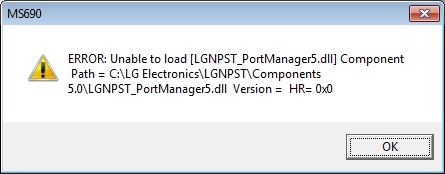
I've been following your instructions, but when upgrading my phone with LGNPST, I got the following error message:


I previously enabled USB debugging before connecting as you suggest, but I really don't know what I did wrong or what happened. Could you please help? BTW my OS is Windows 7 (I don't know if that's messing up with the procedures) :confused:
Thanks in advance!
 
Hi Blaxican:

I've been following your instructions, but when upgrading my phone with LGNPST, I got the following error message:


I previously enabled USB debugging before connecting as you suggest, but I really don't know what I did wrong or what happened. Could you please help? BTW my OS is Windows 7 (I don't know if that's messing up with the procedures) :confused:
Thanks in advance!

if you havent rooted yet..just download GINGERBREAK and it will root your phone for you..no need to manually root anymore. :)
 
When i get to the part where i type adb shell the Superuser does not pop up with the permission request. it doesnt show up at all....

The superuser is on the phone and the phone is rooted i used gingerbreak

so because this is not working I cannot change the $ to a # and therefore cannot get the custom recovery.
 
blaxican25 you're amazing! Thanks for helping me for legit hours and getting my phone back and helping me with the rom. Everything looks great and I don't have anymore of the bloatware that took up half of my storage on the phone. Amazing!
 
if you havent rooted yet..just download GINGERBREAK and it will root your phone for you..no need to manually root anymore. :)

Thanks, I did it and also followed the rest of the tutorial. There's a tip for those who got stuck at the same spot as me (found it @ another post, but it's worth sharing it): Try uninstalling components and reinstalling them again, and turn UAC off before reinstalling.
Now my phone is rooted and got rid of that bloatware, and didn't lose my data, just the apps I installed before but no biggies. Thanks, guys!!!!!!!!
 
Okay, I've gotten to the point that I'm trying to enter the string into the cdma prompt. However I'm running into an issue with it not being able to find the specified path.

I'm using windows 7, so when I go to enter the path (from several steps earlier) into environmental variables, I have a menu pop up with a list of all of the variable paths... Am I supposed to be entering the variable as it's own separate thing, or should I be attaching it to the end of one of the other variables? And if so, which one?

I've tried entering it as it's own path called optimusroot with the semicolon still in the path. I've also tried entering it without the semicolon, still as it's own named path. Also, I've tried attaching it to the variable called "Path". Still don't know what to do... :(
 
Actually, my boyfriend pointed out that the fundamental problem that I was having was that the newest version of program that path is pointing to is r11, and the strings I was copy/pasting from the instructions have r10. :P
 
Ok, if I had the guts i would root my phone. I have LG Optimus M with metro pcs with 2.2.1 Is there an easier way to root it or....delete preinstalled apps etc without rooting the phone?
 
Actually, my boyfriend pointed out that the fundamental problem that I was having was that the newest version of program that path is pointing to is r11, and the strings I was copy/pasting from the instructions have r10. :P

Hi, well I did notice this also and I changed it to r11; however, i'm still having an issue in cmd. I keep getting this message "The system cannot find the path specified" I'm well stuck at this point with no service and I don't know what to do can someone help plzzzzzzzzzzzzzzzzzzzzzzzzzzz.

Or email me at stpacura@yahoo.com thanks in advance.
 
I have no service!
Is there a way to turn it back on?
Is there a recovery mode? If so, will it help turn my service back on?
Please reply!
 
im stuck at the party where u type in su it wont change to a # i thin k it has something to do with the actual su file theres like nothing in it please help me ive been going at this for hours
 
Thank You So Much For Helping Me Out Last Night My Pho nes Run So Smooth Its Crazy! Its Alot Faster Than It Was And Its Completely Rooted! So Gnarlly But I Still Require Your Assistance.
 
Back
Top Bottom